Hello all,
I like vue & all, but I found the nuxt framework much easier for a beginner. https://nuxtjs.org/
does anyone know how I can connect Wails to Nuxt
~~~
import Bridge from "./wailsbridge";
Bridge.Start(() => {
new Vue({
render: h => h(App)
}).$mount("#app");
});
~~~
but there isn't any "App" in Nuxt.
I tried via a plugin but:
~~~~
import Bridge from "./wailsbridge";
export default ({ app }) => {
Bridge.Start(() => {
???????
});
}
~~~~
 AndreiD
All 20 comments
Hi @AndreiD. I'm unfamiliar with Nuxt. If it's different enough from the Vue template, a nuxt specific template may be needed. The code within the start() method is whatever code you'd normally run to start Nuxt.
 leaanthony
on 4 Aug 2019
leaanthony
on 4 Aug 2019
Hey @AndreiD it's late over here so if my answer has gaps I will come back tomorrow.
For now a couple of things:
- What you are after is this https://nuxtjs.org/api/configuration-global-name#the-globalname-property wails tries to find 'app' id.
```Example:
nuxt.config.js
{
globalName: 'myCustomName' <--- change to 'app'
}
2. WailsBridge I feel I want to say it should go here `/layouts/default.vue` but that is just a guess I might be 100% wrong
Wails.Init(() => {
});
```
- other than that and I haven't looked much into what options nuxtjs gives you when building, but I suspect they went after reactjs'
create-react-appstrategy. We dealt with that on reactjs implementation.
Essentially fornuxtjsto produce the buildwailsneeds we'll have to fork this repo https://github.com/nuxt/create-nuxt-app alter it as needed and then push it to our npmjs (ie. https://www.npmjs.com/package/wails-react-scripts)
again - I might be wrong on this one as well I'll have a better look in a few hours :+1:
 bh90210
on 5 Aug 2019
bh90210
on 5 Aug 2019
hello, I just realised your are probably using an "older" version of wails! There were some breaking changes around v0.17.6-pre.
I would recommend to wails update -pre which will install v0.17.11-pre but the documentation is not ready yet.
If u feel adventurous though give it a try! But otherwise please ignore the Wails.Init(() => { part as _it doesn't apply_ to your version.
bh90210
on 5 Aug 2019
if you want, you can implement https://gitcoin.co/products or some similar reward. I want to give come crypto to anyone that wants to solve this integration
AndreiD
on 5 Aug 2019
We will certainly look at getting this into v0.18.0. There's been a lot of changes and we need to make sure we don't break everything so nuxt will be bleeding edge for a couple of weeks or so. Just setting expectations 😃
leaanthony
on 5 Aug 2019
+1
Pointers to integrate with nuxt would be great
Came across wails in one of the meetups. 👍
And is there a way we can call/use any npm package in wails ?
 o1lab
on 19 Aug 2019
o1lab
on 19 Aug 2019
Hi! Looks like GitHub lost my original reply.
You can use any npm package you like so long as it can be used in a browser/packed by webpack.
Out of interest, what Meetup was it and are there slides online? We have a links page and would love to add more content to it.
leaanthony
on 22 Aug 2019
I think the issue is... we're novices in Javascript. Of course it can be integrated with whatever, but can someone help us with a sample project :+1:
AndreiD
on 22 Aug 2019
Of course @AndreiD. I'm not personally across every framework so this really has to be a community effort. We really want to encourage everyone to participate! 🚀
leaanthony
on 23 Aug 2019
OK I have an implementation in the working. I'll have files in a few hours.
I've forked create nuxt app and modified it as necessary (haven't pushed anything yet..) to produce a build that will work with a wails template I am also working on.
I will upload to npm like we did here under wails-nuxt-app and hopefully you will be able to create new projects by running npx wails-nuxt-app <project-name>
_note: wails at the moment and it seems it will stay this way, is not supporting yarn, I am either going to remove the option from nuxt modified cli or leave it there, but please when creating new projects always choose npm._
How it will work:
- First you will have to update to latest wails
-prerelease (although we are a few days away from v0.18.0) - Then you will have to
git clonethe template from my repo inside$GOPATH/src/wailsapp/wails/cmd/templates
to create a new nuxt based project you'll have to
- run
wails initas normally and choose nuxt template option (at the end of the prompts wails will try to build the project, it will fail but that's ok) - then you'll have to cd in
new-projectand runnpx wails-nuxt-app frontend(or alternativelycdinnew-project/frontend&npx wails-nuxt-app), choose whatever options you'd like. wails-nuxt-app will place all new generated files undernew-project/frontend/*.
from this point on you will be able to use wails build, wails serve and npm run dev as expected .
Is this solution alright for now? (honestly I don't think it gets much better)
bh90210
on 23 Aug 2019
If this works as intended @bh90210, let's get a PR! 🚀
leaanthony
on 24 Aug 2019
Hello. I tried to follow all the steps in your "tutorial" but I can't make it to work. building it looks for
~~~~
⣽ Packing + Compiling project...2019/08/24 17:47:12 open /home/me/workspace_learn/wailsnuxttemplate/frontend/dist/app.js: no such file or directory
Mewn
✗ Packing + Compiling project...
Error: exit status 1
~~~~
upon building the nuxt project, you get
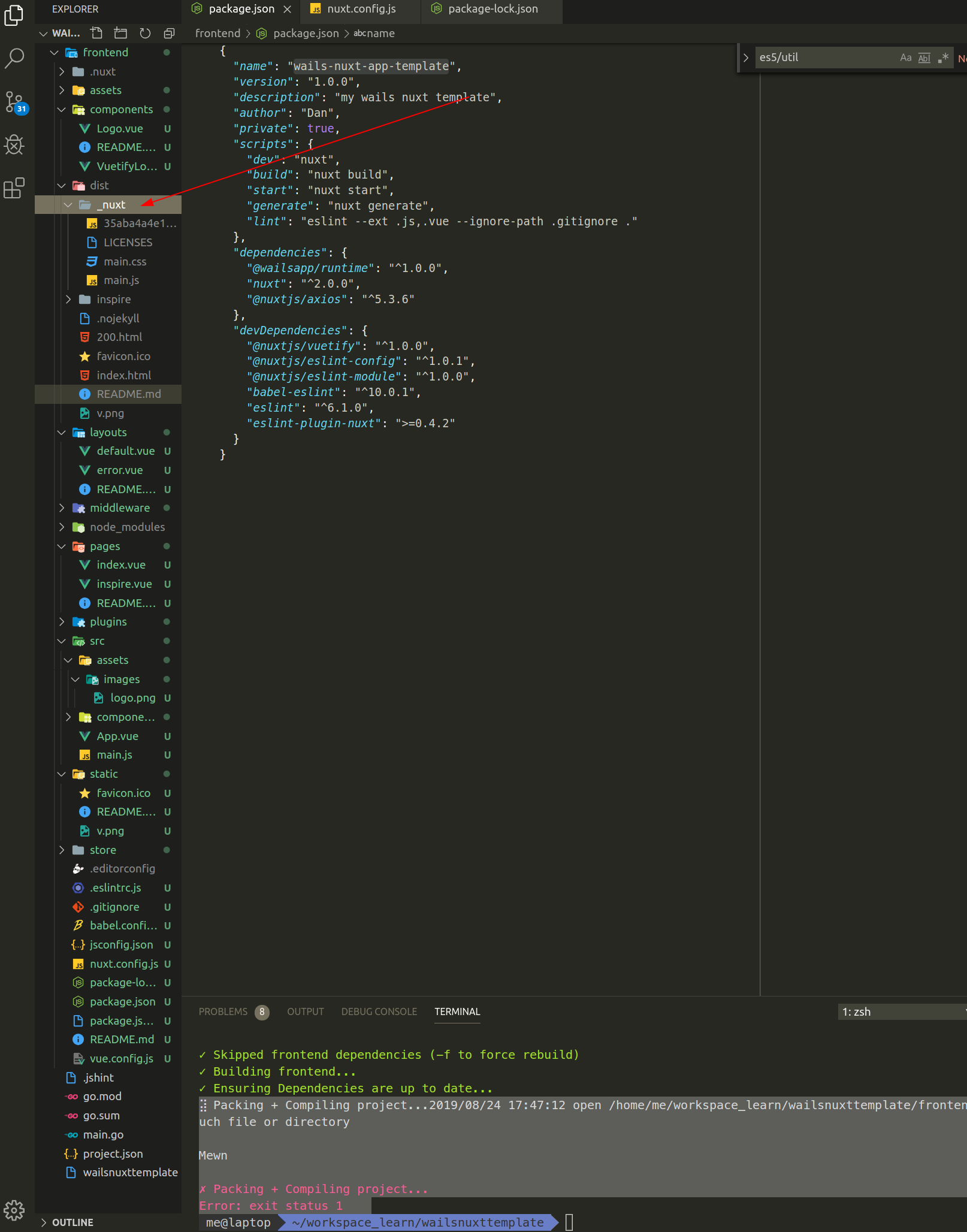
so there isnt' any app.js there. That is for Vue.js but Nuxt has a little different.
also I can't get the window to pop-up. It blocks at ">>>>> To connect, you will need to run 'npm run serve' in the 'frontend' directory <<<<<",
but in frontend there's already "npm run dev" running (not serve, as nuxt use dev)
AndreiD
on 24 Aug 2019
I haven't finished the work yet :)
just explained a possible scenario to see if everyone is onboard before start working the implementation :+1:
there are two issues remaining to solve and I'll have everything working but I am not expert with js either so please be patient.
bh90210
on 24 Aug 2019
sorry, I missed the part "How it WILL work".
Wouldn't it be simpler just to make a ready made project, with everything connected, instead of all this installers
AndreiD
on 24 Aug 2019
I'm trying to carve out some time to start contributing.
 codeg33k
on 29 Aug 2019
codeg33k
on 29 Aug 2019
@AndreiD the way it works for the other frameworks is that you just generate a skeleton project and you get a base build. Not sure that's any need for more them that?
leaanthony
on 29 Aug 2019
wrong person tag.. 😂
bh90210
on 29 Aug 2019
If we can't get this working this week, let's look at it post v1.
leaanthony
on 2 Sep 2019
@AndreiD moving this to after the v1 release which will be November. Priority is stabilisation and tying up loose ends for the v1 release.
leaanthony
on 9 Sep 2019
Closing for now and listing on the https://github.com/wailsapp/wails/wiki/Post-V1-Enhancements page
leaanthony
on 2 Oct 2019
Related issues
 ahmadfarisfs
·
3Comments
ahmadfarisfs
·
3Comments
 incafox
·
7Comments
bh90210
·
5Comments
incafox
·
7Comments
bh90210
·
5Comments
 yosefbenshimon
·
5Comments
bh90210
·
3Comments
yosefbenshimon
·
5Comments
bh90210
·
3Comments
Most helpful comment
OK I have an implementation in the working. I'll have files in a few hours.
I've forked create nuxt app and modified it as necessary (haven't pushed anything yet..) to produce a build that will work with a wails template I am also working on.
I will upload to npm like we did here under wails-nuxt-app and hopefully you will be able to create new projects by running
npx wails-nuxt-app <project-name>_note: wails at the moment and it seems it will stay this way, is not supporting yarn, I am either going to remove the option from nuxt modified cli or leave it there, but please when creating new projects always choose
npm._How it will work:
-prerelease (although we are a few days away from v0.18.0)git clonethe template from my repo inside$GOPATH/src/wailsapp/wails/cmd/templatesto create a new nuxt based project you'll have to
wails initas normally and choose nuxt template option (at the end of the prompts wails will try to build the project, it will fail but that's ok)new-projectand runnpx wails-nuxt-app frontend(or alternativelycdinnew-project/frontend&npx wails-nuxt-app), choose whatever options you'd like. wails-nuxt-app will place all new generated files undernew-project/frontend/*.from this point on you will be able to use
wails build,wails serveandnpm run devas expected .Is this solution alright for now? (honestly I don't think it gets much better)