Wails: Vuetify template does not support vue-router
os: windows 8 64bit
golang: 1.12.0
node: 10.9.0
npm: 6.2.0
wails: 0.17.0
frontend import vue-router , wails build -f again, show error ‘wails‘ undefined
// main.js
import VueRouter from 'vue-router';
Vue.use(VueRouter);

import routers from "./router.js";
const router = new VueRouter({
  routes: routers,
})

Bridge.Start(() => {
  new Vue({
    router,
    render: h => h(App)
  }).$mount("#app");
});
 sotoup
All 21 comments
hello @sotoup , weird, I just compiled vuetify with VueRouter and everything works as expected.
I first installed vue-router:
~/vuetest/frontend$ npm install vue-router
then I modified my main.js like so:
import 'babel-polyfill';
import Vue from "vue";

// Setup Vuetify
import Vuetify from 'vuetify';
Vue.use(Vuetify);
import 'vuetify/dist/vuetify.min.css';
import 'material-design-icons-iconfont';

import App from "./App.vue";

Vue.config.productionTip = false;
Vue.config.devtools = true;

import Bridge from "./wailsbridge";

import VueRouter from 'vue-router';
Vue.use(VueRouter);

const Foo = { template: '<div>foo</div>' }
const Bar = { template: '<div>bar</div>' }

const routes = [
  { path: '/foo', component: Foo },
  { path: '/bar', component: Bar }
]

const router = new VueRouter({
  routes
})

Bridge.Start(() => {
  new Vue({
    router,
    render: h => h(App)
  }).$mount("#app");
});
and
~/vuetest$ wails build -d
Wails v0.17.1-pre - Building Application

✓ Ensuring frontend dependencies are up to date (This may take a while)
✓ Building frontend...
✓ Ensuring Dependencies are up to date...
✓ Packing + Compiling project (Debug Mode)...
Awesome! Project 'vuetest' built!
can you please share more code? chances are that there is something wrong with how you implement vue-routes I'm afraid.
 bh90210
on 6 Jul 2019
bh90210
on 6 Jul 2019
hello @bh90210, Thanks for your answer.
this is my steps
main.js
import 'babel-polyfill';
import Vue from "vue";

// Setup Vuetify
import Vuetify from 'vuetify';
Vue.use(Vuetify);
import 'vuetify/dist/vuetify.min.css';
import 'material-design-icons-iconfont';

import App from "./App.vue";

Vue.config.productionTip = false;
Vue.config.devtools = true;

import Bridge from "./wailsbridge";

import VueRouter from 'vue-router';
Vue.use(VueRouter)

import routes from './routes';

const router = new VueRouter({
  routes
})

Bridge.Start(() => {
  new Vue({
    router,
    render: h => h(App)
  }).$mount("#app");
});
create routes.js
import Foo from './components/Foo'
import Bar from './components/Bar'

const routes = [
  { path: '/foo', component: Foo },
  { path: '/bar', component: Bar }
]

export default routes;
create foo.vue and bar.vue in components folder
// foo.vue
<template>
    <div>Foo</div>
</template>

// bar.vue
<template>
    <div>Bar</div>
</template>
App.vue
<template>
<v-app id="inspire" dark>
<v-navigation-drawer v-model="drawer" clipped fixed app>
<v-list dense>
<v-list-tile :to="{ path: '/foo' }">
<v-list-tile-action>
<v-icon>dashboard</v-icon>
</v-list-tile-action>
<v-list-tile-content>
<v-list-tile-title>Dashboard</v-list-tile-title>
</v-list-tile-content>
</v-list-tile>
<v-list-tile :to="{ path: '/bar' }">
<v-list-tile-action>
<v-icon>settings</v-icon>
</v-list-tile-action>
<v-list-tile-content>
<v-list-tile-title>Settings</v-list-tile-title>
</v-list-tile-content>
</v-list-tile>
</v-list>
</v-navigation-drawer>
<v-toolbar app fixed clipped-left>
<v-toolbar-side-icon @click.stop="drawer = !drawer"></v-toolbar-side-icon>
<v-toolbar-title>Application</v-toolbar-title>
</v-toolbar>
<v-content>
<v-container fluid class="px-0">
<v-fade-transition mode="out-in">
<router-view></router-view>
</v-fade-transition>
</v-container>
</v-content>
<v-footer app fixed>
<span style="margin-left:1em">© You</span>
</v-footer>
</v-app>
</template>
<script>
import HelloWorld from "./components/HelloWorld.vue";
export default {
data: () => ({
drawer: false
}),
components: {
HelloWorld
},
props: {
source: String
}
};
</script>
<style>
.logo {
width: 16em;
}
</style>
wails serve and npm run serve , run normally in web page
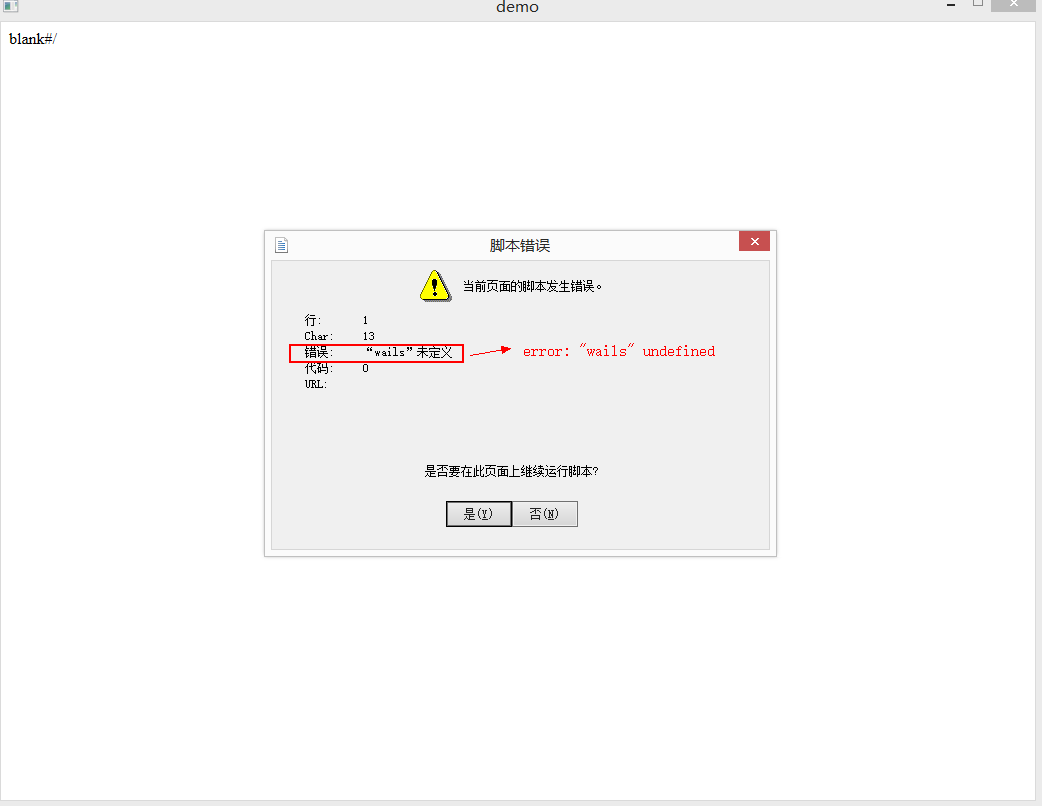
but wails build -d , run demo.exe show error 'wails' undefined
sotoup
on 6 Jul 2019
could you please post the the whole error?
@leaanthony could this be a windows issue and not vue? because the exact above provided code runs fine on ubuntu, just double checked it
~/vuetest$ wails build -d
Wails v0.17.1-pre - Building Application

✓ Skipped frontend dependencies (-f to force rebuild)
✓ Building frontend...
✓ Ensuring Dependencies are up to date...
✓ Packing + Compiling project (Debug Mode)...
Awesome! Project 'vuetest' built!

$ ~/vuetest/vuetest
vuetest - Debug Build
---------------------
INFO[0000] [App] Starting
INFO[0000] [WebView] Initialised
INFO[0000] [Events] Starting
INFO[0000] [Events] Listening
INFO[0000] [IPC] Starting
INFO[0000] [Bind] Starting
INFO[0000] [Bind] Binding Go Functions/Methods
INFO[0000] [Bind] Bound Function: main.basic()
INFO[0000] [WebView] Run()
hello @bh90210, The image below is a screenshot of the window where the error occurred.
sotoup
on 7 Jul 2019
Interesting. But it works fine without Vue router?
 leaanthony
on 7 Jul 2019
leaanthony
on 7 Jul 2019
@bh90210 does it work correctly? As in, does it navigate to different pages when you press the drawer links?
I cannot reproduce the error @sotoup is displaying so I'm thinking it might be a Windows 8 thing (I'm using 10). That being said, I get a blank screen when I add the :to directives in the html.
I think the rendering engine used for Windows is ~IE9 so this may be an issue as the vue-router docs mention a number of things around IE9, like full page refreshes (which will give you a blank screen).
Unfortunately @sotoup, I'm not sure there is anything immediate we can do to fix this. If you want to use multi-page routing, I did it using vuex in my Restoric project.
leaanthony
on 7 Jul 2019
We are looking at replacing WebView as a priority right now and our alternative has support for EdgeHTML which will hopefully fix a lot of Windows issues like this. 🤞
leaanthony
on 7 Jul 2019
Thanks for your help. @leaanthony
sotoup
on 7 Jul 2019
hmmmm I didn't actually implement links thinking _it should work_ but will check..
bh90210
on 7 Jul 2019
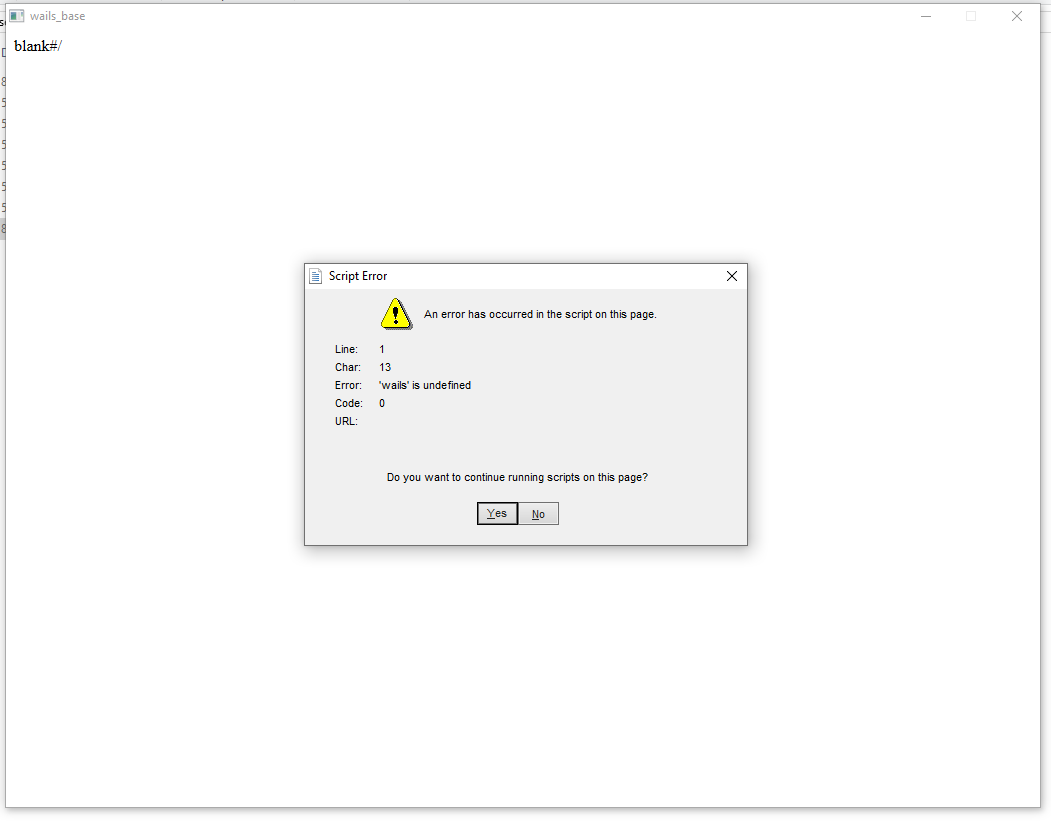
Happening to me on windows 10 too
 Kay-Wolfe
on 7 Jul 2019
Kay-Wolfe
on 7 Jul 2019
@Kay-Wolfe is that using the same code as @sotoup pasted above?
leaanthony
on 8 Jul 2019
Much simpler one:
import 'babel-polyfill';
import Vue from "vue";

// Setup Vuetify
import Vuetify from 'vuetify';
Vue.use(Vuetify);
import 'vuetify/dist/vuetify.min.css';
import 'material-design-icons-iconfont';


import App from "./App.vue";

Vue.config.productionTip = false;
Vue.config.devtools = true;

import Bridge from "./wailsbridge";
import VueRouter from 'vue-router';

Vue.use(VueRouter);
const Foo = { template: '<div>foo</div>' }
const Bar = { template: '<div>bar</div>' }
const routes = [
  { path: '/foo', component: Foo },
  { path: '/bar', component: Bar }
]

const router = new VueRouter({  //removing this part make the code works
  routes
})

Bridge.Start(() => {
  new Vue({
    router,
    render: h => h(App)
  }).$mount("#app");
});
just to confirm,
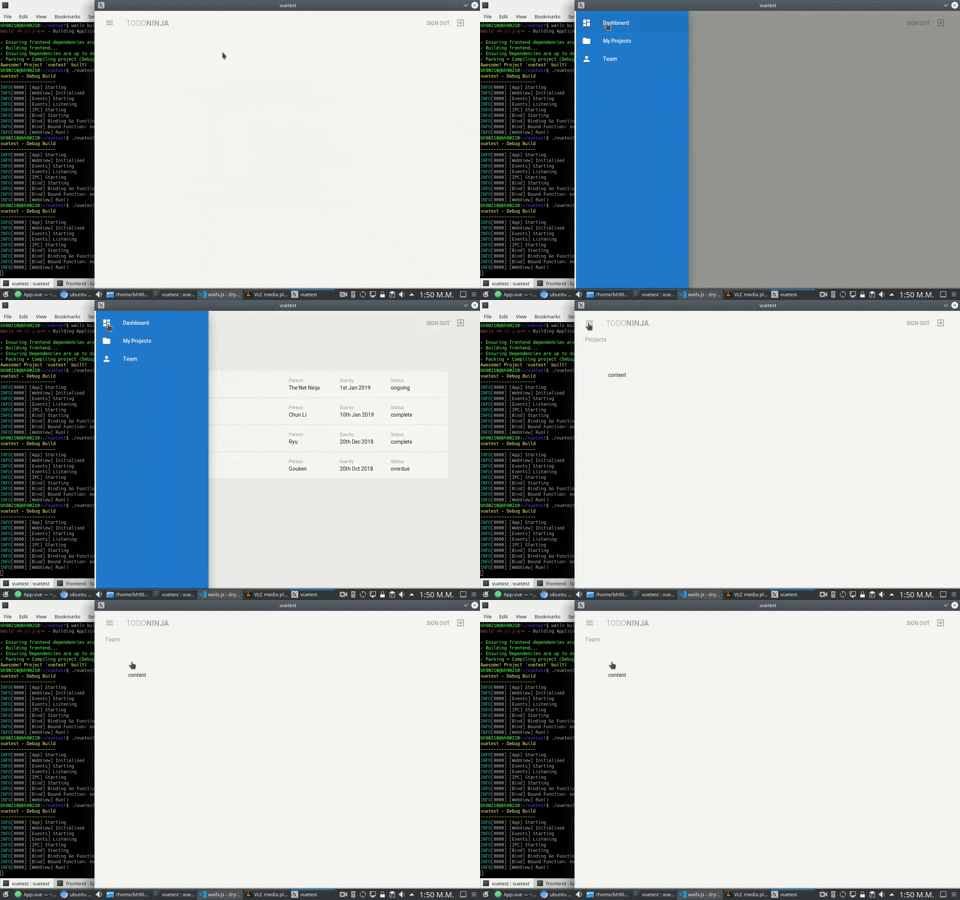
I built this awesome tutorial: https://github.com/iamshaunjp/vuetify-playlist/tree/lesson-15 on ubuntu and not only works it looks amazing too!
bh90210
on 8 Jul 2019
That does look good! So this foes seem to be a windows only issue. I wonder if there's a polyfill needed for cue-router? I just don't get where the error message can be coming from other than the js bundle errors before the wails runtime is loaded.
leaanthony
on 8 Jul 2019
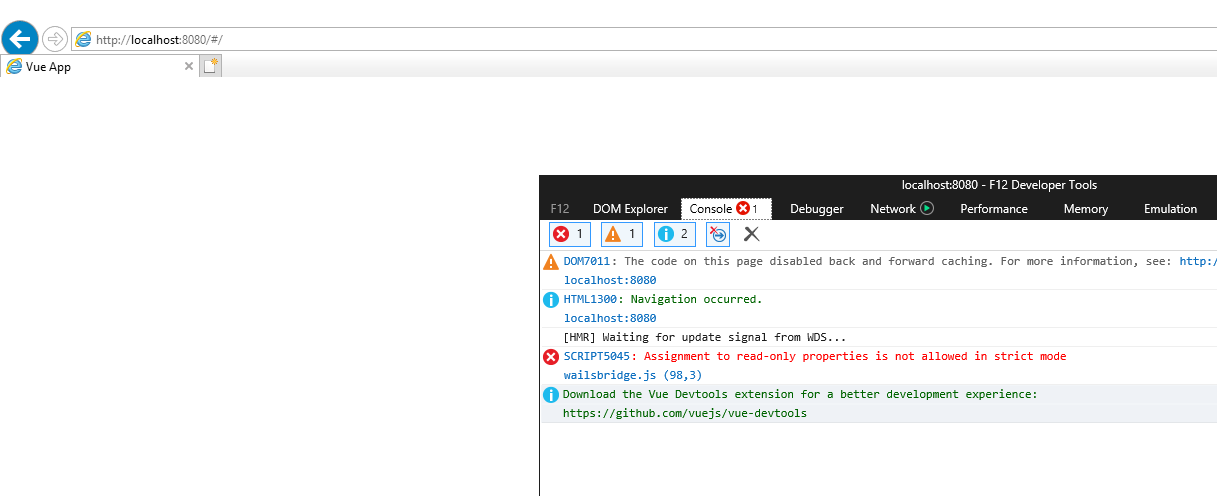
ive got an idea of wails serve + npm run serve
and then open the page on internet explorer (instead of chrome or edge)
Kay-Wolfe
on 8 Jul 2019
Awesome idea @Kay-Wolfe! This is interesting as this is in wailsbridge and would affect all windows users. Can you please let us know what version of IE this was please? Also, can you click on the error to get the actual line that is failing? Line 98 is a brace on my machine! :-)
leaanthony
on 8 Jul 2019
wailsbridge.js:
  window.external = {   <--- this line
    invoke: function invoke(msg) {
      window.wailsbridge.websocket.send(msg);
    }
  }; // Adds a script to the Dom.
  // Removes it if second parameter is true.

Weirdly enough, that errors also persist when trying to run without vue-router
Kay-Wolfe
on 8 Jul 2019
It's weird you can't write to window. I'm refactoring both the runtime and bridge to use babel+webpack. This has already fixed some issues with IE. Let's see if it fixes this also.
leaanthony
on 10 Jul 2019
Hey, just had a message from @adeyinkabadmus that may help with your Vue Router issues. He said he has a fix!
https://github.com/wailsapp/wails/issues/236#issuecomment-532741700
leaanthony
on 19 Sep 2019
Closing for now and listing on the https://github.com/wailsapp/wails/wiki/Post-V1-Enhancements page
leaanthony
on 2 Oct 2019
@sotoup Does this make it work?
leaanthony
on 27 Nov 2019
Related issues
bh90210
·
3Comments
leaanthony
·
3Comments
 intelwalk
·
4Comments
intelwalk
·
4Comments
 ahmadfarisfs
·
3Comments
bh90210
·
4Comments
ahmadfarisfs
·
3Comments
bh90210
·
4Comments
Most helpful comment
ive got an idea of wails serve + npm run serve

and then open the page on internet explorer (instead of chrome or edge)