Wa-automate-nodejs: Feature: ui improvements for non headless puppeteer
Feature Suggestions
This is my suggestion for non headless puppeteer
Dark Mode Session
Allow localStorage.theme to be saved on the session
I always turning on Dark Mode manually everytime i continue my session.
Auto Resize InnerWindow
The puppeteer innerWindow seems to have fixed innerWindow size (similar issue https://github.com/puppeteer/puppeteer/issues/3688)
 Nurutomo
All 10 comments
regarding the second point can you add this to your config:
{
...
defaultViewport: null,
...
}
as you can see here: https://github.com/open-wa/wa-automate-nodejs/blob/f53e6ae7c92fe5a95b574bb7362eb0d508bd6b41/src/controllers/browser.ts#L160
config is spread into the puppeteer launch options
Edit: nvm that doesn't work. Can you try to figure out which pptr configs work please.
 smashah
on 20 Oct 2020
smashah
on 20 Oct 2020
@github-actions run
⚡ Release! ⚡
(async () => {
function exec(cmd) {
  console.log(execSync(cmd).toString());
}

// Config
const gitUserEmail = "github-actions[bot]@users.noreply.github.com";
const gitUserName = "github-actions[bot]";

exec(`echo "//registry.npmjs.org/:_authToken=$NPM_TOKEN" > .npmrc`);
exec(`git config --global user.email "${gitUserEmail}"`);
exec(`git config --global user.name "${gitUserName}"`);
exec(`npm i`);
exec(`npm run release-ci`);

//comment on the issue
var result = execSync(`npx auto-changelog -o ./tempchangelog.txt --commit-limit false --template ./compact-keepachangelog.hbs --stdout`).toString();

    await postComment(result);

//create changelog image
exec(`npm run release-image`);
exec(`git commit -a -m 'updated release-image'`);
exec(`git push --force`);
  })();
Changelog
🚀 Release 3.0.3 (2020-10-20)
smashah
on 20 Oct 2020
Regarding dark mode, you can just use this now: https://open-wa.github.io/wa-automate-nodejs/classes/client.html#darkmode
smashah
on 20 Oct 2020
@github-actions run
⚡ Release! ⚡
(async () => {
function exec(cmd) {
console.log(execSync(cmd).toString());
}
// Config
const gitUserEmail = "github-actions[bot]@users.noreply.github.com";
const gitUserName = "github-actions[bot]";
exec(`echo "//registry.npmjs.org/:_authToken=$NPM_TOKEN" > .npmrc`);
exec(`git config --global user.email "${gitUserEmail}"`);
exec(`git config --global user.name "${gitUserName}"`);
exec(`npm i`);
exec(`npm run release-ci`);
//comment on the issue
var result = execSync(`npx auto-changelog -o ./tempchangelog.txt --commit-limit false --template ./compact-keepachangelog.hbs --stdout`).toString();
await postComment(result);
//create changelog image
exec(`npm run release-image`);
exec(`git commit -a -m 'updated release-image'`);
exec(`git push --force`);
})();
Changelog
🚀 Release 3.0.4 (2020-10-20)
smashah
on 20 Oct 2020
regarding the second point can you add this to your config:
{
    ...
    defaultViewport: null,
    ...
}
as you can see here:
config is spread into the puppeteer launch options
Edit: nvm that doesn't work. Can you try to figure out which pptr configs work please.
@nurutomo This should work now. Report back if working for you thanks
smashah
on 20 Oct 2020
regarding the second point can you add this to your config:
{
  ...
    defaultViewport: null,
  ...
}
as you can see here:
https://github.com/open-wa/wa-automate-nodejs/blob/f53e6ae7c92fe5a95b574bb7362eb0d508bd6b41/src/controllers/browser.ts#L160config is spread into the puppeteer launch options
Edit: nvm that doesn't work. Can you try to figure out which pptr configs work please.@Nurutomo This should work now. Report back if working for you thanks
The config works. but, the dark mode Wallpaper doesn't load. Just plain dark-gray color
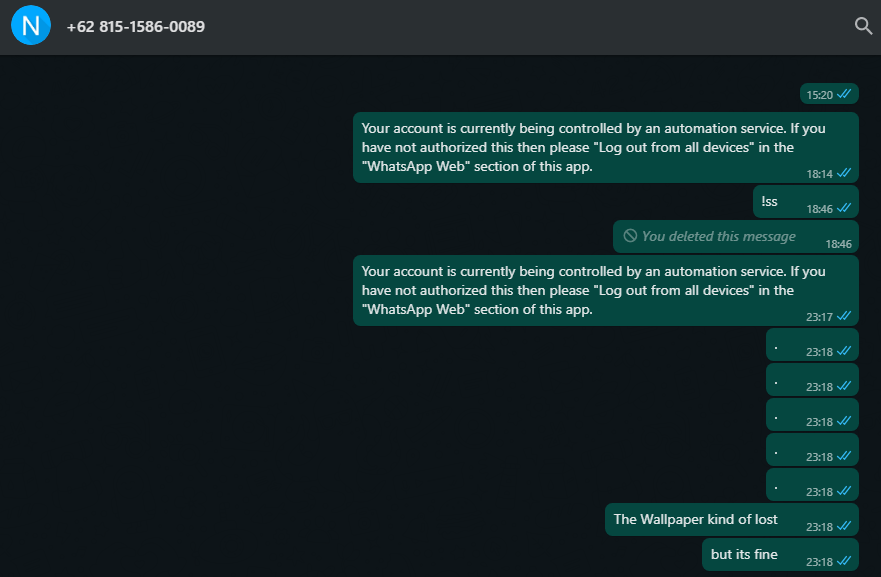
and also this option doesn't change
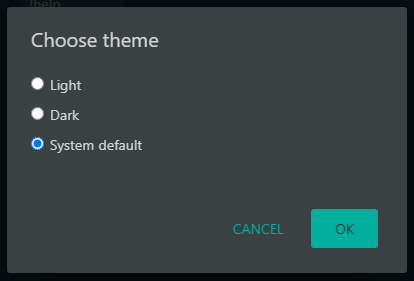
Nurutomo
on 20 Oct 2020
@Nurutomo it's not only dark gray, I can see the doodles there. If you want to change the background colour you can use this https://open-wa.github.io/wa-automate-nodejs/classes/client.html#setchatbackgroundcolourhex
smashah
on 20 Oct 2020
That feature requires INSIDERS LICENSE KEY , which is i doesn't have one.
nvm 'bout the wallpaper
Nurutomo
on 20 Oct 2020
Related issues
 feliperaul
·
5Comments
feliperaul
·
5Comments
 mrbarnk
·
5Comments
mrbarnk
·
5Comments
 sandro-salles
·
4Comments
sandro-salles
·
4Comments
 arisros
·
4Comments
arisros
·
4Comments
 renato-macedo
·
6Comments
renato-macedo
·
6Comments
Most helpful comment
@github-actions run
⚡ Release! ⚡