Wa-automate-nodejs: Nothing happens in the function onLiveLocation
Describe the bug
I'm testing the functionality onLiveLocation but I only get an encrypted message on the console.
Steps to Reproduce
Steps to reproduce the behavior:
- Go to '...'
- Click on '....'
- Scroll down to '....'
- See error
create() code
This is the code you use to create the client. e.g
client.onLiveLocation("[email protected]", (liveLocation) => {
    console.log("You are moved", liveLocation);
  });
Expected behavior
latitude, longitude, speed
DEBUG INFO
This is the info printed to the console when you start your app. It should look like this
Debug Info {
  WA_VERSION: 1.9.7
  PAGE_UA: ...,
  WA_AUTOMATE_VERSION: ...,
  BROWSER_VERSION: ...
}
Screenshots
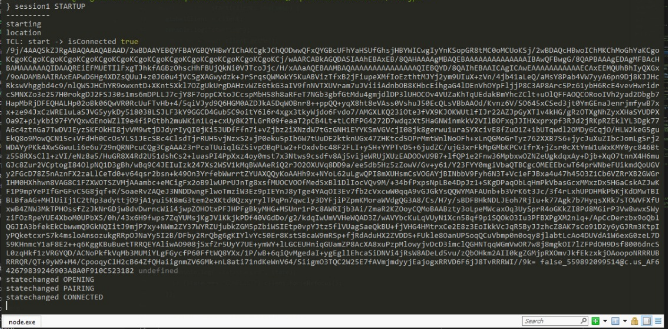
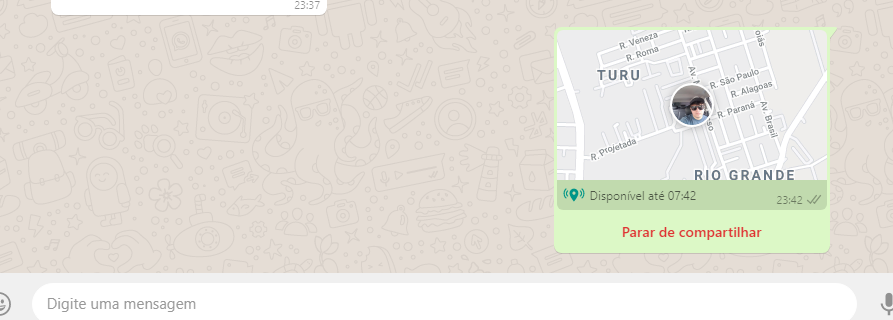
Host (please complete the following information):
- Windows 10
Additional context
Add any other context about the problem here.
 ctoveloz
All 7 comments
You have to subscribe to the location after they have shared it with you. It will return false if you call onLiveLocation before they've shared it with you.
 smashah
on 7 May 2020
smashah
on 7 May 2020
@github-actions run
⚡ Release! ⚡
(async () => {
function exec(cmd) {
  console.log(execSync(cmd).toString());
}

// Config
const gitUserEmail = "github-actions[bot]@users.noreply.github.com";
const gitUserName = "github-actions[bot]";

exec(`echo "//registry.npmjs.org/:_authToken=$NPM_TOKEN" > .npmrc`);
exec(`git config --global user.email "${gitUserEmail}"`);
exec(`git config --global user.name "${gitUserName}"`);
exec(`npm i`);
exec(`npm run release-ci`);

//comment on the issue
var result = execSync(`npx auto-changelog -o ./tempchangelog.txt --commit-limit false --template ./compact-keepachangelog.hbs --stdout`).toString();

    await postComment(result);

//create changelog image
exec(`npm run release-image`);
exec(`git commit -a -m 'updated release-image'`);
exec(`git push --force`);
  })();
Changelog
🚀 Release 1.9.13 (2020-05-07)
smashah
on 7 May 2020
@ctoveloz
You can now force an location update event.
start( client ) {
    client.onMessage( async message => {
        if ( message.type === "location" ) {
          //this is how you determine if someone started a live location
          if ( message.shareDuration ) {
            console.log( 'This user has started sharing their live location', message.author || message.from )
            client.onLiveLocation( message.from, location => console.log( location ) )

            //next line is new. It will trigger the above event. You can call the following line every 30ish seconds ideally. Maybe put it in a loop.
            const forcedLiveLocation = await client.forceUpdateLiveLocation( message.from )
            console.log( forcedLiveLocation[ 0 ] );
          }
        }
      }
    }
Here is the documentation:
https://open-wa.github.io/wa-automate-nodejs/classes/whatsapp.html#forceupdatelivelocation
Thanks
smashah
on 7 May 2020
Hi @smashah
Thanks this work,
I have another question...
I created a loop to pull information forceUpdateLiveLocation each 10 seconds, the intention is to update this information but they are always the same as the first time it is sent.
if ( message.type === "location" ) {
            //this is how you determine if someone started a live location

              if ( message.shareDuration ) {

                  client.onLiveLocation( message.from, location => console.log( location ) )

                  const forcedLiveLocation = await client.forceUpdateLiveLocation( message.from );

                  const motoristaNumber = forcedLiveLocation[0].id.replace('@c.us','');
                  const motoristaLatitude = forcedLiveLocation[0].lat;
                  const motoristaLongitude = forcedLiveLocation[0].lng;
                  const motoristaData = forcedLiveLocation[0].lastUpdated;

                  client.sendTextWithMentions(message.from, `@${motoristaNumber} your location is being monitored 🔍`);

                  // Loop to update informations
                  setInterval(function(){

                    console.log('Latitude: ' + motoristaLatitude,
                                'Longitude: ' + motoristaLongitude,
                                'Last Update: ' + motoristaData);

                  }, 10000);


              }
      }

ctoveloz
on 8 May 2020
If you read the docs you can see that it should be used every 30 seconds at least. Also, use a fake GPA app to test on the monitored phone.
smashah
on 8 May 2020
@ctoveloz
You can now force an location update event.
start( client ) {
    client.onMessage( async message => {
        if ( message.type === "location" ) {
          //this is how you determine if someone started a live location
          if ( message.shareDuration ) {
            console.log( 'This user has started sharing their live location', message.author || message.from )
            client.onLiveLocation( message.from, location => console.log( location ) )

            //next line is new. It will trigger the above event. You can call the following line every 30ish seconds ideally. Maybe put it in a loop.
            const forcedLiveLocation = await client.forceUpdateLiveLocation( message.from )
            console.log( forcedLiveLocation[ 0 ] );
          }
        }
      }
    }
Here is the documentation:
https://open-wa.github.io/wa-automate-nodejs/classes/whatsapp.html#forceupdatelivelocationThanks
Hi @smashah
I tried do 'onLiveLocation' without the trigger sending a message, something directly when the bot start, he takes all live locations in the chat.
something like this, but he is trying to pull the message scoope.
start( client ) {

          client.onLiveLocation( message.from, location => console.log( location ) )

            const forcedLiveLocation = await client.forceUpdateLiveLocation( message.from )

            var jsonData = JSON.parse(forcedLiveLocation);

            console.log(jsonData);

    }
you now if is possible call onlivelocation after bot start ? Thanks
ctoveloz
on 13 May 2020
Related issues
 feliperaul
·
5Comments
smashah
·
5Comments
feliperaul
·
5Comments
smashah
·
5Comments
 yoavmmn
·
5Comments
yoavmmn
·
5Comments
 pedrogrisolia
·
4Comments
pedrogrisolia
·
4Comments
 jazZcarabazZ
·
5Comments
jazZcarabazZ
·
5Comments
Most helpful comment
@github-actions run
⚡ Release! ⚡