Vvv: Cannot set PHP 7.4 for site
Hi,
I want to set PHP 7.4 for a specific site.
So, I read this doc and processed the necessary changes.
I edit my config/config.yml and added this:
mysite:
    nginx_upstream: php74
    hosts:
      - mysite.test
And added this on the bottom:
utilities:
  core:
    - php74
Vagrantfile.txt
provision.sh.txt
Then did a vagrant reload --provision. Sadly the site still runs PHP 7.2.
What am I doing wrong?
Tech specs:
Vagrant version 2.2.7
VVV version 3.4.1
Virtual Box 6.1.10 r138449
 mbootsman
All 15 comments
@mbootsman that looks correct, can you share the terminal output? The attached files are just the vagrantfile and main provisioner, not their output. I also notice there's no repo field for your site, are you usiing custom nginx config fles? If so can I see them?
 tomjn
on 8 Jun 2020
tomjn
on 8 Jun 2020
@tomjn thanks for your reply.
Here's my vvv-nginx-conf, which is in /vargant-local/www/mysite/provision/
vvv-nginx.conf.txt
Is it possible to share the terminal output in private? Since it contains data I do not want to publish publicly.
mbootsman
on 9 Jun 2020
Ah, this is your nginx config file:
server {
    listen       80;

    # Listen for HTTPS requests as well
    listen       443 ssl;
    ssl_certificate /srv/www/mysite/mysite.test.cert;
    ssl_certificate_key /srv/www/mysite/mysite.test.key;

    # Tells nginx what domain name should trigger this configuration. If
    # you would like multiple domains or subdomains, they can be space
    # delimited here. See http://nginx.org/en/docs/http/server_names.html
    server_name  mysite.test ~^mysite\.\d+\.\d+\.\d+\.\d+\.xip\.io$;

    # Tells nginx which directory the files for this domain are located
    root         /srv/www/mysite/htdocs;

    #set          $upstream {upstream};
    set          $upstream php74;

    # Includes a basic WordPress configuration to help with the common
    # rules needed by a web server to deal with WordPress properly.
    include /etc/nginx/nginx-wp-common.conf;
}
Are you using something based n the old wordpress-default template from the VVV 1 days?
In the custom site template, it's a vvv-nginx-default.conf file that gets processed via provision/provision.sh:
server {
    listen       80;
    listen       443 ssl http2;
    server_name  {vvv_hosts};
    root         {vvv_path_to_site}/public_html;

    # Nginx logs
    error_log    {vvv_path_to_site}/log/nginx-error.log;
    access_log   {vvv_path_to_site}/log/nginx-access.log;

    # This is needed to set the PHP being used
    set          $upstream {upstream};

    # Enable server push if SSL/HTTP2 is being used for link preload headers
    http2_push_preload on;

    {vvv_tls_cert}
    {vvv_tls_key}

    # Nginx rules for WordPress, rewrite rules, permalinks, etc
    include      /etc/nginx/nginx-wp-common.conf;

    {{LIVE_URL}}

    location ~* \.(css|eot|gif|ico|jpeg|jpg|js|png|svg|tiff|tiff|ttf|webp|woff|woff2)$ {
        expires 100d;
    }
}
If my hunch is right, the problem is a provisioning script and nginx config that are from the old days of VVV 1, but i would expect it to still run with PHP 7.4 as this is present: set $upstream php74;
How are you testing that it's using PHP 7.2? What does the dashboard say?
GitHub
For when you just need a simple dev site. Contribute to Varying-Vagrant-Vagrants/custom-site-template development by creating an account on GitHub.
 tomjn
on 9 Jun 2020
tomjn
on 9 Jun 2020
Are you using something based n the old wordpress-default template from the VVV 1 days?
Probably yes :)
How are you testing that it's using PHP 7.2? What does the dashboard say?
Using display-php-version plugin to show php version in dashboard.
Should I create a new site, and set nginx_upstream to php74 in config.yml to test if it works for new sites?
Update: Just created a new site, provisioned and I get PHP 7.2 for the new site.
mbootsman
on 9 Jun 2020
That would be helpful, if you SSH into the VM is there a php7.4 available? And if you wrap php74 in quotes, does that help?
tomjn
on 9 Jun 2020
Wrapping in quotes does not make a difference.
PHP 7.4 executable is available.
I'm close to totally removing everything and installing from scratch. (nothing personal, just need php74 to fix and test some issues..)
vagrant@vvv:~$ php7.4 -version
PHP 7.4.6 (cli) (built: May 14 2020 10:02:44) ( NTS )
Copyright (c) The PHP Group
Zend Engine v3.4.0, Copyright (c) Zend Technologies
    with Zend OPcache v7.4.6, Copyright (c), by Zend Technologies
I reprovisioned with one.wordpress.test set to PHP 7.4, and all works as expected using the custom site template on develop here. I think to continue debugging this I would need to know the contents of your provision folder
tomjn
on 11 Jun 2020
Do you want to see the filetree, or the actual files in provision? If you want to see the files, can I just zip 'm and attach here?
mbootsman
on 11 Jun 2020
The files specifically, but if there are a lot of things in there then a filetree would also be useful
tomjn
on 11 Jun 2020
Ok, here's a zip with the content of the /vagrant-local/provision/ directory
provision.zip
mbootsman
on 12 Jun 2020
Ah, no I've no interest in seeing parts of VVV core, it's the provision folder of the site you're trying to provision that I need to see.
Because you do not use the default custom-site-template, I do not know what your sites provisioners look like.
For example, the wordpress-three site that I provisioned with PHP 7.4 looks like this:
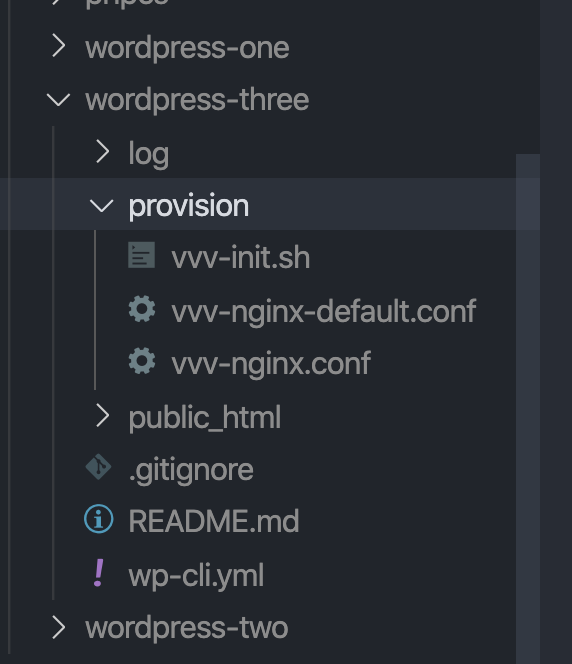
Those files are cloned from here:
https://github.com/varying-vagrant-vagrants/custom-site-template
Then VVV runs /srv/www/sitename/provision/provision.sh to provision the site, from that sites folder, which installs WP, creates DB tables, etc. Finally once that's done it takes provision/vvv-nginx.conf and installs it in the correct location. VVV itself doesn't know how to install or update WordPress.
Normally debugging is easy as I can just look at the site template repo that was used, but you aren't using a site template repo, and I don't know what your provision folder looks like or its contents for that site. What you've sent me instead is the main VVV provisioners.
For when you just need a simple dev site. Contribute to Varying-Vagrant-Vagrants/custom-site-template development by creating an account on GitHub.
tomjn
on 13 Jun 2020
is easy
Did you mean, "_might be straightforward, but could have unforseen complexities that would completely change the prioritization of the issue, so we should let it go through the normal planning and estimation process_"?
![untrivializer[bot] picture](https://avatars.githubusercontent.com/in/6896?v=4&s=40) untrivializer[bot]
on 13 Jun 2020
untrivializer[bot]
on 13 Jun 2020
I would also note that we have a VVV slack, back and forth may be significantly faster there
tomjn
on 13 Jun 2020
Aha. Well..
There are no provision directories in the vagrant-local/www/sitename/ directoriesm, but I have those in the wordpress-develop and wordpress-default directories. I'm going to remove the whole installation, and start from scratch with the site backups, since I have the feeling lots of conf files are in the beyond-repair-state.
Thanks for your help @tomjn
mbootsman
on 16 Jun 2020
Keep in mind the wordpress-default and wordpress-develop configs will be old, you should base any new sites off of the custom site template scripts ( or if possible use those as is and a vvv-nginx-custom.conf file for customisations. It looks like your only change was to use htdocs instead of public_html which is an easy feature to support
You might also have the provision.sh or vvv-nginx.conf in the root of the site
tomjn
on 16 Jun 2020
Related issues
 pvanbavel
·
4Comments
tomjn
·
3Comments
pvanbavel
·
4Comments
tomjn
·
3Comments
 CreativeTransmissions
·
5Comments
CreativeTransmissions
·
5Comments
 ryanfurtner
·
3Comments
ryanfurtner
·
3Comments
 JDGrimes
·
4Comments
JDGrimes
·
4Comments