Vvv: New Install Not Working on Multiple Machines - PHP 7.2 Issue
Expected Behavior
For vagrant up to work on a new installation.
Current Behavior
Receive the following error messages about PHP 7.2 packages not being available.
    default: E: Package 'php7.2-fpm' has no installation candidate
    default: E: Package 'php7.2-cli' has no installation candidate
    default: E: Unable to locate package php7.2-common
    default: E: Couldn't find any package by regex 'php7.2-common'
    default: E: Package 'php7.2-dev' has no installation candidate
    default: E: Package 'php-imagick' has no installation candidate
    default: E: Package 'php-memcache' has no installation candidate
    default: E: Package 'php-memcached' has no installation candidate
    default: E: Package 'php-ssh2' has no installation candidate
    default: E: Package 'php-xdebug' has no installation candidate
    default: E: Package 'php7.2-bcmath' has no installation candidate
    default: E: Package 'php7.2-curl' has no installation candidate
    default: E: Package 'php7.2-gd' has no installation candidate
    default: E:
    default: Package 'php7.2-mbstring' has no installation candidate
    default: E: Package 'php7.2-mysql' has no installation candidate
    default: E: Package 'php7.2-imap' has no installation candidate
    default: E: Package 'php7.2-json' has no installation candidate
    default: E: Package 'php7.2-soap' has no installation candidate
    default: E: Package 'php7.2-xml' has no installation candidate
    default: E: Package 'php7.2-zip' has no installation candidate
    default: Main packages check and install failed, halting provision
The SSH command responded with a non-zero exit status. Vagrant
assumes that this means the command failed. The output for this command
should be in the log above. Please read the output to determine what
went wrong.
Possible Solution
Upgrade to PHP 7.3 by default?
Steps to Reproduce (for bugs)
git clone https://github.com/Varying-Vagrant-Vagrants/VVV.gitvagrant up
Your Environment
- VVV version: 2.6.0
- VVV Git Branch: DEVELOP
- Vagrant version: 2.2.2
- VM Provider name: VirtualBox
- VM Provider version: 5.2.26
- Operating System and version: MacOS 10.13.6
 EricRihlmann
All 36 comments
it is probably because of https://github.com/Varying-Vagrant-Vagrants/VVV/issues/1769
you should use the develop version until we don't release the 2.7 version that fix this.
 Mte90
on 3 May 2019
Mte90
on 3 May 2019
I just tried on my Mac. Even with the latest commit on develop branch, it shows
default: Package php7.2-soap is not available, but is referred to by another package.
default: This may mean that the package is missing, has been obsoleted, or
default: is only available from another source
default: Package php-imagick is not available, but is referred to by another package.
default: This may mean that the package is missing, has been obsoleted, or
default: is only available from another source
default: Package php-memcache is not available, but is referred to by another package.
default: This may mean that the package is missing, has been obsoleted, or
default: is only available from another source
default: Package php-memcached is not available, but is referred to by another package.
default: This may mean that the package is missing, has been obsoleted, or
default: is only available from another source
default: Package php-ssh2 is not available, but is referred to by another package.
default: This may mean that the package is missing, has been obsoleted, or
default: is only available from another source
... ... .... shortened .... ... ...
default: E
default: :
default: Package 'php7.2-fpm' has no installation candidate
default: E
default: :
default: Package 'php7.2-cli' has no installation candidate
default: E: Unable to locate package php7.2-common
default: E: Couldn't find any package by regex 'php7.2-common'
default: E: Package 'php7.2-dev' has no installation candidate
default: E: Package 'php-imagick' has no installation candidate
default: E: Package 'php-memcache' has no installation candidate
default: E: Package 'php-memcached' has no installation candidate
..... ..... .... .... ....
default: Main packages check and install failed, halting provision
The SSH command responded with a non-zero exit status. Vagrant
assumes that this means the command failed. The output for this command
should be in the log above. Please read the output to determine what
went wrong.
 bensahagun
on 3 May 2019
bensahagun
on 3 May 2019
halt the machine, destroy it, and recreate, let us know how that goes
 tomjn
on 3 May 2019
tomjn
on 3 May 2019
It seems some of the packages may not have been mirrored, working on it
tomjn
on 3 May 2019
Thanks @tomjn I can confirm that issue is still present even after recreating the machine.
bensahagun
on 3 May 2019
So I don't think we're going to be able to put up the missing packages, we're working on getting develop updated to Ubuntu 18.04 LTS Bionic. This does mean that if you've turned off database backups there will be data loss as a vagrant destroy will be needed
tomjn
on 4 May 2019
Here is the error message I'm getting with the latest merge #1771. This is another clean install. (appears to be the same).
default: E
default: :
default: Package 'php7.2-fpm' has no installation candidate
default: E
default: :
default: Package 'php7.2-cli' has no installation candidate
default: E
default: :
default: Unable to locate package php7.2-common
default: E
default: :
default: Couldn't find any package by regex 'php7.2-common'
default: E
default: :
default: Package 'php7.2-dev' has no installation candidate
default: E: Package 'php-imagick' has no installation candidate
default: E: Package 'php-memcache' has no installation candidate
default: E: Package 'php-memcached' has no installation candidate
default:
default: E: Package 'php-ssh2' has no installation candidate
default: E: Package 'php-xdebug' has no installation candidate
default: E: Package 'php7.2-bcmath' has no installation candidate
default: E: Package 'php7.2-curl' has no installation candidate
default: E
default: : Package 'php7.2-gd' has no installation candidate
default: E: Package 'php7.2-mbstring' has no installation candidate
default: E
default: : Package 'php7.2-mysql' has no installation candidate
default: E: Package 'php7.2-imap' has no installation candidate
default: E: Package 'php7.2-json' has no installation candidate
default: E: Package 'php7.2-soap' has no installation candidate
default: E: Package 'php7.2-xml' has no installation candidate
default: E: Package 'php7.2-zip' has no installation candidate
default: Main packages check and install failed, halting provision
The SSH command responded with a non-zero exit status. Vagrant
assumes that this means the command failed. The output for this command
should be in the log above. Please read the output to determine what
went wrong.
Having _exactly_ the same issue. Also using the develop version.
 atticus7
on 4 May 2019
atticus7
on 4 May 2019
Same issue here using both branches.
 rogeliozarate
on 4 May 2019
rogeliozarate
on 4 May 2019
Also having same issue with both branches. Fresh install of Vagrant and VirtualBox.
 christopherjanzen
on 4 May 2019
christopherjanzen
on 4 May 2019
It's known, neither master or develop work, as I said earlier work is ongoing with an Ubuntu 18 box.
Some notes:
- myself and @LoreleiAurora have been working on this
- the next release will be VVV 3 as it's a breaking change
- updating will require a
vagrant destroy, which will destroy any MySQL databases that haven't been backed up - we're attempting to put the database data folder back on to a mounted/synced folder so that in future that isn't a problem, but there are some issues we're encountering
tomjn
on 5 May 2019
For reference, the current WIP is in https://github.com/Varying-Vagrant-Vagrants/VVV/pull/1710
tomjn
on 5 May 2019
@tomjn So ... what is the process in the short term for getting vvv reprovisioned if neither master nor develop are working?
 DrewAPicture
on 5 May 2019
DrewAPicture
on 5 May 2019
Right now the only options are to either wait or help. Either way I don't
recommend doing work on a Saturday evening
On Sun, 5 May 2019 at 01:19, Drew Jaynes notifications@github.com wrote:
@tomjn https://github.com/tomjn So ... what is the process in the short
term for getting vvv reprovisioned if neither master nor develop are
working?—
You are receiving this because you were mentioned.Reply to this email directly, view it on GitHub
https://github.com/Varying-Vagrant-Vagrants/VVV/issues/1772#issuecomment-489375680,
or mute the thread
https://github.com/notifications/unsubscribe-auth/AAAOLZ5UO3J5TFSFCXM2YPDPTYR2XANCNFSM4HKWOWLQ
.
tomjn
on 5 May 2019
If I had any idea what was going on in that PR, I'd already be helping, sorry ;-)
DrewAPicture
on 5 May 2019
Right now in that PR provisioning fails because of mariadb. If that gets
fixed then it gets merged and we start the release process
On Sun, 5 May 2019 at 01:30, Drew Jaynes notifications@github.com wrote:
If I had any idea what was going on in that PR, I'd already be helping,
sorry ;-)—
You are receiving this because you were mentioned.Reply to this email directly, view it on GitHub
https://github.com/Varying-Vagrant-Vagrants/VVV/issues/1772#issuecomment-489376104,
or mute the thread
https://github.com/notifications/unsubscribe-auth/AAAOLZ62ICTUROFCTK7L6KDPTYTCJANCNFSM4HKWOWLQ
.
tomjn
on 5 May 2019
That PR got merged into develop, I think all is good, but can you test?
For existing users, a note before testing
Any database you have inside the VM will be destroyed when you update, so run vagrant up but don't provision, and run the DB backup script. This runs on vagrant halt so all you would need to do is run that command and it'll say backing up databases. Otherwise PHPMyAdmin and the MySQL server are accessible via the usual means.
Of course if you're not bothered about the data inside the DB, you can ##proceed
Testing
- First, you'll need the latest
developbranch, so do agit pull, or clone the repo if you're starting from scratch - halt the VM if it's running with
vagrant halt vagrant destroyvagrant up --provision
At this point it should download the new box, then proceed to provision. Wait until the end, then visit http://vvv.test and see if the dashboard, sites, and the tools work as expected. The goal is that the end result should look and work exactly the same, but, on a new VM. I'm not so concerned about performance differences, mainly that all is working and functional.
Thanks for being patient while we worked through this :)
@DrewAPicture @christopherjanzen @rogeliozarate @EricRihlmann @benedicksahagun @Mte90 @benlumia007
Ensuring it doesn't happen again
Rather than using the official Ubuntu 18 box, the lovely @LoreleiAurora built a custom Ubuntu 18 box, and she removed everything that was unnecessary. The success of having our own box means we now have far greater control, but it also means VVV 4 will come bundled with everything the core provisioner sets up out of the box.
In future, for most users only site provisioners will be run, and updating VVV will be as simple as:
vagrant box update
vagrant destroy
vagrant up --provision
This means that spinning up a new site will also be significantly faster, as the bulk of the provisioning will no longer happen.
In the event that provisioning new boxes is broken, things would be fine, we'd just use the last working box that was built
Additionally, VVV 3 uses a mounted folder for the database directory, so it survives a vagrant destroy. Tearing down and spinning up a new instance shouldn't cause data loss as a result. Figuring out how to migrate people to that without data loss has been a long standing blocker to moving to Ubuntu 18, but the 14 EOL necessitated it
tomjn
on 6 May 2019
@tomjn I'm up and running after this update!
 benleeth
on 6 May 2019
benleeth
on 6 May 2019
I am testing, for who was using the plugin vagrant-vbguest has issue with this version of ubuntu.
So the vagrant up will not work with an incomplete provisioning.
Let's do
vagrant plugin uninstall vagrant-vbguest
To remove the plugin and enjoy the provision.
A little suggestion is that now we have finally a custom box so we are sure that the vbguest are available and updated so it is safe to remove it.
Mte90
on 6 May 2019
Works now for me! Thanks for the hard work.
bensahagun
on 6 May 2019
I am testing, for who was using the plugin
vagrant-vbguesthas issue with this version of ubuntu.
So thevagrant upwill not work with an incomplete provisioning.Let's do
vagrant plugin uninstall vagrant-vbguestTo remove the plugin and enjoy the provision.
A little suggestion is that now we have finally a custom box so we are sure that the vbguest are available and updated so it is safe to remove it.
Requiring something like this to be uninstalled for VVV to work is rather disconcerting. This is a global install on the computer and not just local to VVV project. A person could have other vagrant stacks which require vagrant-vbguest plugin. Not having this plugin as a hard requirement for VVV means that same computer could not be used to run any other vagrant VM which needs vagrant-vbguest plugin.
 coolamit
on 6 May 2019
coolamit
on 6 May 2019
@coolamit he was advising, VVV itself only references this plugin to indicate if it's installed in the splash screen for debugging purposes when people open issues. We used to advise to people install that plugin as it fixed things for some people to have the newer guest additions, but it can also cause problems for some people.
Eitherway it's not a requirement, just that for some people it causes issues, so I wouldn't recommend it.
With that in mind, a global install is unnecessary because:
- The guest additions are just a package, you can update and install them yourself inside the VM or in a provisioner. The VVV 3 box contains a much newer version of the guest additions from the start
- You can tell vagrant in your vagrantfile your project needs a plugin, and it will download it just for that project. VVV already does this with the hostsupdater plugin:
config.vagrant.plugins = ["vagrant-hostsupdater"]
- You can install this vagrant plugin with the
--localparameter and it'll be installed only for that vagrant instance e.g.vagrant plugin install vagrant-vbguest --local
There's no need for a global install, even if your setup up requires the plugin.
Further reading:
I think it best though that discussion of that vagrant plugin happen in a new issue though, I'm keen to see that the develop branch is thoroughly tested so a release can happen ASAP
tomjn
on 6 May 2019
Yes I was suggesting that as hint for others that will have problems and still use that plugin.
In my case on vagrant I am actually using only VVV so I didn't saw the problem of a global installation.
I got few issues with mysql on running on my workstation with the latest develop version but is not happened on my laptop.
I am investing about the issue with installing tideways https://github.com/Varying-Vagrant-Vagrants/VVV/issues/1762 that happens in both.
Mte90
on 6 May 2019
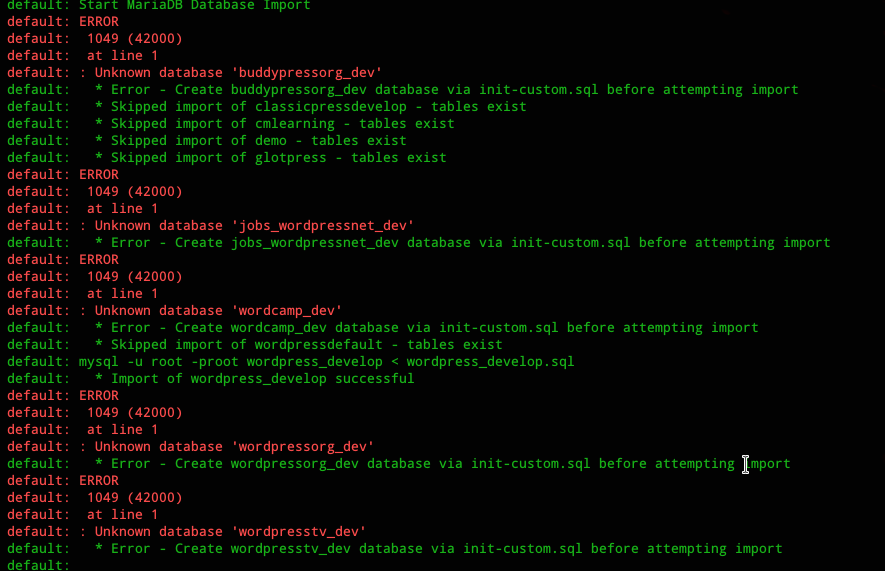
This is the error I am getting with mariadb on creating db (happens also on my laptop), just in case happens also to other people.
Mte90
on 6 May 2019
Seems that issue depends on https://github.com/Varying-Vagrant-Vagrants/VVV/blob/2264eed057771726b1124db775baca74ab33d462/database/import-sql.sh#L54 because there is an import of the sql file but there is no check if the database table exist and in that case require to be created manually.
The best way is on export to include the creation of the database itself in the dump https://github.com/Varying-Vagrant-Vagrants/VVV/blob/2264eed057771726b1124db775baca74ab33d462/config/homebin/db_backup#L30 but this will not fix the problem for previous backups.
Probably is better to create the database anyway before to import the tables.
Mte90
on 6 May 2019
This fix the problem with tideways https://github.com/Varying-Vagrant-Vagrants/vvv-utilities/pull/26
Mte90
on 6 May 2019
@tomjn Thanks for the detailed reply, I did not know about the --local flag.
And thanks for fixing VVV quickly. :)
coolamit
on 6 May 2019
@tomjn Thanks, I can confirm that a new installation is working once again.
EricRihlmann
on 6 May 2019
Thank you for fixing this over the weekend. All working again now!
atticus7
on 7 May 2019
Windows 10 - 64 bit
I am getting the php errors Unable to locate package php7.2-fpm etc.
Terminal log: https://gist.github.com/shanebp/0de3096f77a04e0533413519aa60d3df
Gist
VVV 3.0 update errors. GitHub Gist: instantly share code, notes, and snippets.

 shanebp
on 18 May 2019
shanebp
on 18 May 2019
That's not a VVV 3 box, your provisioner log says it's an Ubuntu 14
Trusty64 VM. We don't support VVV 2, and there is no fix for your issue
other than to upgrade to an Ubuntu 18 VVV3 VM
Note this requires you to run vagrant destroy, this is mandatory and not
optional
On Sat, 18 May 2019 at 17:36, shanebp notifications@github.com wrote:
Windows 10 - 64 bit
I am getting the php errors Unable to locate package php7.2-fpm etc.
Terminal log:
https://gist.github.com/shanebp/0de3096f77a04e0533413519aa60d3df—
You are receiving this because you were mentioned.Reply to this email directly, view it on GitHub
https://github.com/Varying-Vagrant-Vagrants/VVV/issues/1772?email_source=notifications&email_token=AAAOLZ5JO7DPH3DZ54OSU7DPWAWB5A5CNFSM4HKWOWL2YY3PNVWWK3TUL52HS4DFVREXG43VMVBW63LNMVXHJKTDN5WW2ZLOORPWSZGODVWRZGQ#issuecomment-493690010,
or mute the thread
https://github.com/notifications/unsubscribe-auth/AAAOLZ5C3BBI5DJ6RR64FG3PWAWB5ANCNFSM4HKWOWLQ
.
tomjn
on 18 May 2019
For reference your VVV log indicates you're on V2.5.1
On Sat, 18 May 2019 at 17:54, Tom Nowell contact@tomjn.com wrote:
That's not a VVV 3 box, your provisioner log says it's an Ubuntu 14
Trusty64 VM. We don't support VVV 2, and there is no fix for your issue
other than to upgrade to an Ubuntu 18 VVV3 VMNote this requires you to run vagrant destroy, this is mandatory and not
optionalOn Sat, 18 May 2019 at 17:36, shanebp notifications@github.com wrote:
Windows 10 - 64 bit
I am getting the php errors Unable to locate package php7.2-fpm etc.
Terminal log:
https://gist.github.com/shanebp/0de3096f77a04e0533413519aa60d3df—
You are receiving this because you were mentioned.Reply to this email directly, view it on GitHub
https://github.com/Varying-Vagrant-Vagrants/VVV/issues/1772?email_source=notifications&email_token=AAAOLZ5JO7DPH3DZ54OSU7DPWAWB5A5CNFSM4HKWOWL2YY3PNVWWK3TUL52HS4DFVREXG43VMVBW63LNMVXHJKTDN5WW2ZLOORPWSZGODVWRZGQ#issuecomment-493690010,
or mute the thread
https://github.com/notifications/unsubscribe-auth/AAAOLZ5C3BBI5DJ6RR64FG3PWAWB5ANCNFSM4HKWOWLQ
.
tomjn
on 18 May 2019
As always - thank you @tomjn
I just needed to update from vagrant_2.2.3 to vagrant_2.2.4.
VVV is such a great project - where is the Donate button ?
shanebp
on 18 May 2019
Thanks @shanebp, you're right about the Vagrant version, but you shouldn't be able to provision with VVV 2.x.
where is the Donate button ?
Heh perhaps @jeremyfelt could use a few cents here and there to host the docs site, I think thats our only ongoing cost in $$ at the moment, what we need most is help implementing new things and testing out PR's :)
tomjn
on 18 May 2019
Seems @jeremyfelt doesn't want $ donations. All his WP plugin > Donate just go to his website.
VVV should have a Donate $ button somewhere - then the cores would be richer than astronauts.
shanebp
on 18 May 2019
This thread has been automatically locked since there has not been any recent activity after it was closed. Please open a new issue for related bugs.
![lock[bot] picture](https://avatars.githubusercontent.com/in/6672?v=4&s=40) lock[bot]
on 22 Feb 2020
lock[bot]
on 22 Feb 2020
Related issues
tomjn
·
3Comments
tomjn
·
4Comments
 neilgee
·
5Comments
neilgee
·
5Comments
 pvanbavel
·
4Comments
pvanbavel
·
4Comments
 rwrobe
·
4Comments
rwrobe
·
4Comments
Most helpful comment
That PR got merged into
develop, I think all is good, but can you test?For existing users, a note before testing
Any database you have inside the VM will be destroyed when you update, so run
vagrant upbut don't provision, and run the DB backup script. This runs onvagrant haltso all you would need to do is run that command and it'll say backing up databases. Otherwise PHPMyAdmin and the MySQL server are accessible via the usual means.Of course if you're not bothered about the data inside the DB, you can ##proceed
Testing
developbranch, so do agit pull, or clone the repo if you're starting from scratchvagrant haltvagrant destroyvagrant up --provisionAt this point it should download the new box, then proceed to provision. Wait until the end, then visit http://vvv.test and see if the dashboard, sites, and the tools work as expected. The goal is that the end result should look and work exactly the same, but, on a new VM. I'm not so concerned about performance differences, mainly that all is working and functional.
Thanks for being patient while we worked through this :)
@DrewAPicture @christopherjanzen @rogeliozarate @EricRihlmann @benedicksahagun @Mte90 @benlumia007
Ensuring it doesn't happen again
Rather than using the official Ubuntu 18 box, the lovely @LoreleiAurora built a custom Ubuntu 18 box, and she removed everything that was unnecessary. The success of having our own box means we now have far greater control, but it also means VVV 4 will come bundled with everything the core provisioner sets up out of the box.
In future, for most users only site provisioners will be run, and updating VVV will be as simple as:
This means that spinning up a new site will also be significantly faster, as the bulk of the provisioning will no longer happen.
In the event that provisioning new boxes is broken, things would be fine, we'd just use the last working box that was built
Additionally, VVV 3 uses a mounted folder for the database directory, so it survives a
vagrant destroy. Tearing down and spinning up a new instance shouldn't cause data loss as a result. Figuring out how to migrate people to that without data loss has been a long standing blocker to moving to Ubuntu 18, but the 14 EOL necessitated it