Vux: work with vue-server-render shows "Unexpected token import"
Happen
When I import Vux's Components in server side enviroment, it shows "Unexpected token import" error, when I already used babel-loader and vux-loader.
Version
- vue: 2.5.2
- vux: 2.6.5
- vue-router: 3.0.1
- vue-server-nreder: 2.5.2
- vue-class-component: 6.0.0
- babel-core: 7.1.2
- babel-loader: 7.1.2
- babel-preset-es2015: 6.24.1
- babel-preset-stage-0: 6.24.1
- typescript: 2.5.3
- node: 7.6.0
Code
HomePage.Component.ts
import Vue from 'vue';
import { Swiper } from 'vux';
import Component from 'vue-class-component';

@Component({
  components: {
    Swiper
  }
})
export default class Home extends Vue {

}
HomPage.component.vue
<template>
  <div>
    home
  </div>
</template>

<script lang="ts">
import Home from './HomePage.Component.ts';
export default Home;
</script>

<style lang="less" scoped>
@import './index.less';
</style>
Config
webpack.server.ts
import * as path from 'path';
import * as webpack from 'webpack';
import * as vuxLoader from 'vux-loader';
import * as nodeExternals from 'webpack-node-externals';
import * as VueSSRServerPlugin from 'vue-server-renderer/server-plugin';

const DEBUG = process.env.NODE_ENV === 'development';

const webpackConfig = {
  entry: {
    index: ['./src/entry-server.ts']
  },
  target: 'node',
  output: {
    filename: '[name].js',
    libraryTarget: 'commonjs2',
    path: path.join(__dirname, '../static/server/js')
  },
  resolve: {
    extensions: ['.ts', '.js', '.vue'],
    alias: { vue: 'vue/dist/vue.js' }
  },
  module: {
    rules: [
      {
        test: /\.ts$/,
        exclude: /node_modules|vue\/src/,
        loader: 'ts-loader',
        options: {
          appendTsSuffixTo: [/\.vue$/]
        }
      },
     {
        test: /\.js$/,
        loader: 'babel-loader'
      },
      {
        test: /\.vue$/,
        loader: 'vue-loader',
        options: {
          esModule: true,
          loaders: {
            js: 'babel-loader'
          }
        }
      },
      {
         test: /\.less/,
         use: ['style-loader', 'css-loader', 'less-loader']
      },
      {
        test: /\.(png|jpe?g|gif|svg)(\?.*)?$/,
        loader: 'url-loader',
        options: {
          limit: 10000
        }
      }
    ]
  },
  externals: nodeExternals({
    whitelist: /\.less$/
  }),
  plugins: [
    new VueSSRServerPlugin( ),
    new webpack.DefinePlugin({
         'process.env': {
            NODE_ENV: JSON.stringify( DEBUG ? 'development' : 'production' ),
            VUE_ENV: JSON.stringify( 'server' )
         }
    })
  ]
};

const config = vuxLoader.merge( webpackConfig, {
  plugins: ['vux-ui']
});

export default config;
.babelrc
{
  "plugins": [

  ],
  "presets": [
    "es2015",
    "stage-0"
  ]
}
thanks for any reply
 Penggggg
All 7 comments
Could you provide a repo for better and easier reproduction?
 airyland
on 28 Oct 2017
airyland
on 28 Oct 2017
@airyland Thanks for your reply! Here is my repo for this problem.
ts-vue-ssr-vux-demo
Penggggg
on 30 Oct 2017
tried to fix it, but still got another error..
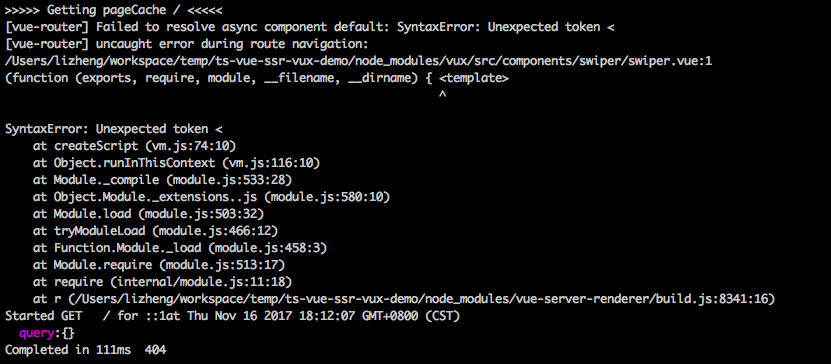
related pr: https://github.com/Penggggg/ts-vue-ssr-vux-demo/pull/1/files
airyland
on 16 Nov 2017
@agileago I will check it later. Thanks for your reply!
It seems that, the vue-loader does not working. So that nodejs cannot analyze the '<' , and throw an Unexpected token Error.
Penggggg
on 16 Nov 2017
我配置的时候也出现了这个问题。第一次请求的时候会报错。请求别的连接在转回来就正常了
 lmy1991
on 14 Dec 2017
lmy1991
on 14 Dec 2017
same here. Would you please reopen it? @airyland
 NoraGithub
on 8 Jul 2018
NoraGithub
on 8 Jul 2018
@Penggggg Have you fixed?
NoraGithub
on 8 Jul 2018
Related issues
 skyshirt
·
4Comments
skyshirt
·
4Comments
 hao-li
·
3Comments
hao-li
·
3Comments
 wangchaolonglls
·
4Comments
airyland
·
5Comments
wangchaolonglls
·
4Comments
airyland
·
5Comments
 GloriaCHL
·
4Comments
GloriaCHL
·
4Comments
Most helpful comment
@airyland Thanks for your reply! Here is my repo for this problem.
ts-vue-ssr-vux-demo