Vuetify: [Bug Report] Chrome's input history suggestions shows for input fields with Vuetify v2
Environment
Vuetify Version: 2.0.4
Vue Version: 2.5.17
Browsers: Chrome 76.0.3809.87
OS: Linux x86_64
Steps to reproduce
- Choose an item from the
v-autocompletedropdown list - Click 'Submit'
- Repeat step 1
- Observe the browser input suggestion overlaying the autocomplete list
Expected Behavior
When typing content into a v-autocomplete or v-combobox, No browser input suggestions should be provided.
Actual Behavior
When typing content into a v-autocomplete and v-combobox, the Chrome input history dropdown overlays the results provided by these components. For the v-text-field, it provides suggestions as well but this isn't much of an issue.
Reproduction Link
https://codesandbox.io/s/vue-template-5b1p7
Other comments
In the reproduction example, if you submit multiple items, only the first one submitted shows up in the browser autocomplete list. In the initially observed scenario however, multiple would show. The more data submitted from that input field, the more browser input suggestions would show.
Also, what has been observed is that these browser suggestions show for v-text-field's as well even if the context is different (i.e. the text field is not related to the data); for example the 'Reproduction Link' in this issue form, it shows some of the suggestions that first showed up in an app I am working on.
Here are some images:
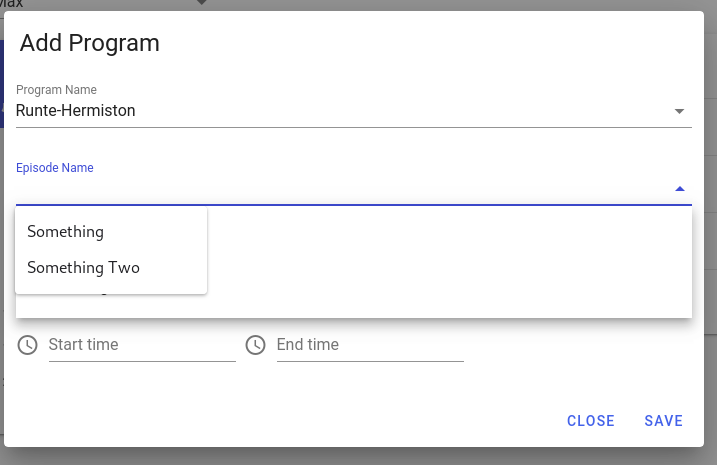

 rgb-one
All 3 comments
Adding autocomplete="off" to v-autocomplete seems to fix the problem.
 myleslee
on 10 Aug 2019
myleslee
on 10 Aug 2019
@myleslee, indeed. Cool stuff. autocomplete="off" by default on v-autocomplete and v-combobox would be good.
rgb-one
on 10 Aug 2019
I would like to work on this
 simjes
on 5 Oct 2019
simjes
on 5 Oct 2019
Related issues
 dohomi
·
3Comments
dohomi
·
3Comments
 cawa-93
·
3Comments
cawa-93
·
3Comments
 dschreij
·
3Comments
dschreij
·
3Comments
 paladin2005
·
3Comments
paladin2005
·
3Comments
 SteffenDE
·
3Comments
SteffenDE
·
3Comments
Most helpful comment
Adding
autocomplete="off"tov-autocompleteseems to fix the problem.https://codesandbox.io/embed/vue-template-z08d0