Vuetify: [Bug Report] VTabs misaligned with fixed-tabs property
Environment
Vuetify Version: 2.0.2
Last working version: 2.0.0
Vue Version: 2.6.10
Browsers: Firefox 68.0
OS: Mac OS 10.14
Steps to reproduce
- Create an application with tabs inside of an app-bar.
- Set the tabs to use
fixed-tabs. - View the website on a mobile browser.
Expected Behavior
- The tab item should fill its container.
- The tabs should have equal padding on each horizontal side.
- The first tab should be aligned with the app bar's left button.
- The tab item itself should be sized to fit the tab text.
- The slider should be aligned with the tab item.
Actual Behavior
- The first tab has a large margin and is no longer aligned with the app bar's left button.
- The slider is misaligned with the text.
- The tab's text exceeds the bounds of the ripple effect.
Reproduction Link
 dylancopeland
All 6 comments
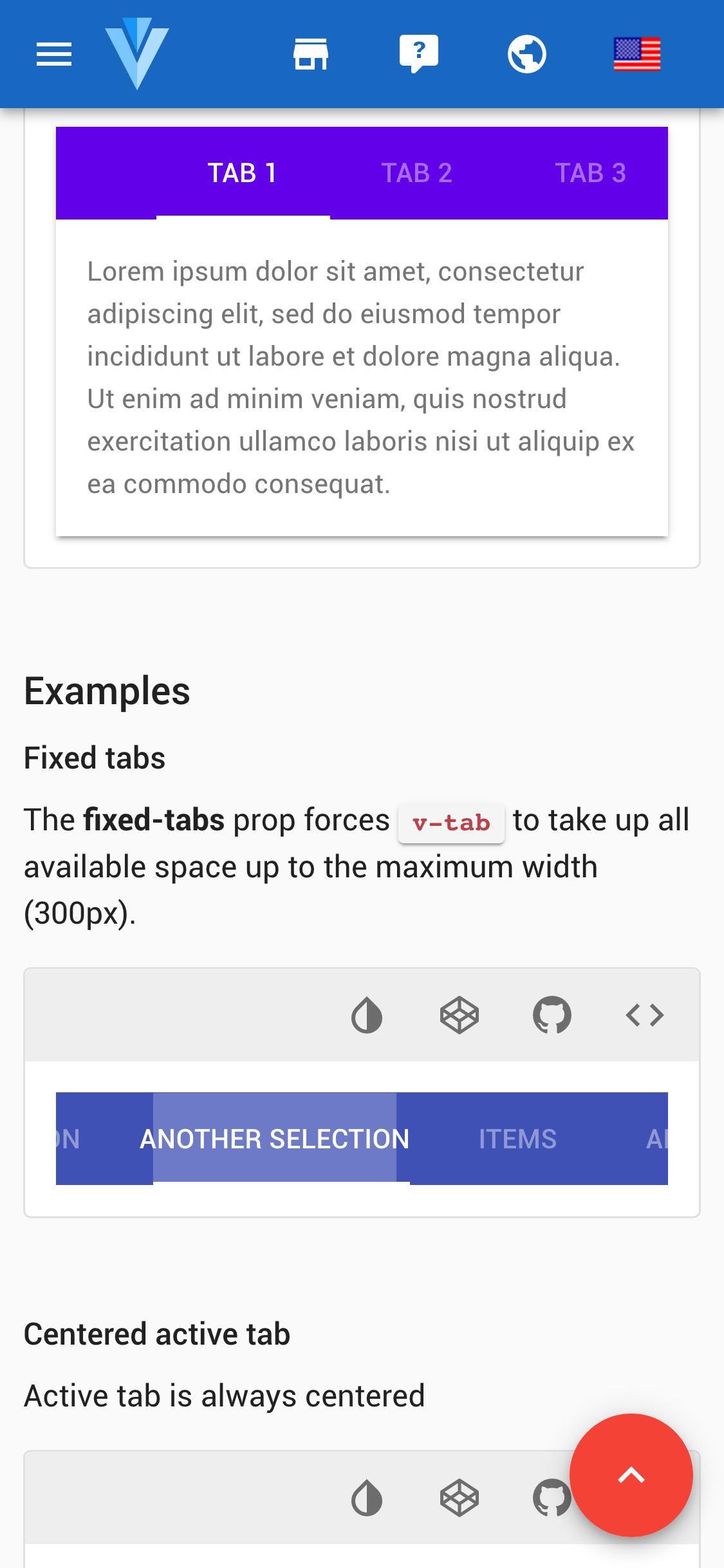
The Vuetify documentation seems to be affected by this, too:
dylancopeland
on 29 Jul 2019
Workaround: https://codepen.io/johnjleider/pen/qemBjq
 johnleider
on 30 Jul 2019
johnleider
on 30 Jul 2019
@johnleider i fix this problem by add "show-arrows" attribute, awesome!
 maroon1
on 31 Jul 2019
maroon1
on 31 Jul 2019
I ended up overriding the css
.v-tabs-bar.v-tabs-bar--is-mobile:not(.v-tabs-bar--show-arrows) > .v-slide-group__wrapper > .v-tabs-bar__content > .v-tab:first-of-type {
  margin-left: unset !important;
}
 neanderthil
on 14 Aug 2019
neanderthil
on 14 Aug 2019
@johnleider The work-around doesn't seem to work when you have tabs in a drawer. I think the reason is because the drawer's width is changing as it opens and closes.
 EBMike
on 27 Sep 2019
EBMike
on 27 Sep 2019
This is resolved as of the latest version.
If you have any additional questions, please reach out to us in our Discord community.
johnleider
on 28 May 2020
Related issues
 Webifi
·
3Comments
Webifi
·
3Comments
 alterhu2020
·
3Comments
alterhu2020
·
3Comments
 gluons
·
3Comments
gluons
·
3Comments
 jofftiquez
·
3Comments
jofftiquez
·
3Comments
 milleraa
·
3Comments
milleraa
·
3Comments