Vuetify: [Bug Report] When choosing year for date picker with an initial value of 9999 for the year results in an 'invalid time' error
Versions and Environment
Vuetify: 1.5.14
Vue: 2.6.10
Browsers: Firefox 67.0, Google Chrome
OS: Windows 10
Steps to reproduce
- Use picker and set value to the year 9999
- Go to year selection
- Error
Expected Behavior
- Either handle edge-case gracefully
- Support years up till 9999
Actual Behavior
invalid time exception, component is unusable afterwards
Reproduction Link
 SanBen
All 10 comments
So we've a got a Y10K problem
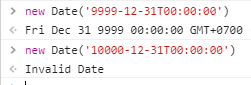
I'd say it's a no fix, unless your example is a real world example and not just testing edge cases
 jacekkarczmarczyk
on 5 Jun 2019
jacekkarczmarczyk
on 5 Jun 2019
It works without the time, in chrome at least

Firefox doesn't like either.
ISO says 5 digit years should be prefixed with +/- for CE/BCE, but that doesn't seem to make a difference.
 KaelWD
on 5 Jun 2019
KaelWD
on 5 Jun 2019
6 digit year with + works in both browsers

This is also the format toISOString uses:
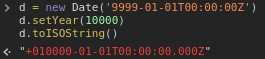
Works in IE11 too surprisingly
KaelWD
on 5 Jun 2019
Not sure if there is no problem on MacOS/ios if we skip the time.
It's a pity that in 2019 there is not built in support for operating just on pure dates, not only in JS...
jacekkarczmarczyk
on 5 Jun 2019
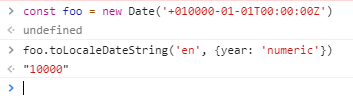
Should be easy fix
jacekkarczmarczyk
on 5 Jun 2019
Yeah that already works, the problem is converting it back to a string. Maybe the date should be stored as a tuple internally so you can do new Date(...dateTuple).toISOString()
KaelWD
on 5 Jun 2019
@nekosaur any thoughts as you're doing now date-time refactor?
jacekkarczmarczyk
on 5 Jun 2019
So we've a got a Y10K problem
I'd say it's a no fix, unless your example is a real world example and not just testing edge cases
@jacekkarczmarczyk Unfortunately it is a real use case, we are renewing a legacy codebase and are migrating the old data.
The previous developers used the date '9999-31-12' for certain cases 💥
I have fixed my specific problem by just clamping the value for now, so this is not urgent...
I thought making an issue for it might help others as well.
SanBen
on 5 Jun 2019
@SanBen https://codepen.io/anon/pen/rgbQwm
Edit: unfortuntely there is still an error if you want to move to the next month
jacekkarczmarczyk
on 5 Jun 2019
Also if you want to go to year selection to change it to the current year then you'll still face the problem https://github.com/vuetifyjs/vuetify/issues/7193
jacekkarczmarczyk
on 5 Jun 2019
Related issues
 smousa
·
3Comments
smousa
·
3Comments
 SteffenDE
·
3Comments
SteffenDE
·
3Comments
 Antway
·
3Comments
Antway
·
3Comments
 aaronjpitts
·
3Comments
aaronjpitts
·
3Comments
 ricardovanlaarhoven
·
3Comments
ricardovanlaarhoven
·
3Comments
Most helpful comment
6 digit year with

+works in both browsersThis is also the format

toISOStringuses:Works in IE11 too surprisingly