Vuetify: Add a 'more items' indicator to popup menus
What problem does this feature solve?
Allow user to see if they should try to scroll the menu for more items. It is very confusing to users when they do not know the popup is scrollable.
What is your proposed solution?
Add a header and footer to the popup with a configurable arrow icon if the content can be scrolled up or down.

Screenshots
Before Activation:

After Activation:
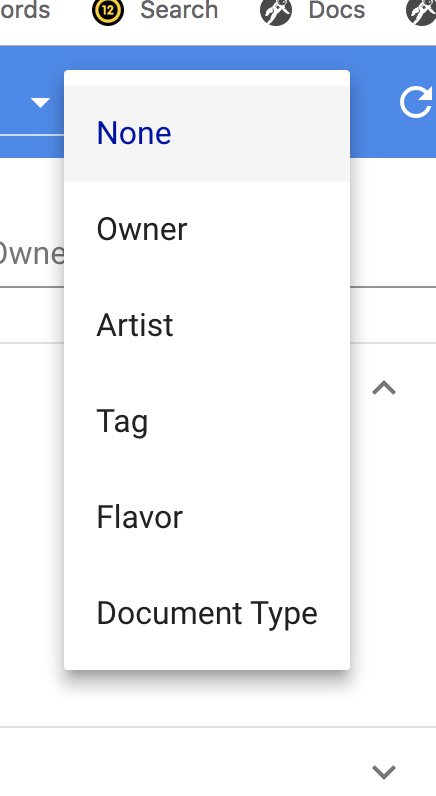
After Scroll:
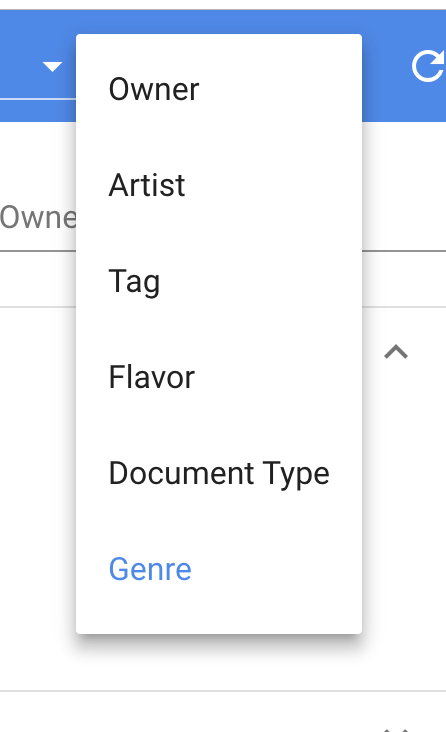
 Flamenco
All 21 comments
https://material.io/design/components/menus.html#behavior
Overflowing menus have scrollbars on desktop, it is the mobile browser vendors decision to hide them. We have been exploring custom scrollbar designs so this may change at some point, but we will not be implementing anything like this.
 KaelWD
on 28 Jul 2018
KaelWD
on 28 Jul 2018
Yes this is mobile and also on ios too, where scroll bars do not show up until mouseover. That’s an awful decision by the developers at Vuetify, and so against what material design is all about.
Flamenco
on 28 Jul 2018
Also, this is not about the scrollbar. I dont want to see that...
Flamenco
on 28 Jul 2018
@KaelWD @johnleider
Here's what I'm talking about. I don't really know why you guys are so stubborn about this feature...
https://www.useloom.com/share/c95c4f7ab9d841a0afa7f52d2a772d8b
Please consider reopening.
Flamenco
on 2 Aug 2018
We do absolutely nothing with mobile scrollbars, so I'm not sure why this is considered a Vuetify decision. We used to modify the scrollbar styles but since it was only supported in a few browsers we ultimately removed it.
As far as the feature, it's a great idea. We get lots of great ideas every day. It boils down to resources. We have a lot of moving parts with the framework, updates, new components, new functionality...we obviously can't make everyone happy. We try our best to ensure we are implementing user feedback and often work with the community to implement such changes into the framework.
Our main goal is always to at least meet the spec, additional features have to be heavily scrutinized and in some cases, need a champion to spearhead their development. In other cases, we have pass on feature functionality.
I hope that this makes sense as I really do take your frustration seriously, and want to ensure Vuetify is accommodating as many use-cases as possible. I will reopen this as low triage task that we will accept a community PR for, but I still stand by @KaelWD 's decision to not have the dev team focus on this.
 johnleider
on 2 Aug 2018
johnleider
on 2 Aug 2018
@johnleider Thanks for the response.
This is not a mobile scrollbar issue. It applies to all platforms. There is a problem with Vuetify menus. I know this because my users on multiple browsers and platforms complain that they did not know there were additional items in menus. The material design spec clearly states that indicators must be used if there are hidden items. IMO if a browser does not show these, then it's Vuetify's responsibility to compensate.
I took the wontfix to mean that I should not even bother submitting a PR. I was hoping this issue would be the start of a nice discussion of the API and UI, instead of immediately being shot down. Ideally I would have liked to constructively discuss:
- Should this be standard behavior, opt-in, or opt-out, or browser dependant?
- If a directive is used, what should it be named? show-indicators...
- How should styling or customization be handled.
- etc.
I also did not assume that feature requests reported on GitHub were targeted directly at your dev team. I would like to think that even if your dev team had other priorities, you would still get involved in a discussion as to guide a community PR in a direction that would not be wasting anyone's time.
FYI My solution polls in the background an replaces all of Vuetify's menus with this much more appealing solution. The components are still the original Vuetify ones. It would be snappier if this was in the core library, however.
So having said this, would the UI behavior in my video be acceptable for a PR for popup menus, or do you have something else in mind?
Flamenco
on 2 Aug 2018
As much as I would like to be involved in all conversations, it's not physically possible anymore :(. Can you link the spec reference?
johnleider
on 2 Aug 2018
My 2 cents:
I wouldn't add this behaviour to v-menu. It would be useful not only in menu but in other contexts too, so I think it should be a separate component (let's call it v-scroller) which should be responsible for horizontal/vertical scrolling. It could be used in menu, navigation, normal page content etc, for example:
<v-navigation-drawer>
  <v-scroller>
    <v-list>...</v-list>
  </v-scroller>
</v-navigation-drawer>
 jacekkarczmarczyk
on 2 Aug 2018
jacekkarczmarczyk
on 2 Aug 2018
@jacekkarczmarczyk
The issue see in general is that the v-menu already has an outlet outside of the container, so that is the natural target to extend.
Flamenco
on 2 Aug 2018
Sorry, i don't understand what you mean by "outlet outside of the container", can you explain (best with codepen)
jacekkarczmarczyk
on 2 Aug 2018
When popup items show, they are placed in the DOM outside of the elements that they are defined in. It adds another level of complexity, from CSS styling to positioning.
Flamenco
on 2 Aug 2018
You would place the scroller inside the v-menu so how does it add any complexity?
jacekkarczmarczyk
on 2 Aug 2018
I would think it would be the other way around. The v-scroller would be (or contain) a v-menu so it could reuse the outlet.
Flamenco
on 2 Aug 2018
@jacekkarczmarczyk The top level outlet is marked as overflow:auto, so that would have to change either way. I will post some code that I used in my video soon.
Flamenco
on 2 Aug 2018
What if you want to add this functionality to the drawer/dialog/somewhere else? Adding more responsibility to all components that could possibly use it is not a good idea. You don't need to worry about overflow auto, just make the scroller to have the same height as the menu content so that you don't have any overflow.
Menu (and dialogs, drawers...) should be left as a container that doesn't care about its contents, just displays detached box and everything else should be handled by menu contents.
Here is the example implementation - it's simple, it does not depend on anything, nothing depends on it, can be used anywhere, can be easily extended or copied to another similar component
https://codepen.io/anon/pen/bjMxzL?editors=1010
jacekkarczmarczyk
on 2 Aug 2018
@jacekkarczmarczyk I do like the idea of encapsulating. If the scrollable content it passed in as a slot with the indicators added as decorations around it, almost anything can be adapted quite easily. However, vuetify menus are not going to be as easy as you may think because of the 'outlet' issue I mentioned. The top level of these outlets needed to be overflow disabled and the display property needed to also be changed.
I will post my current solution this weekend. It's been working well in production and has the scroll logic already implemented.
Flamenco
on 3 Aug 2018
I still don't understand what issue you're talking about, can you show an example in codepen?
jacekkarczmarczyk
on 3 Aug 2018
I can't show it in codepen because it involves the generated code from the vuetify components. Here's a screen shot showing my solution of keeping the top level outlet, but wrapping the menu content in a container.

Flamenco
on 3 Aug 2018
All I am saying is that the vuetify menu's (aka v-autocomplete, v-select, v-combobox) can't simply just plug in and wrap another component. They will need to be reworked a bit.
Flamenco
on 3 Aug 2018
I closed this because I think it is the opposite of a great idea.
This is not a mobile scrollbar issue. It applies to all platforms
It applies to mobile browsers, and safari. Everything else shows a scrollbar when there is overflowing content. Android chrome actually shows it for a second or two when the menu is opened, so it should be pretty obvious that there is scrollable content.
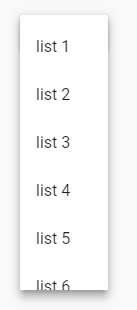
Another thing you could do instead of making a pretty ugly design change for the entire framework is simply set max-height="275" (or 320), cutting the bottom item in half if there is overflow:
We used to modify the scrollbar styles
I don't remember that ever being the case, and we have discussed doing so for 2.0 anyway.
can't simply just plug in and wrap another component. They will need to be reworked a bit
I don't get the point you're trying to make here either.
KaelWD
on 3 Aug 2018
@KaelWD Are you serious? You are the opposite of a good developer. It's stubborn techies like you that prevent positive change in projects. You are missing the entire point I am making, and I am done trying to contribute to this proiect. My users are complaining about your UI and you just keep making excuses.
it should be pretty obvious that there is scrollable content
The only thing pretty obvious here is that you are missing the point and do not have the capacity to take suggestions, criticism, or think outside of your limited use cases.
I will be not be submitting any more feedback or even attempting to contribute any PRs to Vuetify. Although I will be integrating Vuetify with my products, I refuse to spend any more time working with the Vuetify community while you are actively involved.
Flamenco
on 3 Aug 2018
Related issues
 dschreij
·
3Comments
dschreij
·
3Comments
 ricardovanlaarhoven
·
3Comments
ricardovanlaarhoven
·
3Comments
 jofftiquez
·
3Comments
jofftiquez
·
3Comments
 milleraa
·
3Comments
milleraa
·
3Comments
 SteffenDE
·
3Comments
SteffenDE
·
3Comments