Vuetify: v-select's label shakes during transition
Steps to reproduce
Create v-select component with many items and click on the input
Versions
0.14.9
Chrome/Win10
What is expected ?
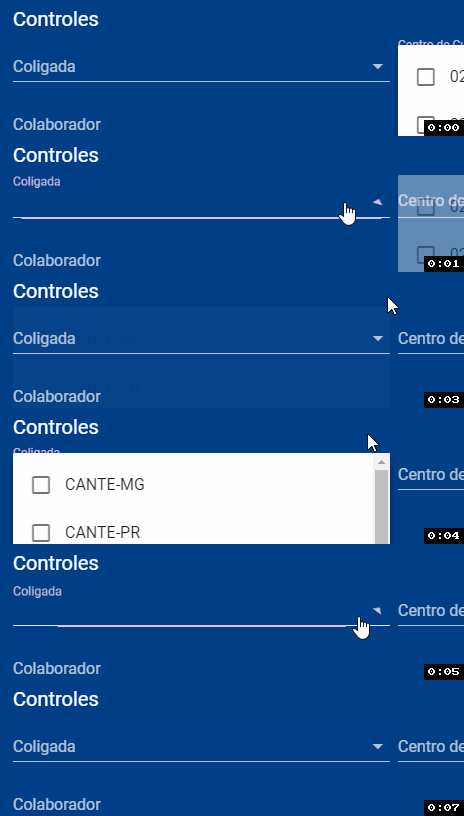
Label transition should be smooth
What is actually happening ?
Label is moving backwards and forwards (by tiny but visible amount, it's more visibile in the browser that on gif)

Reproduction Link
 jacekkarczmarczyk
All 15 comments
@jacekkarczmarczyk I don't see the issue using your codepen. I'm macOS.
Do you see that on other browsers?
 mfferreira
on 12 Aug 2017
mfferreira
on 12 Aug 2017
Also on Edge and even more on Firefox
jacekkarczmarczyk
on 12 Aug 2017
I can repo it on macOS and Firefox.
 DedDorito
on 13 Aug 2017
DedDorito
on 13 Aug 2017
I can reproduce this when the page itself is filled with dom.
 Sydtrack
on 14 Aug 2017
Sydtrack
on 14 Aug 2017
Some wild css, most likely. I'll take a look.
mfferreira
on 14 Aug 2017
@isaaclyman @DedDorito @jacekkarczmarczyk
What browser version?
mfferreira
on 14 Aug 2017
Fx 54, Ch 60, Edge 14 / win10
jacekkarczmarczyk
on 14 Aug 2017
I can confirm the issue with that codepen example. All points to some animation issue in the browser.
Please check example #6 on the Selects doc page. Check if the same happens there. (doesn't for me)
Also, please check this sample. Some odd hacks seem to minimize the problem.
EDIT: updated codepen with new css
mfferreira
on 15 Aug 2017
There are 2 classes starting the label animation. The :focus from input-group and the .input-group--focused class. Since the :focus is browser based, it may start a bit earlier if the page is heavy loaded and vue takes a bit to add the .input-group--focused class.
.input-group--text-field:not(.input-group--single-line):focus:not(.input-group--textarea) label
and
.input-group--text-field:not(.input-group--single-line).input-group--focused:not(.input-group--textarea) label
Sydtrack
on 15 Aug 2017
You may simulate the browser behavior changing line 230 from VSelect.js from:
this.focused = true
to
setTimeout(() => this.focused = true, 100)
This is somewhat close to what happens when Vue takes a while to add the correct --focused class.
Sydtrack
on 15 Aug 2017
@Sydtrack That's a very good catch.
mfferreira
on 15 Aug 2017
Commenting this whole line, so the input doesn't get :focus seems to fix the issue.
Need to investigate more and see the impact.
mfferreira
on 16 Aug 2017
Does the autocomplete still work without focusing the input?
Sydtrack
on 16 Aug 2017
This has been fixed. I ran across this accidentally while looking at events being fired and it turns out that the focus method was being called twice. This was causing a reevaluation of properties that were triggering the select to try and boot up twice. This caused a fluctuation in the applied styles and the shake is the select being focused, then very quickly blurred, then refocused again.
 johnleider
on 18 Aug 2017
johnleider
on 18 Aug 2017
![lock[bot] picture](https://avatars1.githubusercontent.com/in/6672?v=4&s=40) lock[bot]
lock[bot]
Related issues
 cawa-93
·
3Comments
cawa-93
·
3Comments
 efootstep
·
3Comments
efootstep
·
3Comments
 dohomi
·
3Comments
dohomi
·
3Comments
 KuroThing
·
3Comments
KuroThing
·
3Comments
 sebastianmacias
·
3Comments
sebastianmacias
·
3Comments
Most helpful comment
This has been fixed. I ran across this accidentally while looking at events being fired and it turns out that the focus method was being called twice. This was causing a reevaluation of properties that were triggering the select to try and boot up twice. This caused a fluctuation in the applied styles and the shake is the select being focused, then very quickly blurred, then refocused again.