Vuetify-module: Layouts not working properly on static generator
Module version
"@nuxtjs/vuetify": "1.8.3",
"nuxt": "2.9.2",
Describe the bug
I am using vuetify with the google-keep predefined layout (https://github.com/vuetifyjs/vuetify/blob/master/packages/docs/src/examples/layouts/google-keep.vue).
On
npm run dev
everything works properly, but when I run
npm run generate
and upload the files to a static hosting, the site is broken: for example, __v-select__ doesn't work, and the labels of input box are not styled properly
__They work as long as I program inside of the layout file (i.e. layouts/google-keep.vue).__
__But if I programa from the page (i.e page/index.vue) same code does not work properly.__
See a real example here:
https://vuetify-poc.s3-eu-west-1.amazonaws.com/index.html
Repo:
https://gitlab.com/jaimerockandroll/nuxt-vuetify-poc
To Reproduce
Steps to reproduce the behavior:
- Clone my repo: https://gitlab.com/jaimerockandroll/nuxt-vuetify-poc
- Execute npm run dev, notice like top and bottom sections behave exactly the same
- Execute npm run generate
- Deploy /dist to s3 or any other static hosting (gitlab, github... etc)
- Select from upper area works, select from bottom does not work. Same for input labels, they are styled slightly different (notice as the bottom input box is completely closed, and the line is -wrongly- crossing the label)
Expected behavior
The bottom section should behave and look exactly like the upper section.
Screenshots
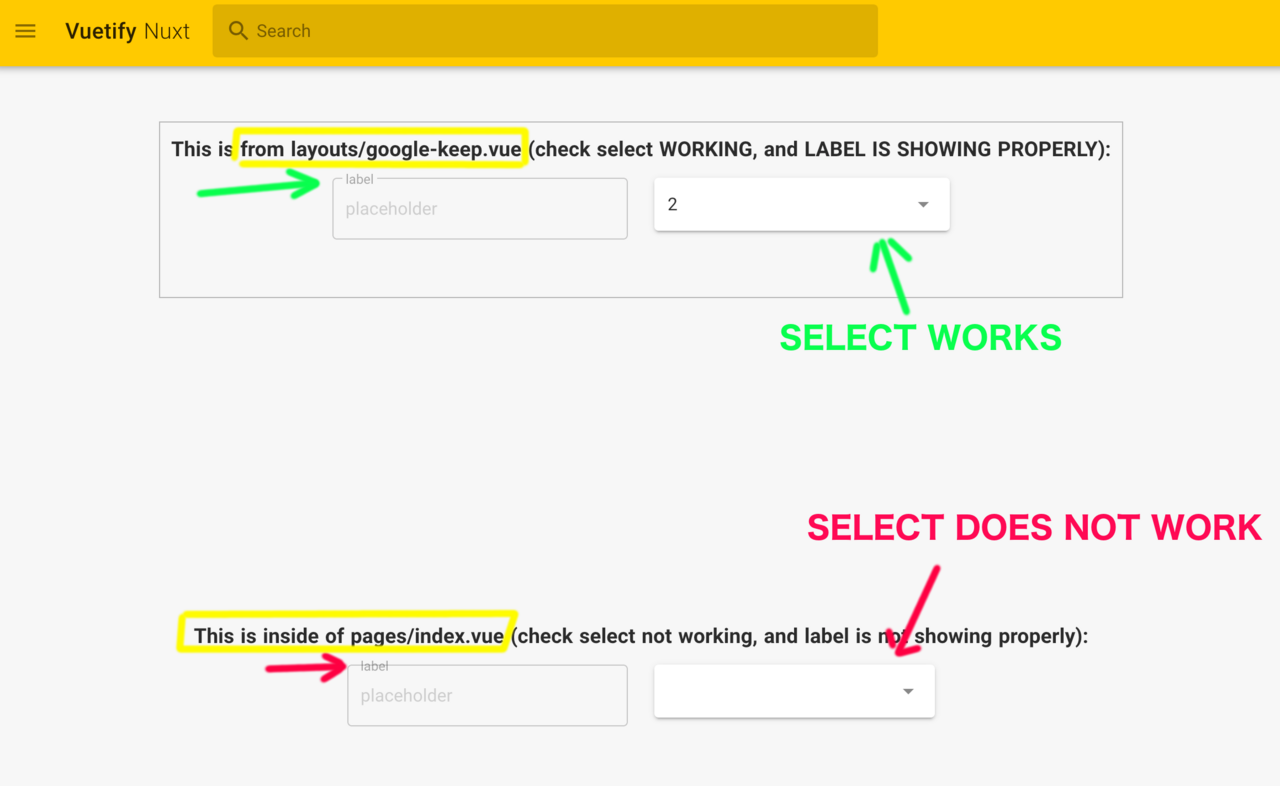
 jaimesemp
All 6 comments
Try moving @nuxtjs/vuetify into buildModules instead of Modules, in your nuxt.config.js file. It looks like you had placed it there at some point and commented it out. Have you tried that before and had the same bug?
 ShaggyTech
on 20 Oct 2019
ShaggyTech
on 20 Oct 2019
@jaimesemp I cloned your project, put @nuxtjs/vuetify and did nuxt build + nuxt start and it works.
Nuxt generate shouldn't change anything.
 kevinmarrec
on 20 Oct 2019
kevinmarrec
on 20 Oct 2019
Thanks a lot to both of you for your answers. See my responses bellow
Try moving @nuxtjs/vuetify into buildModules instead of Modules, in your nuxt.config.js file. It looks like you had placed it there at some point and commented it out. Have you tried that before and had the same bug?
Yes, I tried both approaches, same result.
@jaimesemp I cloned your project, put
@nuxtjs/vuetifyand didnuxt build+nuxt startand it works.
Nuxt generate shouldn't change anything.
Yes, nuxt build works (in fact finally I was able to upload using this approach: I changed mode to 'spa', built it and was able to upload working properly).
But nuxt generate produces the results commented (check it here):
jaimesemp
on 21 Oct 2019
@jaimesemp Sounds like a Nuxt issue and not something around Vuetify module itself, did you have been able to try again with updated dependencies (vuetify updates ?)
You can try the V2 Alpha of the module https://github.com/nuxt-community/vuetify-module/releases/tag/v2.0.0-alpha.0
kevinmarrec
on 4 Nov 2019
@jaimesemp Any update ?
kevinmarrec
on 6 Dec 2019
In fact it could be related to https://github.com/nuxt-community/vuetify-module/issues/208 issue, as static generator uses SSR.
See my last comment about https://github.com/kevinmarrec/nuxt-css-issue
kevinmarrec
on 7 Dec 2019
Related issues
 morficus
·
4Comments
morficus
·
4Comments
 andyfensham
·
3Comments
andyfensham
·
3Comments
 MartinMuzatko
·
4Comments
MartinMuzatko
·
4Comments
 stact
·
3Comments
stact
·
3Comments
 berenicestr
·
5Comments
berenicestr
·
5Comments