Vuetify-module: Nuxt throw error when updating to the latest version
Module version
1.7.0
Describe the bug
Running the latest version throws an error
To Reproduce
Upgrade the module to the latest version and nuxt building progress will throw an error as shown in the screen capture below.
Expected behavior
No error appeared.
Screenshots

Additional context
-
 jefrydco
All 12 comments
I have the same problem
 assoft
on 8 Sep 2019
assoft
on 8 Sep 2019
Working on a fix, sorry for the inconvenience
 kevinmarrec
on 8 Sep 2019
kevinmarrec
on 8 Sep 2019
Please try 1.7.1 and ping me if it's correctly fixed.
kevinmarrec
on 8 Sep 2019
Please try 1.7.1 and ping me if it's correctly fixed.
Not work for me.
Error: Template src not found: @nuxtjs/vuetify/dist/templates/plugin.js
but current path /@nuxtjs/vuetify/templates/plugin.js
 udanpe
on 8 Sep 2019
udanpe
on 8 Sep 2019
@udanpe Can you try replacing
node_modules@nuxtjs/vuetify/dist/build.js L27
path.join(__dirname, '../templates', 'options.js')
by
path.resolve(__dirname, '../templates', 'options.js')
?
kevinmarrec
on 8 Sep 2019
Nvm though you had options issue, but it's around plugin you have issue, but I don't understand why.
path.resolve(__dirname, '../templates', 'plugin.js')
should point to @nuxtjs/vuetify/templates/plugin.js
kevinmarrec
on 8 Sep 2019
@udanpe I'm not sure you updated to last version, your error is from 1.7.0 and you're using custom options, so it was only failing on plugin (not options).
I'm not able to reproduce the issue locally unfortunately
kevinmarrec
on 8 Sep 2019
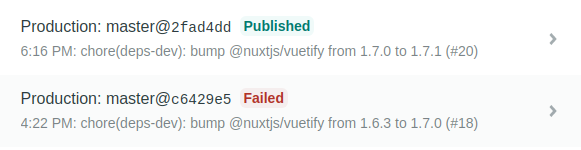
My website https://marrec.io is hosted on Netlify and is using this module, and just bumping the new version fixed it for me:
kevinmarrec
on 8 Sep 2019
@kevinmarrec after replace to resolve everything works.
1.7.0 does not have templates folder. it's really 1.7.1.
npm remove --save @nuxtjs/vuetify && npm i -D @nuxtjs/[email protected]

UPD 1. macOS + node 12
UPD 2. in addition i use typescript \ nuxt-ts
udanpe
on 8 Sep 2019
Relased 1.7.2 but I think I've published without building 🤦♂️, should be fine with : 1.7.3 then now
kevinmarrec
on 8 Sep 2019
@udanpe Clean up and reinstall dependencies, you seem to have a broken node_modules

kevinmarrec
on 8 Sep 2019
@kevinmarrec Thanks. After removing node_modules, package-lock and reinstall everything works.
udanpe
on 8 Sep 2019
Related issues
 andyfensham
·
3Comments
andyfensham
·
3Comments
 1000snowy
·
3Comments
1000snowy
·
3Comments
 robsontenorio
·
6Comments
robsontenorio
·
6Comments
 Valar103769
·
6Comments
Valar103769
·
6Comments
 stact
·
3Comments
stact
·
3Comments
Most helpful comment
@kevinmarrec Thanks. After removing node_modules, package-lock and reinstall everything works.