Vuetify-module: Nuxt generate uses default theme colors ignoring colors defined in config
vuetify-module: 1.0.0
nuxt.config.js:
vuetify: {
    treeShake: true,
    customVariables: ['~/src/assets/style/variables.scss'],
    icons: {
      iconfont: 'mdi'
    },
    theme: {
      dark: true,
      themes: {
        dark: {
          headerAndFooterColor: colors.blue.darken3,
          cardColor: colors.blueGrey.darken4,
          primary: colors.teal.lighten3 // blue.darken2
        },
        light: {
          headerAndFooterColor: colors.blue.lighten4,
          cardColor: colors.shades.white,
        }
      },
    }
  }
nuxt generate ignores the custom colors and uses the default colors for each theme when generating static pages.
nuxt dev displays the correct custom colors on initial page load. On page navigation it reverts back to the colors for the default theme (depending on dark: true or not), but that I believe is a different issue (https://github.com/vuetifyjs/vuetify/issues/7879).
This issue is for nuxt generate completely ignoring the defined colors for both light and dark themes, on both initial page load and subsequently.
 manastalukdar
All 31 comments
@manastalukdar There is indeed some issues around themes, I'm gonna investigate more around Vuetify source code that deals with specific case for Nuxt.
It may be the same issue that is also issuing unwanted behaviors such as https://github.com/nuxt-community/vuetify-module/issues/69
 kevinmarrec
on 26 Jul 2019
kevinmarrec
on 26 Jul 2019
I got a similar problem, mode universal customVariables not working.
 HughesWang
on 26 Jul 2019
HughesWang
on 26 Jul 2019
@HughesWang customVariables only work when treeShaking enabled (https://github.com/nuxt-community/vuetify-module/blob/master/README.md#customvariables)
kevinmarrec
on 26 Jul 2019
@kevinmarrec Thanks ! I miss the line.
When I add treeShake, it works.
HughesWang
on 27 Jul 2019
@manastalukdar Were you using SPA mode or UNIVERSAL ?
kevinmarrec
on 29 Jul 2019
@kevinmarrec universal.
manastalukdar
on 29 Jul 2019
@manastalukdar Could you share a repository with the reproduction ? I have not being able to reproduce your issues locally within one of my project :/ (using 1.0.2 version of the module)
kevinmarrec
on 29 Jul 2019
manastalukdar
on 29 Jul 2019
@manastalukdar Well unfortunately I still have this issue :
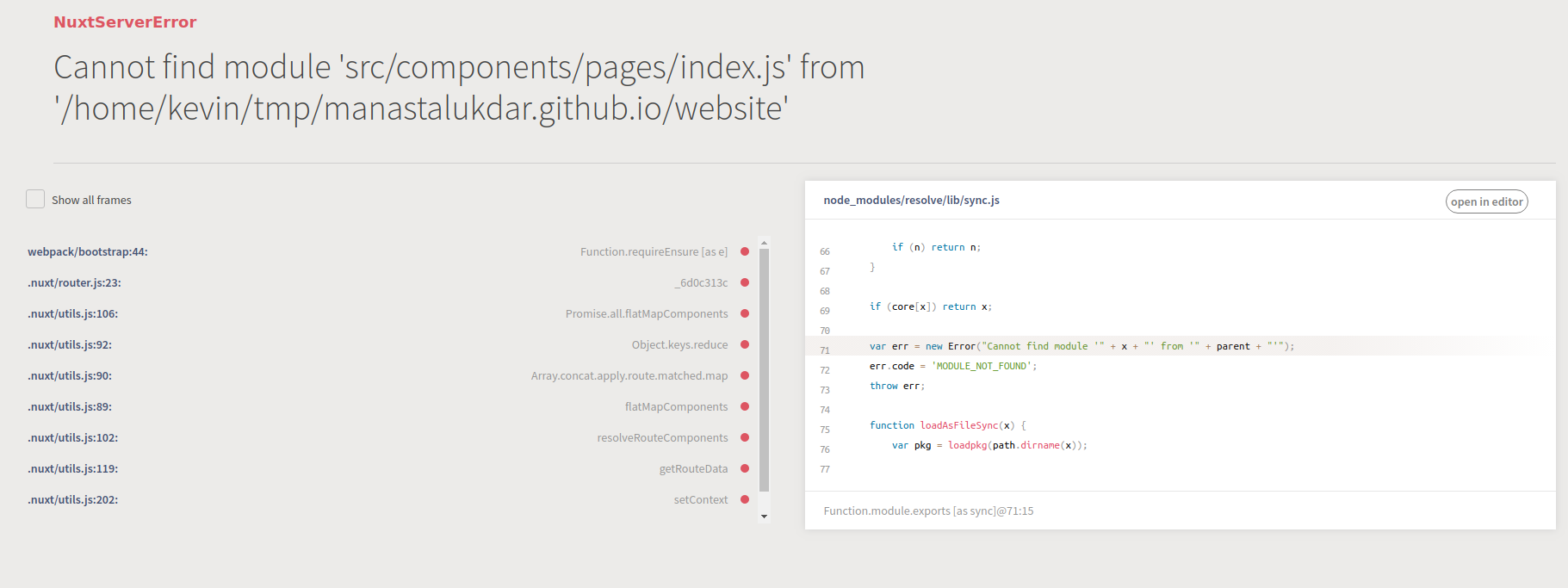
I still don't know how to deal with
kevinmarrec
on 30 Jul 2019
So, this particular GitHub issue is to do with nuxt generate.
Does this Cannot find ... index.js ... also happen when you try to load the generated static pages on a local server? As I recall this error happened on npm run dev on Linux machines.
manastalukdar
on 30 Jul 2019
@manastalukdar Just running dev script makes it broken, and yeah I've linux. I never have such issue on other projects
kevinmarrec
on 30 Jul 2019
@kevinmarrec Can you please try npm run generate and then load the static pages on a local server:
npm install -g serve
cd dist
serve -p 8080
I have opened an issue in the Nuxt.js repo regarding the Cannot find ... index.js ...: https://github.com/nuxt/nuxt.js/issues/6157
manastalukdar
on 30 Jul 2019
@kevinmarrec If you get latest from my repo, you should no longer run into the Cannot find ... index.js ... error. I was able to work around the root cause behind that error.
Here are the instructions to get the site running:
- Get _blog_metadata.json_ file from here.
- Under the
website/staticfolder, create a new folder calledblogdata. - Under
blogdatafolder create a new folder calledmetadataand copy the _blog_metadata.json_ from step 1 into this newwebsite/static/blogdata/metadatafolder. - Copy the folder (along with all sub-folders)
website/blog/2019intowebsite/static/blogdata.website/static/blogdatashould now have 2 subfolders:2019andmetadata.
That should be it. npm run dev should now work.
manastalukdar
on 30 Jul 2019
@manastalukdar Waiting next Vuetify release to see if it fixes your issues, I know that page navigation has been fixed but I'm not sure yet for the custom color names.
kevinmarrec
on 1 Aug 2019
@kevinmarrec Thanks! I will try out the fix when the next release comes out.
manastalukdar
on 1 Aug 2019
@manastalukdar New release of the Vuetify module is available, please check it out and give me feedback :)
kevinmarrec
on 1 Aug 2019
@kevinmarrec This specific issue with nuxt generate still exists even with the latest bits. For some reason, the custom colors simply do not take effect.
This however is not the issue with nuxt run dev, in which case your fix worked. Not sure why it is not working for nuxt generate.
manastalukdar
on 1 Aug 2019
@manastalukdar Your description was mentionning 2 issues
nuxt dev displays the correct custom colors on initial page load. On page navigation it reverts back to the colors for the default theme (depending on dark: true or not), but that I believe is a different issue (vuetifyjs/vuetify#7879).
Can you confirm this one has been fixed ?
nuxt generate ignores the custom colors and uses the default colors for each theme when generating static pages.
That's the issue I still need to dive in 😁
kevinmarrec
on 1 Aug 2019
Furthermore, about the last one, does it work with nuxt build ?
kevinmarrec
on 1 Aug 2019
@kevinmarrec
This has been fixed (thanks!):
nuxt dev displays the correct custom colors on initial page load. On page navigation it reverts back to the colors for the default theme (depending on dark: true or not), but that I believe is a different issue (vuetifyjs/vuetify#7879).
This has not been fixed:
nuxt generate ignores the custom colors and uses the default colors for each theme when generating static pages.
nuxt build followed by nuxt start results in the same issue as nuxt generate.
manastalukdar
on 1 Aug 2019
@manastalukdar All right, I'll take a look soon
kevinmarrec
on 1 Aug 2019
@manastalukdar I'm not able to reproduce it :
Can you check here ? (it's a branch where there is an updated version of our test fixure with custom colors) :
git clone https://github.com/nuxt-community/vuetify-module
git checkout test-1
yarn nuxt build test/fixture
yarn nuxt start test/fixture
@kevinmarrec I'll try to repro the issue with the test fixture.
manastalukdar
on 2 Aug 2019
@kevinmarrec Found the problem:
options: {
minifyTheme(css) {
return process.env.NODE_ENV === 'production'
? css.replace(/[\s|\r\n|\r|\n]/g, '')
: css
}
}
Using this in the options.js of the test fixure project reproduced the issue.
manastalukdar
on 2 Aug 2019
@manastalukdar I've seen you edited your snippet, does customProperties work properly ??
Only issues when using minifyTheme in production right ?
kevinmarrec
on 3 Aug 2019
@manastalukdar It's cause of the regex is wrong (so the one in Vuetify minifyThemedoc is wrong).
/[\s|\r\n|\r|\n]/
makes css like
v-application a {
...
}
v-application .primary {
...
}
minified to
v-applicationa{...}v-application.primary{...}
which is broken.
It should be minified to
v-application a{...}v-application .primary{...}
I'm looking for the right regex and we'll update Vuetify docs in time.
kevinmarrec
on 3 Aug 2019
@manastalukdar Partially fixed with :
options: {
minifyTheme(css) {
return process.env.NODE_ENV === 'production'
? css.replace(/[\s|\r\n|\r|\n](?!\.)/g, '')
: css
},
}
(?!\.) will make not replace the spaces when .class1 .class2 and fixes the stylesheet, so the colors 😉
EDIT : It's still not the good regex, it doesn't work for v-application a, mybad
kevinmarrec
on 3 Aug 2019
@kevinmarrec
does customProperties work properly ??
Yes.
Only issues when using minifyTheme in production right ?
Yes.
manastalukdar
on 3 Aug 2019
@manastalukdar
options: {
  minifyTheme(css) {
    return process.env.NODE_ENV === 'production'
      ? css.replace(/(?<!v-application)[\s|\r\n|\r|\n]/g, '')
      : css
  },
}
Here is the final working regex
kevinmarrec
on 3 Aug 2019
@kevinmarrec Thanks. I just verified that the updated regex works.
manastalukdar
on 3 Aug 2019
@manastalukdar
options: {
  minifyTheme(css) {
    return process.env.NODE_ENV === 'production'
      ? css.replace(/(?<!v-application)[\s|\r\n|\r|\n]/g, '')
      : css
  },
}
Here is the final working regex
The regex is not working for me as it breaks the whole theme not only for the server generated page but also on the client side.
But using https://github.com/bentatum/minify-css-string as given in the example https://vuetifyjs.com/en/customization/theme/#minification fixed the issue.
 FelixRe0
on 30 Apr 2020
FelixRe0
on 30 Apr 2020
Related issues
 phifa
·
4Comments
phifa
·
4Comments
 andrewspy
·
3Comments
andrewspy
·
5Comments
andrewspy
·
3Comments
andrewspy
·
5Comments
 simonmaass
·
4Comments
simonmaass
·
4Comments
 dschreij
·
3Comments
dschreij
·
3Comments
Most helpful comment
@manastalukdar
Here is the final working regex