Vuesax: The close button of the dialog is not work.
:vs-active="$store.state.editBook.isActiveEditPopup"
Does not work if you refer directly to the state in the store like this
not work this.
vuesax/src/functions/vsDialog/index.vue :158
this.$emit('update:vsActive',false)
- macOS: 10.13.5
- node: v10.6.0
- Vuesax: 3.1.51
- Browser version: chrome 67.0.3396.99
- Which package manager did you use for the install?: yarn
 dasisyouyu
All 8 comments
You could try adding something like this
:vs-active.sync="$store.state.editBook.isActiveEditPopup"
 luisDanielRoviraContreras
on 31 Jul 2018
luisDanielRoviraContreras
on 31 Jul 2018
TY!!!! I was able to confirm that it works.
dasisyouyu
on 1 Aug 2018
:vs-active.sync
//don't work.
@vs-cancel="$store.commit('addBook/addPopupToggle')"
addPopupToggle is popup show toggle flag.
dasisyouyu
on 1 Aug 2018
Try a method that internally calls the commit
luisDanielRoviraContreras
on 2 Aug 2018
Not sure if I should ask this one here, but my vs-popup close button shows the word 'close' instead of 'x' (like those in the documentation). How do I fix this please?
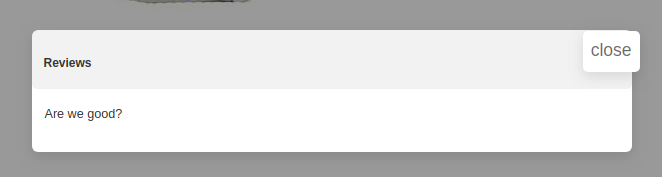
 thukuwanjiku
on 20 Aug 2018
thukuwanjiku
on 20 Aug 2018
@thukuwanjiku
https://lusaxweb.github.io/vuesax/vuesax/#use
npm install material-icons --save
import 'material-icons/iconfont/material-icons.css';
u have to import it separately
dasisyouyu
on 20 Aug 2018
@thukuwanjiku Did you manage to solve the source?
luisDanielRoviraContreras
on 20 Aug 2018
Thank you for that @dasisyouyu Looks like I had forgot the import for the material icon css.
@luisDanielRoviraContreras yes, @dasisyouyu answer solved it for me.
thukuwanjiku
on 27 Aug 2018
Related issues
 grali
·
4Comments
grali
·
4Comments
 jsinhSolanki
·
3Comments
jsinhSolanki
·
3Comments
 danyakov
·
3Comments
danyakov
·
3Comments
 hahuy95
·
3Comments
hahuy95
·
3Comments
 leah-cc
·
3Comments
leah-cc
·
3Comments
Most helpful comment
You could try adding something like this