Vuesax: Button is missing Disabled status
I'm looking and I can't see the readonly and disabled status on any component.
Inputs, Buttons, Checkboxes, Radios, etc. All those should have disabled and readonly.
 fergardi
All 15 comments
How do I not understand what you mean?
 luisDanielRoviraContreras
on 6 Jul 2018
luisDanielRoviraContreras
on 6 Jul 2018
My mistake, I just found that the only component with missing "disabled" status is the Button. At least in the examples and the documentation.
fergardi
on 6 Jul 2018
@luisDanielRoviraContreras raised a PR for this issue.
https://github.com/lusaxweb/vuesax/pull/165
 kumaraksi
on 9 Jul 2018
kumaraksi
on 9 Jul 2018
@kumaraksi Thank you very much for the contribution, but since the disabled property is passed to the element, what is missing is that it visually looks something like
.vs-button
  &:disabled
    opacity: .5
if you can change them, it would be great, thanks
luisDanielRoviraContreras
on 9 Jul 2018
The CSS code is already there for opacity. However it is set to 0.4.
button:disabled
{
    opacity: .4;
    pointer-events: none;
  }
kumaraksi
on 9 Jul 2018
@luisDanielRoviraContreras - Another thing that I noticed is that some components are written in stylus where as some in css (button and chips to name a few). I think we should create a issue where we change styles for all components from css to stylus.
kumaraksi
on 9 Jul 2018
Yeah I noticed the same thing. If I recall correctly the author @luisDanielRoviraContreras is changing all styles to stylus in order to support SSR, and should be finished in a bit.
fergardi
on 9 Jul 2018
ok. Can you guys share the CSS properties for the disabled button. I will make the necessary changes. Else if this okay maybe we can merge this PR.
kumaraksi
on 9 Jul 2018
I think this will do:
.vs-button
  &:disabled
    opacity 0.5
    cursor forbidden
    pointer-events none
If the components are changing to stylus the ones you see with css for now do not have support ssr because the server does not support the css variables, right now I am doing the dialog component migration and it is almost ready then I go with tabs and so on all components with better support and accessibility
and with respect to the disabled with this it works for me but since I am finishing the component I have not been able to upload something like this
.vs-button
  transition: all .2s ease;
  padding: 10px;
  border: 0px;
  border-radius: 5px;
  cursor: pointer;
  position: relative;
  overflow: hidden;
  color: rgb(255, 255, 255);
  box-sizing: border-box;
  background: transparent
  &:disabled
    opacity .5
    cursor: default
    pointer-events: none
@kumaraksi @fergardi thank you very much for the contribution and interest in vuesax
luisDanielRoviraContreras
on 9 Jul 2018
@luisDanielRoviraContreras @fergardi pushed the required changes for button's style. Also change class from vs-btn to vs-button.
However there are some merge conflicts that have come. might be due to some changes made to the master.
Can one of you look into it. Thanks
kumaraksi
on 9 Jul 2018
Please review the PR thank you for the contribution #165
luisDanielRoviraContreras
on 10 Jul 2018
@luisDanielRoviraContreras - made the required changes.
kumaraksi
on 10 Jul 2018
The component already has support to be seen in disabled thank you very much to all
luisDanielRoviraContreras
on 21 Jul 2018
Hello, how can I reactively disable the button? For example, when I click on a button that calls a method, a dialog is opened, I would like to disable the button until the dialog is closed.
For if I enter another dialog, it opens (I believe the button has the selection enabled), example:
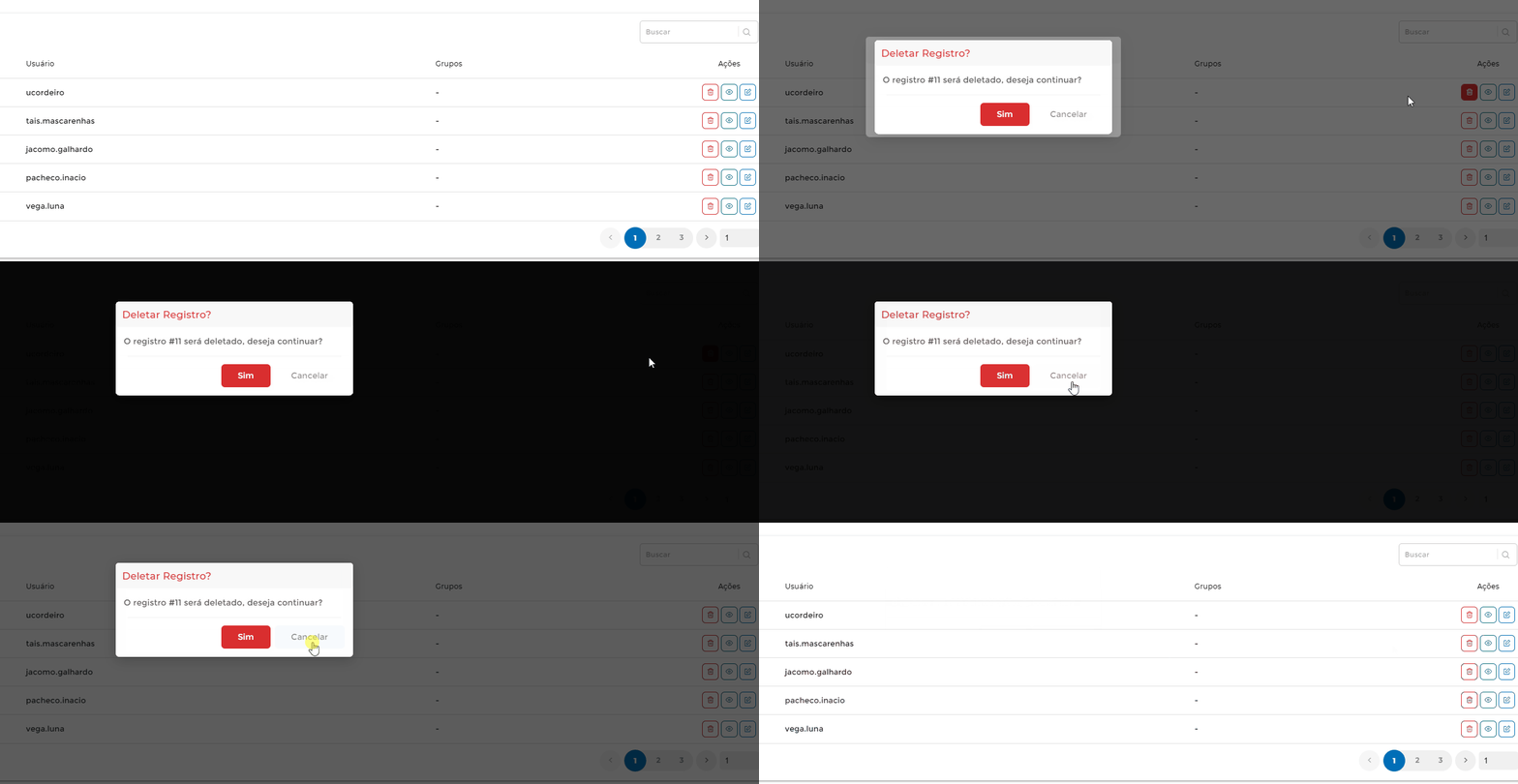
Some help? Thank you
 garbinmarcelo
on 14 Sep 2020
garbinmarcelo
on 14 Sep 2020
Related issues
 jbienesdev
·
3Comments
jbienesdev
·
3Comments
 jsinhSolanki
·
3Comments
jsinhSolanki
·
3Comments
 MeastBlue
·
3Comments
MeastBlue
·
3Comments
 Deltalus
·
3Comments
Deltalus
·
3Comments
 webafra
·
3Comments
webafra
·
3Comments