- [x] I confirm that this is an issue rather than a question.
Bug report
Steps to reproduce
$ yarn add vuepress --dev
$ mkdir docs
$ youch docs/index.md
$ yarn vuepress dev docs

success [08:52:12] Build 1d01b9 finished in 172 ms! ( http://localhost:8080/ )
What is expected?
Vuepress CLI detects file changes and rebuilds.
What is actually happening?
Vuepress CLI doesn't detect file changes. I have to run vuepress dev docs again to build codes.
Other relevant information
- Output of
npx vuepress infoin my VuePress project:
% npx vuepress info

Environment Info:

  System:
    OS: macOS 10.15.4
    CPU: (8) x64 Intel(R) Core(TM) i7-4770HQ CPU @ 2.20GHz
  Binaries:
    Node: 14.2.0 - ~/.nodebrew/current/bin/node
    Yarn: 1.22.4 - ~/.nodebrew/current/bin/yarn
    npm: 6.14.4 - ~/.nodebrew/current/bin/npm
  Browsers:
    Chrome: Not Found
    Edge: Not Found
    Firefox: Not Found
    Safari: Not Found
  npmPackages:
    @vuepress/core:  1.5.0
    @vuepress/theme-default:  1.5.0
    vuepress: ^1.5.0 => 1.5.0
  npmGlobalPackages:
    vuepress: Not Found
 reiwa
reiwa
All 54 comments
reiwa
on 18 May 2020
I have the same situation. After testing node v10.15.3 hot not working. Node v12.14.0 hot working
 iDerekLi
on 19 May 2020
iDerekLi
on 19 May 2020
I have the same problem too.
When I change the content of .md files, the hot reload don't work, even the Vuepress CLI doesn't detect file changes.
I have tried with node v10.15.0 and node v12.16.3,but the hot still don't works。
 xyyxlq
on 19 May 2020
xyyxlq
on 19 May 2020
Same here, not sure if it´s related to the latest Node v12.16.3 upgrade I've made, since in some projects (with similar packages structure and same pkgs versions) hot reloading still works. Very confused atm...
 Karlbovsky
on 20 May 2020
Karlbovsky
on 20 May 2020
I had the same problems a few days ago. I use a workaround to restart the server on file change. See here.
 pepsifan
on 20 May 2020
pepsifan
on 20 May 2020
I tried vuepress 1.4.1 with node 12.16.3 with a new install now -- and it vuepress does not recognize document changes (hot reload does not work). It looks like a regression in one of the dependencies --- so by loading the newer version of the dependency, the feature breaks. I don't know what package is broken.
 Yaakov-Belch
on 21 May 2020
Yaakov-Belch
on 21 May 2020
It seems that in its dependency chain, vuepress uses outdated packages for Chokidar and fsevents that are responsible for watching file changes.
Here is my current install log:
warning vuepress > @vuepress/core > [email protected]: Chokidar 2 will break on node v14+. Upgrade to chokidar 3 with 15x less dependencies.
warning vuepress > @vuepress/core > webpack-dev-server > [email protected]: Chokidar 2 will break on node v14+. Upgrade to chokidar 3 with 15x less dependencies.
warning vuepress > @vuepress/core > chokidar > [email protected]: fsevents 1 will break on node v14+ and could be using insecure binaries. Upgrade to fsevents 2.
warning vuepress > @vuepress/theme-default > docsearch.js > hogan.js > [email protected]: Legacy versions of mkdirp are no longer supported. Please update to mkdirp 1.x. (Note that the API surface has changed to use Promises in 1.x.)
warning vuepress > @vuepress/theme-default > docsearch.js > [email protected]: request has been deprecated, see https://github.com/request/request/issues/3142
warning vuepress > @vuepress/core > webpack > watchpack > watchpack-chokidar2 > [email protected]: Chokidar 2 will break on node v14+. Upgrade to chokidar 3 with 15x less dependencies.
warning vuepress > @vuepress/theme-default > stylus > css-parse > css > [email protected]: Please see https://github.com/lydell/urix#deprecated
warning vuepress > @vuepress/core > chokidar > braces > snapdragon > source-map-resolve > [email protected]: Please see https://github.com/lydell/urix#deprecated
warning vuepress > @vuepress/core > chokidar > braces > snapdragon > source-map-resolve > [email protected]: https://github.com/lydell/resolve-url#deprecated
[2/4] Fetching packages...
info [email protected]: The platform "linux" is incompatible with this module.
info "[email protected]" is an optional dependency and failed compatibility check. Excluding it from installation.
info [email protected]: The platform "linux" is incompatible with this module.
info "[email protected]" is an optional dependency and failed compatibility check. Excluding it from installation.
[3/4] Linking dependencies...
[4/4] Building fresh packages...
As far as I see, the relevant messages are:
vuepress/coreandwebpack-dev-serverdepend on[email protected]with the warning: Chokidar 2 will break on node v14+. Upgrade to chokidar 3 with 15x less dependencies.chokidardepends on[email protected]or[email protected]. Both of these package issue the warning The platform "linux" is incompatible with this module. Quite possibly, chokidar uses other modules on the linux platform.
Yaakov-Belch
on 21 May 2020
As I can see, chokidar is only used for watching files which are added or deleted (see source) and for changes in the config file (see source). I rather think it's a problem with a loader for the webpack server which can't detect changes of .md and .vue files. The loaders are registered in createBaseConfig.js.
pepsifan
on 21 May 2020
I have the same problems now.
Currently, the best solution that does not affect normal use is to directly replace the previous wholenode_modules, then without npm install, and justnpm run devthe project.
I used the vuepress 1.41 package I downloaded earlier, now node v12.16.3, hot reload working
Yes, this way is currently the most effective,and wait for the latest version to deal with this problem.
I used the vuepress v1.40, and node v14.2.0, hot reload working.
And use nodemon to automate the restart on every file change. Thanks @pepsifan .
yarn add -D nodemon
{
"scripts": {
"dev": "nodemon --ext md,vue --watch .vuepress --watch . --exec vuepress dev docs",
}
}
 yangtao2o
on 22 May 2020
yangtao2o
on 22 May 2020
Vuepress v1.4.0, hot reloading not working with node v14.3.0. Using nodemon isnt working either
Edit: For some reason updating the config.js does trigger the hot reload, but nothing happens with the other files
 fmonper1
on 23 May 2020
fmonper1
on 23 May 2020
me too
 a616781689
on 24 May 2020
a616781689
on 24 May 2020
follow bug fixes...
 qyingkou
on 24 May 2020
qyingkou
on 24 May 2020
is there any working workaround (I would be willing to downgrade to older versions)... when was this broken?
 faroit
on 24 May 2020
faroit
on 24 May 2020
I have the same problem :(
 kurotanshi
on 24 May 2020
kurotanshi
on 24 May 2020
Thanks for filing the issue @reiwa! Going to take a look into this as a high priority. Appreciate it!
 bencodezen
on 24 May 2020
bencodezen
on 24 May 2020
I have the same problems now.
Currently, the best solution that does not affect normal use is to directly replace the previous wholenode_modules, then without npm install, and justnpm run devthe project.
I used the vuepress 1.41 package I downloaded earlier, now node v12.16.3, hot reload workingYes, this way is currently the most effective,and wait for the latest version to deal with this problem.
I used the
vuepress v1.40, andnode v14.2.0, hot reload working.And use
nodemonto automate the restart on every file change. Thanks @pepsifan .yarn add -D nodemon{ "scripts": { "dev": "nodemon --ext md,vue --watch .vuepress --watch . --exec vuepress dev docs", } }
Although it works, I have to refresh my browser for it to work
 changhighly
on 25 May 2020
changhighly
on 25 May 2020
"watchpack": "1.6.1"
npm i -D [email protected]
I noticed that the webpack hot update plugin watchpack is now 1.7.2
I compared the previous project and found it was 1.6.1
So I tried to install this version
It's ready for hot update
npx vuepress info

Environment Info:

  System:
    OS: Windows 10 10.0.18363
    CPU: (8) x64 Intel(R) Core(TM) i7-6700HQ CPU @ 2.60GHz
  Binaries:
    Node: 10.15.2 - D:\nodejs\version\node.EXE
    Yarn: 1.22.4 - D:\YarnCache\bin\yarn.CMD
    npm: 6.14.5 - D:\YarnCache\bin\npm.CMD
  Browsers:
    Edge: 44.18362.449.0
  npmPackages:
    @vuepress/core:  1.5.0
    @vuepress/theme-default:  1.5.0
    vuepress: ^1.5.0 => 1.5.0
  npmGlobalPackages:
    vuepress: Not Found
yarn installs "watchpack": "^1.6.1" separately in webpack
This automatically correlates to 1.7.2
So it only works in npm mode
yarn solution is answered below
In a project created by @vue/cli 4.3.1, the watchpack is 1.7.2, but it can still trigger hot updates
Confused!
 SCWR
on 25 May 2020
SCWR
on 25 May 2020
@SCWR Thanks, it works.
xyyxlq
on 25 May 2020
Thanks to @SCWR I got it working by downgrading watchpack to 1.6.1
Added resolutions section to package.json and ran yarn install
  "resolutions": {
    "watchpack": "1.6.1"
  }
Hope this helps to anyone struggling with the same problem
 ansky-pro
on 25 May 2020
ansky-pro
on 25 May 2020
Thanks to @SCWR I got it working by downgrading watchpack to 1.6.1
Addedresolutionssection topackage.jsonand ranyarn install"resolutions": { "watchpack": "1.6.1" }Hope this helps to anyone struggling with the same problem
I acquired new knowledge @ansky-pro Thanks
SCWR
on 26 May 2020
Thanks to @SCWR I got it working by downgrading watchpack to 1.6.1
Addedresolutionssection topackage.jsonand ranyarn install"resolutions": { "watchpack": "1.6.1" }Hope this helps to anyone struggling with the same problem
I acquired new knowledge @ansky-pro Thanks
Hello,
For those who still want to use npm (resolutions only works with yarn by default). You can use this package : https://github.com/rogeriochaves/npm-force-resolutions.
 Loyz07
on 26 May 2020
Loyz07
on 26 May 2020
I think, a good solution would be to commit the package-lock.json into the repo. So the users only have to npm ci. This will ensure that the deps are exactly the same like the ones defined in package-lock.json.
pepsifan
on 26 May 2020
Thanks to @SCWR I got it working by downgrading watchpack to 1.6.1
Addedresolutionssection topackage.jsonand ranyarn install"resolutions": { "watchpack": "1.6.1" }Hope this helps to anyone struggling with the same problem
Good job , Thanks
 morosefrog
on 28 May 2020
morosefrog
on 28 May 2020
If we have created a new project from vuepress cli, on a global install, how to fix it with watchpack?
 spike31
on 29 May 2020
spike31
on 29 May 2020
"watchpack": "1.6.1"
npm i -D [email protected]I noticed that the webpack hot update plugin
watchpackis now1.7.2
I compared the previous project and found it was1.6.1
So I tried to install this version
It's ready for hot updatenpx vuepress info Environment Info: System: OS: Windows 10 10.0.18363 CPU: (8) x64 Intel(R) Core(TM) i7-6700HQ CPU @ 2.60GHz Binaries: Node: 10.15.2 - D:\nodejs\version\node.EXE Yarn: 1.22.4 - D:\YarnCache\bin\yarn.CMD npm: 6.14.5 - D:\YarnCache\bin\npm.CMD Browsers: Edge: 44.18362.449.0 npmPackages: @vuepress/core: 1.5.0 @vuepress/theme-default: 1.5.0 vuepress: ^1.5.0 => 1.5.0 npmGlobalPackages: vuepress: Not Found~
yarninstalls"watchpack": "^1.6.1"separately inwebpack~
~This automatically correlates to1.7.2~
~So it only works innpmmode~
yarnsolution is answered belowIn a project created by
@vue/cli 4.3.1, thewatchpackis1.7.2, but it can still trigger hot updates
Confused!
ohhh it works
 zhouhuan327
on 29 May 2020
zhouhuan327
on 29 May 2020
You can update the configuration in package.json as follows
"devDependencies": {
    "vuepress": "^1.5.0",
    "watchpack": "1.6.1"
 }
then
npm install
finally
npm start
hot reloading is ok
 307590317
on 1 Jun 2020
307590317
on 1 Jun 2020
You can update the configuration in package.json as follows
"devDependencies": {
    "vuepress": "^1.5.0",
    "watchpack": "1.6.1"
 }
then
npm installfinally
npm starthot reloading is ok
yeah this solved my issue
 BaroDevelopment
on 3 Jun 2020
BaroDevelopment
on 3 Jun 2020
I've run into the same issue.
Everything worked fine on VuePress v1.4.1, but after upgrading to v1.5.0 hot reload stopped working.
Downgrading watchpack to 1.6.1 helped.
npm i [email protected] --save-dev
Thank you all a lot for investigating this issue. 🙇♂️
 coffeephile
on 4 Jun 2020
coffeephile
on 4 Jun 2020
i've run into the same issue in VuePress v1.5.0(watchpack is v1.7.2)
so I downgrade watchpack to 1.6.1, and it helps.
thanks a lot for investigating this issue.
 BruceYuj
on 6 Jun 2020
BruceYuj
on 6 Jun 2020
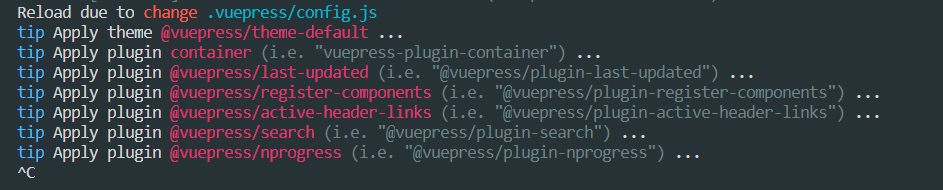
after i add watchpack 1.6.1, md file could hot reload, but .vuepress/config.js could not hot reload.
hung at this step:
 wen11497110
on 7 Jun 2020
wen11497110
on 7 Jun 2020
+1
 jd-0001
on 8 Jun 2020
jd-0001
on 8 Jun 2020
牛批
 PentaTea
on 9 Jun 2020
PentaTea
on 9 Jun 2020
Alright! Hopefully this is now fixed thanks to @pikax and @sodatea for their assistance.
For those on v1.5.0, please make sure to upgrade to v1.5.1 and then you should be good.
I'll close the issue for now, but please let us know if it's still broken for you!
bencodezen
on 9 Jun 2020
Thank you. I confirm the issue is solved for me!
 NicolasThierion
on 9 Jun 2020
NicolasThierion
on 9 Jun 2020
Removed watchpack from my dependencies (just added it cause of this issue) and upgraded to 1.5.1
Works like a charm - thanks!
BaroDevelopment
on 9 Jun 2020
Hi,
It works now well for .md files, but config.js do not hot reload anymore.
For info, I removed watchpack from dependencies and upgraded to 1.5.1
 thominal
on 9 Jun 2020
thominal
on 9 Jun 2020
@thominal this works for me
yarn add vuepress --dev
mkdir docs
echo hello > docs/index.md
echo 'module.exports = { title: "test"}' > docs/.vuepress/config.js
yarn vuepress dev docs
 pikax
on 9 Jun 2020
pikax
on 9 Jun 2020
@thominal Thanks for reporting this. Could you go ahead and open a new issue with what you tried to do so I can replicate it?
bencodezen
on 9 Jun 2020
version 1.5.1
Updating .md files. Hot reload OK.
Updating config.js. Hot reload Not Working.
Updating YAML Frontmatter in .md files. Hot reload Not working.
 tecnoloco
on 10 Jun 2020
tecnoloco
on 10 Jun 2020
@tecnoloco can you provide a repo where I can reproduce that, please?
EDIT: Seen your issue
pikax
on 10 Jun 2020
Hi,
@bencodezen @pilax
I try to recreate a new project from scratch: I have the same observations as @tecnoloco :
- No issue with .md files, hot reload works well
- However, I need to restart manually my server to see config.js changes.
My config.js file is as simple as:
module.exports = {
  title: 'Hello Wolrd',
  description: 'Just playing around'
}
Thanks
thominal
on 11 Jun 2020
I tried everything in the above. But its not working for me too in windows.
The terminal log updates and says build is finished. But its not updating in server. Even refresh not working. had to terminate the job and run vuepress dev again to see the changes.
Please provide me a fix.
 surjithctly
on 23 Jun 2020
surjithctly
on 23 Jun 2020
Hi @surjithctly! We're tracking the bug regarding the config and frontmatter here: https://github.com/vuejs/vuepress/issues/2437
Are you still having issues with the markdown files not reloading?
bencodezen
on 23 Jun 2020
@bencodezen Yes. Markdown works fine. The data inside --- 3 lines do not work.
surjithctly
on 24 Jun 2020
@surjithctly Got it. I would definitely add your comments and threads to #2437 then. Thank you!
bencodezen
on 24 Jun 2020
webpack downgraded to 1.6.1, but still not working.
- √ Changing content in .md file works
- × Changing front matter in .md file NOT works
- × Changing
config.jsNOT works
 SimZhou
on 30 Jun 2020
SimZhou
on 30 Jun 2020
Same here, frontmatter in .md does not work.
I'm using a local custom theme
Also Typescript
Here is my info
Environment Info:
System:
OS: Windows 10 10.0.18363
CPU: (8) x64 Intel(R) Core(TM) i5-1035G7 CPU @ 1.20GHz
Binaries:
Node: 12.13.1 - ~\AppData\Local\Tempyarn--1593533765469-0.49432315341001365\node.CMD
Yarn: 1.21.1 - ~\AppData\Local\Tempyarn--1593533765469-0.49432315341001365yarn.CMD
npm: 6.12.1 - C:\Program Files\nodejsnpm.CMD
Browsers:
Edge: 44.18362.449.0
npmPackages:
@vuepress/core: 1.5.2
@vuepress/theme-default: 1.5.2
vuepress: ^1.5.2 => 1.5.2
npmGlobalPackages:
vuepress: Not Found
 aceven24
on 30 Jun 2020
aceven24
on 30 Jun 2020
Try npm vuepress dev docs --temp .temp/yarn vuepress dev docs --temp .temp instead. See if it works for you.
If yes you could write this into package.json: "dev": "vuepress dev docs --temp .temp"
SimZhou
on 30 Jun 2020
Try
npm vuepress dev docs --temp .temp/yarn vuepress dev docs --temp .tempinstead. See if it works for you.If yes you could write this into package.json:
"dev": "vuepress dev docs --temp .temp"
Tried that, even blew away my node_modules an yarn lock and reinstalled, same issue.. :-(
aceven24
on 30 Jun 2020
Any updates. I'm having the same problem. Using yarn vuepress dev docs --temp .temp doesn't work either.
 sdwru
on 17 Jul 2020
sdwru
on 17 Jul 2020
@sdwru Check this open issue from 2019. Still not fixed #1283
surjithctly
on 17 Jul 2020
Evan is now making a new tool to solve it...
check vuejs/vitepress#motivation
SimZhou
on 17 Jul 2020
Does not work for me I’m on 12.13.1
Sent from my iPhone
On Jul 17, 2020, at 4:02 AM, andrea-ccc notifications@github.com wrote:
Hi guys, just trying vuepress (v.1.3.1) on Node.js v12.18.2 and having the same problem.
Rolling back to Node.js v12.13.1 solved the issue.
Hope that helps.
Note: I always manage Node.js via nvmhttps://github.com/nvm-sh/nvm, so changing versions just for a project or even a session is pretty easy.
—
You are receiving this because you commented.
Reply to this email directly, view it on GitHubhttps://github.com/vuejs/vuepress/issues/2392#issuecomment-659943424, or unsubscribehttps://github.com/notifications/unsubscribe-auth/ADI5LVNR7D2XH3WAJPLDQBLR4AARJANCNFSM4NDVEPSQ.
aceven24
on 18 Jul 2020
Evan is now making a new tool to solve it...
check vuejs/vitepress#motivation
That’s an awesome news. Thanks for letting me know.
surjithctly
on 18 Jul 2020
Related issues
 ynnelson
·
3Comments
ynnelson
·
3Comments
 lileiseven
·
3Comments
lileiseven
·
3Comments
 zeke
·
3Comments
zeke
·
3Comments
 alinnert
·
3Comments
alinnert
·
3Comments
 AleksejDix
·
3Comments
AleksejDix
·
3Comments
Most helpful comment
"watchpack": "1.6.1"
I noticed that the webpack hot update plugin
watchpackis now1.7.2I compared the previous project and found it was
1.6.1So I tried to install this version
It's ready for hot update
yarninstalls"watchpack": "^1.6.1"separately inwebpackThis automatically correlates to1.7.2So it only works innpmmodeyarnsolution is answered belowIn a project created by
@vue/cli 4.3.1, thewatchpackis1.7.2, but it can still trigger hot updatesConfused!