vuepress dev: throws res.getHeader() is not a function
- [x] I confirm that this is an issue rather than a question.
Bug report
- Related issue: https://github.com/webpack/webpack-dev-middleware/issues/380
- PR fix: https://github.com/shellscape/koa-webpack/pull/110
Version
- [email protected]
- Reproduce same fault with node v10.9.0 AND node v8.11.4
- Windows 10
Steps to reproduce
NOTE: This was a first time use of vuepress.
$ npm i -g vuepress
$ echo "# Some Stuff" >> README.md
$ vuepress dev

> VuePress dev server listening at http://localhost:8080/
Visit http://localhost:8080/ in browser
Server throws ...
(node:14508) UnhandledPromiseRejectionWarning: TypeError: res.getHeader is not a function
    at processRequest (C:\ProgramData\nvm\v10.9.0\node_modules\vuepress\node_modules\webpack-dev-middleware\lib\middleware.js:82:18)
    at ready (C:\ProgramData\nvm\v10.9.0\node_modules\vuepress\node_modules\webpack-dev-middleware\lib\util.js:51:12)
    at handleRequest (C:\ProgramData\nvm\v10.9.0\node_modules\vuepress\node_modules\webpack-dev-middleware\lib\util.js:167:5)
    at Promise (C:\ProgramData\nvm\v10.9.0\node_modules\vuepress\node_modules\webpack-dev-middleware\lib\middleware.js:44:7)
    at new Promise (<anonymous>)
    at middleware (C:\ProgramData\nvm\v10.9.0\node_modules\vuepress\node_modules\webpack-dev-middleware\lib\middleware.js:43:12)
    at Promise.all.Promise (C:\ProgramData\nvm\v10.9.0\node_modules\vuepress\node_modules\koa-webpack\index.js:43:7)
    at new Promise (<anonymous>)
    at C:\ProgramData\nvm\v10.9.0\node_modules\vuepress\node_modules\koa-webpack\index.js:42:5
    at dispatch (C:\ProgramData\nvm\v10.9.0\node_modules\vuepress\node_modules\koa\node_modules\koa-compose\index.js:42:32)
    at C:\ProgramData\nvm\v10.9.0\node_modules\vuepress\node_modules\@shellscape\koa-static\legacy\index.js:58:19
    at Generator.throw (<anonymous>)
    at step (C:\ProgramData\nvm\v10.9.0\node_modules\vuepress\node_modules\@shellscape\koa-static\legacy\index.js:6:221)
    at _throw (C:\ProgramData\nvm\v10.9.0\node_modules\vuepress\node_modules\@shellscape\koa-static\legacy\index.js:6:455)
(node:14508) UnhandledPromiseRejectionWarning: Unhandled promise rejection. This error originated either by throwing inside of an async function without a catch block, or by rejecting a promise which was not handled with .catch(). (rejection id: 1)
(node:14508) [DEP0018] DeprecationWarning: Unhandled promise rejections are deprecated. In the future, promise rejections that are not handled will terminate the Node.js process with a non-zero exit code.
 tohagan
All 60 comments
https://github.com/webpack/webpack-dev-middleware/blob/master/lib/middleware.js#L82
if (!res.getHeader('Content-Type')) { <<<
res.setHeader('Content-Type', contentType);
}
res.setHeader('Content-Length', content.length);
how to resolve this problem?
 ing670
on 8 Mar 2019
ing670
on 8 Mar 2019
@ing670 I've never used vuepress before ... but I think the solution for this bug in on the way as part of a fix to koa-webpack that this project depends on. vuepress will need to upgrade once this fix is released. In the meantime an older version of vuepress might work ... I tried several but they all broke so I gave up. Now looking at using https://gridsome.org/ . gidsome had another show stopper but its fixable.
tohagan
on 8 Mar 2019
got the same problem just now
Version
- [email protected]
- Reproduce same fault with node v9.0.0 and v8.12.0
- mac os 10.11.6 and centos 7 (tried it on both os , but failed both )
- installation : npm install -g vuepress
output below is the centos 7 version
DONE [11:57:48] Build 636cc5 finished in 23670 ms!
> VuePress dev server listening at http://localhost:8082/
(node:18856) UnhandledPromiseRejectionWarning: TypeError: res.getHeader is not a function
at processRequest (/root/.nvm/versions/node/v8.12.0/lib/node_modules/vuepress/node_modules/webpack-dev-middleware/lib/middleware.js:82:18)
at ready (/root/.nvm/versions/node/v8.12.0/lib/node_modules/vuepress/node_modules/webpack-dev-middleware/lib/util.js:51:12)
at handleRequest (/root/.nvm/versions/node/v8.12.0/lib/node_modules/vuepress/node_modules/webpack-dev-middleware/lib/util.js:167:5)
at Promise (/root/.nvm/versions/node/v8.12.0/lib/node_modules/vuepress/node_modules/webpack-dev-middleware/lib/middleware.js:44:7)
at new Promise (<anonymous>)
at middleware (/root/.nvm/versions/node/v8.12.0/lib/node_modules/vuepress/node_modules/webpack-dev-middleware/lib/middleware.js:43:12)
at Promise.all.Promise (/root/.nvm/versions/node/v8.12.0/lib/node_modules/vuepress/node_modules/koa-webpack/index.js:43:7)
at new Promise (<anonymous>)
at /root/.nvm/versions/node/v8.12.0/lib/node_modules/vuepress/node_modules/koa-webpack/index.js:42:5
at dispatch (/root/.nvm/versions/node/v8.12.0/lib/node_modules/vuepress/node_modules/koa/node_modules/koa-compose/index.js:42:32)
at /root/.nvm/versions/node/v8.12.0/lib/node_modules/vuepress/node_modules/@shellscape/koa-static/legacy/index.js:58:19
at Generator.throw (<anonymous>)
at step (/root/.nvm/versions/node/v8.12.0/lib/node_modules/vuepress/node_modules/@shellscape/koa-static/legacy/index.js:6:221)
at _throw (/root/.nvm/versions/node/v8.12.0/lib/node_modules/vuepress/node_modules/@shellscape/koa-static/legacy/index.js:6:455)
at <anonymous>
(node:18856) UnhandledPromiseRejectionWarning: Unhandled promise rejection. This error originated either by throwing inside of an async function without a catch block, or by rejecting a promise which was not handled with .catch(). (rejection id: 1)
(node:18856) [DEP0018] DeprecationWarning: Unhandled promise rejections are deprecated. In the future, promise rejections that are not handled will terminate the Node.js process with a non-zero exit code.
and this is macos version
DONE [20:04:45] Build 4211fb finished in 3279 ms!
> VuePress dev server listening at http://localhost:8080/
(node:23109) UnhandledPromiseRejectionWarning: Unhandled promise rejection (rejection id: 1): TypeError: res.getHeader is not a function
(node:23109) [DEP0018] DeprecationWarning: Unhandled promise rejections are deprecated. In the future, promise rejections that are not handled will terminate the Node.js process with a non-zero exit code.
 pata201866
on 8 Mar 2019
pata201866
on 8 Mar 2019
got the same problem just now
(node:1301) UnhandledPromiseRejectionWarning: TypeError: res.getHeader is not a function
 Yxliam
on 8 Mar 2019
Yxliam
on 8 Mar 2019
As a quick and temporary fix you can download 0.x yarn.lock and install dependencies from there.
# root dir of your vuepress project
# replace yarn.lock file / create a new one from the above
rm -rf node_modules
yarn install
Edit: @ulivz has a better solution. See below.
 abrahamdio
on 9 Mar 2019
abrahamdio
on 9 Mar 2019
The dependency chain is webpack-serve -> koa-webpack -> webpack-dev-middleware, and it's caused by the underlying [email protected], so If you're a yarn user you can use resolutions for a temporary fix:
  "resolutions": {
    "webpack-dev-middleware": "3.6.0"
  }
While the npm user can re-install webpack-dev-middleware with a specific version:
npm install [email protected]
When webpack-dev-middleware fixes the issue and publishes, the issue can be closed.
 ulivz
on 9 Mar 2019
ulivz
on 9 Mar 2019
I'm also experiencing this. This is the first time ever that I've searched a repo and actually found my exact same problem!
I'm sorry for the newbie question, but how do I go about implementing @ulivz's fix?
I installed VuePress the recommended way by typing yarn global add vuepress. I didn't use NPM. Happy to go back and do it that way if I need to.
My question is which file should I edit to add the resolutions mentioned above? I'm not seeing a package.json file be generated in the directory where I ran vuepress dev.
 edadams
on 10 Mar 2019
edadams
on 10 Mar 2019
@edadams
Sorry if my answer confused you, I didn't have so much time at that point to dig down which dependency is the culprit.
Since @ulivz has found the exact module that caused the issue, you can override that module version in your package.json, you can read more about the yarn's resolution docs here, https://yarnpkg.com/lang/en/docs/selective-version-resolutions/
What you want to do is to edit your package.json file, and add,
  "resolutions": {
    "webpack-dev-middleware": "3.6.0"
  }
And run yarn install again. Hope you got it fixed :)
abrahamdio
on 10 Mar 2019
@abrahamdio Thank you! I ended up giving up, I'll just wait for the dependency to get updated. I don't have a package.json file generated anywhere after I install VuePress. (I'm sure it's on me being new and not knowing what I'm doing.) No worries, as I say I'll just wait for a proper fix and give this SSG a try later. :)
edadams
on 10 Mar 2019
@abrahamdio Thank you! I ended up giving up, I'll just wait for the dependency to get updated. I don't have a
package.jsonfile generated anywhere after I install VuePress. (I'm sure it's on me being new and not knowing what I'm doing.) No worries, as I say I'll just wait for a proper fix and give this SSG a try later. :)
@edadams
Sure no worries! It seems that you might want to follow this guide instead, https://vuepress.vuejs.org/guide/getting-started.html#inside-an-existing-project. (This will create a package.json file in that dir that you can tweak with resolutions).
Feel free to contact me if you need further help with general installation, and we can take it somewhere else since its no longer relevant to this thread anymore.
abrahamdio
on 11 Mar 2019
> VuePress dev server listening at http://localhost:8081/
(node:50091) UnhandledPromiseRejectionWarning: TypeError: res.getHeader is not a function
at processRequest (/Users/fanmu/Desktop/Learning_blog/node_modules/webpack-dev-middleware/lib/middleware.js:82:18)
at ready (/Users/fanmu/Desktop/Learning_blog/node_modules/webpack-dev-middleware/lib/util.js:51:12)
at handleRequest (/Users/fanmu/Desktop/Learning_blog/node_modules/webpack-dev-middleware/lib/util.js:167:5)
at Promise (/Users/fanmu/Desktop/Learning_blog/node_modules/webpack-dev-middleware/lib/middleware.js:44:7)
at new Promise (<anonymous>)
at middleware (/Users/fanmu/Desktop/Learning_blog/node_modules/webpack-dev-middleware/lib/middleware.js:43:12)
at Promise.all.Promise (/Users/fanmu/Desktop/Learning_blog/node_modules/koa-webpack/index.js:43:7)
at new Promise (<anonymous>)
at /Users/fanmu/Desktop/Learning_blog/node_modules/koa-webpack/index.js:42:5
at dispatch (/Users/fanmu/Desktop/Learning_blog/node_modules/koa/node_modules/koa-compose/index.js:42:32)
at /Users/fanmu/Desktop/Learning_blog/node_modules/@shellscape/koa-static/legacy/index.js:58:19
at Generator.throw (<anonymous>)
at step (/Users/fanmu/Desktop/Learning_blog/node_modules/@shellscape/koa-static/legacy/index.js:6:221)
at _throw (/Users/fanmu/Desktop/Learning_blog/node_modules/@shellscape/koa-static/legacy/index.js:6:455)
(node:50091) UnhandledPromiseRejectionWarning: Unhandled promise rejection. This error originated either by throwing inside of an async function without a catch block, or by rejecting a promise which was not handled with .catch(). (rejection id: 1)
(node:50091) [DEP0018] DeprecationWarning: Unhandled promise rejections are deprecated. In the future, promise rejections that are not handled will terminate the Node.js process with a non-zero exit code.
How to deal with the error
 fanmucc
on 11 Mar 2019
fanmucc
on 11 Mar 2019
Recommend actually reading this thread. There are several solutions.
On Mon, Mar 11, 2019 at 1:16 AM fanmucc notifications@github.com wrote:
VuePress dev server listening at http://localhost:8081/
(node:50091 http://localhost:8081/(node:50091) UnhandledPromiseRejectionWarning: TypeError: res.getHeader is not a function
at processRequest (/Users/fanmu/Desktop/Learning_blog/node_modules/webpack-dev-middleware/lib/middleware.js:82:18)
at ready (/Users/fanmu/Desktop/Learning_blog/node_modules/webpack-dev-middleware/lib/util.js:51:12)
at handleRequest (/Users/fanmu/Desktop/Learning_blog/node_modules/webpack-dev-middleware/lib/util.js:167:5)
at Promise (/Users/fanmu/Desktop/Learning_blog/node_modules/webpack-dev-middleware/lib/middleware.js:44:7)
at new Promise ()
at middleware (/Users/fanmu/Desktop/Learning_blog/node_modules/webpack-dev-middleware/lib/middleware.js:43:12)
at Promise.all.Promise (/Users/fanmu/Desktop/Learning_blog/node_modules/koa-webpack/index.js:43:7)
at new Promise ()
at /Users/fanmu/Desktop/Learning_blog/node_modules/koa-webpack/index.js:42:5
at dispatch (/Users/fanmu/Desktop/Learning_blog/node_modules/koa/node_modules/koa-compose/index.js:42:32)
at /Users/fanmu/Desktop/Learning_blog/node_modules/@shellscape/koa-static/legacy/index.js:58:19
at Generator.throw ()
at step (/Users/fanmu/Desktop/Learning_blog/node_modules/@shellscape/koa-static/legacy/index.js:6:221)
at _throw (/Users/fanmu/Desktop/Learning_blog/node_modules/@shellscape/koa-static/legacy/index.js:6:455)
(node:50091) UnhandledPromiseRejectionWarning: Unhandled promise rejection. This error originated either by throwing inside of an async function without a catch block, or by rejecting a promise which was not handled with .catch(). (rejection id: 1)
(node:50091) [DEP0018] DeprecationWarning: Unhandled promise rejections are deprecated. In the future, promise rejections that are not handled will terminate the Node.js process with a non-zero exit code.How to deal with the error
—
You are receiving this because you were mentioned.
Reply to this email directly, view it on GitHub
https://github.com/vuejs/vuepress/issues/1417#issuecomment-471374521,
or mute the thread
https://github.com/notifications/unsubscribe-auth/AAu-2kRSjQpWwaq4tAIR76uOkHLMPnZgks5vVa5dgaJpZM4bkbSW
.
edadams
on 11 Mar 2019
> VuePress dev server listening at http://localhost:8081/ (node:50091) UnhandledPromiseRejectionWarning: TypeError: res.getHeader is not a function at processRequest (/Users/fanmu/Desktop/Learning_blog/node_modules/webpack-dev-middleware/lib/middleware.js:82:18) at ready (/Users/fanmu/Desktop/Learning_blog/node_modules/webpack-dev-middleware/lib/util.js:51:12) at handleRequest (/Users/fanmu/Desktop/Learning_blog/node_modules/webpack-dev-middleware/lib/util.js:167:5) at Promise (/Users/fanmu/Desktop/Learning_blog/node_modules/webpack-dev-middleware/lib/middleware.js:44:7) at new Promise (<anonymous>) at middleware (/Users/fanmu/Desktop/Learning_blog/node_modules/webpack-dev-middleware/lib/middleware.js:43:12) at Promise.all.Promise (/Users/fanmu/Desktop/Learning_blog/node_modules/koa-webpack/index.js:43:7) at new Promise (<anonymous>) at /Users/fanmu/Desktop/Learning_blog/node_modules/koa-webpack/index.js:42:5 at dispatch (/Users/fanmu/Desktop/Learning_blog/node_modules/koa/node_modules/koa-compose/index.js:42:32) at /Users/fanmu/Desktop/Learning_blog/node_modules/@shellscape/koa-static/legacy/index.js:58:19 at Generator.throw (<anonymous>) at step (/Users/fanmu/Desktop/Learning_blog/node_modules/@shellscape/koa-static/legacy/index.js:6:221) at _throw (/Users/fanmu/Desktop/Learning_blog/node_modules/@shellscape/koa-static/legacy/index.js:6:455) (node:50091) UnhandledPromiseRejectionWarning: Unhandled promise rejection. This error originated either by throwing inside of an async function without a catch block, or by rejecting a promise which was not handled with .catch(). (rejection id: 1) (node:50091) [DEP0018] DeprecationWarning: Unhandled promise rejections are deprecated. In the future, promise rejections that are not handled will terminate the Node.js process with a non-zero exit code.How to deal with the error
the problem has been solved npm i [email protected]
fanmucc
on 11 Mar 2019
I'm still getting this with webpack-dev-middleware at 3.6.0
I also had to force weback 4.8.1 in the resolutions as well to silence some dependency complaints. But still not working with same error.
 ekhall
on 13 Mar 2019
ekhall
on 13 Mar 2019
I can confirm that simply adding this to package.json:
  "resolutions": {
    "webpack-dev-middleware": "3.6.0"
},
and then reinstalling dependencies with yarn install allowed it to work.
 Morgul
on 13 Mar 2019
Morgul
on 13 Mar 2019
I'm still having issues @ekhall is.
package.json
{
...
"scripts": {
"start": "vuepress dev"
},
...
"dependencies": {
"vuepress": "^0.14.10",
"webpack-dev-middleware": "^3.6.0"
},
"devDependencies": {
"eslint": "^5.15.1",
"eslint-config-airbnb-base": "^13.1.0",
"eslint-plugin-import": "^2.16.0"
}
}
I've tried npm and yarn, both result in the same issue.
EDIT
✨ I actually got it working ✨
My package.json, as @ulivz recommended, was missing a part.
I did rm -rf node_modules yarn.lock package-lock.json just to be sure, then I did a yarn install with the following package.json.
{
...
"scripts": {
"start": "vuepress dev"
},
...
"dependencies": {
"vuepress": "^0.14.10"
},
"resolutions": {
  "webpack-dev-middleware": "3.6.0"
},
"devDependencies": {
"eslint": "^5.15.1",
"eslint-config-airbnb-base": "^13.1.0",
"eslint-plugin-import": "^2.16.0"
}
}
Then you'll run it locally (as the resolution is only installed locally) with a script tag dev: vuepress dev.
 vSanjo
on 14 Mar 2019
vSanjo
on 14 Mar 2019
I tried to remove node_modules ,add [email protected] to my package.json and reinstall all dependencies with npm,but ended up with the same error.Then I turn to yarn and finally get it work.So for those who are still struggling with this error,it is strongly recommended to give yarn a try
 HonmaMeikodesu
on 14 Mar 2019
HonmaMeikodesu
on 14 Mar 2019
removed vuepress using npm uninstall -g vuepress, installed it using yarn.
put dependencies, resolitions and devDependencies on the package...
but still getting the same problem....
Its getting the webpack-dev-middleware from AppData still should i do anything else to use the one from the node_modules of the project folder?
 DONE  [08:53:57] Build 9aff89 finished in 396 ms! (http://localhost:8080/Eguru/wiki/)
(node:13824) UnhandledPromiseRejectionWarning: TypeError: res.getHeader is not a function
    at processRequest (C:\Users\rafae\AppData\Local\Yarn\Data\global\node_modules\webpack-dev-middleware\lib\middleware.js:82:18)
    at ready (C:\Users\rafae\AppData\Local\Yarn\Data\global\node_modules\webpack-dev-middleware\lib\util.js:51:12)
    at handleRequest (C:\Users\rafae\AppData\Local\Yarn\Data\global\node_modules\webpack-dev-middleware\lib\util.js:167:5)
    at Promise (C:\Users\rafae\AppData\Local\Yarn\Data\global\node_modules\webpack-dev-middleware\lib\middleware.js:44:7)
    at new Promise (<anonymous>)
    at middleware (C:\Users\rafae\AppData\Local\Yarn\Data\global\node_modules\webpack-dev-middleware\lib\middleware.js:43:12)
    at Promise.all.Promise (C:\Users\rafae\AppData\Local\Yarn\Data\global\node_modules\koa-webpack\index.js:43:7)
    at new Promise (<anonymous>)
    at C:\Users\rafae\AppData\Local\Yarn\Data\global\node_modules\koa-webpack\index.js:42:5
    at dispatch (C:\Users\rafae\AppData\Local\Yarn\Data\global\node_modules\koa\node_modules\koa-compose\index.js:42:32)
    at C:\Users\rafae\AppData\Local\Yarn\Data\global\node_modules\@shellscape\koa-static\legacy\index.js:58:19
    at Generator.throw (<anonymous>)
    at step (C:\Users\rafae\AppData\Local\Yarn\Data\global\node_modules\@shellscape\koa-static\legacy\index.js:6:221)
    at _throw (C:\Users\rafae\AppData\Local\Yarn\Data\global\node_modules\@shellscape\koa-static\legacy\index.js:6:455)
(node:13824) UnhandledPromiseRejectionWarning: Unhandled promise rejection. This error originated either by throwing inside of an async function without a catch block, or by rejecting a promise which was not handled with .catch(). (rejection id: 1)
(node:13824) [DEP0018] DeprecationWarning: Unhandled promise rejections are deprecated. In the future, promise rejections that are not handled will terminate the Node.js process with a non-zero exit code.
EDIT
Got it running using yarn docs:dev instead of vuepress dev
but now im getting a
404
How did we get here?
Take me home.
should i reconfigure something to run using yarn?
 rafaeltaro
on 14 Mar 2019
rafaeltaro
on 14 Mar 2019
I was able to fix this as per @Morgul 's description above however it was important to note that I needed to run the local copy of vuepress via the yarn scripts on the installation page (yarn docs:dev, etc) and not via the global vuepress installation.
ekhall
on 14 Mar 2019
I'm working at:
1、create package.json and don’t use global vuepress cli
2、install [email protected] in project
3、npm run docs:dev is working
ex:
{
  "name": "testvuepress",
  "version": "1.0.0",
  "description": "",
  "main": "index.js",
  "scripts": {
    "test": "echo \"Error: no test specified\" && exit 1",
    "docs:dev": "vuepress dev docs",
    "docs:build": "vuepress build docs"
  },
  "keywords": [],
  "author": "",
  "license": "ISC",
  "dependencies": {
    "vuepress": "^0.14.10"
  },
  "devDependencies": {
    "eslint": "^5.15.1",
    "eslint-config-airbnb-base": "^13.1.0",
    "eslint-plugin-import": "^2.16.0",
    "webpack-dev-middleware": "^3.6.0"
  }
}
 easonjim
on 15 Mar 2019
easonjim
on 15 Mar 2019
Also getting this problem with a fresh install of the global CLI (via npm) running vuepress dev in a directory with a single Markdown file.
 bnb
on 15 Mar 2019
bnb
on 15 Mar 2019
@bnb
Based on previous answers, (you could read for more details)
Assuming you're using yarn, add this to your package.json,
"resolutions": {
    "webpack-dev-middleware": "3.6.0"
  },
"scripts": {
    "test": "echo \"Error: no test specified\" && exit 1",
    "docs:dev": "vuepress dev docs",
    "docs:build": "vuepress build docs"
  }
and yarn install again. Run via yarn docs:dev or yarn docs:build.
If you're using npm,
Run npm install [email protected] --save-dev in your local project folder.
Add this to your package.json,
"scripts": {
    "test": "echo \"Error: no test specified\" && exit 1",
    "docs:dev": "vuepress dev docs",
    "docs:build": "vuepress build docs"
  }
and run npm run docs:dev or npm run docs:build.
These solutions will install a _new_ local dependency of [email protected], and before someone fixed the real root cause, you should be running with your package manager yarn docs:dev / npm run docs:dev, as this will use your local vuepress instead your global's vuepress.
abrahamdio
on 15 Mar 2019
Thanks, @abrahamdio. FWIW, it looks like the upstream fixes linked in the OP have already landed/been closed but the problem still seems to exist 😬
bnb
on 15 Mar 2019
Also, I still get the error when following the instructions provided for npm when running npm run docs:dev 😅
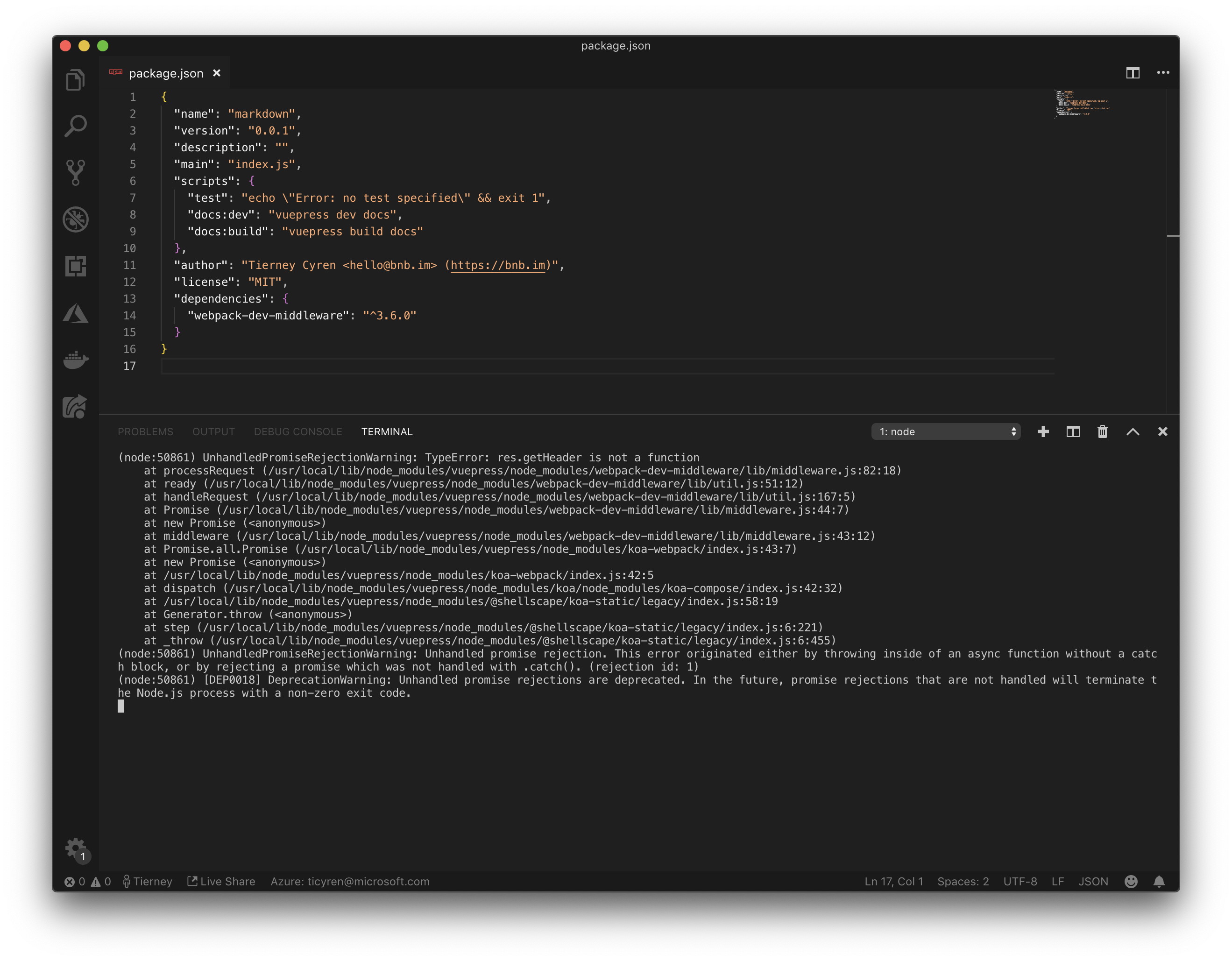
bnb
on 15 Mar 2019
@bnb that means you've not installed [email protected] correctly in your local project dependencies.
Here's my attempt w/o testing it locally (I moved on from npm and used yarn :p),
Delete your local node_modules: rm -r node_modules/
Add devDeps / deps:npm install [email protected] --save-dev
and your package.json should look something like @easonjim had earlier just one post before you.
abrahamdio
on 15 Mar 2019
Ah, that seems to be the difference – in your previous comment --save-dev was omitted 👍
bnb
on 15 Mar 2019
Just started my first VuePress and ran into the same UnhandledPromiseRejectionWarning: TypeError: res.getHeader is not a function error. This is in a fresh project with nothing in it.
Running npm install -D [email protected] like above fixed it for me (I'm using npm). I didn't have to do anything else.
Kinda strange to get this right out of the box... I'm sure it'll be addressed soon.
 johndatserakis
on 16 Mar 2019
johndatserakis
on 16 Mar 2019
got the same problem just now,:-
 Castleeee
on 16 Mar 2019
Castleeee
on 16 Mar 2019
Weird, that out of the box, it seemed to install v3.6.0 (I checked in the node_modules src for the package) but I still got the error.
I followed the npm install -D [email protected] advice which has now solved it.
 webdevisme
on 16 Mar 2019
webdevisme
on 16 Mar 2019
Adding the info below to package.json and using yarn dev solved the issue for me.
Thanks to @kucukkanat
"resolutions": {
    "webpack-dev-middleware": "3.6.0"
  }
 KaanSK
on 16 Mar 2019
KaanSK
on 16 Mar 2019
我尝试了以上所有的方法但是还是不行,不知道其他人有没有更好的解决方案。
(I tried all the above methods, but I still can't. I don't know if other people have better solutions.)
 fengchenzhihun1
on 17 Mar 2019
fengchenzhihun1
on 17 Mar 2019
我尝试了以上所有的方法但是还是不行,不知道其他人有没有更好的解决方案。
(我尝试了以上所有方法,但我仍然不能。我不知道其他人是否有更好的解决方案。)
我尝试了以上所有的方法但是还是不行,不知道其他人有没有更好的解决方案。
(I tried all the above methods, but I still can't. I don't know if other people have better solutions.)
I followed the npm install -D [email protected] advice which can't solved it
 HermesWu
on 17 Mar 2019
HermesWu
on 17 Mar 2019
I am using yarn, add this is my package.json
run yarn install and yarn run docs:dev
It work for me
{
  "name": "vuepress-test",
  "version": "1.0.0",
  "description": "",
  "main": "index.js",
  "scripts": {
    "docs:dev": "vuepress dev docs",
    "docs:build": "vuepress build docs",
    "test": "echo \"Error: no test specified\" && exit 1"
  },
  "resolutions": {
    "webpack-dev-middleware": "3.6.0"
  },
  "keywords": [],
  "author": "",
  "license": "ISC",
  "dependencies": {
    "vuepress": "^0.14.10"
  }
}
 loveyunk
on 17 Mar 2019
loveyunk
on 17 Mar 2019
@HermesWu @loveyunk 0.x,its wrong. i am using vuepress 1.x, its ok. npm install -D vuepress@next.
fengchenzhihun1
on 17 Mar 2019
Weird, that out of the box, it seemed to install v3.6.0 (I checked in the node_modules src for the package) but I still got the error.
I followed the
npm install -D [email protected]advice which has now solved it.
Thx !!! I fix it now !!!
 yulimchen
on 17 Mar 2019
yulimchen
on 17 Mar 2019
我尝试了以上所有的方法但是还是不行,不知道其他人有没有更好的解决方案。
(我尝试了以上所有方法,但我仍然不能。我不知道其他人是否有更好的解决方案。)我尝试了以上所有的方法但是还是不行,不知道其他人有没有更好的解决方案。
(I tried all the above methods, but I still can't. I don't know if other people have better solutions.)I followed the npm install -D [email protected] advice which can't solved it
你是全局安装的吗?我先删除了全局的vuepress,然后本地安装就可以正常运行了。
 jiugeChen
on 18 Mar 2019
jiugeChen
on 18 Mar 2019
@jiugeChen 不行都试过了 我最后用了1.x版本好了
fengchenzhihun1
on 18 Mar 2019
When
webpack-dev-middlewarefixes the issue and publishes, the issue can be closed.
As others have mentioned the issue is already fixed in https://github.com/shellscape/koa-webpack/pull/110 (released as v5.2.2). The problem seems to be that this fixed version does not get pulled, because the dependency is locked to a major version below in webpack-serve. The exact chain is (webpack-serve=1.x -> [email protected] ) . But we need it to be [email protected] -> [email protected]) which will then pull the fix from [email protected].
One way to resolve the issue is to update webpack-serve dependency to 2.x.
However, webpack-serve introduced breaking changes in v2, see https://github.com/webpack-contrib/webpack-serve/releases/tag/v2.0.0
 dmohns
on 18 Mar 2019
dmohns
on 18 Mar 2019
Ahhh, that makes sense! Thanks! 😁
On Mon, 18 Mar 2019, 11:17 Daniel Mohns, notifications@github.com wrote:
When webpack-dev-middleware fixes the issue and publishes, the issue can
be closed.As others have mentioned the issue is already fixed in
shellscape/koa-webpack#110
https://github.com/shellscape/koa-webpack/pull/110 (released as v5.2.2).
The problem seems to be that this fixed version does not get pulled,
because the dependency is locked to a minor version below in webpack-serve.
The exact chain is (webpack-serve=1.x -> [email protected] ) . But we need
it to be [email protected] -> [email protected]) which will then pull the
fix from [email protected].One way to resolve the issue is to update webpack-serve dependency to 2.x.
However, webpack-serve introduced breaking changes in v2, see
https://github.com/webpack-contrib/webpack-serve/releases/tag/v2.0.0—
You are receiving this because you commented.
Reply to this email directly, view it on GitHub
https://github.com/vuejs/vuepress/issues/1417#issuecomment-473850036,
or mute the thread
https://github.com/notifications/unsubscribe-auth/AHKfs2GnQX3N3wQ7OrHJmJqNimBKeSvEks5vX2emgaJpZM4bkbSW
.
webdevisme
on 18 Mar 2019
重新安装 [email protected] 和 [email protected] 成功解决了。
 JofunLiang
on 18 Mar 2019
JofunLiang
on 18 Mar 2019
I find the solution in segmentfault.com. It's about the permission of my Macos.
macos 10.12.6;node 8;you may try this:
npm install -D [email protected]
sudo npm run docs:dev
Hope that can help you.
 AlexZhong22c
on 20 Mar 2019
AlexZhong22c
on 20 Mar 2019
So for those of you having issues still with the fixes listed above, a team mate of mine figured out that the issue was having Vuepress installed globally. It appears that the fixes above are only applying to your local project directory and is not being applied to the global installation.
Following these instructions, I was able to get it to finally work:
1) npm uninstall -g vuepress
2) Run npm install [email protected] to install locally
3) add "vuepress:dev": "vuepress dev" to your package.json file
4) npm run vuepress:dev
You may want to add the resolutions code from above to your package.json as well but I was able to get it to run without: "resolutions": {
"webpack-dev-middleware": "3.6.0"
}
 mattcotter
on 20 Mar 2019
mattcotter
on 20 Mar 2019
Can a temporary solution for the globally installed VuePress be to published a version with a pinned [email protected]?
bnb
on 23 Mar 2019
采坑+1
(node:14088) UnhandledPromiseRejectionWarning: TypeError: res.getHeader is not a function
解决方法: 删除 node_modules, 使用yarn 重新安装依赖。
package.json
{
"name": "test",
"version": "1.0.0",
"main": "index.js",
"license": "MIT",
"scripts": {
"docs:dev": "vuepress dev docs",
"docs:build": "vuepress build docs"
},
"devDependencies": {
"vuepress": "^0.14.10",
"webpack-dev-middleware": "3.6.0"
},
"resolutions": {
    "webpack-dev-middleware": "3.6.0"
  }
}
 Mr-wang007s
on 25 Mar 2019
Mr-wang007s
on 25 Mar 2019
why don't use 1.x ?
all these solutions I had tried but also made issues
 yxbysxcoco
on 26 Mar 2019
yxbysxcoco
on 26 Mar 2019
why don't use 1.x ?
all these solutions I had tried but also made issues
因為 1.x 目前還在 Alpha 階段,配置可能會不斷修改,為了避免重複修改用穩定版可能比較好 roadmap 說 1.x 預計六月釋出,現在算穩定了嗎?如果足夠成熟我也想盡快升級到 1.x
Since 1.x is still in Alpha now, the features might change in the near future. I preferred to use stable release instead.
According to roadmap, 1.x should be released on this June. I wanna know if 1.x is stable enough right now? I'd like to upgrade to 1.x as soon as possible.
 howar31
on 26 Mar 2019
howar31
on 26 Mar 2019
一直听闻vuepress. 今天决定试玩一下, hello world跑不成功, google至此,期待尽快解决。
My first try of vuepress redirected me here (手动滑稽)
 uniquejava
on 26 Mar 2019
uniquejava
on 26 Mar 2019
why don't use 1.x ?
all these solutions I had tried but also made issues因為 1.x 目前還在 Alpha 階段,配置可能會不斷修改,為了避免重複修改用穩定版可能比較好 roadmap 說 1.x 預計六月釋出,現在算穩定了嗎?如果足夠成熟我也想盡快升級到 1.x
Since 1.x is still in Alpha now, the features might change in the near future. I preferred to use stable release instead.
According to roadmap, 1.x should be released on this June. I wanna know if 1.x is stable enough right now? I'd like to upgrade to 1.x as soon as possible.
I have been using it now.And feeling very stable.
yxbysxcoco
on 28 Mar 2019
why don't use 1.x ?
all these solutions I had tried but also made issues因為 1.x 目前還在 Alpha 階段,配置可能會不斷修改,為了避免重複修改用穩定版可能比較好 roadmap 說 1.x 預計六月釋出,現在算穩定了嗎?如果足夠成熟我也想盡快升級到 1.x
Since 1.x is still in Alpha now, the features might change in the near future. I preferred to use stable release instead.
According to roadmap, 1.x should be released on this June. I wanna know if 1.x is stable enough right now? I'd like to upgrade to 1.x as soon as possible.I have been using it now.And feeling very stable.
Wow cool! I'll take a shot. Thanks
howar31
on 28 Mar 2019
mac 10.13.6
npm install -D [email protected]
 qietugou
on 30 Mar 2019
qietugou
on 30 Mar 2019
Is vuepress still actively maintained? would love to help if not
 jackmahoney
on 30 Mar 2019
jackmahoney
on 30 Mar 2019
That's a weird question. What would give you the impression it isn't? In the last 17 days over 25 PRs were merged. There's commits like every other day.
 LinusBorg
on 30 Mar 2019
LinusBorg
on 30 Mar 2019
env:ubuntu 18.04 LTS
if you have run npm install -g vuepress, vuepress will be installed at /usr/local/lib/node_modules/vuepress/node_modules/webpack-dev-middleware, replace webpack-dev-middleware by [email protected]@webpack-dev-middleware
sudo rm -rf /usr/local/lib/node_modules/vuepress/node_modules/webpack-dev-middleware
and then:
sudo cp [email protected]@webpack-dev-middleware /usr/local/lib/node_modules/vuepress/node_modules/webpack-dev-middleware
 fredia
on 31 Mar 2019
fredia
on 31 Mar 2019
mac 10.13.6
npm install -D [email protected]
I've done the same on Windows: in a basic yarn installation, go to 'C:\Users\Username\AppData\Local\Yarn\Data\globalnode_modules' and just run:
npm install -D [email protected] to force the webpack-dev-middleware version.
 SteakdeNiche
on 1 Apr 2019
SteakdeNiche
on 1 Apr 2019
I'm still having issues @ekhall is.
package.json{ ... "scripts": { "start": "vuepress dev" }, ... "dependencies": { "vuepress": "^0.14.10", "webpack-dev-middleware": "^3.6.0" }, "devDependencies": { "eslint": "^5.15.1", "eslint-config-airbnb-base": "^13.1.0", "eslint-plugin-import": "^2.16.0" } }I've tried
npmandyarn, both result in the same issue.EDIT
✨ I actually got it working ✨
My
package.json, as @ulivz recommended, was missing a part.I did
rm -rf node_modules yarn.lock package-lock.jsonjust to be sure, then I did ayarn installwith the followingpackage.json.{ ... "scripts": { "start": "vuepress dev" }, ... "dependencies": { "vuepress": "^0.14.10" }, "resolutions": { "webpack-dev-middleware": "3.6.0" }, "devDependencies": { "eslint": "^5.15.1", "eslint-config-airbnb-base": "^13.1.0", "eslint-plugin-import": "^2.16.0" } }Then you'll run it locally (as the
resolutionis only installed locally) with a script tagdev: vuepress dev.
thank U for solved my problem
MacOS: 10.14.4
node:v10.15.3
npm:6.4.1
vuepress: 0.14.10
 panda8z
on 2 Apr 2019
panda8z
on 2 Apr 2019
I'm working at:
1、create package.json and don’t use global vuepress cli
2、install [email protected] in project
3、npm run docs:dev is working
ex:{ "name": "testvuepress", "version": "1.0.0", "description": "", "main": "index.js", "scripts": { "test": "echo \"Error: no test specified\" && exit 1", "docs:dev": "vuepress dev docs", "docs:build": "vuepress build docs" }, "keywords": [], "author": "", "license": "ISC", "dependencies": { "vuepress": "^0.14.10" }, "devDependencies": { "eslint": "^5.15.1", "eslint-config-airbnb-base": "^13.1.0", "eslint-plugin-import": "^2.16.0", "webpack-dev-middleware": "^3.6.0" } }
Thank you very much!
I user this method by "don’t use global vuepress cli",successfully solved this problem!
 chengpeiquan
on 2 Apr 2019
chengpeiquan
on 2 Apr 2019
Fixed at webpack/webpack-dev-middleware@56dc705 and released at [email protected].
For now you can remove all of your hacking, just rm -rf node_modules and run npm install / yarn.
ulivz
on 3 Apr 2019
notice the version of webpack-dev-server
npm install -D [email protected]
remove all of hacking, just rm -rf node_modules and run npm install / yarn
And I still fail.Then I update webpack-dev-server,which in the relation that requires the webpack-dev-middleware.And success,I hope that help others.
AlexZhong22c
on 5 Apr 2019
I ' m working at
1.rm -rf node_modules and then yarn
yarn add [email protected]
- don't use global vuepress cli
yarn add -D vuepress
3.add resolutions to your package.json file
"resolutions": {
    "webpack-dev-middleware": "3.6.0"
  }
my package.json file(I used to use vuepress 1.0 but it didn't work and now I use vuepress 0.14.11)
{
    "scripts": {
        "docs:dev": "vuepress dev docs",
        "docs:build": "vuepress build docs",
        "deploy": "bash deploy.sh"
    },
    "dependencies": {
        "element-ui": "^2.6.1",
        "node-sass": "^4.11.0",
        "sass-loader": "^7.1.0",
        "tudousi_mixins": "^1.0.0",
        "webpack-dev-middleware": "3.6.0"
    },
    "resolutions": {
        "webpack-dev-middleware": "3.6.0"
    },
    "devDependencies": {
        "vuepress": "^0.14.11"
    }
}
 akbq2008
on 18 Apr 2019
akbq2008
on 18 Apr 2019
Related issues
 AleksejDix
·
3Comments
AleksejDix
·
3Comments
 harryhorton
·
3Comments
harryhorton
·
3Comments
 ynnelson
·
3Comments
ynnelson
·
3Comments
 kid1412621
·
3Comments
ynnelson
·
3Comments
kid1412621
·
3Comments
ynnelson
·
3Comments
Most helpful comment
The dependency chain is
webpack-serve -> koa-webpack -> webpack-dev-middleware, and it's caused by the underlying[email protected], so If you're a yarn user you can useresolutionsfor a temporary fix:While the npm user can re-install
webpack-dev-middlewarewith a specific version:When
webpack-dev-middlewarefixes the issue and publishes, the issue can be closed.