Vuepress: [Bug report] ie11 does not run components script.
- [x] I confirm that this is an issue rather than a question.
Bug report
ie11 does not run components script.
After the build, the template comes up, but the script does not run at all.
Version
most current vuepress 1.0.0-alpha.42
Steps to reproduce
create .vuepress/componenets/Temp.vue
<template>
    <div>test</div>
</template>
<script>
    console.log('TEST SCRIPT');
    export default {
        data: function() {
            return {
                temp: 'ABCD'
            };
        }
    };
</script>
npm run build
What is expected?
Print 'TEST SCRIPT' text in IE11 CONSOLE.
experience like on Chrome.
What is actually happening?
Nothing.
Other relevant information
In the basic state without doing anything, ie11, an error about the arrow function basically occurs.
- Your OS: Windows10
- Node.js version: 9.11.2
- Browser version: IE11
- Is this a global or local install? local
- Which package manager did you use for the install? npm
- Does this issue occur when all plugins are disabled?
 yahao87
All 11 comments
an error about the arrow function basically occurs.
Could you provide the detailed error stack?
 ulivz
on 7 Mar 2019
ulivz
on 7 Mar 2019
IE TEST


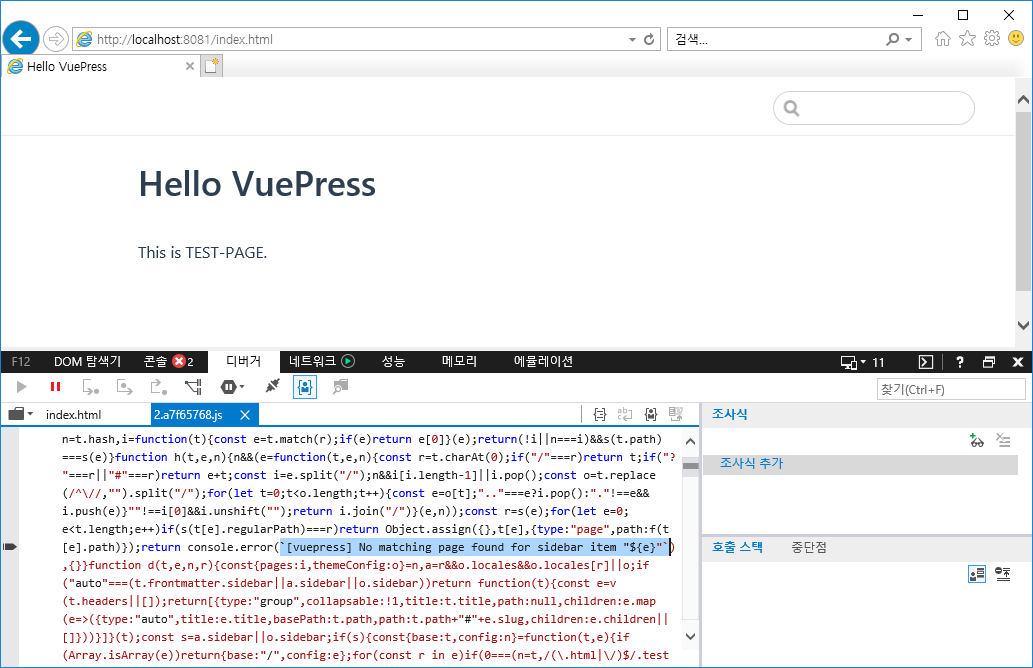
Chrome TEST

Here is the original example.
https://github.com/yahao87/vuepress-ie-bug-report
In my opinion, this does not seem to work with es6 translate like "arrow function" or "back qoute" in some code.
yahao87
on 20 Mar 2019
any progress ?
 xxholly32
on 2 Apr 2019
xxholly32
on 2 Apr 2019
@ulivz
I think this problem is serious.
In IE, the function does not work at all.
I want to PR but I do not know where to fix it.
So I have to worry about finding another framework.
But I want to use vuepress.
The experience on vuepress in Chrome made me so happy!
I'm looking forward to changing the label.
yahao87
on 3 Apr 2019
@alpha.46
it had different error when i run vuepress dev docs and vuepress build docs
i think something wrong in @vue/babel-preset-app config. i try different way to fix , it still not work.
xxholly32
on 3 Apr 2019
See: https://github.com/vuejs/vuepress/issues/1446#issuecomment-473672797
Workaround:
vuepress dev [docs] --temp .temp
vuepress build [docs] --temp .temp # do not forget to add .temp folder in .gitignore
Of course, you can open another Pull Request about making syntax of all temp files compatible for ie11, related code:
ulivz
on 3 Apr 2019
i dont think its asynccommont problem. i am not use any layoutcommonents ,still not working when i use --temp .temp in ie11
1446 the author said still no data
@ulivz
xxholly32
on 4 Apr 2019
@ulivz
Why did you close this?
This problem was not solved at all.
It still does not work on ie11.
In addition, there are two demos uploaded.
You can build it and just run it on ie11.
yahao87
on 10 Apr 2019
hi, @ulivz i found a way to work on ie11
i think the problem is it cant babel vuepress in node_modules. and when i use useBuiltIns: 'entry' vuepress doesnt have config to add "@babel/polyfill"
my company is more complicate. there it is
.rule('compile')
.test(/\.js$/)
.include
.add(/@vuepress/)
.add(/.temp/)
.add(/docs/)
.add(/packages/)
.add(/src/)
.add(/strip-ansi/)
.add(/ansi-regex/)
.end()
I would appreciate your reply
你好, @ulivz 我找到一个方法可以在ie11下跑
我认为这里的问题是babel无法转义node_modules的vuepress,而且在用了 useBuiltIns: 'entry' vuepress并没有提供配置去全局加"@babel/polyfill"
我公司的配置更复杂,如下
.rule('compile')
.test(/\.js$/)
.include
.add(/@vuepress/)
.add(/.temp/)
.add(/docs/)
.add(/packages/)
.add(/src/)
.add(/strip-ansi/)
.add(/ansi-regex/)
.end()
如果得到您的回复我将非常感激
xxholly32
on 16 Apr 2019
I was successful.
Thanks @xxholly32
I modified my config.js file as follows:
module.exports = {
    host: '0.0.0.0',
    "port": 8080,
    "base": "/",
    "dest": "public",
    chainWebpack: (config, isServer) => {
        const jsRule = config.module.rule('js');
        jsRule.uses.delete('buble-loader');
        jsRule.use('babel-loader').loader('babel-loader')
            .options({
                presets: [
                    ["@babel/preset-env", {
                        useBuiltIns: "usage",
                        corejs: 3,
                    }]
                ],
                plugins: ["@babel/plugin-syntax-dynamic-import"],
            });
        const compileRule = config.module.rule('compile');
        compileRule
              .test(/\.js$/)
            .include
              .add(/@vuepress/)
              .add(/.temp/)
              .add(/docs/)
              .add(/packages/)
              .end()
            .use('babel-loader')
                .loader('babel-loader')
                .options({
                    presets: [
                        ["@babel/preset-env", {
                            useBuiltIns: "usage",
                            corejs: 3,
                        }]
                    ],
                    plugins: ["@babel/plugin-syntax-dynamic-import"],
            })
    }
}
Related issues
 higuoxing
·
3Comments
higuoxing
·
3Comments
 harryhorton
·
3Comments
harryhorton
·
3Comments
 shaodahong
·
3Comments
shaodahong
·
3Comments
 FadySamirSadek
·
3Comments
FadySamirSadek
·
3Comments
 ynnelson
·
3Comments
ynnelson
·
3Comments
Most helpful comment
I was successful.
Thanks @xxholly32
I modified my
config.jsfile as follows: