Vuepress: Blog plugin: category, tag page don't work
Bug report
Version
v1.0.0-alpha.1
Steps to reproduce
- install ulivz/vuepress-blog-example-egoist repository
- run development mode(
vuepress dev source) - access to tag, category page
What is expected?
displaying category, tags page.
What is actually happening?
404 page displaying.
Other relevant information
testing on ulivz/vuepress-blog-example-egoist repository.
- Your OS: Windows 10
- Node.js version: v10.4.1
- Browser version: Firefox
- Is this a global or local install? local install
- Which package manager did you use for the install? npm
 mAKEkr
All 13 comments
Can't reproduce it. did you clone the latest repo?
 ulivz
on 28 Sep 2018
ulivz
on 28 Sep 2018
@ulivz yes, I clone latest repo, and try to up to date nodejs, but same problem on my environment.
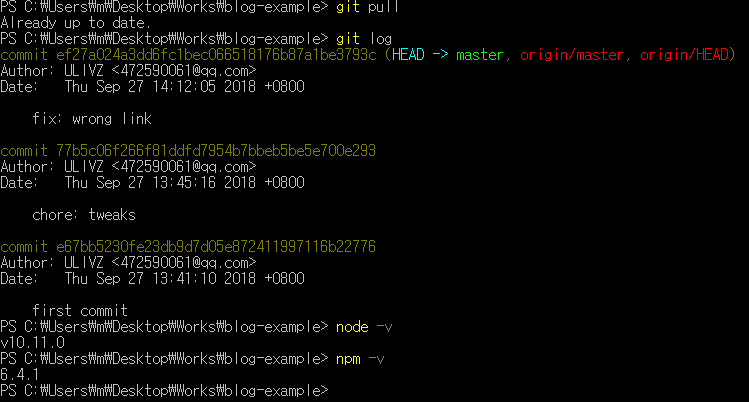
https://github.com/mAKEkr/vuepress-blog-akekr
this is my vuepress repository, maybe this help for solve this issue.
mAKEkr
on 28 Sep 2018
current check build command, all render complete without error.
category and tag page render complete and don't displaying 404.
this problem still an error occurs on dev command.
mAKEkr
on 28 Sep 2018
@mAKEkr Could you check if v1.0.0-alpha.2 works?
ulivz
on 29 Sep 2018
@ulivz I checked v1.0.0-alpha.2 on my repository, these problem not solved yet, and new error on dev/build script.
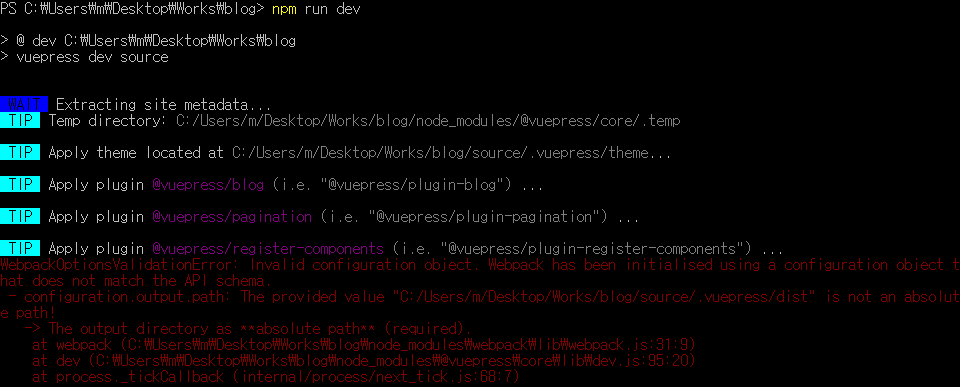
this error has only displaying on Windows OS environment(Ubuntu 18.08 windows subsystem don't display this error). maybe 19e73d7 this commit effect on my environment.
mAKEkr
on 29 Sep 2018
I have the same issue,
and fixed with #886
 ekoeryanto
on 29 Sep 2018
ekoeryanto
on 29 Sep 2018
category and tag page don't register on page-components.js. maybe this is key of solve this issue.
mAKEkr
on 4 Oct 2018
this occurs for me on macOS as well, both with the vuepress-blog-example-egoist (alpha.8) repository and with a simple theme on alpha.13.
 zvinless
on 19 Oct 2018
zvinless
on 19 Oct 2018
@zvinless can you try on applied #909 PR? this PR solved my issue.
mAKEkr
on 20 Oct 2018
@mAKEkr yeah, the pages get generated properly with that change applied 👍
zvinless
on 20 Oct 2018
same issue
Your OS: MacOS 10.14
Node.js version: v11.0.0
Browser version: Chrome
Is this a global or local install? local install
Which package manager did you use for the install? npm & yarn
 amorist
on 29 Oct 2018
amorist
on 29 Oct 2018
It might work according to Node.js version.
My OS is Ubuntu 18.04 on Windows Subsystem for Linux.
Node.js versions
- v8.14.0 => 200 OK
- v9.11.2 => 200 OK
- v10.14.2 => 404 Not Found
- v11.4.0 => 404 Not Found
Applied #909 ( @mAKEkr 👍 )
- v8.14.0 => 200 OK
- v9.11.2 => 200 OK
- v10.14.2 => 200 OK
- v11.4.0 => 200 OK
 tkzwhr
on 12 Dec 2018
tkzwhr
on 12 Dec 2018
This issue should be fixed at the latest version (1.0.0-alpha.30).
ulivz
on 8 Jan 2019
Related issues
 harryhorton
·
3Comments
harryhorton
·
3Comments
 zeke
·
3Comments
zeke
·
3Comments
 gaomd
·
3Comments
gaomd
·
3Comments
 FadySamirSadek
·
3Comments
FadySamirSadek
·
3Comments
 ynnelson
·
3Comments
ynnelson
·
3Comments
Most helpful comment
It might work according to Node.js version.
My OS is Ubuntu 18.04 on Windows Subsystem for Linux.
Node.js versions
Applied #909 ( @mAKEkr 👍 )