Vuepress: Support for inline math using LaTeX
I have quite lot of markdown files which contain many latex equations.
How can I get them show up properly in vuepress?
e.g.
$J \left( \theta_0, \theta_1 \right) = \frac{1}{2m}\sum\limits_{i=1}^m \left( h_{\theta}(x^{(i)})-y^{(i)} \right)^{2}$
 Yeeler
All 14 comments
You can customize by yourself.
There are instructions here 👉 https://github.com/vuejs/vuepress/issues/113
 mtobeiyf
on 29 Apr 2018
mtobeiyf
on 29 Apr 2018
Latex has different syntax from Katex. Markdown-it-katex didn't work on latex. I tried many other markdown plugins, including markdown-it-latex, markdown-it-mathjax, amd markdown-it-texmath etc. No luck.
When I was previewing markdown files in VS Code, I can see the above equation with a plug-in named 'markdown-math' installed. Why l can't do the same in Vuepress?
My current solution is using https://www.codecogs.com/eqnedit.php to insert an equation image. Is there any better choice? How can I show latex equation in node JS? What package should I use?
Yeeler
on 29 Apr 2018
Katex is a library for TeX math rendering, not a new kind of TeX syntax.
Following the guide in #113 , you'll get your inline math equation parsed and rendered correctly.

For all the functions supported in Katex, you may check its official doc KaTeX/function-support
It's enough for you to handle 99% of the cases like the cost function shown above.
mtobeiyf
on 29 Apr 2018
I don't know how to add Katex CSS into my theme, but I did all the other steps. And I got
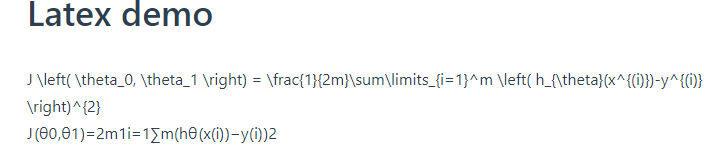
this is my markdown file:
Latex demo
$J \left( \theta_0, \theta_1 \right) = \frac{1}{2m}\sum\limits_{i=1}^m \left( h_{\theta}(x^{(i)})-y^{(i)} \right)^{2}$
Can you please provide your vuepress project? Thanks for your help.
Yeeler
on 29 Apr 2018
Seems that you didn't include the <link> in your markdown file.
- Add the css in your page
README.md
# This is a markdown file
<link rel="stylesheet" href="https://cdnjs.cloudflare.com/ajax/libs/KaTeX/0.5.1/katex.min.css">
<link rel="stylesheet" href="https://cdn.jsdelivr.net/github-markdown-css/2.2.1/github-markdown.css"/>
$J \left( \theta_0, \theta_1 \right) = \frac{1}{2m}\sum\limits_{i=1}^m \left( h_{\theta}(x^{(i)})-y^{(i)} \right)^{2}$
I have created a sample skeleton in vuepress-homepage which might be helpful for your configuration.
The raw README.md file and the rendered page: Demo
Check the config.js of mine so you could have ideas of where to modify. :wink:
mtobeiyf
on 29 Apr 2018
you are right. I missed the css. I didn't know that we can apply css in markdown file in this way.
I copied default theme by run 'vuepress eject docs'
then I modified 'D:_GIT\vue01\docs.vuepress\theme\Layout.vue'
append ''
finally, all worked.
Yeeler
on 29 Apr 2018
Add css in head field of config.js might be a better choice.
 meteorlxy
on 30 Apr 2018
meteorlxy
on 30 Apr 2018
See: https://github.com/vuejs/vuepress/issues/113#issuecomment-382669955
Closing as this can be done in userland.
 ulivz
on 30 Apr 2018
ulivz
on 30 Apr 2018
configure head in config.js, like this:
module.exports = {
    head: [
        ['link', { rel: 'stylesheet', href: 'https://cdnjs.cloudflare.com/ajax/libs/KaTeX/0.5.1/katex.min.css' }]
    ],
    ...
would be more elegant.
 OnceMore2020
on 2 May 2018
OnceMore2020
on 2 May 2018
yeah I like it.
Yeeler
on 2 May 2018
I actually couldn't find the info that its possible to add custom headers without ejecting the theme. This is great! Maybe this could go into the documentation!
 faroit
on 15 May 2018
faroit
on 15 May 2018
actually couldn't find the info that its possible to add custom headers without ejecting the theme
🙈 I missed that, sorry
faroit
on 15 May 2018
If anybody else is facing a similar problem and really wants to use MathJax rather than KaTeX (in order to support \label{} in an align environment rather than merely \tag{] in an \[ aligned \] environment for instance) a similar thing can be done by injecting the cdnjs MathJax script:
<script type="text/javascript" async
  src="https://cdnjs.cloudflare.com/ajax/libs/mathjax/2.7.5/MathJax.js?config=TeX-MML-AM_CHTML">
</script>
Which can be acheived in VuePress, as described in the manual by adding the following to the .vuepress/config.js:
head: [
  ['script',
    { type: '"text/javascript" async',
    src: 'https://cdnjs.cloudflare.com/ajax/libs/mathjax/2.7.5/MathJax.js?config=TeX-MML-AM_CHTML'
    }
  ]
],
This wouldn't be worth adding to this issue, but the new community vuepress-plugin-mathjax plugin does not render LaTeX in an aligned environment and the deprecated latex plugin doesn't quite render the math in a way that looks correct:
$$
\begin{aligned}
         0 &= ax^2 +bx +c
\implies x &= \frac{- b \pm \sqrt{b^2- 4ac} }{2a}
\end{aligned}
$$
This method was suggestested but not detailed in #113 by songololo.
 RyanGreenup
on 6 Jan 2020
RyanGreenup
on 6 Jan 2020
@RyanGreenup I use your method to fix some syntax like $$\begin{cases} \end{cases}$$, but it didn't work. I use the community plugin - vuepress-plugin-mathjax and manually inject Mathjax script. Can you help me?
 BruceYuj
on 9 Oct 2020
BruceYuj
on 9 Oct 2020
Related issues
 higuoxing
·
3Comments
higuoxing
·
3Comments
 herrbischoff
·
3Comments
herrbischoff
·
3Comments
 AMontagu
·
3Comments
AMontagu
·
3Comments
 lesliecdubs
·
3Comments
lesliecdubs
·
3Comments
 ynnelson
·
3Comments
ynnelson
·
3Comments
Most helpful comment
configure
headinconfig.js, like this:would be more elegant.