Vue2-datepicker: Control the timezone
I trying to find a way to control the timezone in the a dual date range calendar. As far as I see it, there is no obvious way to do this.
Any suggestions?
 pimvanderheijden
All 21 comments
try the value-type prop.
 mengxiong10
on 17 Jan 2019
mengxiong10
on 17 Jan 2019
@mengxiong10 It doesn't help
I use range date: ['2018-12-01', '2018-12-31'], show by months.
So I should have available ONLY December.
But it shows November - December.
How can this be fixed?
 Landen13
on 17 Jan 2019
Landen13
on 17 Jan 2019
@Landen13 Looks like you're talking about something else
pimvanderheijden
on 17 Jan 2019
@mengxiong10 I assume you mean I need to add some code to convert it to the date object to the right timezone using moment-timezone or some other library
sure, no problem!
Love the module by the way
pimvanderheijden
on 17 Jan 2019
@Landen13
If you want to use a string as the binding value, you can set the value-type to 'format' in lastest version.
mengxiong10
on 18 Jan 2019
@MidnightP Yes.
{
value2date: (value: any) => Date, // transform the binding value to calendar Date Object
date2value: (date: Date) => any // transform the calendar Date Object to binding value
}
Ah thanks, I didn't fully get that from the docs, my bad.
It reads: "Advanced: You can also customize objects to implement two functions."
Yet, I understand, these "customize objects" are necessary when using the "format" value-type.
This is _merely_ a matter of documentation then
pimvanderheijden
on 18 Jan 2019
Where in my Vue code should I use these function value2date and date2value?
I don't get how it works. Can you give us a working example?
pimvanderheijden
on 24 Jan 2019
No. You don't need to customize objects when using the "format" value-type.
eg: select the UTC time replace Local time.
<date-picker v-model="value" lang="en" :value-type="valueType"></date-picker>
data () {
// transform v-model binding data to calendar Date.
const value2date = (value) => {
const date = new Date(value)
return value ? new Date(date.getTime() + date.getTimezoneOffset() * 60 * 1000) : null
}
// transform calendar Date to v-model binding data.
const date2value = (date) => {
return date ? new Date(date.getTime() - date.getTimezoneOffset() * 60 * 1000) : null
}
return {
valueType: {
value2date,
date2value
},
value: null
}
}
I have did exactly that and removed all the other props from the date-picker
Yet, my value2date and date2value function are never called... :/
pimvanderheijden
on 24 Jan 2019
which version do you use?
Can you show your code
mengxiong10
on 24 Jan 2019
Datepicker(
lang="language"
v-model="startEnd"
:value-type="valueType"
)
data: function() {
const language = moment.locale()
return {
language,
startEnd: null,
valueType: {
value2date: (value) => {
// transform the binding value to calendar Date Object
console.log("value2date", value)
return moment(value).format("LL")
},
date2value: (date) => {
// transform the calendar Date Object to binding value
console.log("date2value", date)
return moment(date).format("LL")
}
}
}
version is latest: 2.6.2
pimvanderheijden
on 24 Jan 2019
okay, I now started using a get and set function on the v-model, that works well
but, I also want to be able to write a function that formats the outputted text using moment("LL")
pimvanderheijden
on 24 Jan 2019
The lastest version is v2.8.1.
229 for stringify function
valueType: {
value2date: (value) => {
const date = new Date(value)
return value ? moment(value, 'LL').toDate() : null
},
date2value: (date) => {
return date ? moment(date).format('LL') : null
}
}
Yes it works! Sorry! Somehow I did not update my package correctly, my bad.
pimvanderheijden
on 28 Jan 2019
My component:
Datepicker(
clearable=false
confirm=false
range=true
width=350
range-separator="-"
v-model="value"
:value-type="valueType"
:lang="language"
:clearable="false"
:type="datePickerType"
:first-day-of-week="1"
:disabled="disabled"
:disabled-days="disabledDays"
:shortcuts="shortCuts"
)
My value-type functions:
props: {
valueType: {
type: Object,
default: function() {
return {
value2date: (value) => {
const startEnd = [
momentTZ(value[0]).tz(this.timezone).format("LL")
,
momentTZ(value[1]).tz(this.timezone).format("LL")
]
console.log('startEnd: ', startEnd);
return startEnd
},
date2value: (date) => {
console.log('date: ', date);
return date
}
}
}
}
The console.log of startEnd:
startEnd: (2) ["January 28, 2019", "January 28, 2019"]
However, the rendered text is still:
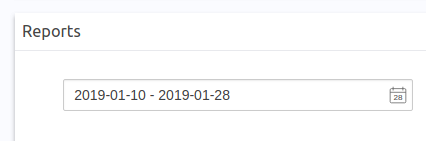
I'm really confused now
pimvanderheijden
on 28 Jan 2019
Yes, I release v2.9.0 to supports custom format.
You can use it like this.
<date-picker v-model="value" lang="en" :format="myFormat" value-type="format"></date-picker>
  data () {
    return {
      myFormat: {
        stringify: (date) => {
          return date ? moment(date).format('LL') : null
        },
        parse: (value) => {
          return value ? moment(value, 'LL').toDate() : null
        }
      }
    }
  }
Cool!
I want to render LL formatted text and receive unix timestamps in my handlers.
Still getting an error. Probably doing something wrong then...
Error:
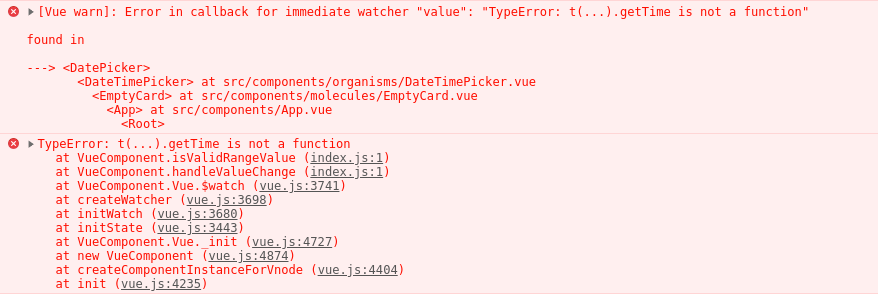
Code:
stringify: (timestamp) => {
const string = momentTZ(timestamp).format('LL')
return string
},
parse: (string) => {
const timestamp = +momentTZ(string)
return timestamp
}
For completeness sake, I also use a computed get and set for the v-model date array. I can probably do without those.
computed: {
value: {
get() {
const startEnd = [
+moment(this.start)
,
+moment(this.end)
]
return startEnd
},
set(startEnd) {
const start = +startEnd[0]
const end = +startEnd[1]
this.setRangeInTimezone(start, end, this.timezone, this.period)
return [
+start
,
+end
]
}
}
the parse function you need to reture a Date Object. Just set the valut-type 'timestamp'.
<date-picker v-model="value" lang="en" :format="myFormat" value-type="timestamp"></date-picker>
  data () {
    return {
      myFormat: {
        stringify: (date) => {
          return date ? moment(date).format('LL') : null
        },
        parse: (value) => {
          return value ? moment(value, 'LL').toDate() : null
        }
      }
    }
  }
yes!
pimvanderheijden
on 31 Jan 2019
Related issues
 kgusihin
·
5Comments
kgusihin
·
5Comments
 BuiHuyCuong
·
5Comments
BuiHuyCuong
·
5Comments
 shawjak3
·
5Comments
shawjak3
·
5Comments
 burzum
·
3Comments
burzum
·
3Comments
 4spen
·
4Comments
4spen
·
4Comments
Most helpful comment
the
parsefunction you need to reture aDate Object. Just set thevalut-type'timestamp'.