Vue2-datepicker: How to change format header
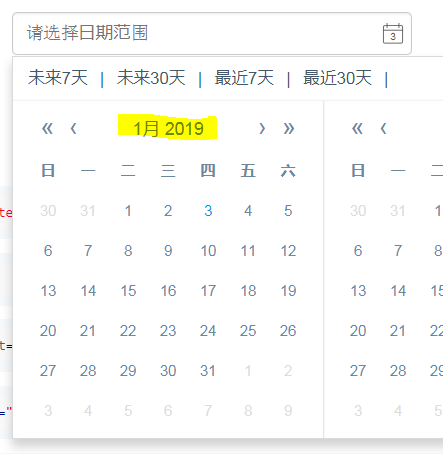
default format header: 1月 2019
now i want to change format: 2019/1 , Please confirm how to change it?
 lequy1010
All 5 comments
Don't have prop to change it.
You just can change the language.
 mengxiong10
on 3 Jan 2019
mengxiong10
on 3 Jan 2019
@mengxiong10
language only change text of label can not change format to display?
some cases we wana change format to display as yyyy/mm, mm/yyyy..
if have any idea please help to tell me !
lequy1010
on 3 Jan 2019
You can switch position of year and months by css #223. But cann't format now.
mengxiong10
on 8 Jan 2019
You can switch position of year and months by css #223. But cann't format now.
Thank you, it's worked. but if you update to allow format is OK.
lequy1010
on 8 Jan 2019
v3.0.
You can set it by lang.
<date-picker :lang="locale" />
```js
// import defalut locale.
import 'vue2-datepicker/locale/zh-cn';
export default {
date() {
return {
locale: {
yearFormat: 'YYYY /',
monthFormat: 'M',
monthBeforeYear: false,
},
};
},
};```
mengxiong10
on 11 Nov 2019
Related issues
 srv91
·
6Comments
srv91
·
6Comments
 BuiHuyCuong
·
5Comments
BuiHuyCuong
·
5Comments
 DragosPeta
·
3Comments
DragosPeta
·
3Comments
 georgehrke
·
4Comments
georgehrke
·
4Comments
 mhdyahiya
·
5Comments
mhdyahiya
·
5Comments
Most helpful comment
v3.0.
You can set it by lang.
```js
// import defalut locale.
import 'vue2-datepicker/locale/zh-cn';
export default {
date() {
return {
locale: {
yearFormat: 'YYYY /',
monthFormat: 'M',
monthBeforeYear: false,
},
};
},
};```