Version
2.6.10
Reproduction link
https://codepen.io/d2school/pen/EBeREg
Steps to reproduce
- 服务端写如下代码 (或见链接)
<!DOCTYPE html>
<html lang="zh">
<head>
<script type="text/javascript" src="https://cdn.bootcss.com/vue/2.6.10/vue.js"></script>
</head>
<body>
  <div id = "app">
    {{test(1390000167)}}
  </div>
  <script type="text/javascript">
  var vm = new Vue({
    el: '#app',
    data: {},
    methods: {    test: function (t) { return t; }  },
  });
 </script>
</body>
</html>
- 用除iPhone之外的手机,或桌面PC常用浏览器访问,输出 正确的 1390000167
- 在 iPhone 6, 7, XR 手机自带浏览器上,输出 {{test(1390000167)}}
- 将HTML中vue 相关代码改成: {{test( "1390000167")}}。 问题依旧。即:哪怕参数改为字符串,但只要字符串可以解析来一个大整数,问题依旧。
- 将HTML中vue 相关代码改成: {{test("A1390000167")}}。 问题消失。即:如果字符串不是一个合法的数字,问题不存在。
- 剥离 vue 调用,直接在 iPhone中定义 test(d) 函数,再原生调用。一切正常。(因此认为应是vue的问题可能性较大)
What is expected?
1390000167
What is actually happening?
{{test(1390000167)}}
环境:
vue ver: 2.5.12 ~ 2.6.10
iphone : 6, 7, xr
 zhuangyan-stone
All 7 comments
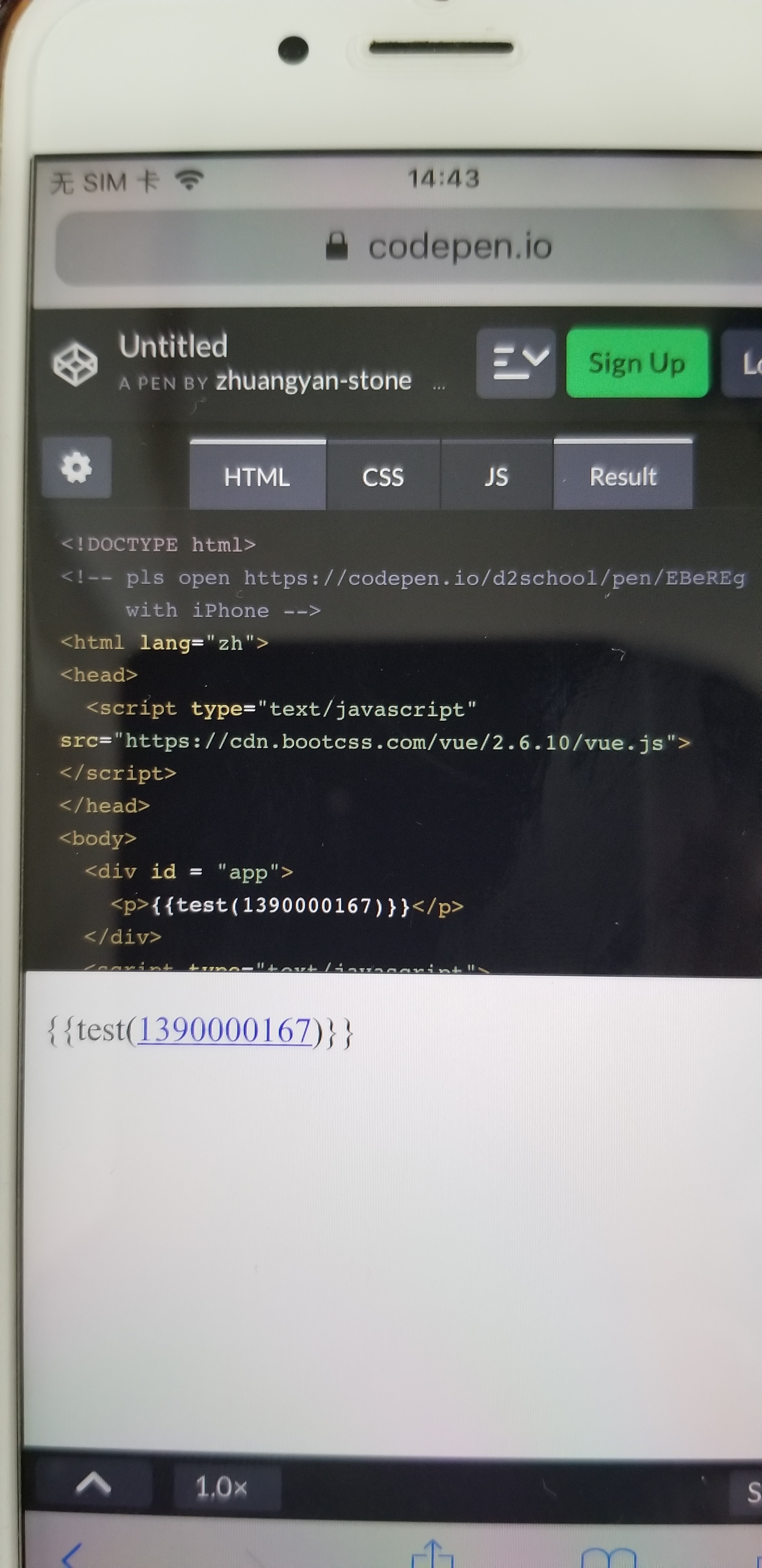
以上是在iPhone手机上调用结果 。不知道 是不是 我自己哪里搞错?
zhuangyan-stone
on 6 Jul 2019
注:从 vue 1.0.27 开始到 2.6.10。结果都一样。
zhuangyan-stone
on 6 Jul 2019
加一行
<meta name="format-detection" content="telephone=no">
试试
 JounQin
on 6 Jul 2019
JounQin
on 6 Jul 2019
加一行
<meta name="format-detection" content="telephone=no">
试试
谢谢,加那一行可以解决问题。不过还是有些好奇。剥离vue,直接写js并无问题,所以为什么“format-detection” 中检测手机号,会影响到vue呢? 另外,实际上我测试的数字,才10位数,或者随便换个大点数字(非13开始),也仍然有这个问题。或许是因为全球范围检查手机号,所以只能放得很宽松。但结果是:随便一个数字就会造成vue在此不工作(事实上任何一个unix时间戳的值,基本都进坑),因为数据的大小,造成程序有时工作,有时不工作,感觉比较怪且不合理。是不是还是应该vue内部来解决(特别是如前所述,剥离 vue后直接调用,在iPhone上并不会有此问题)。
zhuangyan-stone
on 6 Jul 2019
这是因为你用了 in-dom template 啊……
你以为你写的是 test(1390000167),但在 iOS 下,如果不带上面但那个 meta 标签,实际浏览器展现的、JS 读取到的都是 test(<a href="tel:1390000167">1390000167</a>),Vue 对此无能为力(无法区分这是用户本意还是浏览器转换的结果)。
建议给文档提 PR,在这一块加上这个现象
https://vuejs.org/v2/guide/components.html#DOM-Template-Parsing-Caveats
 sodatea
on 6 Jul 2019
sodatea
on 6 Jul 2019
As @sodatea said, Vue receives a different template than you wrote because the browser modifies it before Vue gets access to it. I think it's worth adding some cookbook note in the docs but there isn't much we can do in Vue core to warn against this without creating false positives
 posva
on 6 Jul 2019
posva
on 6 Jul 2019
@sodatea 我后面已经理解这是 浏览器改变了dom节点内容,而 in-dom template 识别不了。谢谢!所以,这不是vue坑,这是所有 in-dom template 都会遇上坑。现在,我干脆直接这样绕过去了: test(1390000167*1); ……注意星号前面不留空格。
zhuangyan-stone
on 6 Jul 2019
Related issues
 franciscolourenco
·
3Comments
franciscolourenco
·
3Comments
 bfis
·
3Comments
bfis
·
3Comments
 6pm
·
3Comments
6pm
·
3Comments
 paceband
·
3Comments
paceband
·
3Comments
 loki0609
·
3Comments
loki0609
·
3Comments
Most helpful comment
加一行
<meta name="format-detection" content="telephone=no">试试