Vue: < with adjacent character and no space in between is parsed incorrectly inside text interpolation {{ a<v }}
Version
2.6.10
Reproduction link
https://codepen.io/laden666666/project/full/ZJbvRg
https://template-explorer.vuejs.org/#%3Cdiv%3E%0A%20%20%20%20%20%20%3Cdiv%3E%7B%7Ba%20%3C%20v-c%20%3E%202%7D%7D%3C%2Fdiv%3E%0A%20%20%20%20%20%20%3Cdiv%3E%7B%7Ba%20%3Cv-c%20%3E%202%7D%7D%3C%2Fdiv%3E%0A%20%20%20%20%3C%2Fdiv%3E
Steps to reproduce
<template>
  <div>{{a < v-c > 2}}</div>
  <div>{{a <v-c > 2}}</div>
</template>
What is expected?
false
false
What is actually happening?
false
{{a 2}}
 laden666666
All 5 comments
I added a template repro.
Please, provide editable versions when providing a repro next time 🙂
 posva
on 30 May 2019
posva
on 30 May 2019
I think it's expected because <v-c > would be parsed as a valid start tag. We need to parse HTML first then go through interpolation for text nodes. If you really want to use < and > in the interpolation expression, just escape them into < and >.
 Justineo
on 31 May 2019
Justineo
on 31 May 2019
I think it's expected because
<v-c >would be parsed as a valid start tag. We need to parse HTML first then go through interpolation for text nodes. If you really want to use<and>in the interpolation expression, just escape them into<and>.
I don't agree, because there is no difference between the above two codes except for one more " ". < and > is even more disagreeing, because there is no mention in the documentation that escaping is needed.
In fact, this bug should be solved by the compiler.
laden666666
on 31 May 2019
I don't agree, because there is no difference between the above two codes except for one more " ".
Not true. According to HTML spec, a start tag starts with a < character and is followed immediately by a tag name. And tag names cannot contain whitespaces. So <v-c > is a valid start tag but < v-c > is not. Vue's HTML parser works exactly the same as that of Chrome in this case:
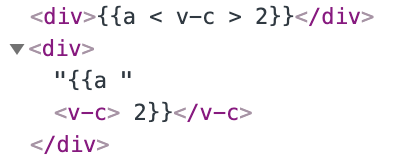
<and>is even more disagreeing, because there is no mention in the documentation that escaping is needed.
Escaping < and > in HTML text is required beyond Vue. We can safely use JavaScript expressions inside an attribute when we use quotations but it will also be problematic without them. It only works reliably if you escape these special characters.
Basically, we handle interpolation after parsing HTML, as I mentioned earlier. It's just how HTML works and I don't think it's a bug of Vue and should be “fixed”. But I do agree that our documentation should cover more for such cases.
Justineo
on 31 May 2019
I still think this is a bug. The jsx of react will not have such a problem.
<div>{a < v-c > 2}</div> = <div>{a <v-c > 2}</div>
But I also understand what you mean, Vue supports DOM declarative rendering, so Vue's compiler must first compile the template as a browser.
laden666666
on 3 Jun 2019
Related issues
 robertleeplummerjr
·
3Comments
robertleeplummerjr
·
3Comments
 Jokcy
·
3Comments
Jokcy
·
3Comments
 julianxhokaxhiu
·
3Comments
julianxhokaxhiu
·
3Comments
 6pm
·
3Comments
6pm
·
3Comments
 paulpflug
·
3Comments
paulpflug
·
3Comments
Most helpful comment
Not true. According to HTML spec, a start tag starts with a
<character and is followed immediately by a tag name. And tag names cannot contain whitespaces. So<v-c >is a valid start tag but< v-c >is not. Vue's HTML parser works exactly the same as that of Chrome in this case:Escaping
<and>in HTML text is required beyond Vue. We can safely use JavaScript expressions inside an attribute when we use quotations but it will also be problematic without them. It only works reliably if you escape these special characters.Basically, we handle interpolation after parsing HTML, as I mentioned earlier. It's just how HTML works and I don't think it's a bug of Vue and should be “fixed”. But I do agree that our documentation should cover more for such cases.