Vue-storefront: Fresh Install Has Hydration Errors
Current behavior
On loading page header tabs are misformatted and unclickable. There are errors about hydration in the console.
Expected behavior
Header Tabs should not misformat/ and should be clickable and console should not have errors about hydration.
Steps to reproduce the issue
1) Created New Debian 9 VM instance on Google Cloud
2) Install Prereqs: Install Docker https://docs.docker.com/engine/install/debian/ , Install Docker Compose https://docs.docker.com/compose/install/ , Install NodeJs 10.x.x https://github.com/nodesource/distributions/blob/master/README.md, and install yarn https://classic.yarnpkg.com/en/docs/install/#windows-stable .
3) Either clone this repo or use the CLI - both fail.
4) Change host in config to 0.0.0.0, change API to https://demo.storefrontcloud.io, clone capybara, set tsconfig.json to capybara
5) Either yarn install and yarn dev or run docker-compose up -d
6) On loading the page I get

Version of Vue Storefront
[ Latest master branch] Vue Storefront
Can you handle fixing this bug by yourself?
NO
Which Release Cycle state this refers to? Info for developer. (doesn't apply to Next)
Pick one option.
- [X ] This is a bug report for current Stable version on https://demo.storefrontcloud.io and should be placed in next stable version hotfix - In this case Developer should create branch from
hotfixormasterbranch and create Pull Request4. Hotfixback tohotfix.
Environment details
- Browser: Google Chrome 84
- OS: Windows 10
- Node: Node 10.x
- Code Version:
latest master branch
Additional information
 SethKitchen
All 5 comments
The current workaround I found is to revert the json packages:
root directory:
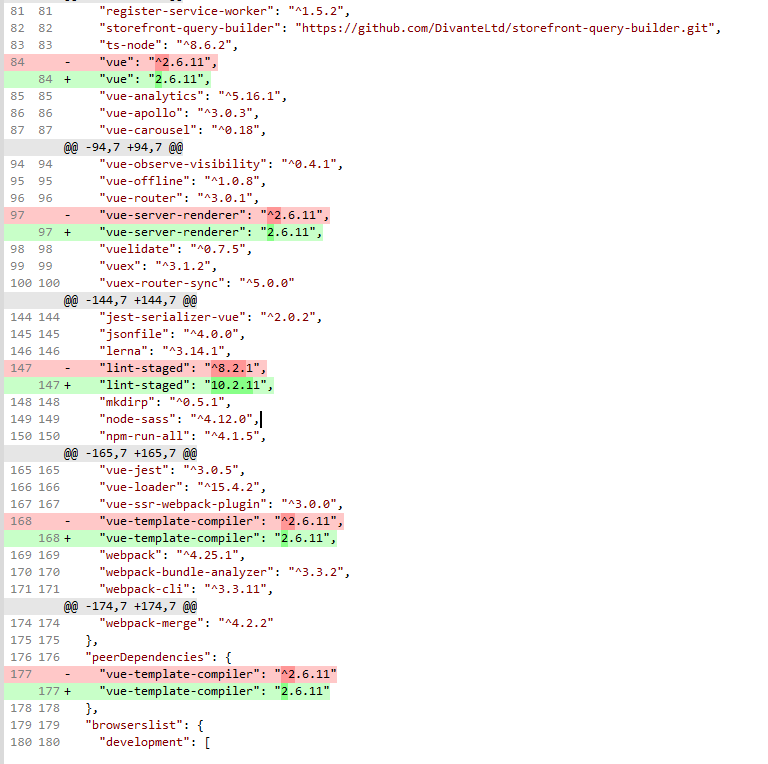
core:
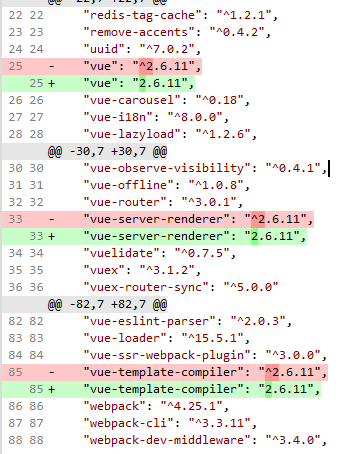
capybara:

SethKitchen
on 25 Aug 2020
It might be due to recent vue release
https://github.com/vuejs/vue/releases/tag/v2.6.12
serialize-javascript dependecy updated from 2.1.2 to 3.1.0
https://github.com/yahoo/serialize-javascript/releases/tag/v3.0.0
https://github.com/yahoo/serialize-javascript/releases/tag/v3.1.0
 dixitdeepak
on 2 Sep 2020
dixitdeepak
on 2 Sep 2020
Its working fine with Default theme, but facing issue with Capybara theme.
dixitdeepak
on 3 Sep 2020
Please update the vue version in capybara/package.json form "vue": "^2.6.6" to "vue": "^2.6.11"
dixitdeepak
on 3 Sep 2020
I think we can close this issue, as this is not related to vue-storefront framework, its related to capybara theme (https://github.com/DivanteLtd/vsf-capybara/issues/462)
dixitdeepak
on 23 Sep 2020
Related issues
 kyvaith
·
5Comments
kyvaith
·
5Comments
 vishal-7037
·
5Comments
vishal-7037
·
5Comments
 jonashrem
·
3Comments
jonashrem
·
3Comments
 talalus
·
4Comments
talalus
·
4Comments
 alinadivante
·
5Comments
alinadivante
·
5Comments
Most helpful comment
It might be due to recent vue release
https://github.com/vuejs/vue/releases/tag/v2.6.12
serialize-javascript dependecy updated from 2.1.2 to 3.1.0
https://github.com/yahoo/serialize-javascript/releases/tag/v3.0.0
https://github.com/yahoo/serialize-javascript/releases/tag/v3.1.0