Vue-storefront: Not possible to override mappingFallback in VSF 1.11
Current behavior
In VSF 1.10 I was able to do this:
In src/modules/index.ts:
import { extendModule } from '@vue-storefront/core/lib/module'
import { urlExtend } from './my-module'

extendModule(urlExtend)
and in my-module:
const extendUrlVuex = {
  actions: {
    async mappingFallback ({ dispatch }, payload: { url: string, params: any}) {
      // Custom check, whether the URL path matches a custom content type.

      return {
        name: 'foo',
        params: {
          slug: 'foo'
        }
      }
    }
  }
}

export const urlExtend = {
  key: 'url',
  store: { modules: [{ key: 'url', module: extendUrlVuex }] },
}
As documented here: https://docs.vuestorefront.io/guide/basics/url.html#how-to-customize-the-mapping-mechanism
However, it seems in 1.11.0 the custom mappingFallback does not get called anymore.
Expected behavior
I should be able to override the default mappingFallback action from my module.
Repository
https://github.com/DivanteLtd/vue-storefront/tree/v1.11.0-rc.2
Can you handle fixing this bug by yourself?
- [ ] YES
- [x] NO
Which Release Cycle state this refers to? Info for developer.
Pick one option.
- [ ] This is a bug report for test version on https://test.storefrontcloud.io - In this case Developer should create branch from
developbranch and create Pull Request2. Feature / Improvementback todevelop. - [x] This is a bug report for current Release Candidate version on https://next.storefrontcloud.io - In this case Developer should create branch from
releasebranch and create Pull Request3. Stabilisation fixback torelease. - [ ] This is a bug report for current Stable version on https://demo.storefrontcloud.io and should be placed in next stable version hotfix - In this case Developer should create branch from
hotfixormasterbranch and create Pull Request4. Hotfixback tohotfix.
 juho-jaakkola
All 19 comments
OK, we must check it
 pkarw
on 20 Nov 2019
pkarw
on 20 Nov 2019
@juho-jaakkola you can still extend modules. Look at this line: https://github.com/DivanteLtd/vue-storefront/blob/v1.11.0-rc.2/src/themes/default/index.js#L22 you can override / extend any module you want. However, @pkarw I think we have to update docs about that because extendModule no longer exist
 andrzejewsky
on 20 Nov 2019
andrzejewsky
on 20 Nov 2019
good point @andrzejewsky; @kkdg can you please update the docs - about the module extendibility (the change has been implemented to the 1.11 - the modules api changed)
pkarw
on 20 Nov 2019
I tried the approach @andrzejewsky mentioned, but my custom mapping still does not get called. I'm pretty sure something is still broken in 1.11.
Could you please test whether you are able to override the default mappingFallback action with a custom one?
juho-jaakkola
on 20 Nov 2019
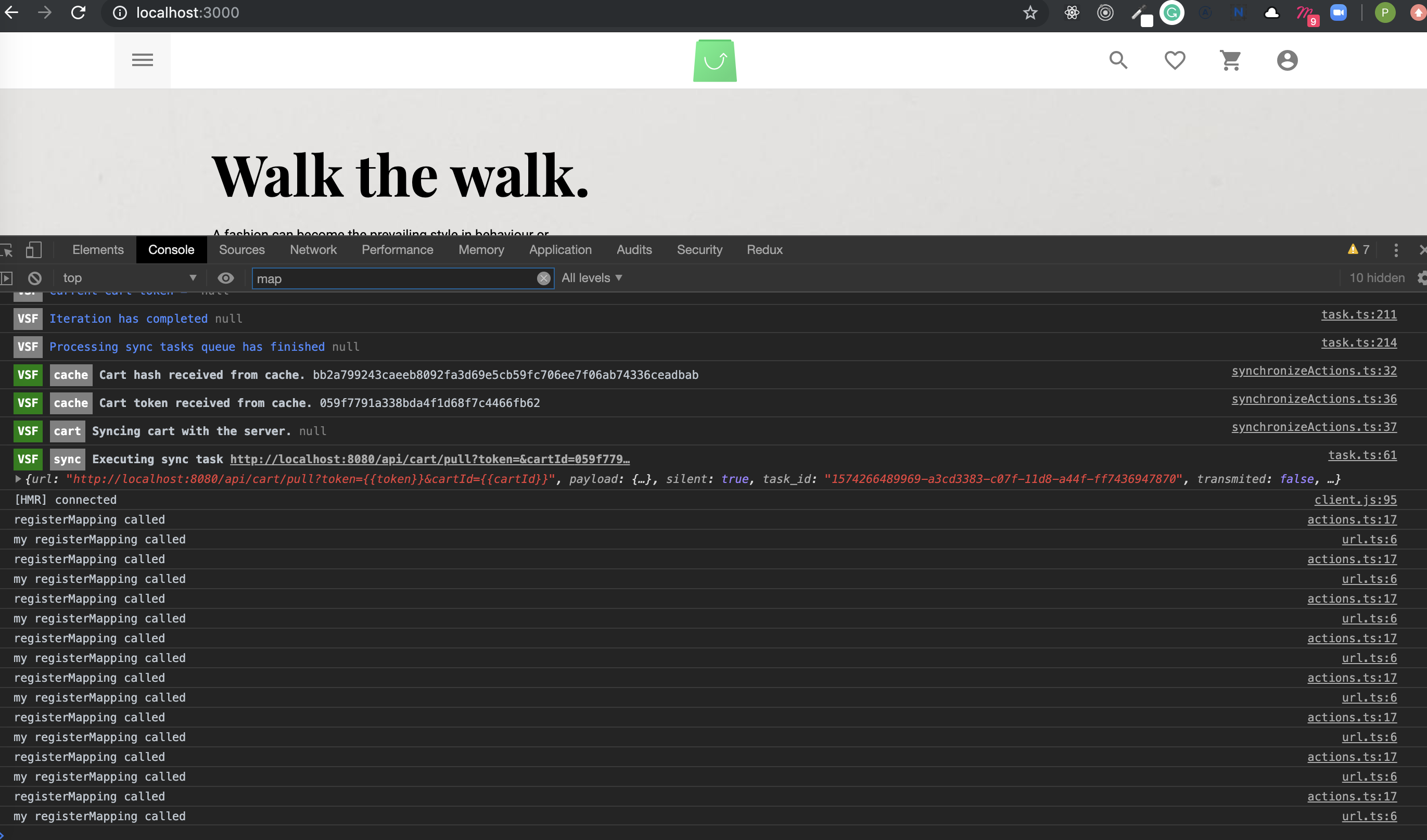
@juho-jaakkola look at that diff: https://github.com/DivanteLtd/vue-storefront/compare/release/v1.11...andrzejewsky:extendingModuleExample?expand=1
I'm extending here (as example) registerMapping:
andrzejewsky
on 20 Nov 2019
I do not fully understand how the routing and url mapping works, but I think the difference is that in 1.10 the whole mappingFallback action got overridden by my custom module, whereas in 1.11 all registered mappingFallback actions get called.
So even if my module returns a matching route, the mappingFallback of the bundled url module will still get called which (apparently?) results in an error.
juho-jaakkola
on 26 Nov 2019
I've got the same problem as @juho-jaakkola. I'm also trying to extend the mappingFallback, but this will redirect the page to /page-not-found when visiting the product page. This results in the following error: [dispatcher] Cannot read property '/product-url-key' of undefined null.
 mikesteeghs
on 27 Nov 2019
mikesteeghs
on 27 Nov 2019
The first problem is that the default mappingFallback expects the category/single action to return null, but it in fact returns undefined: https://github.com/DivanteLtd/vue-storefront/blob/v1.11.0-rc.2/core/modules/url/store/actions.ts#L86
But there is something wrong even if I fix the if clause.
juho-jaakkola
on 27 Nov 2019
When outputting the routeData when mappingFallback is executed, it returns the following data by default:
{
  name: 'configurable-product',
  params:
    {
      slug: 'product-slug',
      parentSku: 'product-parent-sku',
      childSku: 'product-child-sku'
    }
}
After I extended the mappingFallback method with just a return in the method, routeData returned the following data:
[
  {
    name: 'configurable-product',
    params:
      {
        slug: 'product-slug',
        parentSku: 'product-parent-sku',
        childSku: 'product-child-sku'
      }
  },
  undefined
]
So instead of an object, it returns an array with an undefined value, this results. When I check the routeData in the beforeEachGuard method, it's obvious that the data isn't set correctly:
{
  '0':
    {
      name: 'configurable-product',
      params:
        {
          slug: 'product-slug',
          parentSku: 'product-parent-sku',
          childSku: 'product-child-sku'
        }
    },
  '1': undefined,
  name: null,
  meta: {},
  path: '/product-url-key',
  hash: '',
  query: {},
  params: {},
  fullPath: '/product-url-key',
  matched: []
}
This results in the "Route not found" error. Because of this result it's clear that the mappingFallback method is executed twice. Once in the core module and once in the theme. The docblock says that the method could be overridden in a custom module. So currently the override isn't working correctly, the mappingFallback method in the theme should override the one in the core module. So when mappingFallback is dispatched it only executes the override (the one in the theme).
So it looks like the override isn't working or the way of extending modules doesn't work correctly.
mikesteeghs
on 27 Nov 2019
OK, I'm reopening the issue we need to check it out
pkarw
on 27 Nov 2019
So it looks like the override isn't working or the way of extending modules doesn't work correctly.
I think the best way would be to extend the feature (as opposed to overriding it completely like 1.10 was doing). Makes no sense that if you want to implement your own mapping, you need to re-implement all the other already existing mappings in your own module.
juho-jaakkola
on 27 Nov 2019
I got it working now! Thanks to the deleted comment of Filip. I created a custom module and made an override of the core Url module following the documentation: https://docs.vuestorefront.io/guide/cookbook/module.html#_2-2-recipe-b-override-vuex-store-with-extendstore
Unfortunately, I couldn't make it work with a Vuex plugin (like the docs mention in Recipe A).
import { extendStore } from '@vue-storefront/core/helpers'
import { StorefrontModule } from '@vue-storefront/core/lib/modules'
import { currentStoreView, localizedDispatcherRouteName, removeStoreCodeFromRoute } from '@vue-storefront/core/lib/multistore'
import SearchQuery from '@vue-storefront/core/lib/search/searchQuery'

const exampleNameStore = {
  namespaced: true
}

const exampleNameModule = {
  actions: {
    /*
     * Router mapping fallback - get the proper URL from API
     * Overriding the default mappingFallback method, add your custom code in this method
     */
    async mappingFallback ({ dispatch }, { url, params }: { url: string, params: any}) {
      const { storeCode, appendStoreCode } = currentStoreView()
      const productQuery = new SearchQuery()
      url = (removeStoreCodeFromRoute(url.startsWith('/') ? url.slice(1) : url) as string)
      productQuery.applyFilter({key: 'url_path', value: {'eq': url}}) // Tees category
      const products = await dispatch('product/list', { query: productQuery }, { root: true })
      if (products && products.items && products.items.length) {
        const product = products.items[0]
        return {
          name: localizedDispatcherRouteName(product.type_id + '-product', storeCode, appendStoreCode),
          params: {
            slug: product.slug,
            parentSku: product.sku,
            childSku: params['childSku'] ? params['childSku'] : product.sku
          }
        }
      } else {
        const category = await dispatch('category/single', { key: 'url_path', value: url }, { root: true })
        if (category !== null) {
          return {
            name: localizedDispatcherRouteName('category', storeCode, appendStoreCode),
            params: {
              slug: category.slug
            }
          }
        }
      }
    }
  }
}

export const ExampleName: StorefrontModule = function ({app, store, router, moduleConfig, appConfig}) {
  store.registerModule('exampleName', exampleNameStore)
  extendStore('url', exampleNameModule)
}
@mikesteeghs I deleted it because I though the solution provided by @andrzejewsky already covered it and had no idea to dig deeper because I was in a train, sorry ;) Regarding plugins - what exactly you are struggling with?
 filrak
on 28 Nov 2019
filrak
on 28 Nov 2019
I tried to create a module with a plugin which listens to actions as follows:
const exampleNamePlugin = store => {
  store.subscribeAction((action, state) => {
    console.log(action.type)
  })
}

const exampleNameStore = {
  namespaced: true,
  plugins: ['exampleNamePlugin']
}

export const ExampleName: StorefrontModule = function ({app, store, router, moduleConfig, appConfig}) {
  store.registerModule('exampleName', exampleNameStore)
}
But nothing was logged, so I also tried to register it as the url module (because it has to extend it) as follows:
store.registerModule('url', exampleNameStore)
But this will break the url module functionality. I'm not sure how the plugins functionality work and couldn't find out how to listen to actions of a particular module.
mikesteeghs
on 28 Nov 2019
@pkarw duly noted
 kkdg
on 28 Nov 2019
kkdg
on 28 Nov 2019
@mikesteeghs You can't add plugin with vuex module registration. There is some old RFC on github. But in vsf module registration you have access to store instance so you can do something like this.
const exampleNameModule = {
  actions: {
    async mappingFallback ({ dispatch }, { url, params }: { url: string, params: any}) {
      // ...
    }
  }
}

export const ExampleName: StorefrontModule = function ({app, store, router, moduleConfig, appConfig}) {
  extendStore('url', exampleNameModule)
  store.subscribeAction((action, state) => {
    if (action.type.startsWith('url/')) {
      console.log(action.type)
    }
  })
}
Anyway you need to keep in mind that this plugin is registered in whole store scope, not for particular module. You can find other examples in vsf like core/modules/cms/store/cmsPersistPlugin.ts or core/modules/recently-viewed/store/plugin.ts
 gibkigonzo
on 2 Dec 2019
gibkigonzo
on 2 Dec 2019
@juho-jaakkola please let us know if we’re ok to close this issue?
pkarw
on 2 Dec 2019
@pkarw i tried @gibkigonzo example but extended mappingFallback function is not getting called. @mikesteeghs have you had success with extendStore method?
UPDATE: it's working now - can it be renaming my module to vsf-modulename was necessary bevor it was without vsf-
 steffen-wirth
on 31 Jan 2020
steffen-wirth
on 31 Jan 2020
What's the correct way of extending mappingFallback?
 benjick
on 16 Apr 2020
benjick
on 16 Apr 2020
Related issues
 talalus
·
4Comments
talalus
·
4Comments
 yuriboyko
·
3Comments
yuriboyko
·
3Comments
 kyvaith
·
5Comments
kyvaith
·
5Comments
 sandermangel
·
5Comments
sandermangel
·
5Comments
 vishal-7037
·
5Comments
vishal-7037
·
5Comments
Most helpful comment
What's the correct way of extending mappingFallback?