Vue-storefront: Category Filters not working
Hi I tried ask on slack but nobody responded :(
I have migrated data from magento 2 all good. I have atributte with code "drive". I have added this in config/local.json in default filters and whole category is not loadng now. I know that I have to use proper control in sidebar.vue but is it nomral that whole category is not loading?
 bachus03
All 12 comments
Hi! Are there any errors reported in the Vue-storefront or Vue-storefront-api console? I belive it may be caused due to the need of indexing this attribute in ES schema but I’m not sure
 pkarw
on 9 Sep 2018
pkarw
on 9 Sep 2018
No there is nothing in vue-storefront/var/log/vue-storefront.log and vue-storefront/var/log/vue-storefront-api.log. I cleared them first and then try to capture my bug but nothing was written there during test.
1.) npm run db new -- --indexName=vue_storefront_catalog
2.) edited local.joson added my filter to defaultFilters like "defaultFilters": [
"color",
"size",
"price",
"erin_recommends",
"test"
],
3 run node --harmony cli.js fullreindex
4 npm run db rebuild -- --indexName=vue_storefront_catalog
5 npn run dev in vue-storefront and vue-torefront-api
The category page is not loading.
I have tried with two types of atributte dropdown with text and also text with numbers
The attributes are visible on vuestorefront on product page
bachus03
on 9 Sep 2018
Try to load home page open dev console in Chrome go to category client side (without page reload) and check if there’s is any error in the dev console
If not please attach a elastic dump that will let us debug this issue
pkarw
on 9 Sep 2018
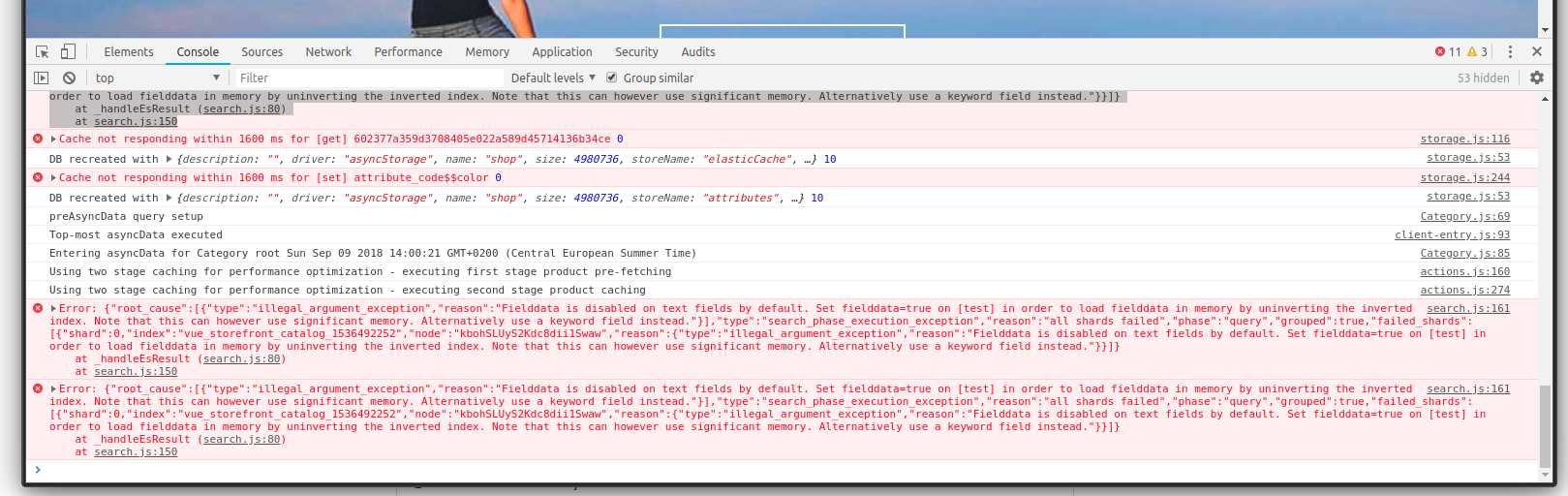
There is something like this:
search.js:161 Error: {"root_cause":[{"type":"illegal_argument_exception","reason":"Fielddata is disabled on text fields by default. Set fielddata=true on [test] in order to load fielddata in memory by uninverting the inverted index. Note that this can however use significant memory. Alternatively use a keyword field instead."}],"type":"search_phase_execution_exception","reason":"all shards failed","phase":"query","grouped":true,"failed_shards":[{"shard":0,"index":"vue_storefront_catalog_1536492252","node":"kbohSLUyS2Kdc8dii1Swaw","reason":{"type":"illegal_argument_exception","reason":"Fielddata is disabled on text fields by default. Set fielddata=true on [test] in order to load fielddata in memory by uninverting the inverted index. Note that this can however use significant memory. Alternatively use a keyword field instead."}}]}
at _handleEsResult (search.js:80)
at search.js:150
bachus03
on 9 Sep 2018
Elastic doesn’t allow to filter / aggregate Tex fields. Please check FAQ in our /doc regarding this issue - in short words you need to setup the valid field type in vsapi/config/*.schema.json and run “npm run db rebuild” to reindex ES with new field type set
pkarw
on 9 Sep 2018
Ok, thanks for help I am one step forward, but I am not shure how to setup the field type.
I have opened elastic.schema.attribute.json:

Would you be able to show me the easiest exapmle? for example only to values to filter arg1, arg2 and atrubutte code "test".
I would really appreciate any example of custom filter!
bachus03
on 9 Sep 2018
You should modify the “product” schema (not “attribute” - this is just for attributes meta data). Take a look on how “erin_recommends” and “size”, “color” are defined. The attribute to filter on should be of integer or drop down type (set in Magento and mapped to the same type in here).
pkarw
on 9 Sep 2018
Great! It works :) THANKs a lot!
I just added a line drive: {"type": "integer"}" elastic.schema.product.json
but on the front, there is
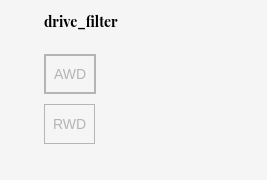
how to specify a name for this? In elastic.schema.product.json there is only type specify for the fields you mentioned color, size etc. I guess i can handle it in sidebar.vue but if I am dealing with multistore I would like to know how it should be done properly.
Tanks once again! :)
bachus03
on 9 Sep 2018
You should define a translation string for it in en-US.csv and recompile the project
Could You please update the FAQ based on this response and send us a Pull Request with this update? Would be great / thanks :)
pkarw
on 9 Sep 2018
Yes I will do this :)
Ok translation for this I understand, but there is not any "name" property on this mapping ("elastic.schema.product.json")?
bachus03
on 9 Sep 2018
Just check how SidebarMeni.vue uses “t()” helper it calls sth like “t(attribute_code + ‘_filter’)”
pkarw
on 9 Sep 2018
You can add this hint - how to change filter caption - to the FAQ as well ;) thanks!
pkarw
on 9 Sep 2018
Related issues
 vishal-7037
·
5Comments
pkarw
·
5Comments
vishal-7037
·
5Comments
pkarw
·
5Comments
 cewald
·
5Comments
cewald
·
5Comments
 filrak
·
4Comments
filrak
·
4Comments
 talalus
·
4Comments
talalus
·
4Comments
Most helpful comment
You should modify the “product” schema (not “attribute” - this is just for attributes meta data). Take a look on how “erin_recommends” and “size”, “color” are defined. The attribute to filter on should be of integer or drop down type (set in Magento and mapped to the same type in here).