vue-storefront API | Facing error while installing
Connector to Mangento : https://medium.com/@piotrkarwatka/vue-storefront-how-to-install-and-integrate-with-magento2-227767dd65b2
Without docker, it will install API?
In reference URL also mention "you must have docker and redis instances up and running (docker-compose up in vue-storefront-api directory)"
I am using ubuntu 16.0 OS. I installed npm, yarn etc..
I have not docker.
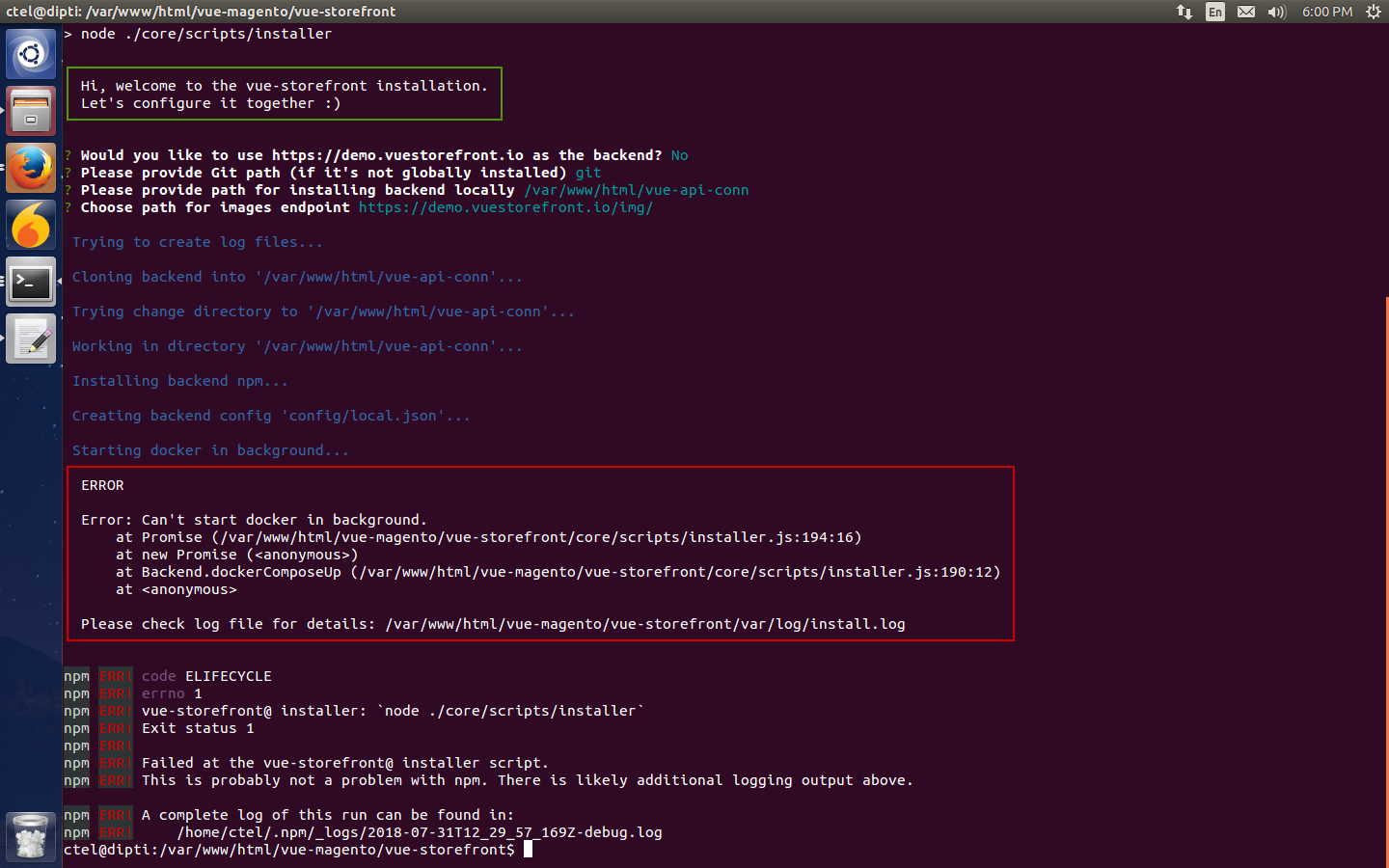
I am getting error as docker can't start automatically.
Refer attached screenshot
 diptipatel
All 8 comments
You have to install docker , create the docker group and add your account to the group.
To create the docker group and add your user:
Create the docker group.

$ sudo groupadd docker

Add your user to the docker group.

$ sudo usermod -aG docker $USER
 MichielLucassen
on 3 Aug 2018
MichielLucassen
on 3 Aug 2018
I tried creating a docker group but again having the same issue.
 rafinkarki
on 9 Apr 2019
rafinkarki
on 9 Apr 2019
Is anyone have the solution of this issue. I am getting the same issue.
 ashishsjagnani
on 19 Jul 2019
ashishsjagnani
on 19 Jul 2019
I am also facing the same issue
 razzul
on 16 Sep 2019
razzul
on 16 Sep 2019
Am also facing same issue, USER already added into group.
I can run "docker run hello-world" which work fine
what else am missing
But am able to run through "docker -composer up -d"
 Faizanq
on 28 Sep 2019
Faizanq
on 28 Sep 2019
For latecomers,
In my case I have old docker version, that causing the issue.
But if you still facing the issue then do below changes, so will get more idea about the error
- find line[196], vue-storefront/core/scripts/installer.js
inside [if] condition change "docker-compose up -d > /dev/null 2>&1" to "docker-compose up -d"
i.e.if (shell.exec(
docker-compose up -d).code !== 0) {
reject(new Error('Can\'t start Docker in background.'))
}
Faizanq
on 6 Oct 2019
just use "sudo docker-compose up -d" inside (vue-storefront/core/scripts/installer.js) in line 196
 amman20
on 8 Dec 2019
amman20
on 8 Dec 2019
To resolve this error edit the line 196 in path
vue-storefront/core/scripts/installer.js
change conditon to "sudo docker -composer up -d"
/**
- Run 'docker-compose up' in background
* - @returns {Promise}
*/
dockerComposeUp () {
return new Promise((resolve, reject) => {
Message.info('Starting Docker in background...')
  if (shell.exec(`sudo docker-compose up -d`).code !== 0) {
    reject(new Error('Can\'t start Docker in background.'))
  }
  // Adding 20sec timer for ES to get up and running
  // before starting restoration and migration processes
  setTimeout(() => { resolve() }, 20000)
})
}
 sanaullahAhmad
on 29 Jul 2020
sanaullahAhmad
on 29 Jul 2020
Related issues
 Jensderond
·
5Comments
Jensderond
·
5Comments
 pkarw
·
5Comments
pkarw
·
5Comments
 ArjanStudent
·
3Comments
ArjanStudent
·
3Comments
 kyvaith
·
5Comments
kyvaith
·
5Comments
 talalus
·
4Comments
talalus
·
4Comments
Most helpful comment
I tried creating a docker group but again having the same issue.