Vue-select: Add an option to keep placeholder text even when an option selected
Currently I'm using this component to show my options with multiple select option,
when an option is selected and the text clears, I'm rendering the selections outside of the component due to styling purposes.
but currently the placeholder disappears and I would like to keep it even after some options are selected
Also there's no option to Not render the selected options inside the component itself, which makes me to use an empty div inside "selected-option-container" slot
I hope this is clear , Please ask anything if more info is needed. thanks
 jd1378
All 7 comments
Agreed this would be useful can we get it in the next release?
 zanedev
on 5 Feb 2020
zanedev
on 5 Feb 2020
I recently came across the same requirement, with one addition: I want to be able to disable the dropdown entirely, and have inline-autocomplete support.
The approach I took for the renderless component in #977 is okay, but definitely not ideal. To really have renderless work well, I need to write it from the ground up instead of hacking the current implementation into a renderless component. The renderless component needs to be the base, and then Vue Select as we know it now becomes an optional implementation on top of it.
After revisiting the implementation this morning, I'm thinking I will release the slot overhaul from #977 as v4, and v5 will be a mostly ground up rewrite using a renderless base component.
 sagalbot
on 9 Feb 2020
sagalbot
on 9 Feb 2020
@jd1378 you can actually keep the placeholder present right now with the search scoped slot:
<v-select>
  <template #search="{ events, attributes }">
    <input
      placeholder="Always show the placeholder"
      type="search"
      class="vs__search"
      v-bind="attributes"
      v-on="events"
    >
  </template>
</v-select>
I'm working on supporting the exact use case you describe:
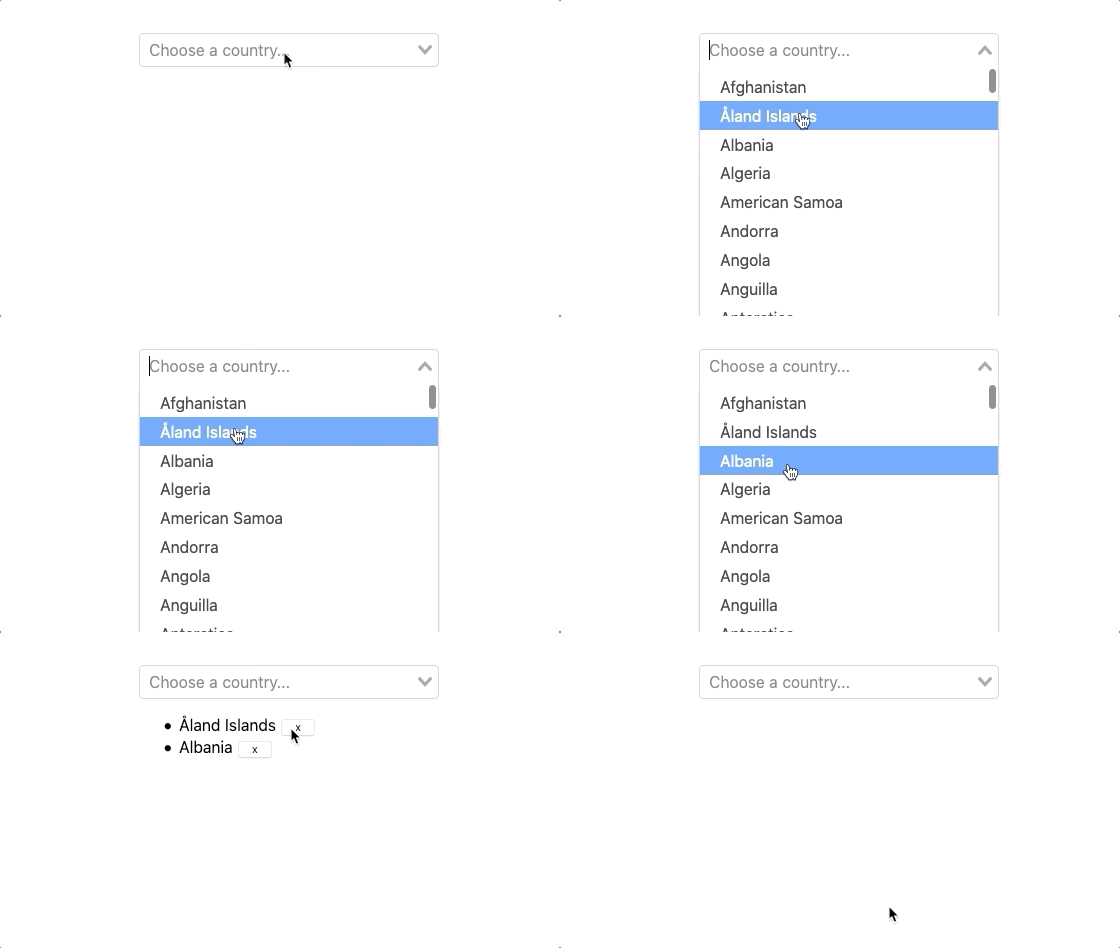
560 adds slots above and below the component. That + appendToBody provides what you see above. I'm using the empty scoped slots you mentioned in the example above, I think I'll also introduce a prop to disable rendering the selected options.
sagalbot
on 9 Mar 2020
Thanks a lot !
I'm very happy and impressed to see that you have been following this issue after a month or so , I thought I must stop by and say thank you, really. I wish you the best.
I'll check it out when I can 👍
jd1378
on 10 Mar 2020
Hi again @sagalbot
sorry for the long wait
I updated the vue-select to 3.9.5 and I tried the scoped slot but it seems I can't get the desired effect, e.g. Afghanistan still appears inside the select instead of outside
is there any prop by chance that cancel outs this template ?
I would be happy if you reply
jd1378
on 7 Apr 2020
Ah sorry , I had removed the empty element and i forgot the purpose was to keep the placeholder,
it works just fine as expected
jd1378
on 7 Apr 2020
@jd1378 you can actually keep the placeholder present right now with the
searchscoped slot:<v-select> <template #search="{ events, attributes }"> <input placeholder="Always show the placeholder" type="search" class="vs__search" v-bind="attributes" v-on="events" > </template> </v-select>I'm working on supporting the exact use case you describe:
560 adds slots above and below the component. That +
appendToBodyprovides what you see above. I'm using the empty scoped slots you mentioned in the example above, I think I'll also introduce a prop to disable rendering the selected options.
@sagalbot
Hi, this worked fine..but there is another issue related to search slot, I have raised a PR
Please have a look - https://github.com/sagalbot/vue-select/pull/1254
 rki-financial-com
on 10 Aug 2020
rki-financial-com
on 10 Aug 2020
Related issues
 gilles6
·
3Comments
gilles6
·
3Comments
 PrimozRome
·
4Comments
PrimozRome
·
4Comments
 davidalvarezr
·
3Comments
davidalvarezr
·
3Comments
 pud1m
·
3Comments
pud1m
·
3Comments
 FrozenIce0617
·
3Comments
FrozenIce0617
·
3Comments
Most helpful comment
@jd1378 you can actually keep the placeholder present right now with the
searchscoped slot:I'm working on supporting the exact use case you describe:
560 adds slots above and below the component. That +
appendToBodyprovides what you see above. I'm using the empty scoped slots you mentioned in the example above, I think I'll also introduce a prop to disable rendering the selected options.