Vue-select: Open programatically, and keep dropdown Open
So, i would like to implement a search select that open with a button, and the dropdown keeps open until closed not like the way it works right now that closes on input blur, something like what stripe does:
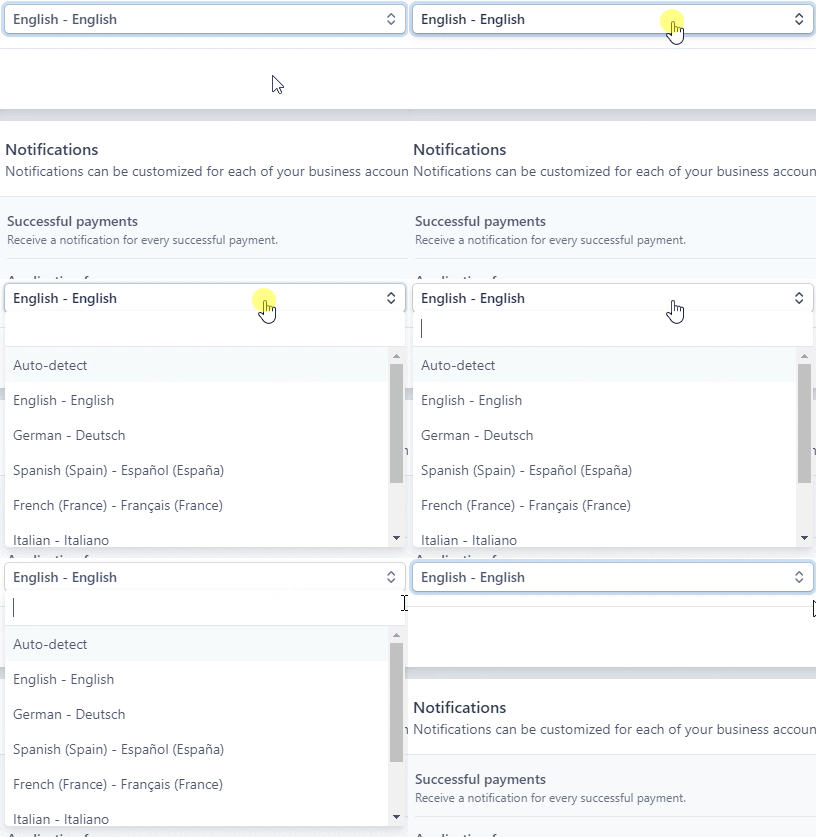
The limitations right now with vue-select are, that there are no way to keep the drop down open and there's no way to open it programatically, my workaround for this is to do something like this:
<button @click="openSelect" class="btn">{{ label }}</button>

<v-select
      v-show="isOpen"
      ref="localeSearch"
      :options="normalizeOptions"
    >
    </v-select>

methods: {
    openSelect() {
      if (this.isOpen) {
        return this.$nextTick(() => this.$refs.localeSearch.searchEl.focus());
      }
      this.isOpen = !this.isOpen;
    }
  }
it works half ok, because, the moment i click, somewhere else, well, the dropdown disspaears, but the input keeps on sight, i can try and workaround this using the @search:blur event and setting isOpen = false but it seems hacky and doesn't work that well, because now the button gets in a loop of course
Check this Sandbox i prepare with that implementation
So to summarize:
- A way to keep the dropwdown open, no matter if it's blur or not
- A way to open show the select programatically
 flick36
All 6 comments
I'm struggling with the same issue. Nearly impossible to use Inspect in the browser dev tool as dropdown disappears on any click outside.
 seyfer
on 4 Sep 2019
seyfer
on 4 Sep 2019
Related #1067
 sagalbot
on 22 Feb 2020
sagalbot
on 22 Feb 2020
A workaround in case you want to inspect the dom of the opened dropdown.
Open the node_modules/vue_select/dist/vue-select.js search for closeSearchOptions comment the contents of the function.
Restart your webpack (other build solutions).
Revert back when you are done.
 adrian-huminiuc
on 8 Dec 2020
adrian-huminiuc
on 8 Dec 2020
I'm struggling with the same issue. Nearly impossible to use Inspect in the browser dev tool as dropdown disappears on any click outside.
Same problem. Did anyone find a workaround for this?
 jonathanmach
on 21 Apr 2021
jonathanmach
on 21 Apr 2021
Check this out https://github.com/sagalbot/vue-select/issues/758#issuecomment-854716295
 itsoft3g
on 4 Jun 2021
itsoft3g
on 4 Jun 2021
Check this out #758 (comment)
$vm0.isOpen=true worked for me 👍
jonathanmach
on 4 Jun 2021
Related issues
 fabianmieller
·
3Comments
fabianmieller
·
3Comments
 FrancescoMussi
·
3Comments
FrancescoMussi
·
3Comments
 davidalvarezr
·
3Comments
davidalvarezr
·
3Comments
 edalzell
·
3Comments
edalzell
·
3Comments
 NexoraSolutions
·
3Comments
NexoraSolutions
·
3Comments
Most helpful comment
I'm struggling with the same issue. Nearly impossible to use Inspect in the browser dev tool as dropdown disappears on any click outside.