Vue-select: v-model, reduce and multiple problem (v3.0)
Describe the bug
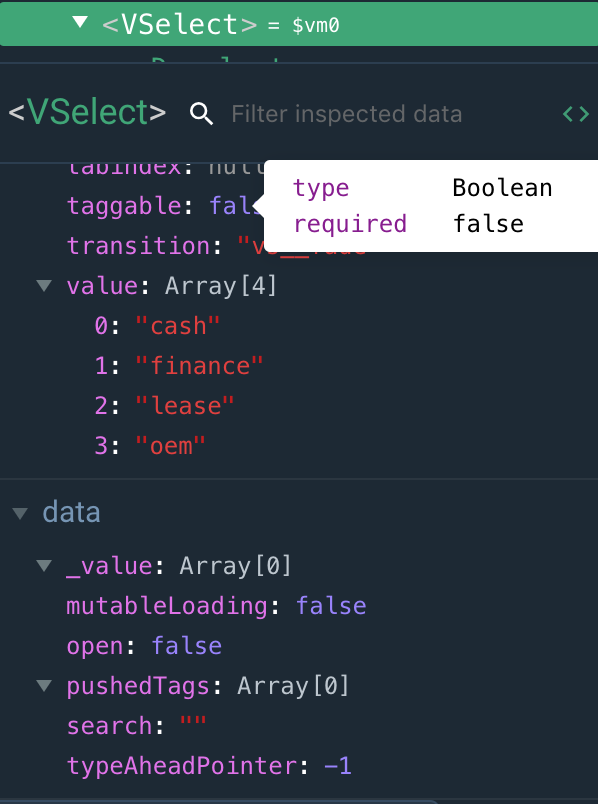
When using v-select with multiple and reduce, if your v-model already has tags, it does not load the tags properly.
To Reproduce
Steps to reproduce the behavior:
- Add v-select with multiple, v-model, options (should be an array of Objects) and a reducer.
- Add pre-determined tags into the v-model data binding
- Load v-select and the tags will not be loaded properly onto the component, despite having the value set as an array of tags
- When you click on a tag from here, it will wipe the existing array values and start a new array with the newly selected tag.
Expected behavior
The tags should show on v-select.
Screenshots



Desktop (please complete the following information):
- macOS Mojave 10.14.3
- Chrome
- 73.0.3683.103
Smartphone (please complete the following information):
n/a
Additional context
This seems to occur when the component loads before the data is loaded on the page.
 codymoorhouse
All 8 comments
Thanks for the detailed report! Can you take a look at the CodePen below and let me know if there's any difference in your implementation? I can't seem to reproduce.
https://codepen.io/sagalbot/pen/dLKqRJ?editors=1010
Test use case reference
https://github.com/sagalbot/vue-select/blob/d522acacfd9086e08e93404309a10b47fba4b5b2/tests/unit/Reduce.spec.js#L54-L68
 sagalbot
on 21 Apr 2019
sagalbot
on 21 Apr 2019
@codymoorhouse I got a similar situation too, and I found a solution that just works.
Since my tags are generated through ajax requests, just add a v-if tag to the V-select component and wait till the array of tags is ready.
 ButterButterflyFlies
on 1 May 2019
ButterButterflyFlies
on 1 May 2019
@ButterButterflyFlies maybe you could do <v-select :disabled="loading" /> instead of v-if? Might be a smoother experience.
https://vue-select.org/api/props.html#disabled
@codymoorhouse have you had any luck with this?
sagalbot
on 1 May 2019
@sagalbot Yes the issue resulted from when I was using http requests and vuex. I made a modification to my code that sets the store data before the component is rendered. This seemed to fix it for me. Simply disabling it would probably not be enough I imagine, the issue was the tags weren't loading into the component because the data was rendered after the component.
codymoorhouse
on 1 May 2019
@sagalbot
I have updated your code pen example to show it more clearly
codymoorhouse
on 1 May 2019
Thanks @codymoorhouse! Looks like this is the same issue as #855 then.
You're right, :disabled wouldn't work, because the component finds determines the selected options when it's created. I'll have to add a watcher to make sure this scenario gets covered.
sagalbot
on 1 May 2019
I experience I think the same issue, my case - edit user settings. I get user model and options via axios, and my v-select was always empty. I set v-if="user.id" and wait till the model will be ready, and then it works.
<v-select :options="genres" v-if="user.id"
 :reduce="genre => genre.id"
 multiple
v-model="user.genres"
></v-select>
 dorogoff
on 24 May 2019
dorogoff
on 24 May 2019
@talkhabi has a fix in the referenced issue #855
 RobinBrons
on 11 Jul 2019
RobinBrons
on 11 Jul 2019
Related issues
 rudykaze
·
3Comments
rudykaze
·
3Comments
 xuwenhao
·
3Comments
xuwenhao
·
3Comments
 NexoraSolutions
·
3Comments
NexoraSolutions
·
3Comments
 manjunath-coachthem
·
3Comments
manjunath-coachthem
·
3Comments
 twz915
·
3Comments
twz915
·
3Comments