Vue-select: The 'current selection' area is not displaying nicely [UI]
Hi, the vue-select component is really nice. Does a great job functionality wise. I'm having a bit of frustration with the UI.
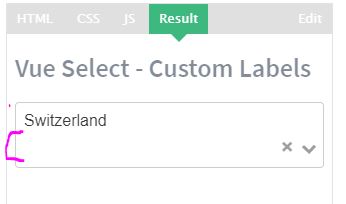
The 'current selection' area has an additional line of whitespace. my selection can only take up less than half of the selection text box ... if the text is too long ... i guess wrapping is turned on and an unneeded line of white space appears in the 'current selection' area. I've tried setting padding to 0 hoping that would give more room, but this trick didn't really help. It would be really like to use the tool; it's really cool, but the 'current selection area' for the UI is a bit wonky.
Please see the pictures below in case there is any misunderstanding as to which white space this message is about.
I reviewed other issues and i'm guessing this tool worked fine before some people put in feature requests for wrapping and other (#241, #176, #340, #308).
I would sort of consider this UI behavior a bug.
If there is a property which I can set which prevents this from happening which I'm overlooking, that would be awesome.
Figure 1: Ideal ... no white space but the select needs to be insanely long for a small bit of text

Figure 2: This is what happens when i start to shrink the internet browser, thereby also shrinking the width of the select
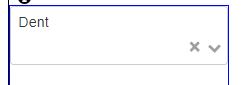
Figure 3: The below pictures show that same thing happens on the vue-select website
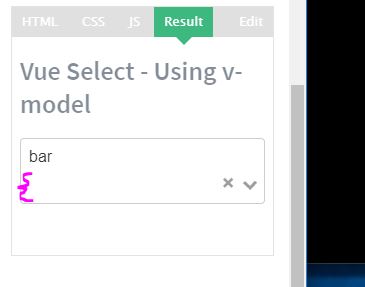
Figure 4: shows same as figure 3
 fractalocity
All 5 comments
seems to be a exact duplicate of #430. Somehow I overlooked issue #430
fractalocity
on 16 Feb 2018
Haven't this been merged yet?
 ghost
on 24 May 2018
ghost
on 24 May 2018
Hi. I'm using 2.5.1 and I'm having issues with this. See next image, I've just added more chars to the values from the Docs
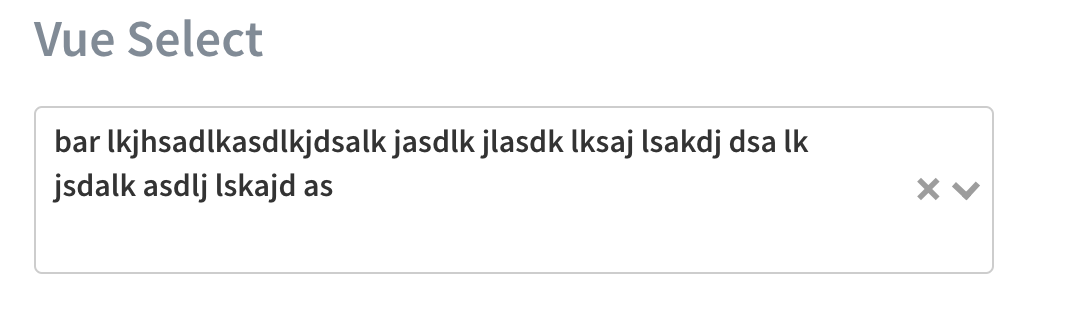
 nahuelhds
on 19 Oct 2018
nahuelhds
on 19 Oct 2018
@nahuelhds have you fixed it?
 abtv
on 22 Jan 2019
abtv
on 22 Jan 2019
Doesn't work for me in v3.1.0
I did an ugly workaround changing css 'display' property when a value is selected listening to 'input' event.
<v-select ref="select" @input="onInput" >
..

onInput: function (v) {
    if(v == null)
        this.$refs.select.$refs.search.style.display = "block"
    else
        this.$refs.select.$refs.search.style.display = "none"
}
 wmarcos
on 14 Jul 2019
wmarcos
on 14 Jul 2019
Related issues
 gilles6
·
3Comments
gilles6
·
3Comments
 rafalolszewski94
·
3Comments
rafalolszewski94
·
3Comments
 PrimozRome
·
4Comments
PrimozRome
·
4Comments
 rudykaze
·
3Comments
rudykaze
·
3Comments
 manjunath-coachthem
·
3Comments
manjunath-coachthem
·
3Comments
Most helpful comment
Hi. I'm using 2.5.1 and I'm having issues with this. See next image, I've just added more chars to the values from the Docs