Vue-select: How to pass extra params to the events?
I have a case where I am using this plugin inside a table and I need to pass the row index to the events:
:on-search="getItems"
:on-change="setItemID"
How can we achieve this?
 arivera12
All 6 comments
Wondering the exact same thing. Have a table with multiple selects and need to know which one was changed. Want to pass an index through the :on-change method
 ColinMichaels
on 30 Dec 2017
ColinMichaels
on 30 Dec 2017
Unless there's some Vue magic that I'm not up to date on - I think the only way to achieve this is to provide the VM instance as a parameter to every event that the component emits.
 sagalbot
on 10 Jan 2018
sagalbot
on 10 Jan 2018
@arivera12 I ran into this same problem and was able to resolve it with currying.
Untested basic example:
<row ...
  <v-select :value="theCurrentValue" :options="theOptions"
                  :on-change="(selected) => updateSelected(selected, theCurrentValue)"
                  :getOptionLabel="labelFromRow"
                  label="name">
</row>
Here I capture the entire theCurrentValue in the function scope and when the anonymous "selected" function is called I can access the theCurrentValue value.
Hope that helps!
 redijedi
on 7 Feb 2018
redijedi
on 7 Feb 2018
@redijedi it works, thanks for your solution!
 iyjian
on 21 Oct 2018
iyjian
on 21 Oct 2018
i need send row variable in onSearch
                            <v-select label="name" :filterable="false" :options="row.account_list" @search="onSearch(row)" dir="rtl" v-model="row.account">
                                <template slot="no-options">
                                    type to search GitHub repositories..
                                </template>
                                <template slot="option" slot-scope="option">
                                    <div class="d-center">
                                        ({{option.code}}) {{ option.name }}
                                    </div>
                                </template>

                            </v-select>
 nazaninhesari
on 26 Jan 2019
nazaninhesari
on 26 Jan 2019
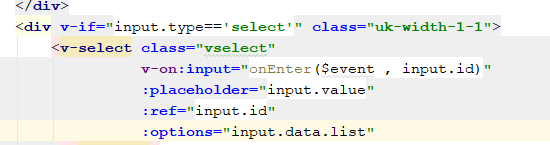
This Works too .
 Yxfms
on 17 May 2019
Yxfms
on 17 May 2019
Related issues
 rafalolszewski94
·
3Comments
rafalolszewski94
·
3Comments
 fabianmieller
·
3Comments
fabianmieller
·
3Comments
 gilles6
·
3Comments
gilles6
·
3Comments
 pud1m
·
3Comments
pud1m
·
3Comments
 xuwenhao
·
3Comments
xuwenhao
·
3Comments
Most helpful comment
@arivera12 I ran into this same problem and was able to resolve it with currying.
Untested basic example:
Here I capture the entire
theCurrentValuein the function scope and when the anonymous "selected" function is called I can access thetheCurrentValuevalue.Hope that helps!