Vue-select: Strange behavior after size CSS size change.
Hello,
after changing a few parameters i when i change the CSS the text box changes height to accomodate for the height of the element in pink which is:
.v-select.vselectmerlinaddresscountry input[type=search],
.v-select.vselectmerlinaddresscountry input[type=search]:focus


I went through your module and extracted the complete CSS then customized only the parts i needed. You will find them with this line:
//custom***********
but yet there are issues with that block with the input text. Can you please help me?
Here is the complete code:
.v-select.vselectmerlinaddresscountry {
    position: relative;
    font-family: sans-serif;
    text-align: center; //custom*************************************
}

.v-select.vselectmerlinaddresscountry,
.v-select.vselectmerlinaddresscountry * {
    box-sizing: border-box;
}

.v-select.vselectmerlinaddresscountry .open-indicator {
    position: absolute;
    bottom: 22px; //custom*************************************
    right: 10px;
    display: inline-block;
    cursor: pointer;
    pointer-events: all;
    transition: all .15s cubic-bezier(1, -.115, .975, .855);
    transition-timing-function: cubic-bezier(1, -.115, .975, .855);
    opacity: 1;
    transition: opacity .1s;
    height: 10px; //custom*************************************
    width: 10px; //custom*************************************
}

.v-select.vselectmerlinaddresscountry .open-indicator:before {
    border-color: rgba(60, 60, 60, .5);
    border-style: solid;
    border-width: 3px 3px 0 0;
    content: "";
    display: inline-block;
    height: 10px; //custom*************************************
    width: 10px; //custom*************************************
    vertical-align: top;
    transform: rotate(133deg);
    transition: all .15s cubic-bezier(1, -.115, .975, .855);
    transition-timing-function: cubic-bezier(1, -.115, .975, .855);
    box-sizing: inherit;
}

.v-select.vselectmerlinaddresscountry.open .open-indicator:before {
    transform: rotate(315deg);
}

.v-select.vselectmerlinaddresscountry.loading .open-indicator {
    opacity: 0;
}

.v-select.vselectmerlinaddresscountry.open .open-indicator {
    bottom: 18px; //custom*************************************
}

.v-select.vselectmerlinaddresscountry .dropdown-toggle {
    -webkit-appearance: none;
    -moz-appearance: none;
    appearance: none;
    display: block;
    padding: 0;
    background: none;
    border: 1px solid rgba(60, 60, 60, .26);
    border-radius: 4px;
    white-space: normal;
    transition: border-radius .25s;
}

.v-select.vselectmerlinaddresscountry .dropdown-toggle:after {
    visibility: hidden;
    display: block;
    font-size: 0;
    content: " ";
    clear: both;
    height: 0;
}

.v-select.vselectmerlinaddresscountry.searchable .dropdown-toggle {
    cursor: text;
}

.v-select.vselectmerlinaddresscountry.unsearchable .dropdown-toggle {
    cursor: pointer;
}

.v-select.vselectmerlinaddresscountry.open .dropdown-toggle {
    border-bottom-color: transparent;
    border-bottom-left-radius: 0;
    border-bottom-right-radius: 0;
}

//tag in the dropdown
.v-select.vselectmerlinaddresscountry .dropdown-menu {
    display: block;
    position: absolute;
    top: 100%;
    left: 0;
    z-index: 1000;
    min-width: 160px;
    padding: 5px 0;
    margin: 0;
    width: 100%;
    overflow-y: scroll;
    border: 1px solid rgba(0, 0, 0, .26);
    box-shadow: 0 3px 6px 0 rgba(0, 0, 0, .15);
    border-top: none;
    border-radius: 0 0 4px 4px;
    text-align: left;
    list-style: none;
    background: #fff;
    font-size: 24px; //custom*************************************
    text-align: center; //custom*************************************
}

.v-select.vselectmerlinaddresscountry .no-options {
    text-align: center;
}

.v-select.vselectmerlinaddresscountry .selected-tag {
    color: #333;
    // background-color: green;
    background: none !important;// no it's distracting to have a bright background
    // border: 1px solid #ccc;
    border: 0px solid #ccc; //custom*************************************
    border-radius: 4px;
    // height: 26px;
    font-size: 24px; //custom*************************************
    height: 32px; //custom*************************************
    margin: 6px 6px 0 6px;
    padding: 1px .25em;
    float: left;
    line-height: 26px;
}

.v-select.vselectmerlinaddresscountry .selected-tag .close {
    float: none;
    margin-right: 0;
    font-size: 20px;
    appearance: none;
    padding: 0;
    cursor: pointer;
    background: 0 0;
    border: 0;
    font-weight: 700;
    line-height: 1;
    color: #000;
    text-shadow: 0 1px 0 #fff;
    filter: alpha(opacity=20);
    opacity: .2;
}

.v-select.vselectmerlinaddresscountry input[type=search]::-webkit-search-cancel-button,
.v-select.vselectmerlinaddresscountry input[type=search]::-webkit-search-decoration,
.v-select.vselectmerlinaddresscountry input[type=search]::-webkit-search-results-button,
.v-select.vselectmerlinaddresscountry input[type=search]::-webkit-search-results-decoration {
    display: none;
}

.v-select.vselectmerlinaddresscountry input[type=search]::-ms-clear {
    display: none;
}

.v-select.vselectmerlinaddresscountry input[type=search],
.v-select.vselectmerlinaddresscountry input[type=search]:focus {
    appearance: none;
    -webkit-appearance: none;
    -moz-appearance: none;
    line-height: 1.42857143;
    // font-size: 1em;
    font-size: 24px; //custom*************************************
    // height: 34px;
    height: 45px; //custom*************************************
    display: inline-block;
    border: none;
    outline: none;
    margin: 0;
    padding: 0 .5em;
    width: 10em;
    max-width: 100%;
    // background: none;
    background: pink; //custom*************************************
    position: relative;
    box-shadow: none;
    float: left;
    clear: none;
    text-align: center; //custom*************************************
}

.v-select.vselectmerlinaddresscountry.unsearchable input[type=search] {
    max-width: 1px;
}

.v-select.vselectmerlinaddresscountry li {
    line-height: 1.42857143;
}

.v-select.vselectmerlinaddresscountry li>a {
    display: block;
    padding: 3px 20px;
    clear: both;
    color: #333;
    white-space: nowrap;
}

.v-select.vselectmerlinaddresscountry li:hover {
    cursor: pointer;
}

.v-select.vselectmerlinaddresscountry .dropdown-menu .active>a {
    color:$is-primary-merlin-hover;
    background:rgba(50,50,50,.3);
}

.v-select.vselectmerlinaddresscountry .dropdown-menu>.highlight>a {
    background:$is-primary-merlin-hover;
    color: white;
}

.v-select.vselectmerlinaddresscountry .highlight:not(:last-child) {
    margin-bottom: 0;
}

.v-select.vselectmerlinaddresscountry .spinner {
    opacity: 0;
    position: absolute;
    top: 5px;
    right: 10px;
    font-size: 5px;
    text-indent: -9999em;
    overflow: hidden;
    border-top: .9em solid hsla(0, 0%, 39%, .1);
    border-right: .9em solid hsla(0, 0%, 39%, .1);
    border-bottom: .9em solid hsla(0, 0%, 39%, .1);
    border-left: .9em solid rgba(60, 60, 60, .45);
    transform: translateZ(0);
    animation: vSelectSpinner 1.1s infinite linear;
    transition: opacity .1s;
}

.v-select.vselectmerlinaddresscountry .spinner,
.v-select.vselectmerlinaddresscountry .spinner:after {
    border-radius: 50%;
    width: 5em;
    height: 5em;
}

.v-select.vselectmerlinaddresscountry.loading .spinner {
    opacity: 1;
}

@-webkit-keyframes vSelectSpinner {
    0% {
        transform: rotate(0deg);
    }
    to {
        transform: rotate(1turn);
    }
}

@keyframes vSelectSpinner {
    0% {
        transform: rotate(0deg);
    }
    to {
        transform: rotate(1turn);
    }
}
/*
.fade-enter-active,
.fade-leave-active {
    transition: opacity .15s cubic-bezier(1, .5, .8, 1);
}

.fade-enter,
.fade-leave-to {
    opacity: 0;
} */
 nicolasvahidzein
All 12 comments
+1
 trycatchjames
on 11 Sep 2017
trycatchjames
on 11 Sep 2017
In fact, it is happening in the original.
 setefocos
on 21 Sep 2017
setefocos
on 21 Sep 2017
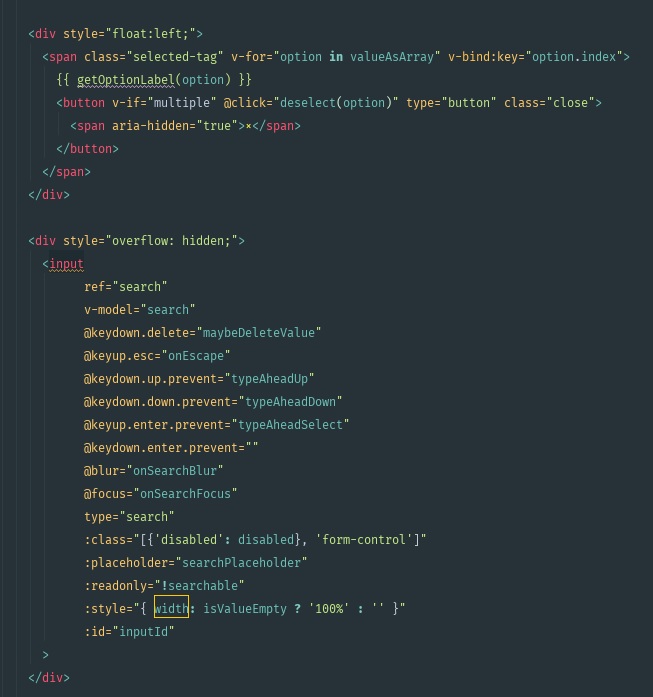
I solved it on the template, adding 2 wrapping divs, over the <span> and over the <input>, and changing the FALSE value of the input width style from 'auto' to '':
setefocos
on 21 Sep 2017
I found the same behavior including component inside an horizontal-form.
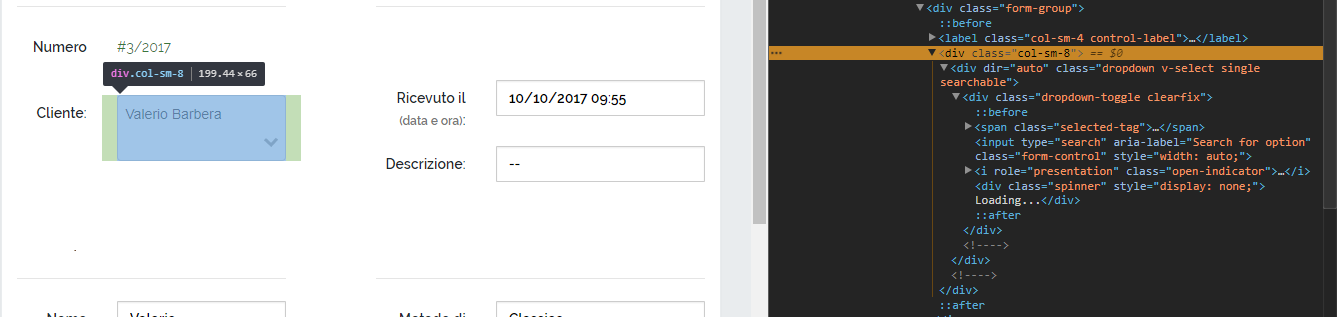
But I have not been able to correct the behavior.
 ilvalerione
on 16 Oct 2017
ilvalerione
on 16 Oct 2017
I'm having major problems like this too. And I'm only trying to change the font size. Has anyone found a more elegant solution?
 embryCODE
on 18 Oct 2017
embryCODE
on 18 Oct 2017
I'm disappointed, it seems mr sagalbot is not maintaining this module. This is a huge problem. I suggest we create duplicate tickets pointing to this one to get his attention. Or does someone have a better idea?
nicolasvahidzein
on 18 Oct 2017
I will do a pull request with the solution.
setefocos
on 19 Oct 2017
I’ve moved on to vue-multiselect.
embryCODE
on 19 Oct 2017
@embryCODE thanks a million!!! That is my solution.
nicolasvahidzein
on 20 Oct 2017
this is working solution taken from @stefan-angelov on this page
225
.v-select .dropdown-toggle {
display: flex !important;
flex-wrap: wrap;}
.v-select input[type=search], .v-select input[type=search]:focus {
flex-basis: 20px;
flex-grow: 1;
height: 33px;
padding: 0 20px 0 10px;
width: 100% !important;
}
 MohammadSabbagh
on 4 Nov 2017
MohammadSabbagh
on 4 Nov 2017
@MohammadSabbagh Thanks! Solves it for Chrome, but doesn't look like this works for Firefox unfortunately.
 kjfdebruin
on 24 Jan 2018
kjfdebruin
on 24 Jan 2018
Not fully tested, but I seemed to fix this issue in a horizontal form by adding this css:
.v-select .selected-tag { position: absolute; }
Functionality still appears to work as expected.
 danbrellis
on 8 Aug 2018
danbrellis
on 8 Aug 2018
Related issues
 gilles6
·
3Comments
gilles6
·
3Comments
 FrozenIce0617
·
3Comments
FrozenIce0617
·
3Comments
 PrimozRome
·
4Comments
PrimozRome
·
4Comments
 threeaccents
·
3Comments
threeaccents
·
3Comments
 xuwenhao
·
3Comments
xuwenhao
·
3Comments
Most helpful comment
this is working solution taken from @stefan-angelov on this page
225
.v-select .dropdown-toggle {
display: flex !important;
flex-wrap: wrap;}
.v-select input[type=search], .v-select input[type=search]:focus {
flex-basis: 20px;
flex-grow: 1;
height: 33px;
padding: 0 20px 0 10px;
width: 100% !important;
}