Vue-select: Using Vue Select Inside a Modal

Inside the Modal , when I click in the select , it shows the scrow of the page .
 murilolivorato
All 5 comments
This is going to be difficult for me to replicate. Can you find the root of the issue?
 sagalbot
on 22 Feb 2017
sagalbot
on 22 Feb 2017
Hi @sagalbot ..
I'm having this issue also.

But my problem is that, cannot scroll it and the list is cutoff by the modal.
I'm guess perhaps its due to z-index maybe?
For more information, I'm using jQuery NiftyModal.
Thanks in advance
 nizam27391
on 22 Feb 2017
nizam27391
on 22 Feb 2017
After debugging and try many solutions for the issue. I manage to solve my issue. It's due to the max-height set for the class .dropdown menu is 400px. And the .modal-content is having overflow:hidden.
So as temporary solution (not sure if its proper or not), I'm changing it using jQuery to style the max-height to lesser value and set .modal-content overflow to initial.
Thanks
nizam27391
on 22 Feb 2017
You can change the max height directly, with the max-height prop:
<v-select max-height="200px"></v-select>
Good, I tried the max height but still the same, any help?

Update
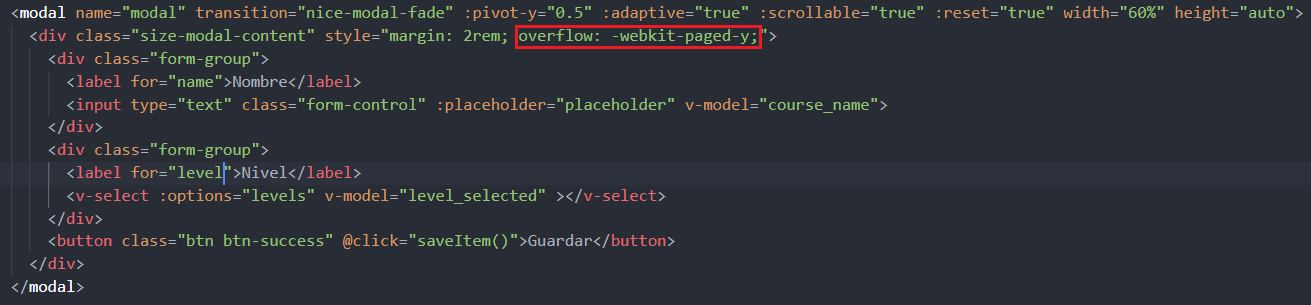
I got the modal to expand down when I press v-select

 Ki11Z0n3
on 17 Apr 2019
Ki11Z0n3
on 17 Apr 2019
Related issues
 ducdev
·
3Comments
ducdev
·
3Comments
 twz915
·
3Comments
twz915
·
3Comments
 gilles6
·
3Comments
gilles6
·
3Comments
 NexoraSolutions
·
3Comments
NexoraSolutions
·
3Comments
 pud1m
·
3Comments
pud1m
·
3Comments
Most helpful comment
You can change the max height directly, with themax-heightprop: