Vue-router: Nodes leak when using an input with type=password
Version
3.0.1
Reproduction link
<!DOCTYPE html>
<html lang="en">

<head>
  <meta charset="UTF-8">
  <meta name="viewport" content="width=device-width, initial-scale=1.0">
  <meta http-equiv="X-UA-Compatible" content="ie=edge">
  <title>Document</title>
</head>


<body>
  <script src="https://unpkg.com/[email protected]/dist/vue.min.js"></script>
  <script src="../dist/vue-router.min.js"></script>

  <div id="app">
    <router-link :to="'/'">Home</router-link>
    <router-link :to="'/Login'">Login</router-link>
    <router-view />
  </div>

  <script>
    const Home = {
      template: `
      <div class="home">
      <input
        type="password"
        placeholder="password"
        name="password"><br>
  </div>
  `
    }

    const Login = {
      template: `
      <div class="login">
    <div>
      <h2>Login</h2>

      <button>Login</button>
    </div>
  </div>
  `,
      methods: {
        submitClicked(id, password) { }
      }
    }

    Vue.use(VueRouter);
    const router = new VueRouter({
      mode: "history",
      base: '/explorations/',
      routes: [
        {
          path: "/",
          name: "home",
          component: Home
        },
        {
          path: "/login",
          name: "login",
          component: Login
        }
      ]
    });

    new Vue({
      router,
    }).$mount("#app");
  </script>

</body>

</html>
(file to be created in explorations folder) in vue-router repro after running npm run build
Steps to reproduce
- record memory grap in performance tab in chrome
- click links to change views multiple times
- garbage collect
- repeat
- stop recording
- check node count increase
What is expected?
node count should go back to the same value after second garbage collection
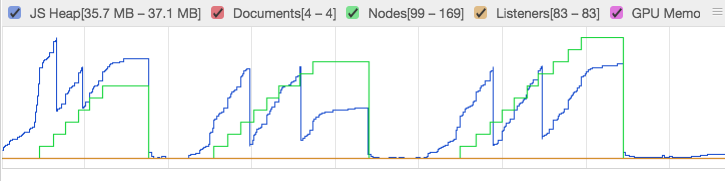
What is actually happening?
it keeps increasing
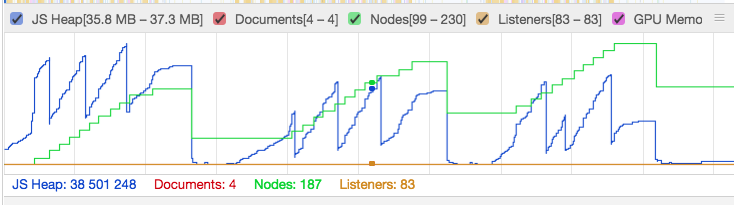
Removing the type=password makes it behave as expected
 posva
posva
All 7 comments
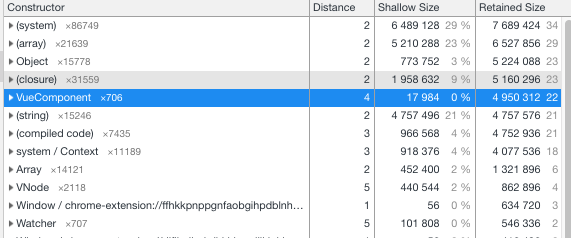
seems like VueComponent and VNode did not cleared.
I did some test, seems little bit better:
// vue-router.esm.js
// # 535
Vue.mixin({
beforeCreate: function beforeCreate () { ... },
    destroyed: function destroyed () {
      registerInstance(this);
      this.$vnode = null; // test
    }
});
 chiaweilee
on 13 Nov 2018
chiaweilee
on 13 Nov 2018
Sorry to bother, has there been any progress on this since, we also noticed this memory leak as well and was wondering if there was any work around?
Edit: I tried @chiaweilee fix with the reproduction and unfortunately it looks like the nodes (green line) still increase over time.

 GummyDonut
on 20 Nov 2018
GummyDonut
on 20 Nov 2018
I've done some digging and I think this issue is not related to Vue Router. I tried to reproduce this issue in plain Vue by just toggling a password input on and off.
I created a JSFiddle reproducing this:
https://jsfiddle.net/Domino9697/u2Lnh9r3/
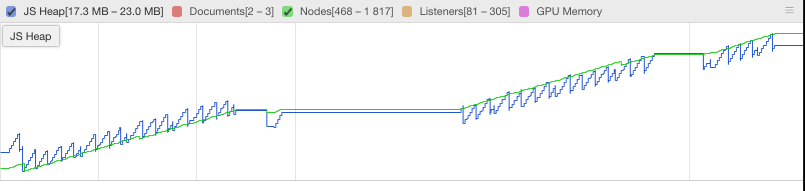
If you follow the steps mentioned by @posva above by clicking on the button instead of changing views, you will have these results in the performance tab:

By removing the type="password", you will see a normal behavior as described by @posva.
I then did some more digging in the memory panel of the chrome dev tools and I found that the Detached HTML Input elements were still referenced by a node named Blink Roots:
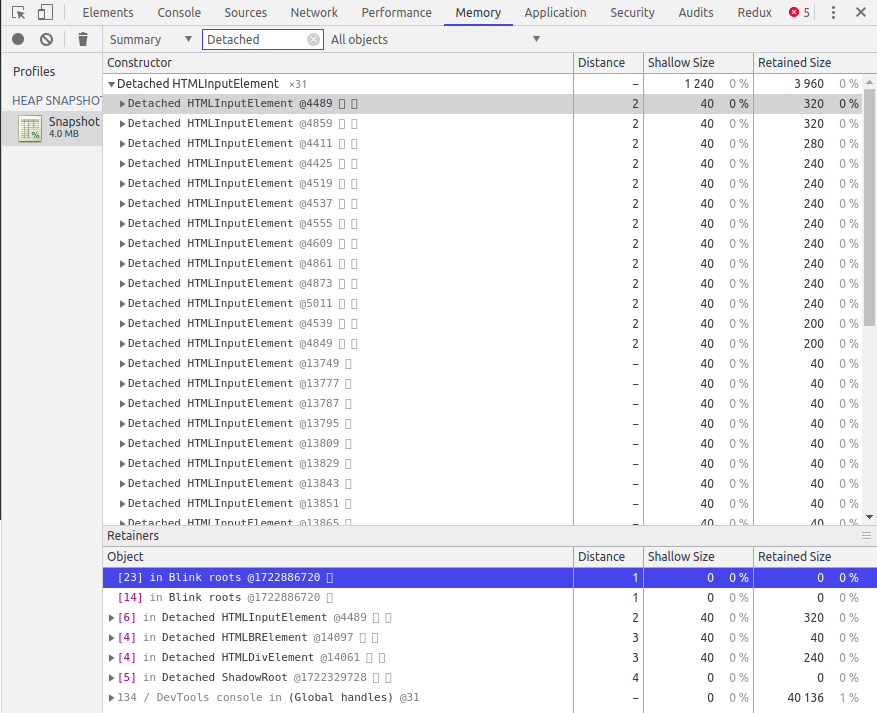
These Blink Roots do not appear when using an input type other than "password".
I then tried to reproduce the issue in plain JavaScript to see if it was a Vue related issue:
https://jsfiddle.net/Domino9697/zb59ch2j/
The idea is to add a password type input and then to remove it from the DOM in plain JavaScript using a toggle button.
We get the same issue as above:

However, if we remove the input type from the field we get this:
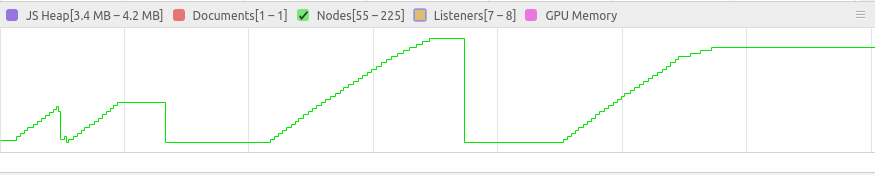
I thus believe this is a browser related issue.
 Domino9697
on 23 May 2019
Domino9697
on 23 May 2019
Thanks! I think you should open an issue in chromium and any other browser that has the same leak. I haven't checked their issue trackers so maybe it was already reported
posva
on 23 May 2019
I opened https://bugs.chromium.org/p/chromium/issues/detail?id=967438
to me the leak only happens if we type in the password field
posva
on 27 May 2019
Hmmm this is weird ! In my case, this also happens when I am only toggling the password input ... In both cases, I think the problem is related to the Blink root element referencing the password html input elements. Since these are referenced, they cannot be removed with the garbage collector.
Domino9697
on 28 May 2019
Closing as this is not related to Vue nor Vue router
posva
on 5 Jun 2019
Related issues
 lbineau
·
3Comments
lbineau
·
3Comments
 rr326
·
3Comments
rr326
·
3Comments
 shinygang
·
3Comments
shinygang
·
3Comments
 baijunjie
·
3Comments
baijunjie
·
3Comments
 Lyfme
·
3Comments
Lyfme
·
3Comments