Vue-router: Allow absolute path change without destroying rendered components (Twitter-style modals)
Status Quo
In vue-router, the URL is the single source of truth. That means that no matter weither the user triggers a route from an external link, by typing out the URL himself or by clicking on a <router-link> inside our app, the same route if the URL is the same, then the same routes will be matched, and the same components will be rendered - no side-effects are taken into account.
I consider this to be a sensible, good approach. But there are situations where this behaviour is undesired:
The problem
If you go to Twitter's website, and open a tweet from any place (your own timeline, someone else's timeline, a list ...), three things happen:
- A modal with the tweet opens
- the URL changes to an absolute URL pointing to that tweet
- Something doesn't change, though: the background of the modal. Even though we started from e.g.
twitter.com/linus_borgand went totwitter.com/vuejs/status/xxxxxwhen we opened the modal, my profile's timeline is still in the brackground.
The user could simply copy & paste the tweets URL, post it somewhere, go back to twitter, close the modal and continue browsing my profile. Great!
Butr currently, this is not possible with vue-router. With vue-router, we would either have to
- render the modal as a child-route of my timeline, which means the URL would not point to the tweet really, but to
/linus_borg_/status/vuejs/status/...or something. - render the tweet route as an absolute path, but then the background view (my profile) would be destroyed.
Downsides
This breaks vue-routers philsophy of the URL as the only source of truth, because opening a tweet from timeline leads to a different view than opening the tweet's URL directly.
Proposed Solution(s)
Here this proposal becomes thin, and I didn't add the discussion label for nothing:
I don't really have an idea on how to approach this. I know that it's probably very hard to implement this in vue-router as it working different to the whole route-matching pattern etc, so I'm open to ideas.
Maybe, we could at least implement a way to "pause" the router's URL change callback? So the user can "deactivate" the router momentarily, change the URL himself, show the modal, and on closing the modal, reactivate the router?
Or maybe this could be accomplished with named router views, if we allow route that _only_ point to a named view , so the "normal components, e.g. the profile, stay rendered, and we show the overlay in a named view? (tested this, doesn't work right now).
Anyways, I think this wold be a great feature for many scenarios (Spotify's uses this for its ovelays showing album / playlist / artist views anywhere, for example)
So, what do you guys think? Any opinions? Ideas for solutions?
 LinusBorg
All 85 comments
I think this can be done with history.pushState:
- You can pushState to replace the url when the modal shows up:
history.pushState({}, null, '/tweet/3') - Then do back to dismiss it:
history.back() - If you leave the route, you can also call
history.back()to pop that state
I tried on a project and works like a charm. It's quite manual, so we may consider leveraging that.
Edit: This went through an RFC for v4 and is merged and supported through the route prop on <router-view>. There is an e2e test on vue-router next repo for modals
 posva
on 30 Sep 2016
posva
on 30 Sep 2016
I think this is already possible with 2.0 because child routes can have a root path. ;)
It's not quite a noticeable change, so you probably have missed that:
https://github.com/vuejs/vue-router/blob/dev/examples/nested-routes/app.js#L39-L43
To achieve your example:
{
// /linus_borg
path: '/:userId', component: Parent,
children: [
// NOTE absolute path here!
// this allows you to leverage the component nesting without being
// limited to the nested URL.
// components rendered at /baz: Root -> Parent -> Baz
// /vuejs/status/xxxxx
{ path: '/:organization/status/:xxxxx', component: Baz }
]
}
 fnlctrl
on 30 Sep 2016
fnlctrl
on 30 Sep 2016
@posva ...but pushstate will trigger a popstate event which will be picked up by the router... Which will re-route, which we don't want.
LinusBorg
on 30 Sep 2016
@fnlctrl but this would to duplicate paths in the pathMap if I wanted that path as a root route and as a child route in multiple places...
LinusBorg
on 30 Sep 2016
@LinusBorg
I think duplicating paths in config is unavoidable if you need it('/vuejs/status/xxxxx') to be child route in multiple places.. as for the root route, there's only one to be defined, so no duplications.
Aside from that, I guess we can also try aliases?
http://router.vuejs.org/en/essentials/redirect-and-alias.html
[{
// /linus_borg
path: '/:userId', component: Parent,
children: [
{ path: ':organization/status/:xxxxx',
component: Baz,
// /vuejs/status/xxxxx
alias: '/:organization/status/:xxxxx' }
],
}, {
path: '/foo/bar', component: Parent,
children: [
{ path: ':organization/status/:xxxxx',
component: Baz,
// /vuejs/status/xxxxx again
alias: '/:organization/status/:xxxxx' }
]
}, {
path: '/:organization/status/:xxxxx', component: Baz
}]
Duplicates in the pathMap are not possible, the last one would override the previous one... So only one, the last one, would ever be recognizable.
LinusBorg
on 30 Sep 2016
I see... but in that case where you want the path as a child route in multiple places, it would be mapping /:organization/status/:xxxxx to multiple components...so what /:organization/status/:xxxxx shows will depend on app state.
I think what we really need is a url rewrite feature like the backend servers have. It would be like an alias without being registered into pathMap.
i.e.
User is on /linus_borg,
navigates to /linus_borg/vuejs/status/:xxxxx
url rewrites to /vuejs/status/:xxxxx, but no actual navigation is made.
From this point on:
When the user refreshes the page, it shows the root record that /vuejs/status/:xxxxx really maps to.
When the user clicks another link, everything goes on normally.
fnlctrl
on 30 Sep 2016
Yes, that's describes pretty much what I had in mind, thanks :)
LinusBorg
on 30 Sep 2016
I think going from /u/alice to /u/bob/s/something will reuse the user view component, so how about "freezing" updates on it? I recall Evan talking about ability to bypass reactive updates.
 simplesmiler
on 30 Sep 2016
simplesmiler
on 30 Sep 2016
I'm facing the exact same issue.
With backbone router you have a trigger option.
It allows you to update the url without making any route matching / rerender
http://backbonejs.org/#Router-navigate
that behaviour with router.push or router.replace would be awesome :)
 nicolas-t
on 7 Oct 2016
nicolas-t
on 7 Oct 2016
any update on this topic ?
nicolas-t
on 21 Oct 2016
I 'm on this, but haven't found the time to finish it with tests and all.
Actually it's quite easy: You could, today, use the history API directly to change the URL with pushstate() or replaceState() and revert it back after e.g. the popup closes.
Since the "popstate" event will only be called by actually clicking on the browser buttons, this can be achieved without interfering with vue-router.
I'm working on providing a convenience function for this, but since I'll be on vacation until Nov. 2nd, this may take a while.
LinusBorg
on 21 Oct 2016
This IS possible with vue-router 2, I just migrated my app to vue-router 2 to achieve this.
This code (adapted from here) will actually do what you want:
const User = {
template: `
<div class="user">
<h2>User {{ $route.params.id }}</h2>
<router-view></router-view>
</div>
`
}
const UserHome = { template: '<div>Home</div>' }
const UserProfile = { template: '<div>Profile</div>' }
const UserPosts = { template: '<div>Posts</div>' }
const router = new VueRouter({
routes: [
{ path: '/user/:id', component: User, name: 'user',
children: [
// UserHome will be rendered inside User's <router-view>
// when /user/:id is matched
{ path: '', component: UserHome, name: 'home' },
// UserProfile will be rendered inside User's <router-view>
// when /user/:id/profile is matched
{ path: 'profile', component: UserProfile, name: 'profile' },
// UserPosts will be rendered inside User's <router-view>
// when /posts is matched
{ path: '/posts', component: UserPosts, name: 'posts' }
]
},
{ path: '/posts', component: UserPosts, name: 'posts-permalink' }
]
})
const app = new Vue({ router }).$mount('#app')
<div id="app">
<p>
<router-link :to="{name: 'home', params: {id: 'foo'}}">/user/foo</router-link>
<router-link :to="{name: 'profile', params: {id: 'foo'}}">/user/foo/profile</router-link>
<router-link :to="{name: 'posts', params: {id: 'foo'}}">/posts (with user ID context)</router-link>
<router-link :to="{name: 'posts-permalink'}">/posts (permalink)</router-link>
</p>
<router-view></router-view>
</div>
Basically you can go to the route named posts by sending the id of the user. It will have the URL /posts but will contain the information about the user, and the UserPosts component will be inserted in the router-view element of the User component (like on Twitter, the content displayed as modal above the user feed). Please note that the URL does not contain the user id.
Now, if you refresh the page, as the URL has no information regarding the user context (here the id of the user), it will match the route posts-permalink, therefore not displaying the context in which this modal was opened in the first place. The component UserPosts will then be inserted in the root app router-view element.
To summarize, both posts and posts-permalink have the same URL, just different contexts.
Just like on Twitter.
Hope this helps
Jérôme
 jeerbl
on 26 Oct 2016
jeerbl
on 26 Oct 2016
Will have to test this, looks good. Though I'm not sure weither the definition of the same absolute path in different places can produce unwanted side-effects e.g. for the pathMap. will look into this.
If that works out as described though, I will be happy to close this issue.
LinusBorg
on 18 Nov 2016
@LinusBorg The first route matching will be the one chosen. In this case, when going to /posts directly, the router will look for it, will see/user/:id therefore will continue and then will find /posts, the matching route.
About priorities between routes, in the vue-router documentation, see Dynamic Route Matching > Matching Priority:
Sometimes the same URL may be matched by multiple routes. In such a case the matching priority is determined by the order of route definition: the earlier a route is defined, the higher priority it gets.
jeerbl
on 18 Nov 2016
Hm yeah that should do it ...
LinusBorg
on 18 Nov 2016
@jeerbl I'm trying to implement this and here's what I found...
- On a profile page, visitor clicks "posts" and a modal opens with posts (via child router-view)
- Visitor clicks back button and modal disappears. All good.
- Visitor then clicks forward button expecting the modal to re-open, but instead they're redirected to the posts permalink route.
I'm guessing this is because the history push was not initiated from Vue Router so you lose the ability to tell Vue Router which route you want to use.
 bradroberts
on 29 Nov 2016
bradroberts
on 29 Nov 2016
@bradroberts Yes indeed. Got no solution for this yet. On Twitter it works fine. I'll try to find a way.
jeerbl
on 29 Nov 2016
This seems a little hackish, but it solved the back/forward button issue for me. In keeping with the example, the parent component (User) can intercept the route change (in this case when the visitor uses the browser's forward button) using the beforeRouteLeave hook and change it to the desired route. I found that using router.push adds an additional history entry, likely because Vue Router has already added the new entry by the time the beforeRouteLeave hook is called. However, replace seems to work.
const User = {
beforeRouteLeave (to, from, next) {
if (to.name === 'posts-permalink') {
router.replace({ name: 'posts'});
} else {
next();
}
}
}
It's worth noting that this will also affect route changes initiated by <router-link>, so if you actually wanted the visitor to navigate to the posts-permalink route (from the child posts route), you couldn't do so. I'm not sure how to address that unless there's a way to differentiate between a router-link click and the browser's back/forward buttons.
bradroberts
on 1 Dec 2016
@LinusBorg I think it would still make sense to implement something like the BackboneJS functionality @nicolas-t mentioned. Just explicitly say to the router: "Ok, now just change the route silently and don't do any thing about it". This is much easier to reason about. I read through the example given by @jeerbl several times, and I still can't figure out how or if I can apply it in my situation.
 Maidomax
on 10 Mar 2017
Maidomax
on 10 Mar 2017
I was just about to post an issue similar and then I saw this. What @nicolas-t suggested seems like it would be perfect. Basically an "update the URL silently". I'm thinking this may be the easiest way forward? Since vue-router can operate in different modes, I would like to use vue-router to always change the URL. This way it can work in history mode or the hash fallback thing.
My scenario is just paging through the comments section of a page. I would like to change the comment page query param without refreshing the whole page. This way the URL could be shared with others and that particular comment page would show.
 hworld
on 22 Mar 2017
hworld
on 22 Mar 2017
Any updates on this? I really need this. Right now I have both routes for the modals (like login, register, product, etc) and in place rendering. But I have to sacrifice the user unable to click back button for closing the modal, and have to add a perma-link box, because in place rendering cannot update the browser url :(
 99Percent
on 18 Apr 2017
99Percent
on 18 Apr 2017
Would love something like this feature nicolas-t was talking about. Im building a product modal where a user can navigate between different products in the same modal.
 nilsi
on 28 Apr 2017
nilsi
on 28 Apr 2017
any updates on this ? i think the backbone router solution is quite intuitive
 darkylmnx
on 8 May 2017
darkylmnx
on 8 May 2017
@jeerbl your solution only works from one page and one needs to duplicate the children on each state for the solution to work from anywhere, exemple : notification system. You need to open a modal post from anywhere because it would be opened from the notification dropdown
darkylmnx
on 9 May 2017
anyone have any insight of how we can help to solve this issue ?
 CoffiDev
on 23 May 2017
CoffiDev
on 23 May 2017
Yepp, If someone could make a jsfiddle of how we can achieve Pinterest style navigation it would be great. At the moment Im using history.pushState({}, null, '/products/10/slug') and open the modal manually but I still haven't figured out all parts with the navigation.
nilsi
on 28 May 2017
Facing the same issue. Could the people who have figured out workarounds post their solutions, along with their drawbacks?
 lazlo-bonin
on 2 Jun 2017
lazlo-bonin
on 2 Jun 2017
@lazlo-bonin As stated here: https://github.com/vuejs/vue-router/issues/703#issuecomment-255359627 you can still use pushState() and replaceState() to display whatever you want in the browser's address bar. This has worked fine for what I needed. One drawback is when the user hits the "back" browser button and then "forward" again - your code doesn't get a chance to intercept the action and display a model. You could observe the event, but I found this path of logic to get too complicated.
My website has two methods of displaying a post via its dynamic route: 1) within a modal, and 2) with the content embedded directly within the page. Both scenarios show example.com/posts/123 in the address bar. When navigating around the site, if the user clicks to a post, it is displayed in the modal and the url is changed artificially with pushState(). Clicking "back" just takes them back. If they arrive on the page from another site (or they click "forward" after clicking "back", which is uncommon enough) the content is displayed within the page instead of a modal. This is the desired behavior for newcomers to the site because they see the site's logo and full navigation.
This was modeled after Product Hunt. To see an example, go directly to a post: https://www.producthunt.com/posts/workflowy It appears "within" the page. However, if you got to that post from browsing on the site, you'd see it in a modal. Both versions have the same URL in the address bar.
 pejalo
on 2 Jun 2017
pejalo
on 2 Jun 2017
Hello,
I have two vuex actions for opening and closing the modal:
(the modal is just a div at the end of the <body>, visible depending on the app state)
When I open the modal I set the route I want, for example /item/42
openModal = ({ commit }, props) ->
commit(types.UI_OPEN_MODAL, props)
window.history.pushState(null, 'sitename', '/item/42')
When I close the modal I pass the route of the page behind the modal (for example /home)
closeModal = ({ commit }, { setRouteTo }) ->
commit(types.UI_CLOSE_MODAL)
if setRouteTo
window.history.pushState(null, 'sitename', setRouteTo)
it works pretty well.
drawbacks:
- You have to specify the url you want to set everytime you close the modal
You can't use router-link by default to open the modal, you need to trigger the actions via @click events, so you can't use "open in new tab" feature without a bit of coding.
history.back can be a bit buggy.
Whenever you change pages you have to force modal closing
I think that's all, tell me if you need more details.
I really wish some clean way of doing this will be added to vue-router
nicolas-t
on 2 Jun 2017
Hello. If I want to make the view by Overlapping layers (display: fixed). For example
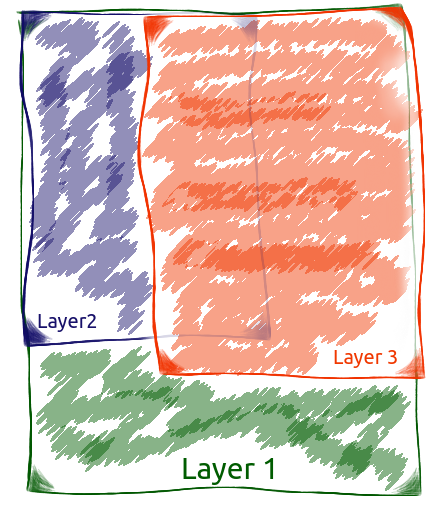
And. Layer1 is static "root".
Layer2 is _Functional_ routing by:
{ path: '/one', name: 'one', component: Layer2one },
{ path: '/two', name: 'two', component: Layer2two },
{ path: '/three', name: 'three', component: Layer2three },
Layer3 is _Settings_ (I would like to) routing by:
{ path: '(.*)?/settings/first', name: 'first', component: Layer3first },
{ path: '(.*)?/settings/second', name: 'second', component: Layer3second },
{ path: '(.*)?/settings/last', name: 'last', component: Layer3last },
{ path: '(.*)?/settings/additional', name: 'additional', component: Layer3additional },
{ path: '(.*)?/settings/more', name: 'more', component: Layer3more },
As a result: least 15 (3*5) variant of routing path. The current router model finds only one path. Why not more?? This is the usual VIEW - not backend controller!...
Now I did TWO root VUE Instance in one APP
Each has its own router... First - absolute for _Functional_ layer, and second relative for _Settings_ layer.
It's crooked and awful (because the vue-router finds only one path), but it works - because I have two vue-router to find two path ...
/
/two
/two/settings/more
/three/settings/more
/settings/more
/settings/additional
Can you add feature - multimatching _for relative_ path?
 tebaly
on 18 Jul 2017
tebaly
on 18 Jul 2017
A modal with the tweet opens
@LinusBorg @fnlctrl - How will you close your [nested|relative] Modal, now? And when user type|paste URL? For what I described above, there is no normal way for this. I think..
Methods back() and go() is simple alias to window.history.go(n) - and, when you past URL and close modal by router.back() - Your app will self close, Instead of closing the modal dialog (suicidal app). Therefore, we must (#575 #1605) Make a _router inside the router_ With his blackjack and hookers method _back()_
beforeEach((to, from, next) => {
if (!to.meta.back) {
to.meta.back = from.fullPath;
}
next();
});
And in self back() method of components
back(back) {
back = back ? back : this.$route.meta.back;
back ? this.$router.replace(back) : this.$router.replace('/');
},
I honestly don't really understand what you are getting at. It may be the language barrier :(
LinusBorg
on 18 Jul 2017
May be.. I can draw :art:
Let me ask you a question personally, To clarify.
i.e.
User is on /linus_borg,
navigates to /linus_borg/vuejs/status/:xxxxx
url rewrites to /vuejs/status/:xxxxx, but no actual navigation is made.
It is Good. How do you close your modal dialog?
tebaly
on 18 Jul 2017
My modal dialog will be a route component like any other. I close it by navigating to another route, which can happen in a multitude of ways.
LinusBorg
on 18 Jul 2017
@LinusBorg but here the modal is opened without really being a route.
from /home to /modal
modal appears, but nothing is on the background.
Except if : /modal is a nested component of /home
If it's the case, then you can't open /modal from another route than /home which is the main issue here, having the possibility to open a modal from anywhere associated with a url.
(and push state is buggy on back button and stuff)
Just like twitter ou dribbble or pinterest or facebook's modal system.
As said above
@jeerbl your solution only works from one page and one needs to duplicate the children on each state for the solution to work from anywhere, exemple : notification system. You need to open a modal post from anywhere because it would be opened from the notification dropdown
darkylmnx
on 18 Jul 2017
I close it by navigating to another route
if you have one modal to one page - Holy simplicity :dart:
But I have one modal, to more then one pages. And "navigating to another route" is not simple..
tebaly
on 18 Jul 2017
@tebaly ... Just navigate back via this.$router.go(-1) in your close method.
 mikeyudin
on 18 Jul 2017
mikeyudin
on 18 Jul 2017
@tebaly ... Just navigate back via this.$router.go(-1) in your close method.
when editing pushState out of vue-router, the history is buggy (on chrome windows at least), so even with this, the problem remains.
darkylmnx
on 18 Jul 2017
@mikeyudin - Repeat easily: _"Methods back() and go() is simple alias to window.history.go(n) - and, when you paste (or type) URL and close modal by router.back() - Your app will self close, Instead of closing the modal dialog (suicidal app)."_
tebaly
on 18 Jul 2017
Would love the mentioned "wild card" functionality as well. Maybe to help clearify. I think what is meant is, that the "modal" needs it's own url. That's what is the hard part. So using a modal in many different places and using the history method works, but that means it's not available as it's own url (if you copy/paste it as mentioned).
 bensmeets
on 19 Jul 2017
bensmeets
on 19 Jul 2017
Any update this issue
 tagmetag
on 7 Nov 2017
tagmetag
on 7 Nov 2017
Why vue-router have no way to change url whithout re-render route component? It's very important feature on my opinion. A big disadvantage against ssr... Just add option for router.replase() method keepCurrentCopmAlive: true/false of something like.
 tobira-shoe
on 14 Nov 2017
tobira-shoe
on 14 Nov 2017
The only working solution I have found is to store the original "parent" component in Vuex and then use a <component :is="…"></component> to conditionally show it in App.vue just below the router-view:
<router-view keep-alive></router-view>
<component :is="$store.state.modal.bgComponent" v-if="$store.state.modal.open"></component>
It is hacky, but it works in exactly the way I'd expected it to whilst not needing any native pushState hacks or circumnavigating VueRouter.
 robsterlini
on 20 Nov 2017
robsterlini
on 20 Nov 2017
i agree with @Maidomax this has to be implemented like the Backbone router trigger:false option.
The parent/children paths solution does not cover all cases, one of which: You have a search page with results and filters/sorting toggles, user updates a filter or updates the sorting order, we would like to fetch new results and display them, but also silently update the URL in case the user copies that URL for sharing or bookmark.
No modal, no child components, just a search results.
 akhoury
on 2 Dec 2017
akhoury
on 2 Dec 2017
(removed "+1" comment - vote with emojis as is common netiquette on github)
LinusBorg
on 7 Dec 2017
I'm using this code as an alternative
vue-html
<button @click="login">login</button>
<modal v-if="$route.query.page === 'login'">
<slot />
</modal>
methods.click()
this.$router.push({ query: { page: 'login' } }, (route) => {
if (route.query.page && !this.$isServer) {
setTimeout(function() {
window.history.replaceState({} , null, `/${route.query.page}`)
}, 1)
}
})
 e2goon
on 24 Dec 2017
e2goon
on 24 Dec 2017
This functionality is sometimes referred to as 'microstates'.
Another good example of this is viewing an album on Facebook. A nicety of the Facebook implementation is that it erases the all the history that was created by the modal once it is closed.
Most SPA frameworks allow for bypassing the render on route change so I'm a bit disappointed to learn that this is not possible with Vue as this is an essential requirement in the project I'm working on in which I have chosen Vue for.
I agree that Vue should have some way of overriding the render like the Backbone router.
Vue is nice but I've found myself stumbling on several obstacles like this one which are otherwise very simple to implement with other frameworks.
 theone00
on 2 Jan 2018
theone00
on 2 Jan 2018
I see two different options discussed, both could be solved with a named view, a route wildcard/suffix and a new type option (eg standard(default)/masquerade/additive). A somewhat structured URL rewrite approach.
The first example is that of @LinusBorg. Route /linus_borg/vuejs/status/xxxxx should display /vuejs/status/xxxxx in a popup of /linus_borg, but display a URL of /vuejs/status/xxxxx
We could have a route:
{
path: '*/vuejs/status/:xxxxx',
type: masquerade
name: status
component: Status
}
The second case is /linus_borg/vuejs/status/xxxxx should display /vuejs/status/xxxxx in a popup of /linus_borg and keep the URL as /linus_borg/vuejs/status/xxxxx. (This can already be done with a query)
We could have a route
{
path: '*/vuejs/status/:xxxxx',
type: additive
name: status
component: Status
}
In both cases, the main page would have a dedicated named view for the status:
<router-view/>
<router-view name="status"/>
The direct route would be (type and view name omitted since they are the defaults):
{
path: '/vuejs/status/:xxxxx',
component: Status
}
This also assumes that the router will empty router-views that are not explicitly filled.
Route processing priority would be as follows with each subsequent suffix match being removed from the URL before passing it on to the next match.
1) additive (multiple matches would work)
2) masquerade (only one will work)
3) regular
 realcarbonneau
on 4 Jan 2018
realcarbonneau
on 4 Jan 2018
FYI I removed my assignment because I currently don't find the time to work on this. If someone wants to take this on this would be welcome.
LinusBorg
on 4 Jan 2018
So there is no hope for this issue? I currently really need this. :(
 sangdth
on 8 Feb 2018
sangdth
on 8 Feb 2018
I got it to work at least for my use case, having this easier to do would be nice tho.
Here's what I did,
// https://router.vuejs.org/en/advanced/navigation-guards.html
router.beforeEach(
(to,from,next) => {
if(to.name==from.name && to.meta.urlChange) {
//Same route, just change url
history.replaceState({}, null, "#"+to.path+ ( _.endsWith(to.path,"/") ? '' :'/' )) // i have my url ending with a / and thus just making sure not to stack / and having just one at end
return false;
}
.
.
.
My route definition:
{
path: '/somePath/:id/:tabName?',
name: 'someName',
component: someComponent,
meta: {
urlChange: true
},
},
And on my JS side, whenever i change tabs (or open a dialog) i run this
if(this.id)
this.$router.replace({ name: 'someName', params: { id: this.id,tabName: 'foo' } });
 SergioReis97
on 16 Feb 2018
SergioReis97
on 16 Feb 2018
I have an exactly same issue with this post...
Does anyone know a good way???
 Heunsig
on 11 May 2018
Heunsig
on 11 May 2018
For anyone looking for a temporary workaround, I've taken @jeerbl 's code and added dynamic routing to it. DISCLAIMER: I've found a way to add nested routes which relies on non-public interface, i.e. this is a hack.
https://jsfiddle.net/mikeapr4/sycsuox9/
There is a /user/foo route which has profile nested, from there you can click the launch modal link to create a further nested route with an absolute url and a specific name, after that the router has a push() which has the name and the current route request data.
Here is the key code:
// Work out current route record to act as parent
const parent = this.$route.matched[this.$route.matched.length - 1];
// Add the modal route without parent
this.$router.addRoutes([
{ path: '/posts', meta: { modal: 'posts-modal' }, name: 'posts-modal' },
]);
// Grab the new record back from the router
const { route } = this.$router.resolve({ name: 'posts-modal' });
// Sneakily write in the parent (if it wasn't obvious, hack!)
route.matched[0].parent = parent;
// Extract current URL data
const { params, query } = this.$route;
// Redirect to new router record
this.$router.push({ name: 'posts-modal', params, query });
Worth mentioning that dynamically adding nested routes is a feature currently in PR, once merged this should cease to be a hack.
 michaelgallaghertw
on 17 May 2018
michaelgallaghertw
on 17 May 2018
Any update? Waiting for better solutions everyday!!!
tagmetag
on 24 May 2018
I'm also having issues here. I think it would be nice solution to be able to add functional components to routes which do not replace the current component rendered or may be "functional" routes like in components.
 nkostadinov
on 28 May 2018
nkostadinov
on 28 May 2018
I found an elegant (non hack) solution wich solves the problem using functional components. I got the idea from my previous comment :). You can find a small blog post about the solution here: https://nikolakk.wordpress.com/2018/05/28/vue-router-how-to-change-url-without-loosing-parent-context
nkostadinov
on 28 May 2018
@nkostadinov thank you very much, spend all day to solve this problem, i like your solution best! One addition though, i sometimes have multiple Popups in a row and due to that, Vue is throwing an "Call Stack Size exceeded" Error when navigating from Popup to Popup. To Solve this, i name the popup and check for that name:
let parentComponent = null
export default {
name: 'popup',
functional: true,
render (createElement, context) {
if ( parentComponent && parentComponent.name == 'popup' ) return;
var Comp = Home;
return createElement(
parentComponent || Comp,
context.data,
context.children
)
},
beforeRouteEnter (to, from, next) {
if ( router.getMatchedComponents()[0].name !== 'popup' ) {
parentComponent = router.getMatchedComponents()[0]
}
next()
},
}
 graphek
on 17 Jun 2018
graphek
on 17 Jun 2018
@nkostadinov This solution is the best compare with other solutions in this issue and best solution with Vue Router I think. Thank you. I made it success for my project.
tagmetag
on 21 Jun 2018
I've implemented an 'alias route' that allows me to append to the path of a route and still match it. Plan is to use it for modals, so localhost with a modal looks like localhost/+foo and localhost/boom with the same modal looks like localhost/boom/+foo. It is clunky and probably highly non-performant (it temporarily updates the matcher when the alias is hit, then redirects), but it works - with history/popstate too - keeps route names, etc. in tact while providing state in meta. The following is obviously specific to our needs, not boilerplate:
new Router({
mode: 'history',
routes: [{
name: '+alias',
path: '/:path(.*)?/+:name(.*)',
beforeEnter: (to, from, next) => {
const matched = this.a.resolve(to.params.path || '/').route; // underlying route
const path = matched.matched[0].path || '/'; // underlying path
const matcher = this.a.matcher;
this.a.matcher = new Router({ // temporarily update the matcher
mode: 'history',
routes: this.a.options.routes.map((route) => {
if (route.name === '+alias') return false; // exclude this route
else return route.path === path ? { // alias-ify a copy of underlying route
...route,
alias: to.path,
meta: {
...route.meta,
alias: { path, params: to.params }
}
} : route; // leave other routes untouched
}).filter(route => route),
}).matcher;
// redirect to alias-ified route ('replace' resolves history API tomfoolery)
next({ path: to.path, replace: isPopState /*** see below ***/ });
this.a.matcher = matcher; // return the matcher to it's natural state
},
},
{
name: 'another-route',
path: '/',
component: Home,
}]
});
and in the same file something to handle / warn of history / popstate events:
let isPopState = false;
window.addEventListener('popstate', () => {
isPopState = true;
setTimeout(() => {
isPopState = false;
});
});
The actual alias/modal content is dealt with separately based on route.meta.alias. The main issue we were trying to solve was allowing the underlying/original component to still rely on vm.$route for state when an alias was in place (handy in dynamic/child routing situations).
... a better system might allow for the underlying/matched route to be resolved via a user-defined method (based on the from/to routes), to setup some truly wild situations
Above would probably work well as a plugin if someone has the time.
 theprojectsomething
on 2 Jul 2018
theprojectsomething
on 2 Jul 2018
Updated:
According to @nkostadinov 's solution in this article. I tried with Nested Routes and it doesn't work. Until now I have been finding a solution.
It still can’t cope with nested routes(( I have tried to add element and children by myself in createElement, and seems it works. But in second project I have a lot of components and nested routes, so seems I need to repeat the structure but without router-view. It sounds like a very bad solution - commented by Oleg Starostin
So Anyone have your own solution, please share it because so many people need it now.
tagmetag
on 29 Aug 2018
@feedgit
i didn't got nested routes to work properly either. My Solution was to not implement nested routes via vue-router but to do it myself.
I just check the current route via state and display the appropriate Content.
This works, since we don't need vue-router.
graphek
on 29 Aug 2018
@graphek This solution is not work if router.getMatchedComponents() is return length > 2 (Nested Route), because it just render router.getMatchedComponents()[0] components
tagmetag
on 30 Aug 2018
@feedgit i don't know if i understand you correctly, but for me it was a problem to render the underlying component of the modal in a nested route. So i just moved the routing for nested routes out of vue-router and did it myself with if-statements - sorry if that doesn't help you ;(
Anyway i really would love an update on the vue-router core related to this topic
graphek
on 31 Aug 2018
Hello.
I don't know if it relates to this Issue, but I have encountered problems related to this in my project.
My solution to realize functions like "Twitter style modal" is here.
demo: https://tmiame-vue-router-twitter-style-modals.netlify.com/
code: https://github.com/tmiame/vue-router-twitter-style-modals
router.js
    ...
    {
      path: '/',
      name: 'home',
      component: Home,
      meta: {
        twModalView: true
      }
    },
    {
      path: '/directAccess',
      name: 'directAccess',
      component: DirectAccess
    },
    ...
    {
      path: '/:userId/tweet/:id',
      name: 'userTweet',
      beforeEnter: (to, from, next) => {
        const twModalView = from.matched.some(view => view.meta && view.meta.twModalView)

        if (!twModalView) {
          //
          // For direct access
          //
          to.matched[0].components = {
            default: TweetSingle,
            modal: false
          }
        }

        if (twModalView) {
          //
          // For twModalView access
          //
          if (from.matched.length > 1) {
            const childrenView = from.matched.slice(1, from.matched.length)
            for (let view of childrenView) {
              to.matched.push(view)
            }
          }
          if (to.matched[0].components) {
            to.matched[0].components.default = from.matched[0].components.default
            to.matched[0].components.modal = TweetModal
          }
        }

        next()
      }
    },
    ...
 tmiame
on 9 Oct 2018
tmiame
on 9 Oct 2018
@tmiame I will look at this. Thank you very much
tagmetag
on 10 Oct 2018
I took a look the solution which @tmiame gave. It's the same as solution of @nkostadinov, and @tmiame solution is the next level of @nkostadinov solution because it use Vuex to store data, then use this stored data to tranmit into view, instead of retain data of previous Route (which can cause error in multi router-views case).
With the solution of @tmiame, i think it make you confused in case of storing too many data (multi router-view).
Hope anyone can support a new solution!!
tagmetag
on 17 Oct 2018
This works for me. This can easily be ported to work for modals also.
tabChanged would only have to be changed to open modal XYZ.
tab.vue
<v-tabs left slider-color="green" v-model="activetab">
    <v-tab key="0" href="#tab1" @click="setRoute('tab1', 'first')">
      Tab 1
    </v-tab>
    <v-tab key="1" href="#tab2" @click="setRoute('tab2', 'second')">
      Tab 2
    </v-tab>
</v-tabs>

<script>
export default {
  data () {
    return {
      activetab: 'tab1'
    }
  },
  methods: {
    setRoute (tab, route) {
       history.pushState({tab: tab}, {}, route)
    },
    tabChanged () {
      this.activetab = this.$route.meta.tab || 'tab1'
      let self = this
      window.onpopstate = function (event) {
        self.activetab = event.state.tab
      }
    }
  },
  created: function () {
    this.tabChanged()
  },
  watch: {
    $route (to, from) {
      this.tabChanged()
    }
  }
}
</script>
router.js
<script>
const router = new Router({
  mode: 'history',
  routes: [{
      path: '/test',
      name: '',
      component: {template: '<router-view></router-view>'},
      children: [
        {path: 'first', component: Todo, name: 'First Tab', meta: {label: 'First Tab', tab: 'tab1'}},
        {path: 'second', component: Todo, name: 'Second Tab', meta: {label: 'Second Tab', tab: 'tab2'}},
      ]
    }]
})
</script>
 pitieu
on 31 Oct 2018
pitieu
on 31 Oct 2018
I use a somewhat similar solution for an item-modal that overlays a list view. Think Trello boards with an opened ticket modal.
It fulfills all my needs:
- If a item-modal is opened, the list component stays visible in the background
- Back and forward buttons of browsers work
- If as user navigates directly to a modal (url: ticket/123) the corresponding ticket modal is shown in front of the list
My router forwards all routes of unique tickets to the TicketList component:
router.js:
routes :[{
            path: '',
            component: MainLayout,
            children: [{
                path: '',
                component: TicketList,
                children: [{
                    // sends all indivdual ticket requests to the list which than figures out which ticket to open via the params.id
                    path: 'ticket/:id',
                    component: TicketList
                }]
            },
In the list component. The child modal is always included:
TicketList.vue:
<ticket-modal v-if="$store.state.showTicketModal"/>
A click on a list item triggers a route mutation:
TicketList.vue:
<ticket-list-item v-for="(ticket, index) in filteredTickets" :key="ticket.id" :ticket="ticket" @click.native="routeToTicketModal(ticket.id)" />
The route mutation changes the url:
Store.js:
routeToTicketModal: (state, ticketId) => {
      router.push({ path: `/ticket/${ticketId}` })
    },
Back in the list component I have a watcher on the route. This watcher triggers to show or not to show the modal depending on the params.id. Watch out to change the params.id to and integer!
TicketList.vue
watch: {
        '$route' () {
            // watches changes on route to open or close modal
            if (this.$route.params.id) {
              this.$store.commit('showTicketModal', parseInt(this.$route.params.id, 10))
            } else {
              this.$store.commit('hideTicketModal')
            }
        }
    },
Inside the modal component the closing of the modal is also triggered with the same mechanism:
Change the route -> Watcher will than trigger the show/no show of the modal
TicketModal.vue:
<button-round-close @click.native="routeToTicketList()" />
Store.js:
routeToTicketList: (state) => {
      router.push({ path: '/' })
    },
The only use-case missing is when somebody navigates directly to a ticket modal with typing in a url like .../ticket/123
The watcher won't work here, because it is not loaded yet, so it can't detect the route change. For this case I check the URL in the created hook inside the list component:
TicketList.vue
created: function () {
        // responsible to open Modal if directly linked
    if (this.$route.params.id) {
        this.$store.commit('showTicketModal', parseInt(this.$route.params.id, 10))
        }
    },
This will show the right modal if somebody directly enters the url.
This at least works for me. But as soon as there is some native support in vue-router I would love to switch.
 tcamde
on 2 Dec 2018
tcamde
on 2 Dec 2018
I couldn't make it work based on solution by @tmiame on Nuxt, using nuxt router.
Does anybody have the solution for nuxt router?
 slaveofcode
on 7 Jun 2019
slaveofcode
on 7 Jun 2019
Hello, after 2 years of looking deeply this issue. I finally found the best NON-HACKY solution, which basing on listener of history pushState. I think this is the best solution for not only VueJs, but also NuxtJS. I will write step by step:
- Write in
App.vue. This is the global modal component.
<app-router></app-router>
- Create file
history.jsto manage history state.
const listeners = [];

export const push = route => {
  const previousRoute = window.location.pathname;
  window.history.pushState(null, null, route);
  listeners.forEach(listener => listener(route, previousRoute));
};

export const listen = fn => {
  listeners.push(fn);
};
- In AppRouter.vue
You have to css this file like modal. Because I have no CSS
<!-- AppRouter.vue -->
<template>
  <component :is="routedComponent"></component>
</template>


<script>
import { listen } from "./history";
// Import your component view
import ProductDetail from "@/views/Product/Detail";

const routes = {
  "/create": ProductDetail
};

export default {
  data() {
    return {
      current: window.location.pathname
    }
  },
  created() {
    listen((route, previousRoute) => {
      this.current = route
    });
    window.addEventListener(
      "popstate",
      event => (this.current = window.location.pathname)
    );
  },
  computed: {
    routedComponent() {
      return routes[this.current];
    }
  },
  render(createElement) {
    return createElement(this.routedComponent);
  }
};

</script>
<style>
Style modal here
</style>
- Change RouterEach:
router.beforeEach((to, from, next) => {
    if (!to.name) {
      next(false)
      window.history.pushState(null, {}, to.path)
    }
  },
- Finally, call it in anywhere:
import { push } from "@/views/history";
methods: {
   goTo(route) {
      push(route)
    },
}
I like your solution @tmiame! We implemented something similar, but still encountered a few problems.
Expected UI
In our app, a user can launch a Project Viewer (modal) from multiple pages: Home, Search, Profile, etc. Once the Project Viewer is open, the user can click "Next" and "Previous" buttons to move to the next/previous project. After clicking next/prev, the Project Viewer component will fetch the new project data in its beforeRouteUpdate hook.
Problems
- When clicking next/prev, the
beforeRouteUpdatehook on the underlying page (Home, Search, Profile) fires. We don't want this hook to fire. We only want the Project Viewer component to handle route updates. - All event handlers are still active on the base page component. The user mostly can't interact with this page, as the Project Viewer has an overlay div on top of it. However, if the base page created an event handler for window scroll events, for infinite scroll purposes, that event fires when the Project Viewer popup is first launched.
to.matchedis manipulated when first routing to the Project Viewer via this code block: https://github.com/tmiame/vue-router-twitter-style-modals/blob/master/src/router.js#L85if (from.matched.length > 1) { const childrenView = from.matched.slice(1, from.matched.length) for (let view of childrenView) { to.matched.push(view) } }Suppose the user is launching the Project Viewer from the Search page, which has nested routes. This goes to the url,
/project/:id, which matches the Project Viewer route. The route object, at this point, is been modified to contain the matched components of the Search page. The user then clicks next to go to a second/project/:idpage. The user then clicks the browser back button, which tries to take the user to the first/project/:idurl. This is going to a route with manipulated matched components. This check in thevue-routercode fails: https://github.com/vuejs/vue-router/blob/dev/src/history/base.js#L119if ( isSameRoute(route, current) && // in the case the route map has been dynamically appended to route.matched.length === current.matched.length ) { this.ensureURL() return abort(new NavigationDuplicated(route)) }Because the length of matched components has been manipulated, behavior by the browser back button is buggy.
Proposed Solutions
- Deactivate all listeners on the base components before routing to the popup and transferring those base components to the popup route's
matchedcomponents. This fixes problems 1 & 2 above, but not 3. Also, it will create extra work to manually deactivate everything whenever pushing to the popup route. This seems like a pitfall for future bugs as well. Define the popup route as follows:
{
  path: '/project/:projectId',
  name: 'projectPopup',
  components: { default: FakeBackgroundComponent, modal: ProjectViewer },
}
The
FakeBackgroundComponentrenders a page that looks like the site, but isn't using real data. It has the general HTML structure of the base components with a gaussian blur over images. To a user, it looks close enough. Once the user clicks back. The previous page is restored.Benefits: only one popup route, which requires no manipulation of matched components.
Drawbacks: app will need some way to maintain the state and scroll position from before the Project Viewer is launched. It will need to restore the state and scroll position once the Project Viewer is closed.
Has anyone run into any similar issues? Has anyone come up with a good solution for this? This is an interesting, difficult problem that would be great for the community to solve! Thanks!
 bryanpackman
on 6 Aug 2019
bryanpackman
on 6 Aug 2019
@bryanpackman Yes. The solution you mentioned is one of the best solution in the current time. I've tried implementing it before but I recognize some problems below, so I decide to use window.history.pushstate
- Multi Nested View
- Key in Router-View (for force re-render view)
- Saved Scroll Position doesn't work correctly
@bryanpackman Have you face theses problems?
tagmetag
on 7 Aug 2019
@LinusBorg's https://github.com/vuejs/vue-router/issues/703#issuecomment-255359627 works fine.
- Opening modal and pressing browser back closes it and changes the url
- Opening modal and closing it, changes the url
The problem now is pressing forward button actually triggers the browser to do a page reload instead of just opening a modal.
What makes me confused is that, pressing browser back button does not trigger a page reload but forward button does. Why?
Tested doing forward button on Twitter after opening a modal and going back and the page did not reload. How is that possible? popstate event cannot be cancelled.
 xxRockOnxx
on 28 Aug 2019
xxRockOnxx
on 28 Aug 2019
Very amazed that such an important feature haven't found a simple solution in router API yet and this thread stands open for 3 years.
If one has multiple components in a view and one of which changes it state and the user wants this state shareable through url.... Why is it so hard that this state can be silently updated in the url without triggering any re-render and losing or keeping through the state of all components in the view?
Why so much hacks and specific cases solutions and nothing clean, simple and reliable.
Can anybody clarify what is in the way: browser location API, poor not flexible design.....
why something like the below haven't found it's way out yet?
this.$router.updateRoute(true /* no trigger */ )
... or what ever
 webbby
on 4 Oct 2019
webbby
on 4 Oct 2019
Few notes regarding @tmiame solution https://github.com/vuejs/vue-router/issues/703#issuecomment-428123334
NOTE 1
His package.json installs:
vue ^2.5.17
vue-router ^3.0.1
but for now we have:
vue ^2.6.10
vue-router ^3.1.3
It throws 2 warnings in console regarding this part of code:
...
{
  path: '/:userId',
  name: 'user',
  alias: 'userTweets',
  component: User,
  meta: {
    twModalView: true
  },
  children: []
}
...
Warnings:
[vue-router] Named Route 'user' has a default child route. When navigating to this named route (:to="{name: 'user'"), the default child route will not be rendered. Remove the name from this route and use the name of the default child route for named links instead.
2.
[vue-router] Non-nested routes must include a leading slash character. Fix the following routes:
- userTweets/
- userTweets/profile
- userTweets/media
- userTweets
Fixes:
- Remove
name: 'user', - Either change
alias: 'userTweets',toalias: '/userTweets',or simply remove alias (I did not find the purpose of this alias - everything works ok without it).
NOTE 2
Just want to highlight, that it is necessary to add named router-view to App.vue, like <router-view class="app_view_modal" name="modal" />. Shown here.
NOTE 3
In my case I have Profile route with children which looks like navigation with active/highlighted current tab:
{
  path: '/:profileUrl',
  component: Profile,
  meta: {
    twModalView: true
  },

  children: [
    {
      path: '',
      name: 'ProfileDetails',
      component: ProfileUser
    },

    {
      path: 'events',
      name: 'Events',
      component: ProfileEvents
    },

    {
      path: 'photos',
      name: 'Photos',
      component: ProfilePhotos
    }
  ]
}
When needed modal is opened, in console I see:
[vue-router] missing param for named route "ProfileDetails": Expected "profileUrl" to be defined
[vue-router] missing param for named route "Events": Expected "profileUrl" to be defined
[vue-router] missing param for named route "Photos": Expected "profileUrl" to be defined
This is due to the fact that my modal does not have profileUrl. In order to fix it, it was necessary to add Object.assign(to.params, from.params) below to.matched[0].components.modal = TweetModal, so the block should look like:
if (to.matched[0].components) {
  // Rewrite components for `default`
  to.matched[0].components.default = from.matched[0].components.default
  // Rewrite components for `modal`
  to.matched[0].components.modal = TweetModal

  // Fix [vue-router] missing param for named route
  Object.assign(to.params, from.params) // <<<<<------
}
Be careful, if you use urls ids, it will replace "to id" by "from" id, so you need to use another way instead of Object.assign.
NOTE 4
Instead of the code which is shown above, I actually have:
children: [
  {
    path: '',
    name: 'ProfileDetails',
    // component: ProfileUser <<<<<------ this is shown above

    // This is what I actually have
    components: {
        user: ProfileUser,
        place: ProfilePlace,
        organization: ProfileOrganization
    }
  },
  {},
  {}
]
with the RouterView which looks like (profileType can be one of user/place/organization) ...:
<RouterView :name="$route.name === 'ProfileDetails' ? profileType : 'default'" />
... there is a problem -> if I open a modal inside ProfileDetails, profile data disappears, because we actually replace ProfileDetails route by modal's route (in case of @tmiame's it is tweet/userTweet). So if you have something that disappears, it seems you use named RouterView, name of which should be fixed (should include your-modal's-route-name).
 TitanFighter
on 8 Oct 2019
TitanFighter
on 8 Oct 2019
Hello,
I also have same kind of needs:
- I want to open a modal view when a certain URL is encountered, e.g. /cart
- I want to open a modal top of existing view, so that e.g. a product list can been seen behind the modal
I have written a sample solution to solve these problems, but don't know if I'm creating new ones at the same time.
I'm using a custom "router-wrapper" component to keep components untouched when needed (that is when there is no matching URL for the router view).
This solution can be tested here: https://cdpn.io/ksurakka/debug/RwwKyPy#/product/123
And source code can be seen here (if you are not familiar with CodePen): https://cdpn.io/ksurakka/pen/RwwKyPy#/product/123
(Updated more recent code pen versions, now modal+history cleaning works better)
 ksurakka
on 21 Oct 2019
ksurakka
on 21 Oct 2019
@ksurakka Good solution, non tricky. I am looking into this
tagmetag
on 14 Nov 2019
window.history.replaceState({}, document.title, "/path?id" + this.id);
works if you really need it.
 dxc-jbeck
on 11 Dec 2019
dxc-jbeck
on 11 Dec 2019
@dxc-jbeck There are some side effects. For example $route.query doesn't get updated.
 MZanggl
on 22 Jan 2020
MZanggl
on 22 Jan 2020
Has this issue resolved?
 951759534
on 30 Mar 2020
951759534
on 30 Mar 2020
Has this issue resolved?
It looks like @posva is looking into it for an upcoming release – https://twitter.com/posva/status/1242513301726203904
robsterlini
on 30 Mar 2020
You could take a look at my solution. A bit hacky with the meta property, but I use it and it works just fine with no breaking changes: https://github.com/vuejs/vue-router/issues/3041
 osasson
on 30 Mar 2020
osasson
on 30 Mar 2020
Hey, this issue has "fixed on 4.x" it's already in beta, documentation is there but I can't find any information on new features that enables this in v4. Am I missing something?
 stepanorda
on 15 Oct 2020
stepanorda
on 15 Oct 2020
Can we all have some kind of a short mention of how to achieve this with v4? We are ready to upgrade just because of this feature, however it's unclear how to implement it with new version. Thanks!
 aalyokhin
on 6 Jan 2021
aalyokhin
on 6 Jan 2021
Related issues
 achen224
·
3Comments
achen224
·
3Comments
 alexstanbury
·
3Comments
alexstanbury
·
3Comments
 lbineau
·
3Comments
lbineau
·
3Comments
 rr326
·
3Comments
rr326
·
3Comments
 thomas-alrek
·
3Comments
thomas-alrek
·
3Comments
Most helpful comment
Hello.
I don't know if it relates to this Issue, but I have encountered problems related to this in my project.
My solution to realize functions like "Twitter style modal" is here.
demo: https://tmiame-vue-router-twitter-style-modals.netlify.com/
code: https://github.com/tmiame/vue-router-twitter-style-modals