Version
3.0.4
Reproduction link
https://codesandbox.io/s/misty-tree-xzmh1?file=/src/main.js
Steps to reproduce
Open the link, check the console
What is expected?
The template ref should be <div>hello</div>
What is actually happening?
The template ref is <div>foo</div>
 qq397023775
All 20 comments
Very strange, I added a breakpoint and it worked.

 edison1105
on 10 Dec 2020
edison1105
on 10 Dec 2020
Is this because the <div> is being reused across renderings and the console logging shows the current content of that <div>, not the content it had when it was logged? The content of that <div> gets updated when it re-renders. You'd need to give it a key for the diffing to pair up the correct nodes.
Using console.log(refDom.value.innerHTML); seems to give the correct value.
 skirtles-code
on 11 Dec 2020
skirtles-code
on 11 Dec 2020
Yep. Would say this is expected behavior.
 LinusBorg
on 11 Dec 2020
LinusBorg
on 11 Dec 2020
I think this is a bug, if you replace patchKeyedChildren with patchUnkeyedChildren, then everything will work fine.
Check this link, the click event will be bound to div(foo): https://codesandbox.io/s/throbbing-snowflake-vpm1x, but when mounted, patch has not been performed yet, let alone reuse, the div(foo) doesn't exist yet, right?
In this reproduction, if you remove the refVal.value && h('span', 'bar') sentence, it will also work correctly, I tracked this issue and its update process is as follows:
The pre-vnode:
[
  prev-comment1,
  prev-div(hello),
  prev-comment2
]
The next-vnode:
[
  next-div(foo),
  next-div(hello),
  next-div(bar)
]
- remove the
prev-comment1
- remove the
- patch:
prev-div(hello) ---> next-div(foo)
- patch:
- remove the
comment2
- remove the
- create:
next div(bar)
- create:
- create:
next div(hello)
- create:
But I don’t know what caused the problem, it's weird, just like @edison1105 said.
qq397023775
on 11 Dec 2020
Please reopen this issue, wait @yyx990803 to check it.
qq397023775
on 11 Dec 2020
I can't follow.
The div will be re-used as it doesn't have a key. That's expected behavior (or did I miss an optization in Vue 3? Totally possible!).
Since it's being re-used, the logged element will first contain 'hello', but the component will immediately update due to the changed ref value to true, so it will only show 'hello' for a millisecond, not enough to catch it with the eyes.
So in that update, the element will be patched to now contain 'foo', and the logged element, which is still the same same element, will show as 'foo'.
So in short I don't understand what the bug is supposed to be.
LinusBorg
on 11 Dec 2020
I think I get it now. Thanks for explaining.
Reopening.
LinusBorg
on 11 Dec 2020
The immediate reason is that setRef is async, so that the refDom.value has a preValue on the first frame.
https://github.com/vuejs/vue-next/blob/07559e5dd7e392c415d098f75ab4dee03065302e/packages/runtime-core/src/renderer.ts#L344-L358
You can change the onMounted callback like code blow to verify it in reproduction link https://codesandbox.io/s/throbbing-snowflake-vpm1x provided by @qq397023775
onMounted(() => {
      refDom.value.addEventListener("click", () => {
        console.log("what????");
      });
      console.log(refDom.value)
      setTimeout(() => {
        console.log(refDom.value)
      })
      refVal.value = true;
    });
And then you can find that the refDom.value is div(foo) on the first frame and div(hello) on the next frame.
But the root cause i think is incorrect element reusing when patch , i will create a PR to take up.
By the way, as a workround you can wrap the dom handle into nextTick.
 luwuer
on 14 Dec 2020
luwuer
on 14 Dec 2020
But the root cause i think is incorrect element reusing when patch
@luwuer
This problem has nothing to do with patch, please note that we have already had the issue in the onMounted hook, and no patch has been performed yet.
qq397023775
on 14 Dec 2020
Hook mounted is trigger after patch.
luwuer
on 14 Dec 2020
Hook mounted is trigger after patch.
Completely wrong, the patch here refers to the update triggered after changing the reactive data. the mounted is always before the updated.
qq397023775
on 14 Dec 2020
Completely wrong, the patch here refers to the update triggered after changing the reactive data. the
mountedis always before theupdated.
Its ok mounted before update.
But there one thing i didnt make clear that the refDom.value is correct when mounted (alreay patch), and go wrong when
patch before updated hook(dom children were changed). To verify it you can remove code refVal.value = true.
So i said:
i think is incorrect element reusing when patch
luwuer
on 14 Dec 2020
How does Vue trigger this problem ?

luwuer
on 14 Dec 2020
Your solution is not correct. There is no problem in reusing nodes, because pre-div(hello) and next-div(foo) should be reusable, because their type(div) and key(undefined) are the same, which has nothing to do with ref dom.
 HcySunYang
on 14 Dec 2020
HcySunYang
on 14 Dec 2020
Your solution is not correct. There is no problem in reusing nodes, because pre-div(hello) and next-div(foo) should be reusable, because their type(div) and key(undefined) are the same, which has nothing to do with ref dom.
yep, consensus.
qq397023775
on 14 Dec 2020
But if resuing when there has ref will lead to this issue, and the refDom.value will be changed nextTick.
luwuer
on 14 Dec 2020
Also,resuing without ref assertion will change the uid of VNode of div(hello) . This seem not to be a principle of reuse.
luwuer
on 14 Dec 2020
The problem you see comes from logging in the console the HTML node, but the variable contains the right HTMLElement all the time: the div with the hello text. At some point, the node gets reused (as mentioned in a comment above) but the ref ends up pointing to the correct node. If you manage to reproduce it where the ref points to the wrong element, open a new issue with a breaking example.
Looking at https://vue-next-template-explorer.netlify.app/ to compare the output render function with the one you manually wrote could also make it easier to expose the bug
 posva
on 15 Dec 2020
posva
on 15 Dec 2020
Just calling @yyx990803 , I believe he can give me the answer.
qq397023775
on 15 Dec 2020
The problem you see comes from logging in the console the HTML node, but the variable contains the right HTMLElement all the time: the
divwith thehellotext. At some point, the node gets reused (as mentioned in a comment above) but the ref ends up pointing to the correct node.
Ref pointing to wrong HTMLElement at one tick, actually. @posva
onMounted(() => {
      refDom.value.addEventListener("click", () => {
        console.log("what????");
      });
      // --- notice console log ---
      console.log(refDom.value)
      setTimeout(() => {
        console.log(refDom.value)
      })
      // --- notice console log ---
      refVal.value = true;
    });
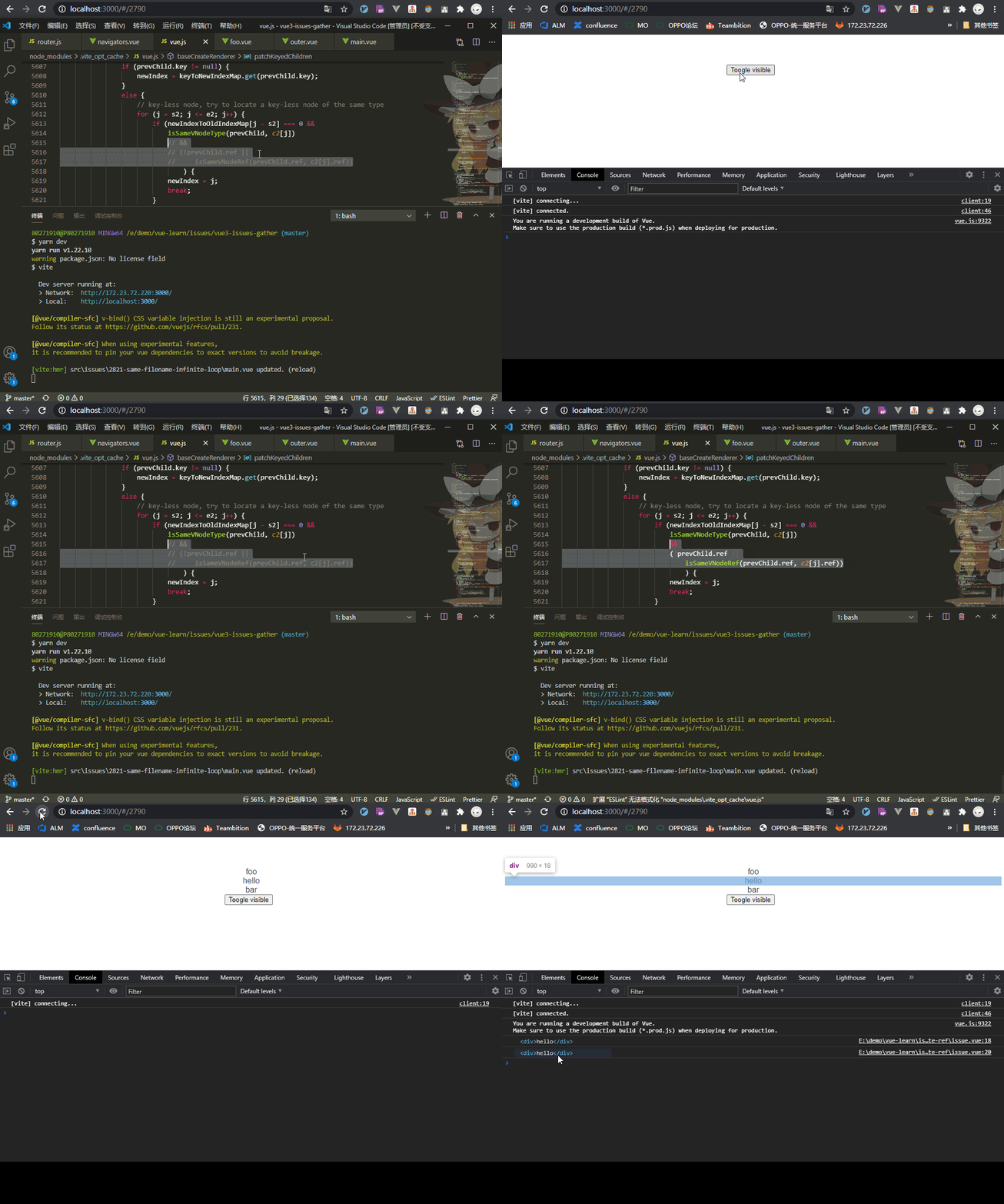
This example is in a comment above.
luwuer
on 15 Dec 2020
Related issues
 anandkumarram
·
4Comments
anandkumarram
·
4Comments
 HakamFostok
·
3Comments
HakamFostok
·
3Comments
 mika76
·
3Comments
mika76
·
3Comments
 cexbrayat
·
3Comments
cexbrayat
·
3Comments
 mannok
·
3Comments
mannok
·
3Comments
Most helpful comment
Is this because the
<div>is being reused across renderings and the console logging shows the current content of that<div>, not the content it had when it was logged? The content of that<div>gets updated when it re-renders. You'd need to give it akeyfor the diffing to pair up the correct nodes.Using
console.log(refDom.value.innerHTML);seems to give the correct value.