Vue-multiselect: Remove inlined auto width style
Hello,
I'm wondering if a small tweak would be possible for the inputStyle computed property:
// current
inputStyle () {
  if (this.searchable || (this.multiple && this.value && this.value.length)) {
    return this.isOpen ? { 'width': 'auto' } : { 'width': '0', 'position': 'absolute', 'padding': '0' }
  }
},
// suggesting:
inputStyle () {
  if (this.searchable || (this.multiple && this.value && this.value.length)) {
    return !this.isOpen ? { 'width': '0', 'position': 'absolute', 'padding': '0' } : false
  }
},
Reproduction Link
https://jsfiddle.net/andreasvirkus/jqofkzxc/3336/
Expected behaviour
No width: auto style is inlined
Actual behaviour
Currently inline styles are injected via the inputStyle computed property, forcing the implementing developer's hand to use !important to override the injected styles, even though they aren't necessary.
Current behaviour:
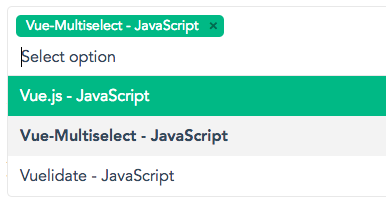
Desired scenario:
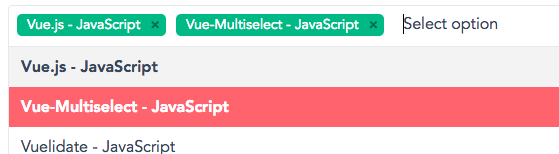
Edit: Played around with it some more, and found out that your issue repl has an interesting but but after initial interaction behaves like I'd like my implementation to behave.
- Navigate to https://jsfiddle.net/andreasvirkus/jqofkzxc/3343/
- Focus the multiselect (cursor/input appears on a new line)
- Select an option and unselect it (leaving the initial tag selected)
- Refocus and see that the cursor/input is placed on the same line
Any idea what is causing ☝️ behaviour? Atm in my own project we've created a wrapper
for vue-multiselect which simply adds a label and some minor styles, but nothing that
messes with the input's width. Yet I never achive the input being placed on the same line :/
Any tips/suggestions to help me further debug this are more than welcome and thanks for a great component!
 andreasvirkus
All 3 comments
This issue has been automatically marked as stale because it has not had recent activity. It will be closed if no further activity occurs. Thank you for your contributions.
![stale[bot] picture](https://avatars3.githubusercontent.com/in/1724?v=4&s=40) stale[bot]
on 22 Jul 2018
stale[bot]
on 22 Jul 2018
Second this issue - explicitly setting width to auto here via an inline style creates a lot of issues. Can this be re-opened? Would you accept a PR?
 rnicholus
on 20 Feb 2019
rnicholus
on 20 Feb 2019
I just ran into issues with this as well.
I have some vue-multiselect boxes side by side using flexbox in a fairly narrow space, and when I focus one of the multiselects, it expands in width, pushing other items outside of the container.
See https://jsfiddle.net/agv1wqf2/
Interestingly, if I drop the CDN version back from v2.1.3 to v2.1.0, then it works fine:
See https://jsfiddle.net/agv1wqf2/1/
The breaking difference appears to be the addition of width: auto when the input is focused. I have tried apply the change suggested by @andreasvirkus in a local copy and it works (at least for my use case).
 jessarcher
on 26 Feb 2019
jessarcher
on 26 Feb 2019
Related issues
 eleftrik
·
4Comments
eleftrik
·
4Comments
 Uninen
·
4Comments
Uninen
·
4Comments
 dmitov
·
4Comments
dmitov
·
4Comments
 hskrishna29
·
3Comments
hskrishna29
·
3Comments
 MaxHalford
·
4Comments
MaxHalford
·
4Comments
Most helpful comment
Second this issue - explicitly setting
widthtoautohere via an inline style creates a lot of issues. Can this be re-opened? Would you accept a PR?