Vue-multiselect: Not showing placeholder label for single select
Hi,
In my current project, I am using vue-multiselect and facing problem while using single select .
no :multiple attribute
Example :
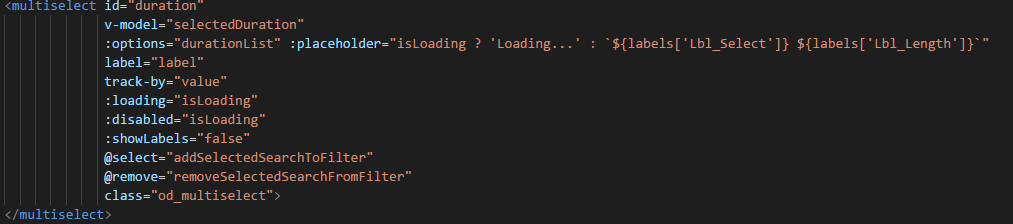
Problem is it is not showing the placeholder.
Here is screenshot:

And for more debugging here is screenshot of console:

Please help me with this..ASAP
After updating to version 2.1.0, placeholder is displayed but now it not showing selected value as you can see here :

And i have selected the value as you can in <span> here :

 akki-jat
All 8 comments
Empty :value should be [].
Check what is in v-model.
 sourenaraya
on 30 Mar 2018
sourenaraya
on 30 Mar 2018
@sourenaraya thanks for reply.
In my case :value is {} because it is it is single select
akki-jat
on 30 Mar 2018
yes, i think its better to have {} as empty value in case of single select, but this component only support [] as empty value.
sourenaraya
on 30 Mar 2018
@sourenaraya thanks for your concern but dropdown values are showing just fine but problem is that placeholder is not displayed.
akki-jat
on 30 Mar 2018
just set value in data to empty array. DO IT!
sourenaraya
on 30 Mar 2018
@sourenaraya I tried that no luck. And I have one more concern, as you can see in screenshot of console there is <span> tag appearing which is not appearing for other all multi selects.
akki-jat
on 30 Mar 2018
I was also having this issue, but setting the empty value to an empty array fixed it. Thank you @sourenaraya
 Owlnofeathers
on 30 Mar 2018
Owlnofeathers
on 30 Mar 2018
@sourenaraya you were right setting it as empty array worked.
As before I tested it, it was in influence of another custom class.
Thanks @sourenaraya
akki-jat
on 30 Mar 2018
Related issues
 xereda
·
20Comments
xereda
·
20Comments
 304NotModified
·
19Comments
304NotModified
·
19Comments
 enkrs
·
26Comments
enkrs
·
26Comments
 silvestreh
·
18Comments
silvestreh
·
18Comments
 shentao
·
21Comments
shentao
·
21Comments
Most helpful comment
Empty :value should be [].
Check what is in v-model.