Vue-multiselect: CSS Not working

If i remove the css, this works perfectly (without style)
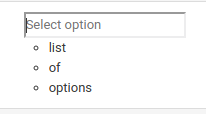
how to fix this? Thanks
help wanted
 nusendra
All 4 comments
Please remember to add <style src="vue-multiselect/dist/vue-multiselect.min.css"></style> to your code/component.
 shentao
on 2 Jan 2018
shentao
on 2 Jan 2018
👍1
i already add that css. the result is first image. If i remove that css, the result is the second image
nusendra
on 2 Jan 2018
And that is the correct behaviour. You need the CSS added somewhere in your code.
shentao
on 2 Jan 2018
👍1
I know this issue is old, but I don't understand something and I like to understand ^^
This package exports a Vue Single File Component.
In this Vue component, there is a template, a script and a style tag.
And therefore, I don't understand why the style is not applied and why we need to import the dist CSS.
Thank you :)
 ByScripts
on 25 Jun 2019
ByScripts
on 25 Jun 2019
👍3
Was this page helpful?
0 / 5 - 0 ratings
Related issues
 Uninen
·
4Comments
Uninen
·
4Comments
 wujekbogdan
·
4Comments
wujekbogdan
·
4Comments
 MaxHalford
·
4Comments
wujekbogdan
·
4Comments
MaxHalford
·
4Comments
wujekbogdan
·
4Comments
 yaakovp
·
3Comments
yaakovp
·
3Comments
Most helpful comment
I know this issue is old, but I don't understand something and I like to understand ^^
This package exports a Vue Single File Component.
In this Vue component, there is a
template, ascriptand astyletag.And therefore, I don't understand why the style is not applied and why we need to import the dist CSS.
Thank you :)