Vue-multiselect: Dropdown bottom item cutoff when using arrow keys
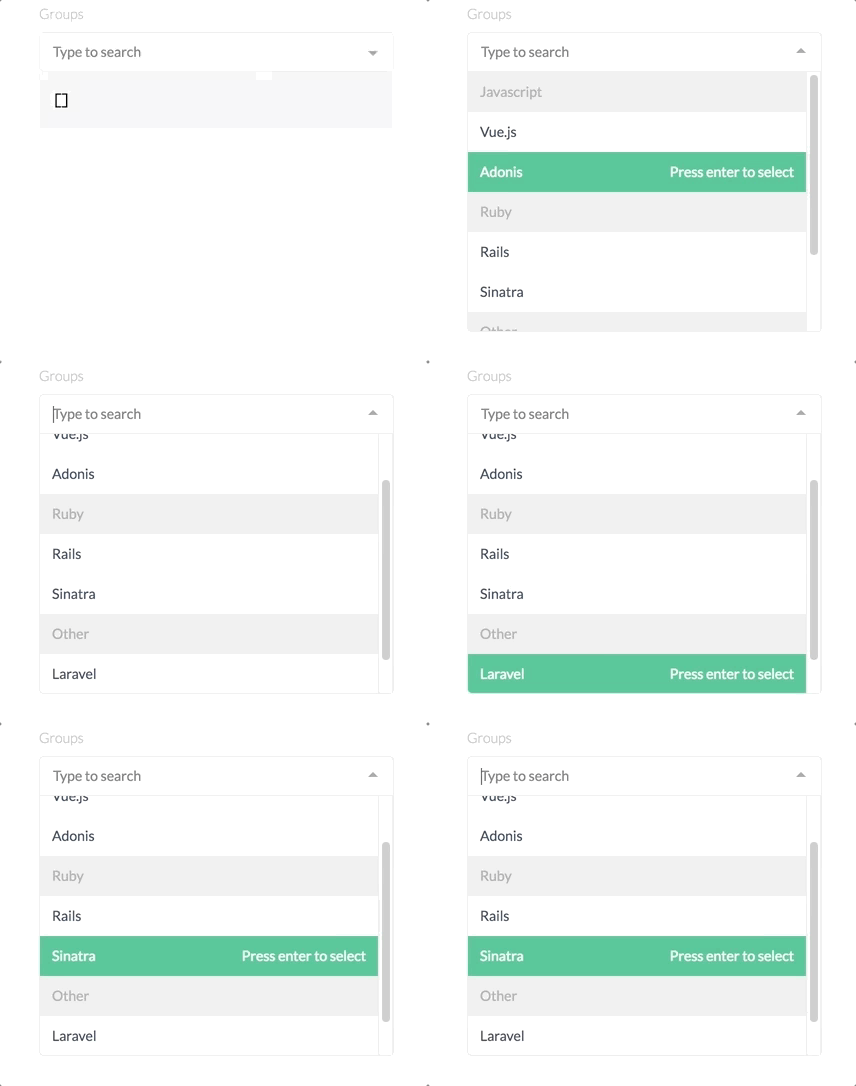
This video is taken from the Option groups example on the vue-multiselect site, and the same issue appeared in my project. Pressing the down arrow-key does not show the lowest item in the viewport.
For example, max-height="200" shows 5 list-items but the down key highlights the 6th-item which is not visible in the viewport.
bug
 jamesAtcodeninja
All 4 comments
Seems related to #486. Will look into it. Thanks!
 shentao
on 30 Aug 2017
shentao
on 30 Aug 2017
Hi, I still have this problem on version 2.0.3
 przemyslawDev
on 9 Oct 2017
przemyslawDev
on 9 Oct 2017
👍2
Can’t reproduce. If your options are higher than the default please remember to use :option-height prop.
shentao
on 29 Oct 2017
Sorry I forgot to write. The problem was that in the project the style file from the package was not up to date...
przemyslawDev
on 1 Nov 2017
Was this page helpful?
0 / 5 - 0 ratings
Related issues
 wujekbogdan
·
4Comments
wujekbogdan
·
4Comments
 yaakovp
·
3Comments
wujekbogdan
·
4Comments
yaakovp
·
3Comments
wujekbogdan
·
4Comments
 zachleigh
·
3Comments
zachleigh
·
3Comments
 Uninen
·
4Comments
Uninen
·
4Comments
Most helpful comment
Hi, I still have this problem on version 2.0.3