Vue-material: [MdAutocomplete] Selecting before typing doesn't work
Steps to reproduce
Basically any autocomplete
Which browser?
Chrome 65, Ubuntu 16.04
What is expected?
Selecting an option from an autocomplete should just work
What is actually happening?
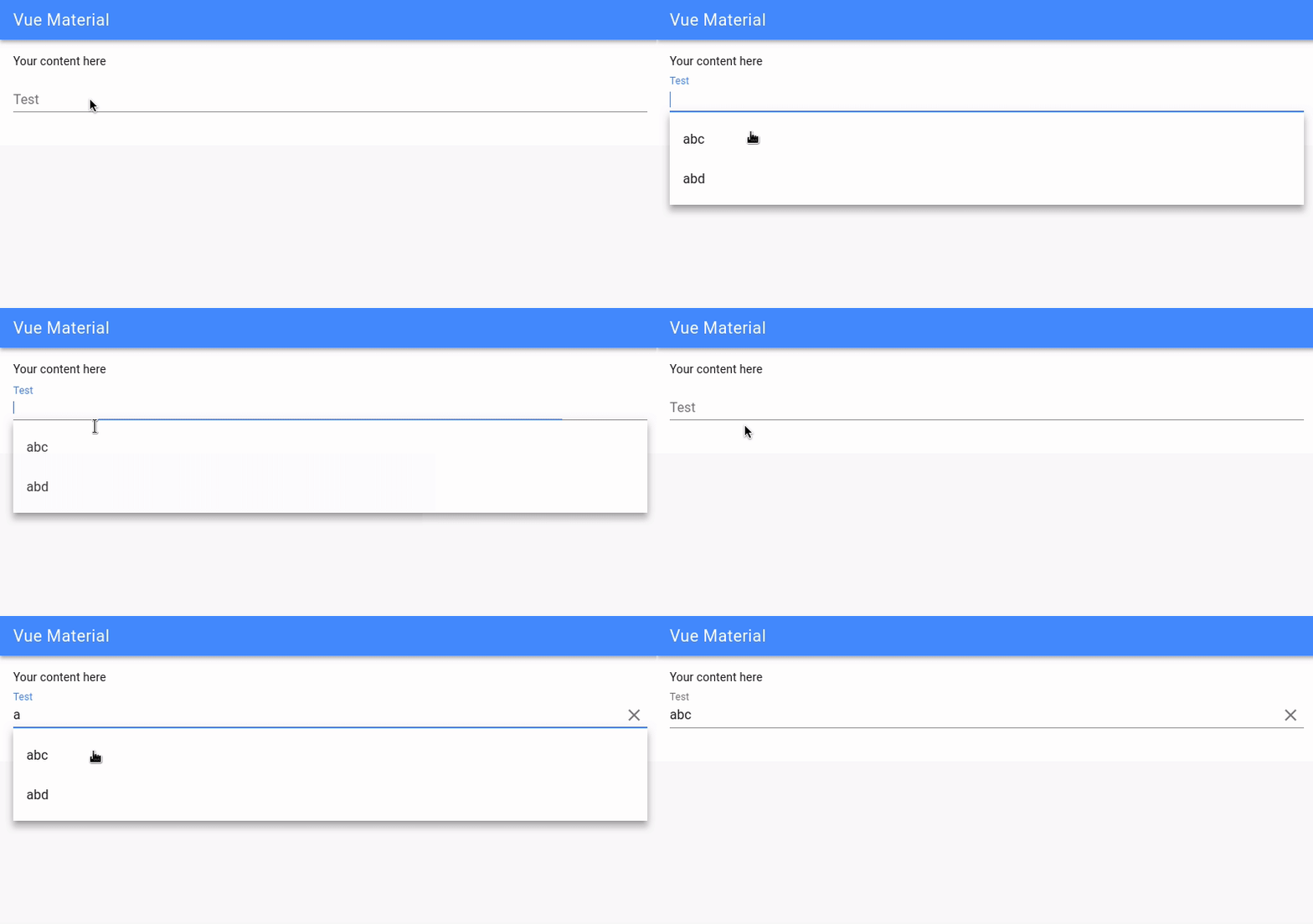
If nothing is typed into the box, selecting an item doesn't actually do anything.
Reproduction Link
 emman27
All 13 comments
Confirmed using repro link on Windows 10 with Firefox 59.0.2 and Chrome 65.0.3325.181.
@emman27, if you'd like to you can make the following additions to your description, for it to be slightly quicker to understand: ;)
Steps to reproduce
- Add a
MdAutocompletewith at least one entry in:md-options. - Focus the text input and select one of the options.
Which browser?
Firefox 59.0.2 (Windows 10)
Chrome 65 (Ubuntu 16.04, Windows 10)
 Y0hy0h
on 2 Apr 2018
Y0hy0h
on 2 Apr 2018
I found it sometimes doesn't work even after typing if using :md-open-on-focus="false". Typing one letter, clicking the remove button and then selecting works as long as the input field loses focus.
Steps to reproduce
- Add a
MdAutocompletewith at least one entry and the property:md-open-on-focus="false" - Focus on the text input, type one letter and select one of the options remaining. It will not select.
- Focus on the text input and type two letters directly after each other, select now works.
Which browser?
Chrome 65 (Windows 10)
Workaround
On the md-open event, add one char to the input model, then remove it.
<md-autocomplete v-model="name" v-on:md-opened="opened" :md-options="items">
opened:function() {
            this.name += " ";
            this.name = this.name.substring(0, this.name.length - 1)
        }
Bit silly that even works.
 thecrazything
on 5 Apr 2018
thecrazything
on 5 Apr 2018
It can be because of this https://github.com/vuematerial/vue-material/pull/1665
 Samuell1
on 5 Apr 2018
Samuell1
on 5 Apr 2018
I tested it in DEV and it works. Closing issue for now.
Samuell1
on 11 Apr 2018
I have the same issue. It doesn't select before I begin to type. If there's any input - then it selects. Just like on this GIF.
Is it possible to fix it? Where's the solution? Why is this closed?
 ChrisRobston
on 1 May 2018
ChrisRobston
on 1 May 2018
@emman27 did you find the solution?
ChrisRobston
on 1 May 2018
I just looked into source code, and looks like you messed with package. The content of MdMenuContent.vue is broken. They are different than on this GitHub. I tried to build vue-material but I can't Error: Cannot find module build/local
Too many bugs for such a good looking project. This is very unfortunate.
ChrisRobston
on 1 May 2018
Never managed to find the solution to this one. Unfortunately I ended up not using this library for production as my projects were time sensitive.
emman27
on 2 May 2018
@canyoudev @emman27 solution is solved in dev
Samuell1
on 2 May 2018
@Samuell1 sorry for asking noob questions, but how to use dev branch as npm package? I should run npm i vue-material@dev?
ChrisRobston
on 2 May 2018
Doesn't work here, see below.
@canyoudev You can specify a Git repo including a branch or commit hash as the version in the package.json. See the documentation.
So in this case you would specify something like
...
"vue-material": "vuematerial/vue-material#baf6a14030c1f57cc77e1751fba424ef11dfe0e6",
...
baf6a14030c1f57cc77e1751fba424ef11dfe0e6 is the latest commit. Specifying that instead of the dev branch (using "vuematerial/vue-material#dev") has the benefit that everyone will always npm install the same version. With dev, in the future someone might pull a version that is different from yours and debugging will be a nightmare ("It works on my machine.")
You can still update the commit hash whenever you want, so you can easily upgrade, but still have control.
Y0hy0h
on 2 May 2018
@Y0hy0h you cant use dev branch directly from our repo because dist is not rebuilded.
Samuell1
on 2 May 2018
Oh, ok. Makes sense. 😅
Y0hy0h
on 2 May 2018
Related issues
 jackovsky8
·
24Comments
jackovsky8
·
24Comments
 askdesigners
·
18Comments
askdesigners
·
18Comments
 husseinjahan
·
18Comments
husseinjahan
·
18Comments
 praneetloke
·
39Comments
praneetloke
·
39Comments
 DevEclipse
·
16Comments
DevEclipse
·
16Comments
Most helpful comment
I found it sometimes doesn't work even after typing if using
:md-open-on-focus="false". Typing one letter, clicking the remove button and then selecting works as long as the input field loses focus.Steps to reproduce
MdAutocompletewith at least one entry and the property:md-open-on-focus="false"Which browser?
Chrome 65 (Windows 10)
Workaround
On the
md-openevent, add one char to the input model, then remove it.<md-autocomplete v-model="name" v-on:md-opened="opened" :md-options="items">Bit silly that even works.