Vue-material: how to embedd select box into the Prompt Dialog
Can I embed selectBox instead of the textbox, please go through below image:
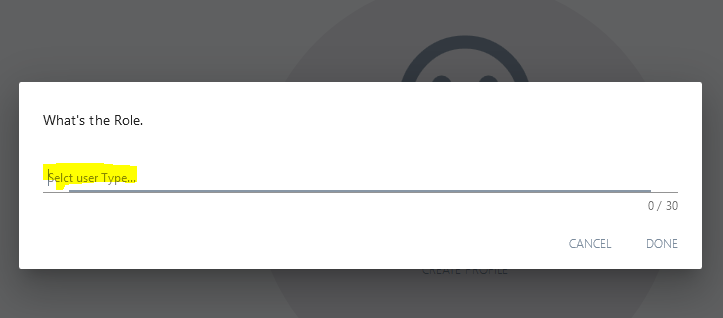
 kjhatis
All 20 comments
You cant, you need to use custom modal with select.
 Samuell1
on 7 Feb 2018
Samuell1
on 7 Feb 2018
@kjhatis I have tried embedding a select in the regular md-dialog component and that doesn't seem to work either.
@Samuell1 Is there another component that we should use or are we saying we need to use a different library to build modals for forms?
 caseyprovost
on 9 Feb 2018
caseyprovost
on 9 Feb 2018
@Samuell1 ^^
caseyprovost
on 9 Feb 2018
@caseyprovost selects works fine in custom modals, if you provide your code i can look at it
Samuell1
on 9 Feb 2018
<template>
  <div>
    <md-dialog :md-active.sync="showDialog">
      <md-dialog-title>Pick a language</md-dialog-title>
      <md-dialog-content>
        <div class="md-layout md-gutter">
          <div class="md-layout-item">
            <form method="post" action="/some-api-eventpoint" @submit.prevent="onSubmit">
              <md-field>
                <label>Payer:</label>
                <md-select name="language" v-model="language">
                  <md-option v-for="lang in languages" v-bind:value="lang">
                    {{ lang }}
                  </md-option>
                </md-select>
              </md-field>
              <md-button class="md-raised md-primary" @click.prevent="onSubmit">Search</md-button>
            </form>
          </div>
        </div>
      </md-dialog-content>
      <md-dialog-actions>
        <md-button class="md-primary" @click="showDialog = false">Close</md-button>
        <md-button class="md-primary" @click="showDialog = false">Save</md-button>
      </md-dialog-actions>
    </md-dialog>
    <md-button class="md-primary md-raised" @click="showDialog = true">Find Provider</md-button>
  </div>
</template>

<script>
  export default {
    name: 'language-picker',
    data() {
      return {
        showDialog: false,
        languages: ['PHP', 'CSS', "Ruby"],
       language: null,
      }
    }
  }
</script>

<style lang="scss" scoped>
  .md-dialog {
    min-width: 960px;
    min-height: 800px;
  }
</style>
@Samuell1 ^^
caseyprovost
on 9 Feb 2018
@caseyprovost any errors in console? because i see you doesnt have v-model="language" but in data its not
Samuell1
on 9 Feb 2018
@Samuell1 adding it fixes that console error, but the bigger problem is that if you click the select box the popup doesn't appear.
caseyprovost
on 9 Feb 2018
What version do you using of vuematerial?
Samuell1
on 9 Feb 2018
The default version the site gives you, which is currently: vue-material@beta.
caseyprovost
on 9 Feb 2018
@Samuell1 ^^
caseyprovost
on 9 Feb 2018
@caseyprovost and version?
Samuell1
on 9 Feb 2018
@Samuell1 from package.json "vue-material": "^1.0.0-beta-8",
caseyprovost
on 9 Feb 2018
Try to adding :key="lang" on md-option, then if doesnt work, then i dont know what is wrong.
Samuell1
on 9 Feb 2018
I added it and no dice. The selects work fine outside of the model but not in it. Seems like a bug in this beta...right?
caseyprovost
on 10 Feb 2018
@caseyprovost there is issue with z-index, menu for select is shown behind dialog, to temporary fix it you can add this simple css code
.md-menu-content {
  z-index: 111;
}
@Samuell1 @caseyprovost for time being it is a temporary solution but we should have a select box component like prompt which will give you direct value of the selected option in return, else i am this time updating the selected value to the API and on on API response i am attempting the another fields of the form. Also it will be too good if we can have any input type in promptBox to make it more comfortable.
kjhatis
on 12 Feb 2018
@kjhatis I think what most of us are looking for are a way to do forms in "modals" or "dialogs". So it would need to support any regular form elements. The prompt modal is close, but I think confirm dialogs, prompt dialogs, alert dialogs etc are very concise and are simply a better version of the browser defaults.
All we need I think is a dialog that is a simple wrapper like md-wrapper tries to be, but making sure it supports things that have hidden elements that become shown. Elements like md-select md-autocomplete, date selects, popovers, etc.
caseyprovost
on 12 Feb 2018
@kjhatis temporary solution is for z-index, prompt dialog is specified only for input not select, because with select you need to handle much more things then simply checking what user is writing.
Samuell1
on 14 Feb 2018
@Samuell1 i got it.
kjhatis
on 15 Feb 2018
Related issues
 tudor33sud
·
15Comments
tudor33sud
·
15Comments
 askdesigners
·
18Comments
askdesigners
·
18Comments
 husseinjahan
·
18Comments
husseinjahan
·
18Comments
 GillesBodart
·
16Comments
GillesBodart
·
16Comments
 mattgrande
·
25Comments
mattgrande
·
25Comments