Vue-material: [mdAutocomplete] Issues with md-autocomplete
There are some issues with the autocomplete component. Have added a pen here with the component. https://codepen.io/zapping/pen/GmVapv
Steps to reproduce
When the component is initially loaded the label appears raised even though the v-model is not assigned a value. But when it receives a focus and then a blur, without typing a value, then label transitions back to just above the input correctly.
When you start typing a value the component looses focus, probably when the debounce timeout occurs, and you cannot continue typing rest of your contents to the component.
When you start typing the entire list/array appears in the dropdown without filtering according to the content being typed in the component.
The document for the component has a typo instead of the
md-autocompletetag it has themd-inputtag.Is there a way to show the dropdown list of the autocomplete when it receives focus? Both when it is clicked as well as when you tab through to the component. Maybe add a property for it or provide an event for that.
Which browser?
Vue and vue-material is the latest one from the CDN. Tried on chrome, firefox and IE edge. The OS is window.
What is actually happening?
The data that is fed to the component is a :list. I have not tried the :fetch option.
Reproduction Link
 zapping
All 16 comments
I've recently created a new branch on my fork of vue-material here and I'll see what I can do to fix this. I'm currently working on the menu to appear at the bottom and fill the entire width of the input. Here's how this currently looks:
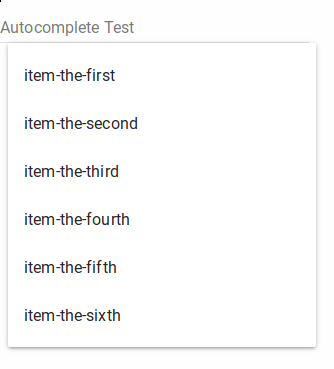
There's still a small issue with the x-positioning and it seems to always be offset by 8px, however this is still a work in progress and the focusing problem has not been fixed yet. The focusing issue happens because the autocomplete menu is just the mdMenu element re-purposed, so when you click on a button or element with a menu, it automatically focuses on that menu. However, for auto-completion we obviously want to avoid this.
The problem with filtering can be solved by using the filter-list attribute in md-autocomplete. You have to assign it to a filter function, for instance:
exampleFilter: function(list, query) {
    return list.filter(function(item) {
        return item.label.indexOf(query) === -1 ? false : true;
    });
}
Please note that this filter has to be changed to suit your specific use-case. For example, the data that I have looks like this:
exampleList: [
    {label: "item-the-first"},
    {label: "item-the-second"},
    {label: "item-the-third"},
    {label: "item-the-fourth"},
    {label: "item-the-fifth"},
    {label: "item-the-sixth"}
]
Therefore, my filter function filters according to the label key.
To give a better example, I have created a fork of your codepen here which works with a filter.
Please note that this example is a bit flaky and may not work the first time. I know when I tested it, it only worked about half the time. I've had more luck with the development version personally but you would have to compile it yourself.
(And of course, the documentation should be updated to give such an example)
I will keep you updated on any progress made.
 argarak
on 7 Aug 2017
argarak
on 7 Aug 2017
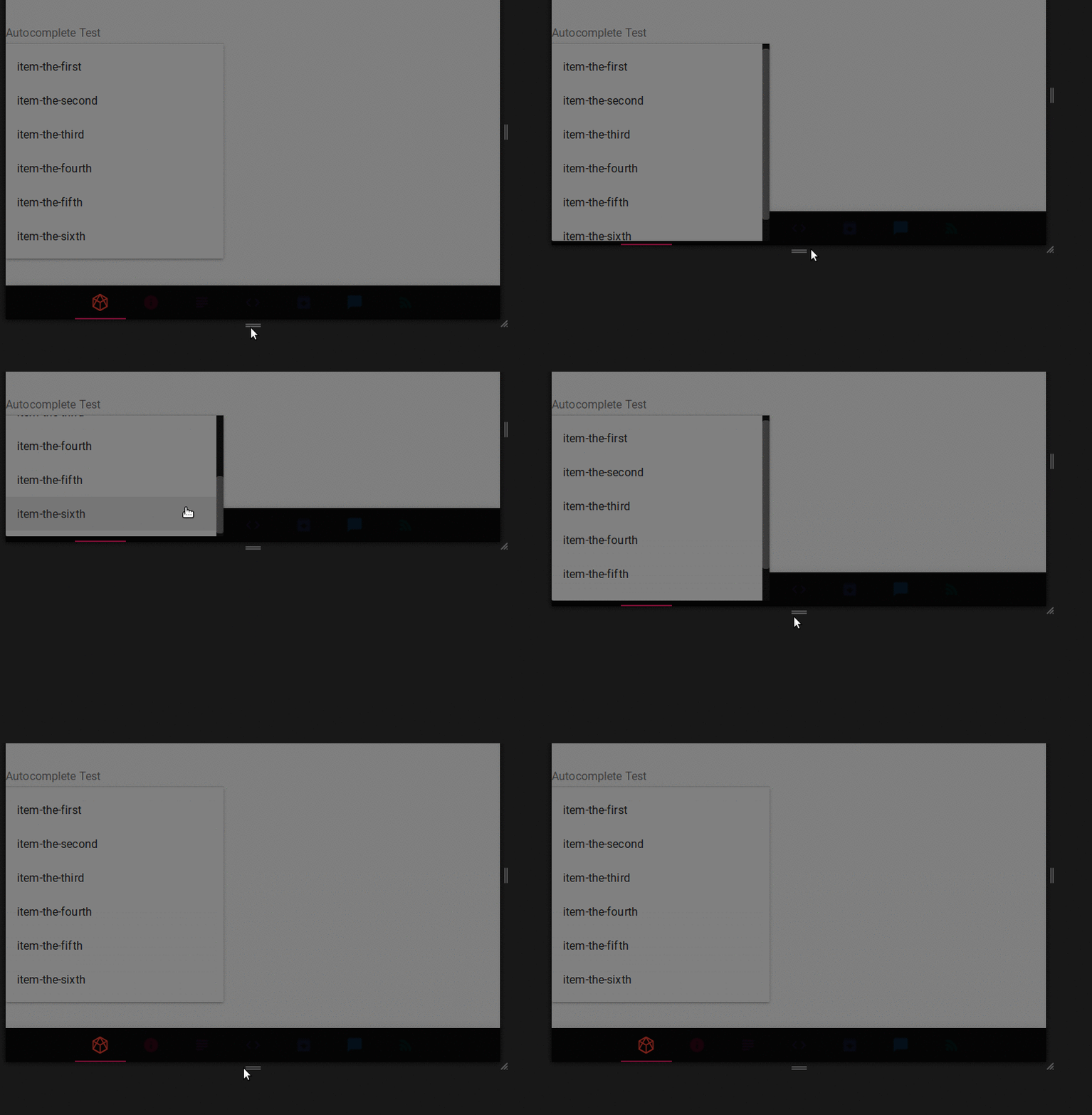
So far, I've managed to make the menu responsive while making it fixed to the top. This is because md-menu by default moves above the trigger element and this would obscure the input area.
Here's a demonstration:
argarak
on 8 Aug 2017
Currently, keyboard navigation is about 90% complete, with one minor issue still left to fix where md-menu has not updated the length of the list.
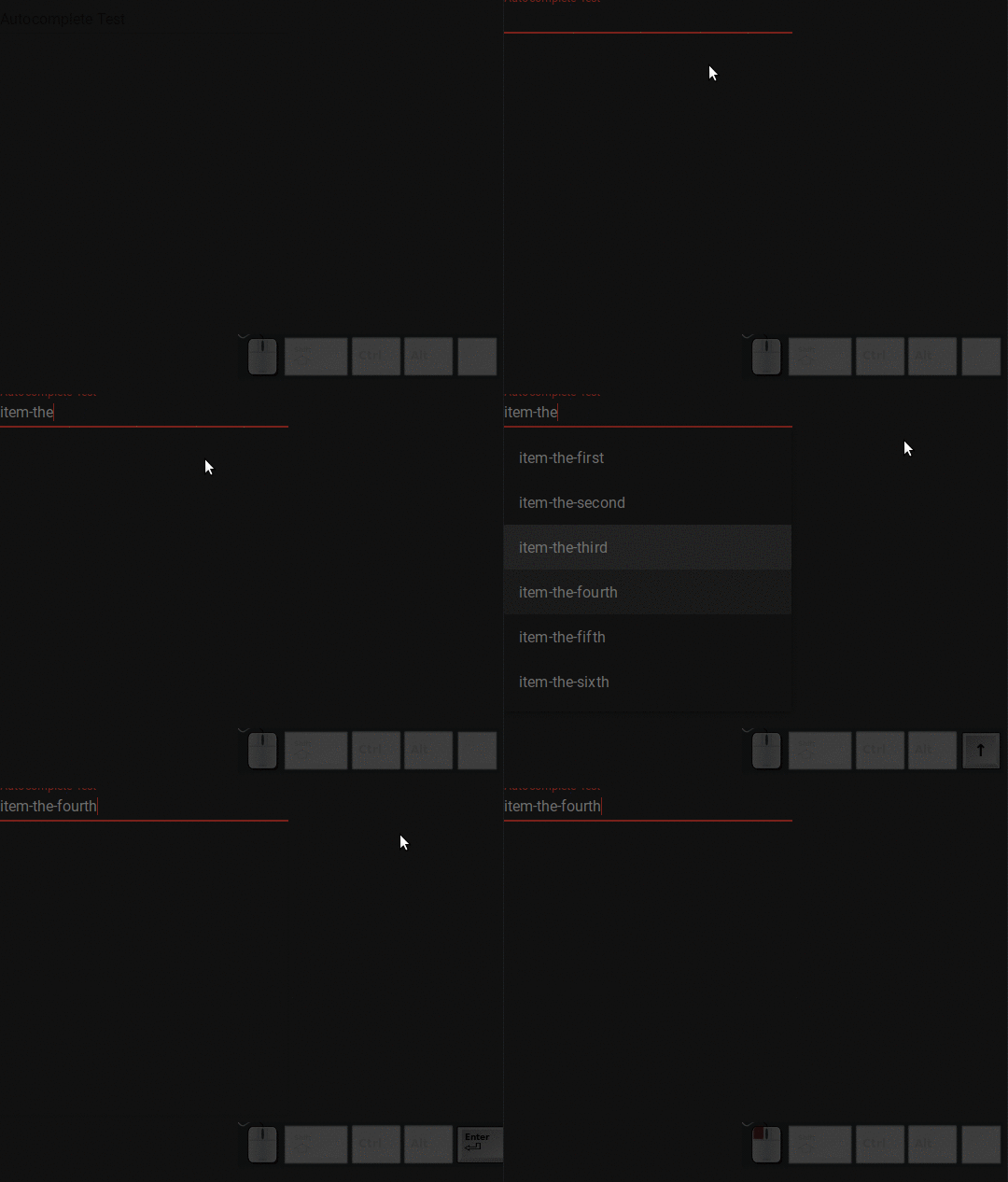
@pablohpsilva I think I will have this completed sometime this week. You can have a look at the commits in my autocomplete-fixes branch for my current progress.
argarak
on 10 Aug 2017
@argarak YOU SIR! YOU!!!!
You rooock!
 pablohpsilva
on 10 Aug 2017
pablohpsilva
on 10 Aug 2017
That's just awesome!!!
I would like to add one more please. Can a feature be added so that the list pops out when focus is received? Like in the case where the list might not be painstakingly big or the list can be loaded pretty fast. In such cases it will be helpful to the users to just pickout the option rather than thinking about what to type to get the result. Also performance way it can save/avoid posts/hits to the server when the user tries/types out different options.
zapping
on 11 Aug 2017
Yeah, that's not a problem, I'll create a new attribute for that. I had to add a new attribute to the md-menu element called md-manual-toggle, where the element would not automatically open when the trigger element was clicked. What I'll do is keep this attribute on the autocomplete md-menu and add a menu open method to onFocus().
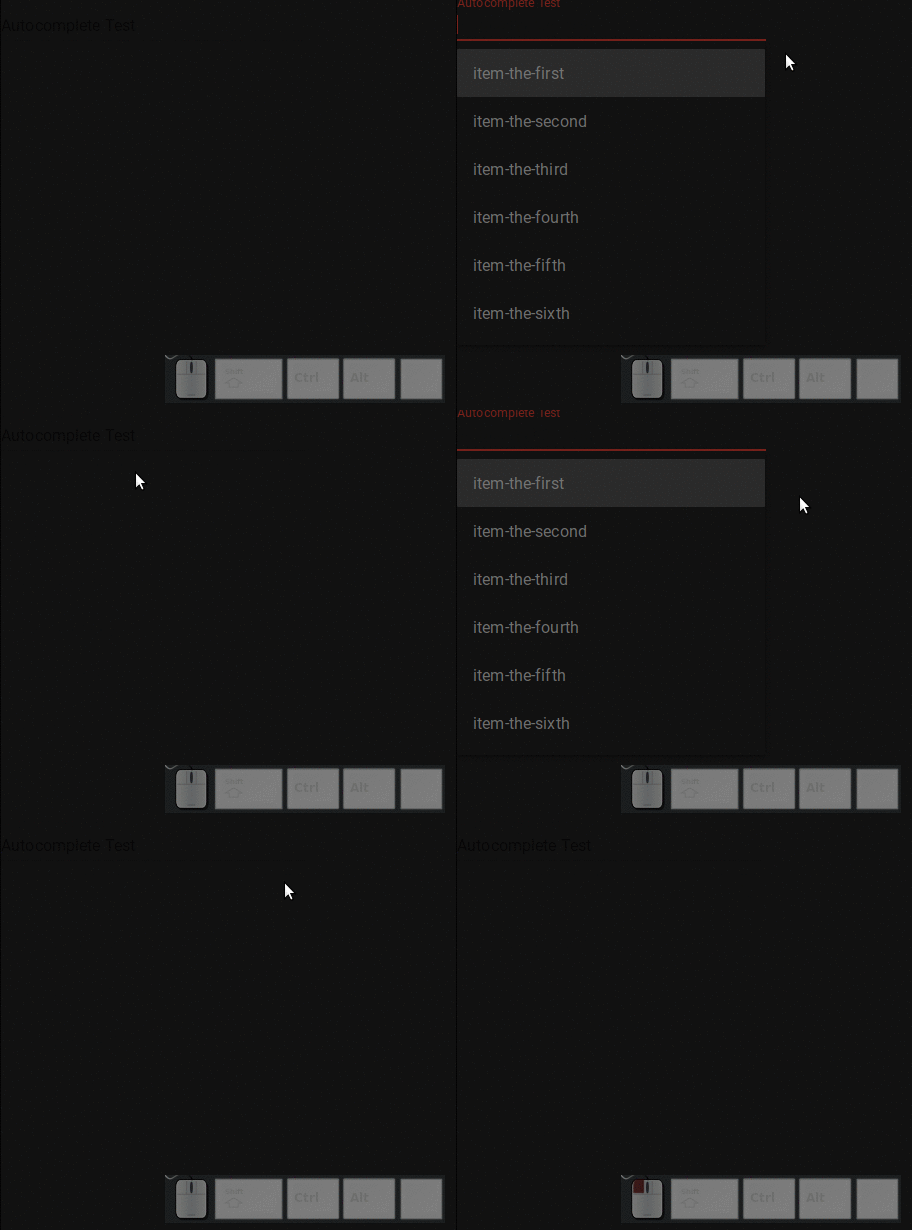
I'm not sure what to call this attribute, maybe "md-open-on-focus"?
I'll also have to add a "max-height" attribute for long lists where you still want to show all the values and I'll also make sure to add an example in the docs where there is a large list of data but you want to limit the number shown, say up to five items at a time.
I also wanted to add a callback function to be called when an item will be chosen which will be useful for me as my web application will need to navigate to a different page (via router) when an item has been chosen.
argarak
on 11 Aug 2017
Awesome!
I've struggled with second step myself.
Also it would be convenient to not have to create multiple functions just for the :filter-list prop.
I hope there will be a merge sometime soon. ;)
 PreownedFIN
on 11 Aug 2017
PreownedFIN
on 11 Aug 2017
I'm sorry that this is taking a while, however there are still issues to fix and testing to be done. I also have not started writing the documentation yet. As I mentioned in a previous comment, I should have this completed sometime this week.
@pablohpsilva I'm also worried that PR #962 might cause conflicts when I make my pull request, could you look into that please?
argarak
on 11 Aug 2017
Hello @argarak
I've merged the #962 . Could you please sync your branch with the vue-material's develop branch? Just to make sure its all OK or fix possibles merge conflicts.
pablohpsilva
on 12 Aug 2017
The main issue is not particularly with getting the merge sorted but that I think that some functions @petarpanicVIU implemented might conflict with mine. I'm not saying that his contribution was bad in any way, it's just that I think it would have been more sensible to wait until I had mine sorted.
Here's my comment on the PR:
- Fixed lost focus on input when the menu appeared with the results
- [has been fixed]
- Added max-res prop which can be added to limit the number of results shown in the list
- [in my opinion this should be handled by the
filter-listfunction]
- [in my opinion this should be handled by the
- Show dropdown menu when input receives focus (not just when typing)
- [can be enabled with
open-on-focusattribute]
- [can be enabled with
- Added a possibility to set max-chars to 0 and show the list (not fetched, but list) immediately on input focus, with input being empty.
- [again, this can be enabled with
open-on-focus]
- [again, this can be enabled with
- Fix mdTablePagination.vue error because of which it did not compile (linter issue with unused var)
- [this is something I have not fixed as it is not directly related to autocomplete]
- Added max-res in the docs
- [this is specific to the attributes @petarpanicVIU implemented, I'm yet to update the docs until I fix the
md-menubug]
- [this is specific to the attributes @petarpanicVIU implemented, I'm yet to update the docs until I fix the
I'm happy for @petarpanicVIU to comment, maybe we can work to merge his changes into mine. I would also encourage taking a look at the commit history of my autocomplete-fixes branch and looking at a comparison between my branch and the current develop branch.
Again, I would like to apologise for not getting this pull request up quicker but I have to do a lot of reading, troubleshooting and testing and as we all know, that's not instantaneous.
argarak
on 12 Aug 2017
That should be the md-autocomplete element ready to go, the only thing I need to do now is to write the documentation.
Here's a final example with callback and max-height:

(The gif is sped up because I could not record the dialog with my normal method because it crashed my computer as I tried to render it, so I had to record it in webm format and then upload it to gfycat, which sped up the gif. Here's the webm version on gfycat at normal speed)
Note that the smooth scrolling only works on the latest Firefox and possibly Chrome if you enable experimental features (though not fully sure as I have not tested this).
Also, @pablohpsilva, should I write the documentation in a new "Autocomplete" section or should I put the examples in the "Input" section? I would personally prefer having a new section made as I'll have to make 2-3 examples. If we do decide to make a new section, I will also move the properties list for md-autocomplete.
argarak
on 12 Aug 2017
Hey @argarak , here is my response to your response on my PR :)
- Fixed lost focus on input when the menu appeared with the results
- [has been fixed]
- I cannot find the commit for fixing this lost focus in the link you provided, so I cannot comment on the method you used vs mine.
- Added max-res prop which can be added to limit the number of results shown in the list
- [in my opinion this should be handled by the filter-list function]
- I think filtering should be separate from limiting. You can use your filter function to limit as well, but I think that for a component to be easy-usable, it should have everything it needs as a setting (prop) that would affect the results shown.
- Show dropdown menu when input receives focus (not just when typing)
- [can be enabled with open-on-focus attribute]
- I agree it might be better to add it as a prop (as it's currently not for my PR), but from a glance I'm not sure why did you need additional prop for md-menu for this to work. I think this is a pretty straightforward thing that doesn't require many changes.
- Added a possibility to set max-chars to 0 and show the list (not fetched, but list) immediately on input focus, with input being empty.
- [again, this can be enabled with open-on-focus]
- No, it cannot, because if you set open on focus, you might not want to show the list if it doesn't have enough chars in the query. Of course, in a combination with that prop for open-on-focus, it can work as intended, but still, that must be implemented with regards for the max-chars prop. (If set to 5, don't open on focus if the query has 4 chars or less, regardless of open-on-focus value)
- Fix mdTablePagination.vue error because of which it did not compile (linter issue with unused var)
- [this is something I have not fixed as it is not directly related to autocomplete]
- Added max-res in the docs
- [this is specific to the attributes @petarpanicVIU implemented, I'm yet to update the docs until I fix the md-menu bug]
Btw way to go adding keyboard functionality and fixing the height issue!
We haven't arrived at that problem in the development of our app, but I've just tested it and it looks really awful in the current theme version, so I'm happy you did such a good job on that :)
I'm sure we can find a middle ground for the merge :)
 petarpanicVIU
on 13 Aug 2017
petarpanicVIU
on 13 Aug 2017
@petarpanicVIU, I fixed the lost focus by adding a prop to md-menu, while not being the most elegant solution, md-autocomplete does obviously use the same md-menu as you would use, say on a button so the requirements do differ slightly. And so you have to tell the md-menu
element to not focus somehow and the only way I could do it is with props, unless you can propose a better solution. Here's the commit.
Added md-no-focus prop to md-menu:
mdNoFocus: {
    type: Boolean,
    default: false
}
The code that prevents md-menu from focusing:
if (!this.mdNoFocus) {
    this.menuContent.focus();
}
For open-on-focus, I've decided that going with your idea would be better here since we would be able to drop a property from the md-autocomplete element and open-on-focus makes max-chars have no effect anyway so we would still be able to achieve the same effect:
- The list opens even if no input has been given or
- The list opens but it must be given some input beforehand (length also specified)
However, something that we should add is the ability for filter-list to be called even if the input is empty. Maybe this could be something you could add when max-chars is 0?
For the record, I did not create a prop for md-menu specifically for it to open on focus. Here's a list of the props I added to md-menu:
md-auto-width, resizes menu to width of trigger element (in this case the autocomplete input)md-fixed, prevents the menu from moving up when window is resized (fixed to bottom of trigger element)md-no-focus, does not allow the menu to focus automaticallymd-manual-toggle, disables menu toggle when trigger element is clicked as defined inmd-menu. This allows to manually set the menu on and off from the autocomplete element so the two don't conflict.md-max-height, sets maximum height of menu in terms of the number of items in the list. Not to be confused with limiting as if there are more elements than the specified height, the list overflows (as in, a scrollbar appears and you can scroll through the list)
On the topic of limiting, I still stick to doing it via filter-list. Now, while this is not as easy for the developer, it provides a lot more flexibility (You already expect the programmer to know Vue and have a decent knowledge of Javascript anyway). So I personally don't find a use for this, that's why I did not implement it. However, if you and others find it useful then sure, you can implement it. This will allow people with either the flexibility of having it done via filter or the ease of use of doing it via prop.
Here's an example of how you might want to implement limiting via filter-list:
For this example, say that for your filter you must sort the results of the query.
Here's the filter function code:
colorFilter: function(list, query) {
    var arr = [];

    for(var i = 0; i < list.length; i++) {
        if(list[i].name.indexOf(query) !== -1)
            arr.push(list[i]);

        if(arr.length > 5)
            break;
    }

    return arr.sort();
}
In this filter function, time is increased if there are less than six results since it only has to look through the entire list if there are it cannot find more than 5 results. However, sorting the list is consistently faster as it only has to sort a list the size of how many items you want to display at once.
So here's how I propose we should do this:
- Have @pablohpsilva revert PR #962 (but not close it)
- I make my PR and remove
open-on-focus(I'm aiming at having it open by today 22:00 BST, but no guarantee as I still have some examples to write in the documentation and an issue when the menu opens after the item has been selected) - My PR is merged into develop and you merge develop into your branch
- You add
max-resandmax-chars = 0support in the same branch - Your PR is merged into develop
How does that sound?
(Edit: PR will come tommorow as I just managed to fix the menu opening after selection issue and have not yet started working on the examples.)
argarak
on 13 Aug 2017
Hey @argarak I just refocused the input after the menu gets shown. I think that's simpler as to not dirty the md-menu if it doesn't have any additional use out of that prop and if it adds more complexity to 2 components, instead of just one.
I do understand though, why you had to modify the md-menu for the rest, so that's all ok. I just think there is a an easier, simpler way to do it.
As for the filter list, I can add a call to it even when max-chars equals 0.
But, I do not agree that filter list is going to be faster for sorting when doing result limitation. In your example, you're first limiting, and then sorting, but then you don't really have a sorted list that was filtered and limited, but you have an unordered list that was limited and filtered from the top, but then that result from the top is sorted.
Which makes no sense if I want to have a list sorted from z-a, but my list is currently sorted as a-z. If I enter the letter 'a' as a search query, I would get only results that start with 'a', because you would find those results first. You would never get a chance to even search the 'z' part of the list.
So I think that first sorting and then filtering is the only choice for the correct context, so you loose the big benefit of performance here.
Of course, I agree with you that using the for-loop is still going to be faster because you can break out of the loop when you reach the limit, but if the list isn't that long, the performance benefit could be negligible and the separation of functionality can be beneficial for ease-of-use and understandability.
As for the PR, I'm ok with you going forward with yours, and then me adding my stuff if that's easier for you.
petarpanicVIU
on 14 Aug 2017
@petarpanicVIU, scrap that, what I'll do instead is I'll try to fix conflicts in my pull request (#969) while keeping your changes in develop. I'll make sure to test it and you can also review the changes to see if the functionality you added remains.
And regarding the statement about sorting in my previous comment, that's my bad. I should have tested it beforehand.
Edit: changes are in this commit: https://github.com/vuematerial/vue-material/pull/969/commits/1479f3c230e3608755faef8ef2752f04965e5d67, however this may change because I have not tested this.
Edit 2: Seems to work pretty well on my end so PR is ready to go for me, though I would like someone to test it if possible.
argarak
on 14 Aug 2017
You both are awesome!
I hope @marcosmoura could add you guys on the vue-material team LOL.
Thank you!!!! :D
pablohpsilva
on 15 Aug 2017
Related issues
 Dennisoost
·
16Comments
zapping
·
24Comments
Dennisoost
·
16Comments
zapping
·
24Comments
 joshbotnet
·
46Comments
joshbotnet
·
46Comments
 tudor33sud
·
15Comments
tudor33sud
·
15Comments
 alexMugen
·
23Comments
alexMugen
·
23Comments
Most helpful comment
Currently, keyboard navigation is about 90% complete, with one minor issue still left to fix where
md-menuhas not updated the length of the list.@pablohpsilva I think I will have this completed sometime this week. You can have a look at the commits in my
autocomplete-fixesbranch for my current progress.