Vue-material: [MdInput] Zooming when focusing input-fields on iOS
Hi!
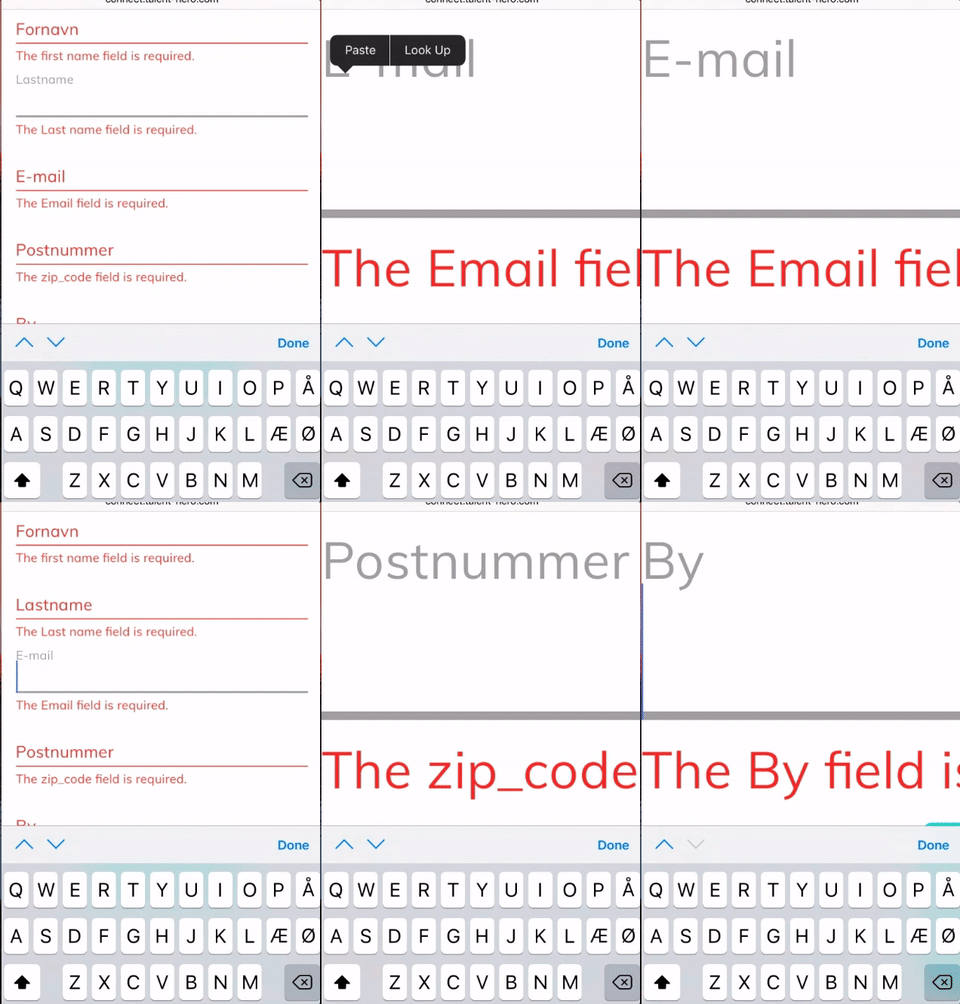
When focusing input-fields on iOS the device zooms into the field.
See my gif.
 Bolandish
All 7 comments
Hello! Thank you for opening this issue.
Could you please provide a gif instead of a png? I just want to make sure before replying what I think the issue can be.
Thanks!
 pablohpsilva
on 11 Jun 2017
pablohpsilva
on 11 Jun 2017
Ah, Sorry @pablohpsilva ! I Dont know what happened :)

Bolandish
on 12 Jun 2017
Closing this issue as our focus is on the new 1.0.0 version.
 Samuell1
on 23 Nov 2017
Samuell1
on 23 Nov 2017
@Samuell1 This issue happens for me in the 1.0.0-beta7 version, consider re-opening
 qubitron
on 3 Feb 2018
qubitron
on 3 Feb 2018
Its not issue on our side, its because iOS have autozoom for inputs. And its default behavior for Mobile Safari. @qubitron
Samuell1
on 3 Feb 2018
@Samuell1 From the hint in #417 I was able to figure out this is happening because the md-input has an initial font size of 1px, causing the auto-zoom to zoom in way too far when you tap on the input control.
I was able to fix this issue by putting the following style in my App.vue:
.md-input {
  font-size: 16px !important;
}
It seems like this could be a simple fix to change the font-size to 16px. Without it, the the vue-material framework is unusable for me on mobile devices, and with this change it works great.
qubitron
on 3 Feb 2018
@qubitron for now use that temp css to fix it, if everything will be okay with changing font-size, we add it in next version.
@marcosmoura can we change font-size to 16px? Its not used for some animations?
Samuell1
on 3 Feb 2018
Related issues
 capttrousers
·
3Comments
capttrousers
·
3Comments
 philipfeldmann
·
3Comments
philipfeldmann
·
3Comments
 Feduch
·
3Comments
Feduch
·
3Comments
 diverted247
·
3Comments
diverted247
·
3Comments
 xinzhanguo
·
3Comments
xinzhanguo
·
3Comments