Vue-js-modal: Do not bundle styles in index.js and let us import the separated styles.css file
Problem:
I'm using tailwind with vue-js-modal:
<template>
  <modal
    :name="this.name"
    :adaptive="true"
    :scrollable="true"
    width="600"
    height="auto"
    classes="bg-white rounded-lg shadow-xl transform transition-all sm:w-full p-4"
  >
  </modal>
</template>
It works fine in dev mode but my custom styles got overridden in production, because the styles are inlined in dist/index.js (see the capture below) therefore they take precedence over my custom classes.
Solution:
Strip CSS classes from dist/index.js and let us import the separated styles.css file wherever we want. So I can do:
import "vue-js-modal/dist/styles.css";
import "@/assets/css/tailwind.css"; // My custom styles
Version:
2.0.0-rc.3
Example & screenshots:
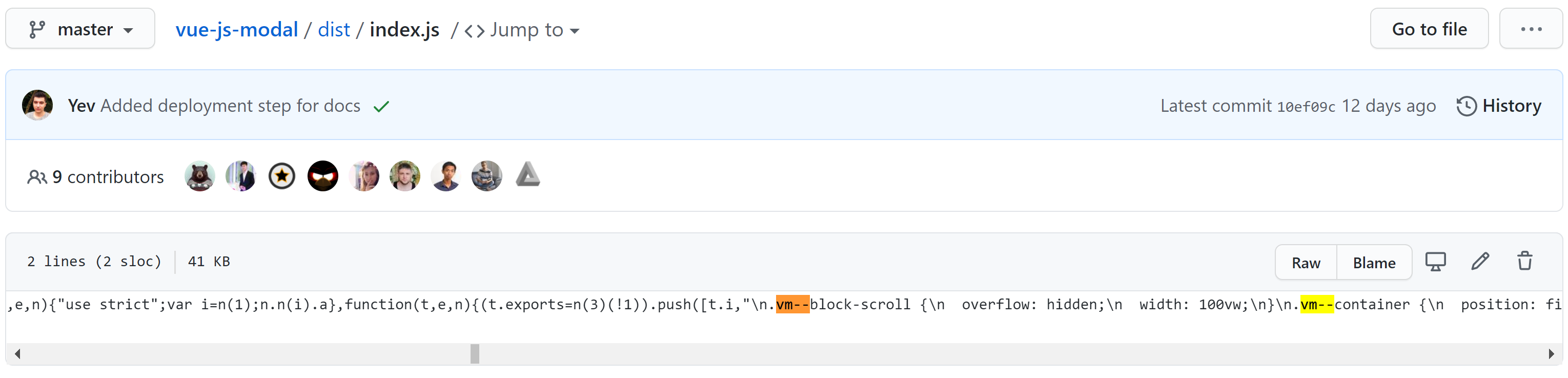
 DavidRouyer
All 5 comments
Hi. You can do that if you import nocss file. It is explained in in documentation.
 euvl
on 8 Jul 2020
euvl
on 8 Jul 2020
The only nocss file I see is the ssr.nocss file which is (as the name seems to suggest) only useful for SSR scenarios as it throw an exception e._ssrNode is not a function if I try to use it in a traditional browser scenario.
DavidRouyer
on 8 Jul 2020
@euvl This doesn't work. ssr.nocss does not work.
 barfurth
on 8 Jul 2020
barfurth
on 8 Jul 2020
Thanks for your PR @DavidRouyer, just published 2.0.0-rc.5 that should have your build
euvl
on 8 Jul 2020
Will be closing this for now, ping me if you think this should stay open
euvl
on 14 Jul 2020
Related issues
 chris-rowe
·
4Comments
chris-rowe
·
4Comments
 uptownhr
·
4Comments
uptownhr
·
4Comments
 vesper8
·
3Comments
vesper8
·
3Comments
 ar53n
·
4Comments
ar53n
·
4Comments
 bicstone
·
4Comments
bicstone
·
4Comments
Most helpful comment
The only nocss file I see is the
ssr.nocssfile which is (as the name seems to suggest) only useful for SSR scenarios as it throw an exceptione._ssrNode is not a functionif I try to use it in a traditional browser scenario.