Vue-js-modal: Dynamic modal is not shown when using vue-class-component
I've created a modal component using vue-class-component
<template>
    <div>Hello, world!</div>
</template>

<script lang="ts">
    import Vue from 'vue';
    import Component from 'vue-class-component';

    @Component
    export default class ModalHelloWorld extends Vue {}
</script>
When I try to open it, using dynamic modals, it does not appear:
// some code here
import ModalHelloWorld from '@/components/ModalHelloWorld.vue';

openModal() {
    this.$modal.show(ModalHelloWorld);
}
Of course, I've imported vue-js-modal in this way:
import Vue from 'vue';
import VModal from 'vue-js-modal';

Vue.use(VModal, { dynamic: true, injectModalsContainer: true });
 GrassiSupport
All 6 comments
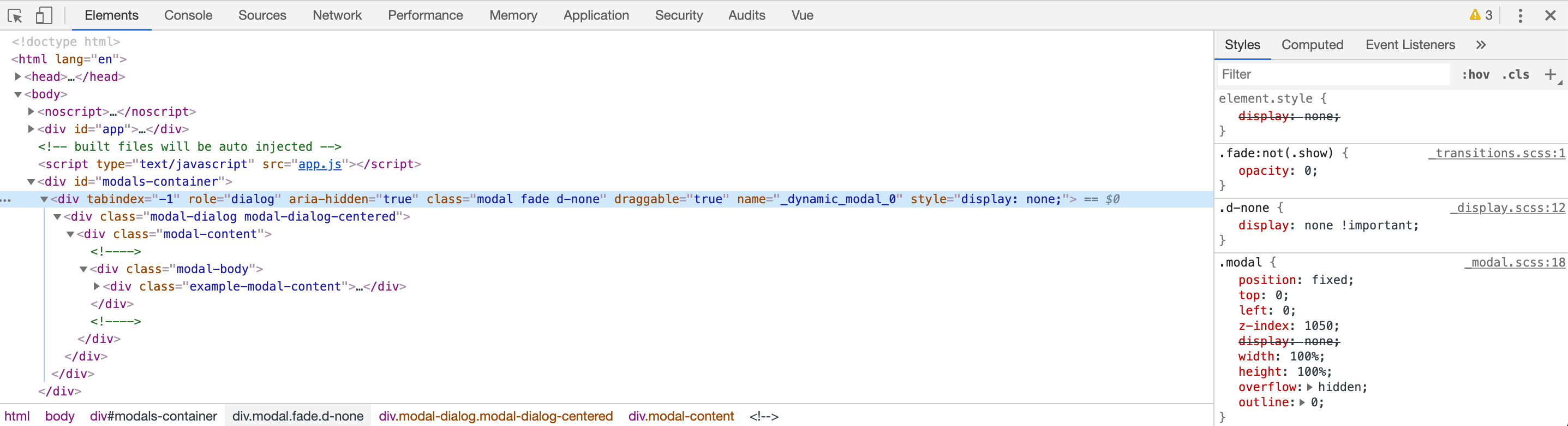
I have a similar problem. Looks like the CSS is not being applied correctly, and the dynamically injected model has display: none and opacity: 0:
 seeARMS
on 22 Oct 2019
seeARMS
on 22 Oct 2019
UPDATE
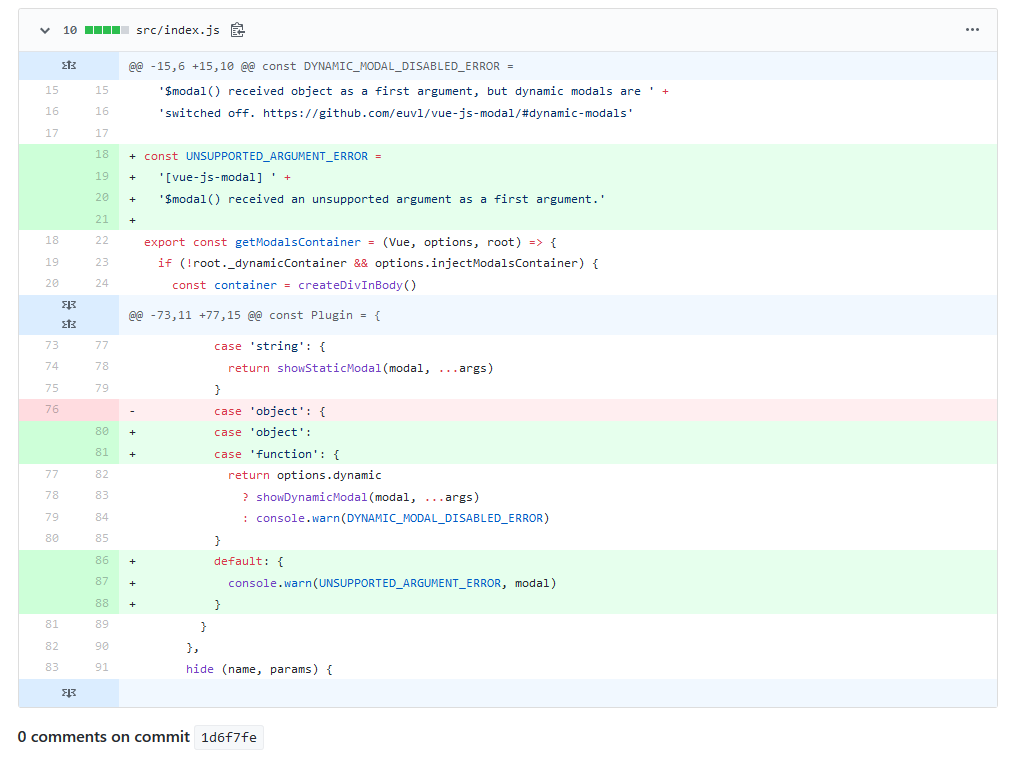
Looks like it may just be that current npm package1.3.31 has that as a bug which was already fixed in this commit
As mentioned below, try downloading the latest dist or manually patching your copy or downgrading to 1.3.28 to see if it fixes.
UPDATE
I have the same issue. I think the npm package code is behind the GitHub code.
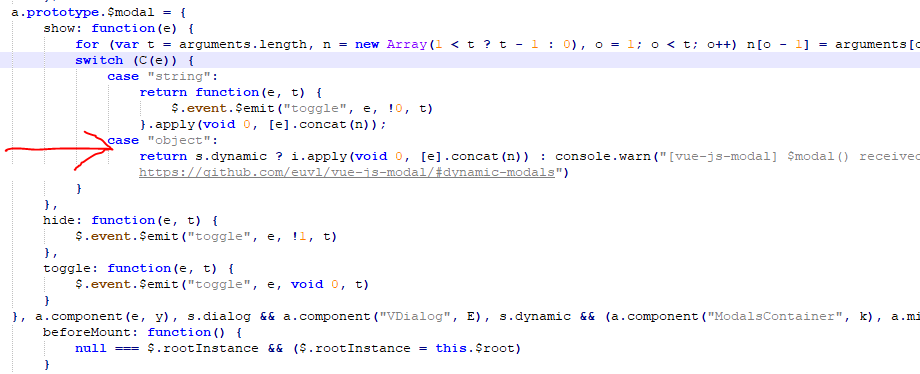
Un-minifying and diffing npm versions of dist/index.js between versions 1.3.28 and 1.3.31 (ie latest) reveals several changes in how $modal.show works for dynamic components (at least using typescript). src/index.js implies that a new switch statement is supposed to include a 'function' case which allows imported components to render as dynamic:
However, the generated 1.3.31 npm bundle dist/index.js (here un-minified) does NOT include the 'function' case:
The code here is correct:
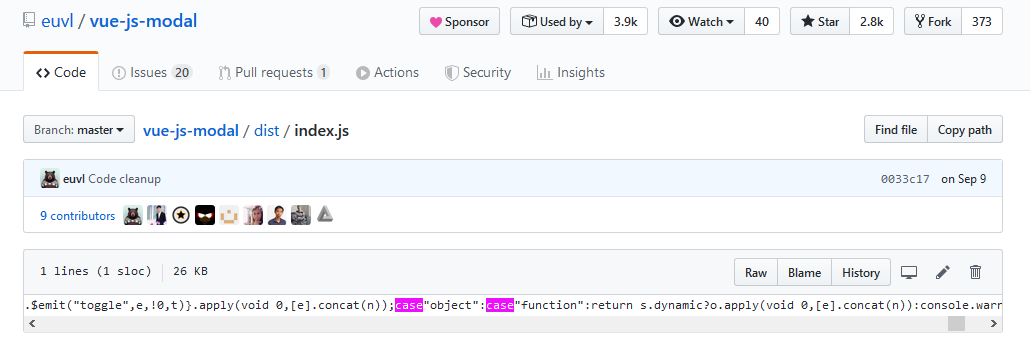
Downloading above and replacing in node_modules or manually adding "case 'function':" to dist/index.js fixes it for me.
 jbryan-76
on 23 Oct 2019
jbryan-76
on 23 Oct 2019
@euvl when will news version?
 nibytes
on 26 Oct 2019
nibytes
on 26 Oct 2019
Temp fix for peoples who can't download and replace code in node_modules.
Just change version to this
"vue-js-modal": "euvl/vue-js-modal#master",
But in future when new version will on npm, replace back to need version.
nibytes
on 26 Oct 2019
This issue has been automatically marked as stale because it has not had recent activity. It will be closed if no further activity occurs. Thank you for your contributions.
![stale[bot] picture](https://avatars.githubusercontent.com/in/1724?v=4&s=40) stale[bot]
on 25 Nov 2019
stale[bot]
on 25 Nov 2019
This issue has been automatically closed.
stale[bot]
on 2 Dec 2019
Related issues
 ar53n
·
4Comments
ar53n
·
4Comments
 smholsen
·
4Comments
smholsen
·
4Comments
 chris-rowe
·
4Comments
chris-rowe
·
4Comments
 vesper8
·
3Comments
vesper8
·
3Comments
 dland512
·
4Comments
dland512
·
4Comments
Most helpful comment
UPDATE
Looks like it may just be that current npm package1.3.31 has that as a bug which was already fixed in this commit
As mentioned below, try downloading the latest dist or manually patching your copy or downgrading to 1.3.28 to see if it fixes.
UPDATE
I have the same issue. I think the npm package code is behind the GitHub code.
Un-minifying and diffing npm versions of dist/index.js between versions 1.3.28 and 1.3.31 (ie latest) reveals several changes in how $modal.show works for dynamic components (at least using typescript). src/index.js implies that a new switch statement is supposed to include a 'function' case which allows imported components to render as dynamic:

However, the generated 1.3.31 npm bundle dist/index.js (here un-minified) does NOT include the 'function' case:

The code here is correct:

Downloading above and replacing in node_modules or manually adding "case 'function':" to dist/index.js fixes it for me.